Unable to access file. Another process is currently using it.


Originally posted here: usa.autodesk.com/getdoc/id=TS14206145

When you try to start XSI.exe or xsibatch, you get a pop-up dialog box that looks something like this:

---------------------------
XSI
---------------------------
Unable to access c:\Softimage\Softimage_2010_x64Data\Preferences\Default\OutputFormat\Cine_16.xsipref
Another process is currently using it.
Click Cancel to continue.
---------------------------
Retry   Cancel   
---------------------------

The actual file could be any file in the factory location or in a workgroup location. When you look in the specified folder, you find a .lock file for the file that could not be opened.

Typically, there are two situations when you may encounter this problem:

  • When you run multiple instances of xsibatch on a single computer
  • When multiple xsibatch jobs on multiple render nodes try to load a workgroup from a network server

The .lock files are created when a process (like xsi.exe) opens certain files (.xsitb, .xsicompound, .xsiprefs, and a few others) through the Windows API. Usually you’ll never see the .lock files. But if something happens to interrupt the file access (such as a network problem), you can get .lock files left around, which causes a sharing violation the next time a process tries to access the file.

You might want to try Process Monitor or Process Explorer to see what is going on. If you cannot delete the .lock file, try using Process Monitor to free the .lock file handle.

A possible workaround is to make the folder read-only, so xsi.exe and xsibatch cannot write a lock file. Then there can be no concurrent access to the lock file.

Here’s a few threads about lock files:
compound locks
lock files causing render problems
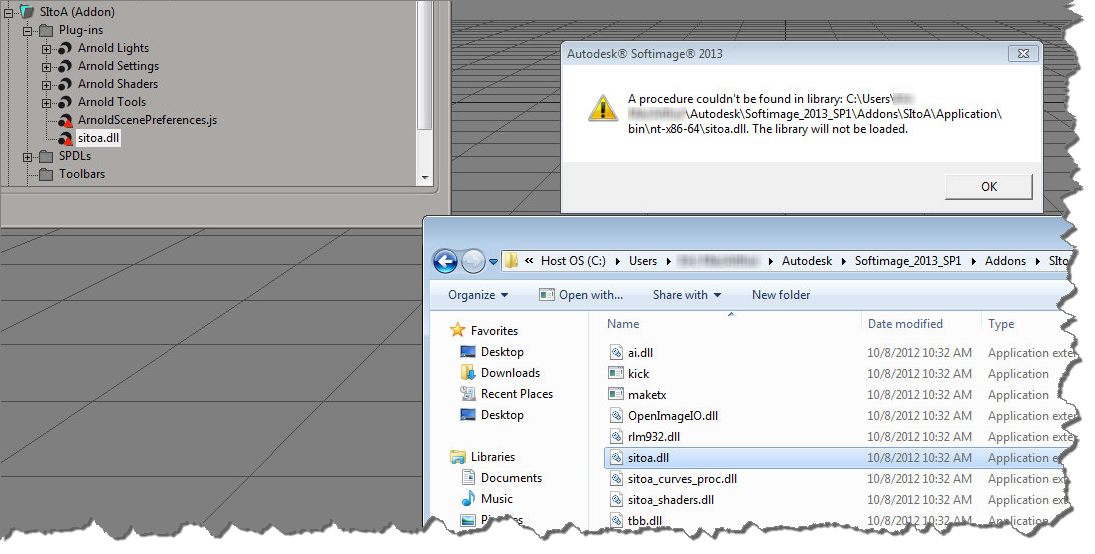
A procedure couldn’t be found in library


When you get an error like this

A procedure couldn’t be found in library Addons\SItoA\Application\bin\nt-x86-64\sitoa.dll. The library will not be loaded.

it usually doesn’t mean that Softimage couldn’t find the DLL (sitoa.dll in this case).

Typically, this error is caused by a missing DLL dependency, or the wrong version of a dependent DLL. You can use Dependency Walker and Process Monitor to track down what’s going wrong. A “DLL dependency” or “dependent DLL” is another file that sitoa.dll depends on. When Softimage loads sitoa.dll, that other DLL isn’t found, or if it is, it’s the wrong version. And so you get the error.

Finding phantom passes created with Duplicate


As I mentioned last year around this time, it is possible to end up with passes that don’t show up in the explorer. This happens when you Duplicate a pass, and the Hierarchy option “preferences.duplicate.hierarchy” is set to None. So your new pass has no parent, and is disconnected from the rest of the scene (aka floating).

These phantom passes have names like “#Pass”, and you can select them if you know how.

Here’s how, in Python, with the 2013 SP1 Python shortcuts.

from sipyutils import si			# win32com.client.Dispatch('XSI.Application')
from sipyutils import siut		# win32com.client.Dispatch('XSI.Utils')
from sipyutils import siui		# win32com.client.Dispatch('XSI.UIToolkit')
from sipyutils import simath	# win32com.client.Dispatch('XSI.Math')
from sipyutils import log		# LogMessage
from sipyutils import disp		# win32com.client.Dispatch
from sipyutils import C			# win32com.client.constants

si=si()

sClassID = siut().DataRepository.GetIdentifier( si.ActiveProject.ActiveScene.Passes(0), C.siObjectCLSID )
passes = si.FindObjects( None, sClassID ).Filter( "", None, "#Pass*" )
print passes.Count
print passes.GetAsText()

#
# The following don't work! At least not all the time 😦
#
si.DeleteObj( passes )

#si.ParentObj( "FloatingPasses.Passes", "#Pass<61>" )
#si.CopyPaste( passes(0), "", si.Dictionary.GetObject("FloatingPasses.Passes") )

si.SelectObj( passes )

When I was testing this, sometimes I was able to delete those phantom passes, and sometimes I wasn’t.
Sometimes those passes disappeared when I saved the scene, did New Scene, and then reloaded the scene. Sometimes they didn’t (disappear that is).

When DeleteObj didn’t work, I’d use the explorer to view the phantom passes (since I called SelectObj on them, I could just show selected in the explorer).

Rescuing corrupted scenes


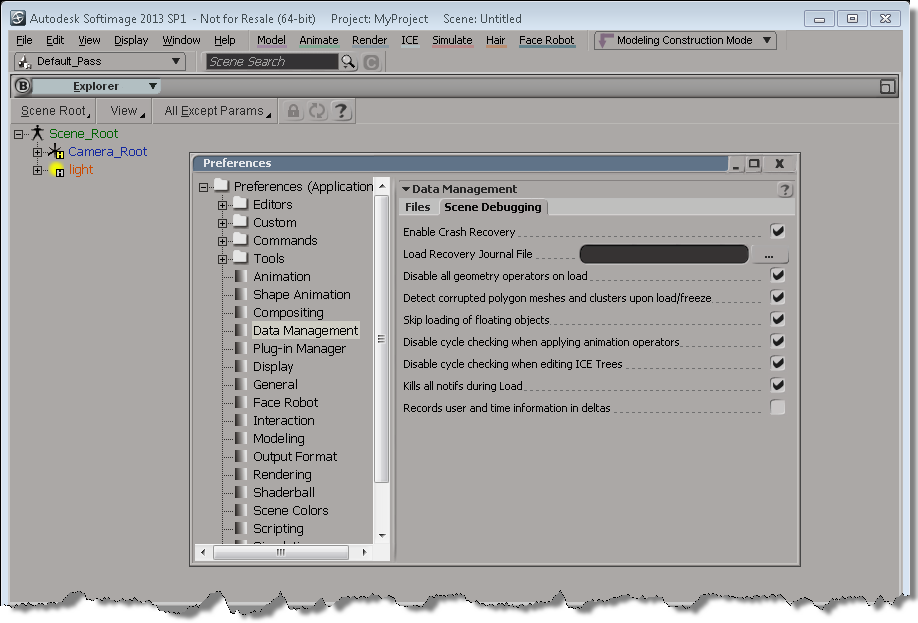
Here’s a few things you can try when you need to rescue a scene (or model) that crashes Softimage when you try to load it.

Setting up Softimage before you merge in a corrupted scene:

Sending Customer Error Reports (CERs)


Autodesk applications like Softimage use senddmp.exe to send CER reports to an Autodesk server, where the CER reports are automatically processed and entered into a CER system. senddmp.exe is installed with Softimage, in %XSI_BINDIR%.

You cannot submit CER reports by email; the system is not set up to handle that. The CERs have to be submitted to the Web service that does all the grunt work. For example, the Web service takes care of extracting the crash dump and matching it up against the symbols for that version of Softimage.

If you do want to collect the CER data yourself, click View Report Details in the Error Report dialog. That will generate the dmpuserinfo.xml file, and create a dumpdata.zip archive that contains:

  • Contact data and system information (dmpuserinfo.xml)
  • The crash dump (a .dmp file)
  • The Softimage script history (.ScriptLog.txt)

You will find dumpuserinfo.xml and dumpdata.zip in the XSI Temp folder (for example, %TEMP%\XSI_Temp_7558, where 7588 is the process ID of xsi.exe).

The .dmp and .ScriptLog.txt files actually exist in your Softimage user folder; senddmp.exe just takes a copy of them and puts them in a .zip archive. When I left Autodesk, I had 253 crash dump files (90MB worth) lying around under different C:\users\blairs\Autodesk\SoftimageXXX folders.

I suppose you might be able to run senddmp.exe yourself, but the command line is rather complicated. Here’s the senddmp command line for a recent crash I had. Note that I formatted it for readability. Also note that I didn’t actually try to run it myself, I just dug up the details (using my old friend Process Monitor).

"C:\Program Files\Autodesk\Softimage 2013\Application\bin\senddmp.exe" 

/APPXML "<ProductInformation name=\"Autodesk Softimage 2013\" build_version=\"SI2013RC2\" registry_version=\"11\" registry_localeID=\"1033\" uptime=\"105591217359\" session_start_count=\"111\" session_clean_close_count=\"42\" current_session_length=\"183\" />" /APPLOCALEID 1033 

/DMP "C:\Users\blairs\Autodesk\Softimage_2013\MTL2UA0150CWY4fdae16a6f4c4e93603f470.dmp" 

/UPITOKEN "C:\Program Files\Autodesk\Softimage 2013\UPI\upiconfig.xml" 

/CADSETTINGSPATH SOFTWARE\Autodesk\Autodesk Softimage 2013\2013\CadManagerControl\CustomerErrorReport 

/SERIALNUM 399-99999999 

/SAMPLEDESCALTPATH "C:\Program Files\Autodesk\Softimage 2013\Application\bin\CER\exampleDesc.htm " 

/CALUPTIME 151026979918 

/COUNT 24 

/EXTRA "C:\Users\blairs\Autodesk\Softimage_2013\MTL2UA0150CWY4fdae16a6f4c4e93603f470.ScriptLog.txt" 

/ALTRESPATH "(null)" 

/ALTTYPGPATH "(null)"

You can get the /APPXML and /CALUMPTIME from dumpuserinfo.xml.
I think /COUNT is the crash count.

CER uptime and session count stats


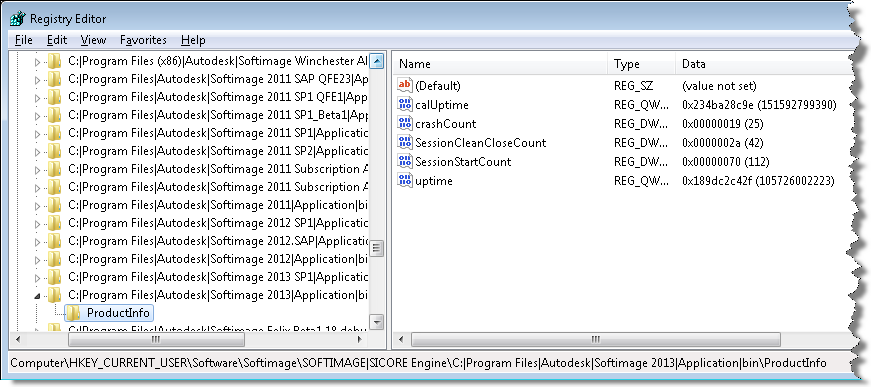
You can always find interesting stuff if you poke around in the registry. For example, the Customer Error Report (CER) mechanism logs some basic usage stats into the registry, under the keys like

HKEY_CURRENT_USER\Software\Softimage\SOFTIMAGE|SICORE Engine\C:|Program Files|Autodesk|Softimage 2013|Application|bin\ProductInfo

  • calUptime is the cumulative amount of time that Softimage has been open. By cumulative, I mean it is the total uptime for all Softimage sessions, ever.
  • upTime is the process uptime (not including any idle time). Again, this is a cumulative total.
  • crashCount is the number of crashes caught by CER.
  • SessionStartCount is the total number of Softimage sessions.
  • SessionCleanCloseCount is the total number of clean exits with no crash. You’ll notice in my case that the crashCount + SessionCleanCloseCount doesn’t equal the total number of sessions. That’s because CER doesn’t catch all crashes, and CER doesn’t catch things like the XSI.exe process being ended in the Task Manager.

* I believe that the uptime totals are in 100-nanosecond intervals.

ERROR File not found in SPDL registry during render


A customer recently reported that random machines on the farm were reporting this error. They have custom shaders installed in a workgroup, and the workgroup lives on a network drive that is accessible to all machines on the farm.

So, what is this SPDL registry thing?

It’s a file named spdl.xsiindex, and it’s a cached index of all the shader spdl files. Softimage creates/updates this SPDL registry at startup (so you can delete it to force the recreation of a new file).

You can find the file in %XSI_USERHOME%\Application. Actually, the file is named “spdl.MACHINE.xsiindex”. We had to add the machine name to the file name to prevent issues with concurrent access. However, I would think that if you ran multiple instances of xsibatch on the one machine, you might still have problems.

There’s also a MTL2UA0150CWY.xsishaderdefcache file to deal with the new-fangled, non-SPDL shaders.

Licensing troubleshooting on Linux


Troubleshooting licensing problems on a Softimage Linux workstation? Here’s a quick summary of some things to look for on the workstation:

  • The Location of the license server is specified by the ADSKFLEX_LICENSE_FILE environment variable that is specified in /usr/Softimage/Softimage_2013/.xsi_2013.
  • The file ~/.flexlmrc can also be used to specify the license server location:

    ADSKFLEX_LICENSE_FILE=@example:@mtlicserver

    If Softimage can’t check out a license from the server specified in .xsi_2013, then it tries the servers listed in ~/.flexlmrc. The .flexlmrc lists all the license servers from which Softimage has checked out licenses.

  • There is a licensing log file named /var/tmp/SoftimageLicense.log. This log file will contain entries that look like this:
    18377	2011/06/23	19:18:59	Reason=Fatal error
    18377	2011/06/23	19:18:59	ComputerName=localhost.localdomain
    18377	2011/06/23	19:18:59	OS=2.6.35.6-45.fc14.x86_64
    18377	2011/06/23	19:18:59	File=AdlmIntNWFBLicense.cpp,Line=766
    18377	2011/06/23	19:18:59	VendorID=3 [FLEXLM-NW]
    18377	2011/06/23	19:18:59	VendorError=-18 [Server does not support this feature]
    18377	2011/06/23	19:18:59	FLEXLM-NW=v11.9.0.0 build 87342 x64_lsb
    18377	2011/06/23	19:18:59	Reason=Fatal error
    18377	2011/06/23	19:18:59	ComputerName=localhost.localdomain
    18377	2011/06/23	19:18:59	OS=2.6.35.6-45.fc14.x86_64
    18377	2011/06/23	19:18:59	File=AdlmIntNWFBLicense.cpp,Line=749
    18377	2011/06/23	19:18:59	AdlmIntError=20 [License check out failed]
    
  • Setting FLEXLM_DIAGNOSTICS to 3 didn’t get me any diagnostics messages or logs, but I did find those diagnostics in the strace log (just search for “FLEXnet”). See this post for more info on the FLEXLM diagnostics in the strace log.

The case of Error 2000 Failed creating scripting engine XSI.SIPython.1


The guy sitting next to me kept getting this Python error at startup (which meant I had to either fix his install or continue taking all the CrowdFX cases 😉

' ERROR : 2000 - Failed creating scripting engine: XSI.SIPython.1.
' pythoncom error: PythonCOM Server - The 'win32com.server.policy' module could not be loaded.
' <type 'exceptions.ImportError'>: No module named win32com.server.policy
' pythoncom error: CPyFactory::CreateInstance failed to create instance. (80004005)

This happened only with the Python installed with Softimage. We did runonce.bat. We checked that Python was in the PATH. I scoured a Process Monitor log for several hours. But no luck. After a few days off, I came back and took another look at his Process Monitor log, and I noticed that at a certain point, Softimage switched over to reading files from the system Python install (in C:\Python26). And that was the clue.

It turns out that the environment variable PYTHONHOME was set to C:\Python26. Unsetting that environment variable was the solution.

Setting PYTHONPATH to C:\Python26 also causes the same error.