The case of the missing anchors


In this case, a customer reported that the Add to Menu list in the Command Wizard was empty. Normally, Add to Menu lists all anchor points for menus where you can add a custom command, but now it had just one entry: None.

The SDK wizards are JScript plugins, so it wasn’t hard to track down where things were going wrong. The Add to Menu list is built by parsing a header file (xsi_decl.h):

var oFSO = new ActiveXObject( "Scripting.FileSystemObject" ) ;
strFactoryPath = Application.InstallationPath( siFactoryPath ) ;
strDeclFile = XSIUtils.BuildPath(XSIUtils.Environment("XSISDK_ROOT"),"include","xsi_decl.h") ;

Based on this, it didn’t take to long to figure out the problem: the customer was starting Softimage with a shortcut to XSI.exe, so setenv.bat was never called, and XSISDK_ROOT was never set.

XSI.bat is the way to start Softimage. XSI.bat calls setenv.bat to set all the required environment variable, and then starts XSI.exe.

Friday Flashback #43


When I interviewed at Softimage back in 94, they gave me a media packet. I finally found dug up that packet recently, and found that it included a set of slides!

I guess I could have borrowed my parent’s slide projector, but instead I borrowed a scanner and transferred them to my computer.

MGM Lion – Boss Film Studio

Fruity Pebbles – Topix C Graphics Anim

Asterix in America – 94 Les Ed. A. Rene – Goscinny/Uderzo

Rain Forest – Zival, Houdek &Kurek

ICE attributes: user-defined versus built-in


ICE attributes are categorized as built-in or user-defined, so you would assume you could easily find your own custom attributes by checking the AttributeCategory property. However, try this: create an empty point cloud and run this script:

si = Application
attrs = si.Selection(0).ActivePrimitive.Geometry.ICEAttributes;

# There's also a "unknown" category but I'll ignore that here
for attr in attrs:
	si.LogMessage( "Attribute: %s, IsDefined: %s, AttributeCategory: %s" % (attr.Name, attr.IsDefined, "Built-in" if attr.AttributeCategory == 1 else "User-defined" ) )

You’ll see that while some attributes, like NbPoints, PointPostion, and PointVelocity are “built-in” as you would expect, most of the attributes are in the “user-defined” category.

For example, size and shape are listed as user-defined attributes. Why’s that?

I think it is because those attributes are dynamic attributes added by [factory-default] ICE compounds. Until you plug in those compounds, the compounds don’t exist and aren’t initialized (in other words, they are not defined yet). They’re not really built into the system (and the attribute explorer is hard-coded to show them as a convenience).

Built-in attributes like PointPosition are intrinsic attributes.

Consider this ICE tree on my empty point cloud. The Size attribute is just like my own custom Xxx attribute, whereas the built-in PointPosition attribute resolves nicely.

If you want to distinguish your own attributes, I’d use a prefix for the attribute names. For example, I sometimes use a “ps” (for Product Support) prefix or a “sisupp” prefix.

Setting workgroups at startup


Here’s a simple, low-tech way to connect to specific workgroups at startup:

Instead of xsibatch -w or xsi -w, you could modify setenv.bat to create another .xsipref file in %XSI_USERHOME%\Data\Preferences. Whatever is in that file will override what is in default.xsipref.

So, for example, you could do this:

echo data_management.workgroup_appl_path	= C:\Users\blairs\MyWorkgroup >  %XSI_USERHOME%\Data\Preferences\workgroups.xsipref

or you could use an environment variable:

echo data_management.workgroup_appl_path	= %MY_XSI_WORKGROUPS%  >  %XSI_USERHOME%\Data\Preferences\workgroups.xsipref

This does require you to edit setenv.bat, which isn’t so useful if you have a lot of seats. In that case, if you use a network deployment, you could deploy a %XSI_BINDIR%\SiteDeploy.bat file and use that to echo out the workgroup preference.

Accumulating values in a weightmap


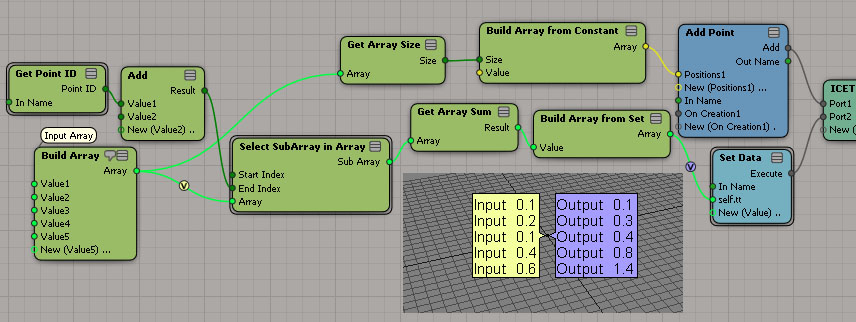
Courtesy of Vladimir Jankijevic on the XSI mailing list, here’s how to accumulate values in a weightmap:

The nice thing about his tree is how it sets things into per-point context so nicely. My own attempt seems crude in comparison:

The thing about setting weight map values is that you can’t do it like this:

ICE will evaluate this tree just once, even if it is in the Simulation stack. Perhaps this is a case of mistaken optimization? (branch is a scalar constant, so no need to reeval?)

If you replace the scalar node with any of these branches, then the weightmap values will change as your play through the timeline.