Disabling desktop composition, either for a specific app or globally, or using a non-Aero theme, may result in refresh problems in some editors.
From the dev team: “Areo must be on otherwise the clipping regions are broken”

Disabling desktop composition, either for a specific app or globally, or using a non-Aero theme, may result in refresh problems in some editors.
From the dev team: “Areo must be on otherwise the clipping regions are broken”
Interesting thread on some of the problems people have encountered…
fickle events, and automated workgroup switching – Google Groups.
In previous versions of Softimage, you could use Parameter.Source to get the shader/texture connected to a material parameter such as the diffuse port.
As of 2011, Source returns a ShaderParameter. To get the connected shader, use ShaderParameter.Parent (in C++, GetSource().GetParent()).
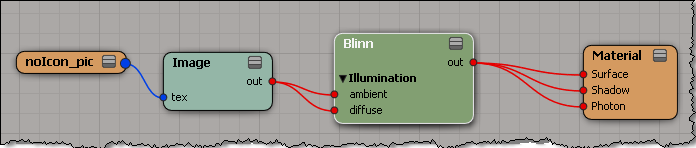
var m = Dictionary.GetObject( "Sources.Materials.DefaultLib.Material.Blinn" );
var p = m.Parameters("diffuse");
LogMessage( p.Source );
// INFO : Sources.Materials.DefaultLib.Material.Image.out

LogMessage( ClassName( p.Source ) );
// INFO : ShaderParameter

LogMessage( p.Source.Parent );
// INFO : Sources.Materials.DefaultLib.Material.Image

LogMessage( ClassName( p.Source.Parent ) );
// INFO : Texture
Learn how to use particle sprites with ICE in Softimage – the sprite technique is a cost-effective way to give the illusion of detail by mapping 2D texture onto a plane.
via Softimage tutorial: How to use particle sprites with ICE in 7 easy steps.
An Ola Madsen tutorial at 3D World. I don’t see it on his site yet, so I linked it.
720deg slerp ICE compound
via Mr_doOo’s 3D stuff.
Update: Drag-and-drop didn’t work with IE, but it did with Firefox.
In a recent case, a customer was using an ICE tree in the Modeling stack to create a fixed number of particles. Then, he used an animated scalar value in the ICE tree to drive changes in the particle positions. Basically, it was a bunch of “spokes” rotating in a circle.
The problem was that there was no motion blur when he rendered with mental ray (but there was motion blur with 3Delight).
To get motion blur in this type of scene, you have to set the PointVelocity attribute to a value that indicates the direction and distance/second of travel.
Unlike 3Delight, mental ray only takes the motion from the velocity attribute. There’s no delta comparison done.
UPDATE: Please see the comment from Patrick for a tip. Thanks!
You can use Plugin.UserData to pass data into a plugin.
For example, from outside the plugin, you can store a list in the UserData:
p = Application.Plugins("MyTestPropertyPlugin")
p.UserData = ['a', 'b', 'mpilgrim', 'z', 'example']
In the plugin callbacks, you would access the UserData like this:
def MyTestProperty_Test_OnClicked( ):

    p = Application.Plugins("MyTestPropertyPlugin")

    if p.UserData == None:
        Application.LogMessage( "UserData is empty" )
    else:
        Application.LogMessage( p.UserData )
        Application.LogMessage( p.UserData[2] )
This will work with lists, but not with dictionaries.
Softimage cannot convert Python dictionaries into a COM Variant type. If you try to store a dict in User Data:
x = Application.Plugins("MyTestPropertyPlugin")
x.UserData = {"author":"blairs", "name":"testplugin"}
You’ll get this error:
# TypeError: Objects of type 'dict' can not be converted to a COM VARIANT
I’m afraid there’s no way around that error for Python dictionaries.
This also prevents you from saving dictionaries with SetGlobal or SetGlobalObject.
If you look up “UserData” in the index, you’ll see three different UserData properties that apply to a plugin.

Plugin.UserData is probably the most useful. It allows you to store global data that you can access from anywhere in the plugin code. You can use it to share data between external code and the plugin, between instances of the plugin, or between any callback (in a scripted plugin, not all callbacks get a context argument).
Context.UserData allows you to share data between callbacks (except for those callbacks that don’t get a context, like the OnClicked callbacks in a scripted plugin).
PluginRegistrar.UserData allows you to share data between XSILoadPlugin and XSIUnloadPlugin.
 eX-SI
eX-SI 