One year ago I was at Iguazu Falls in Argentina. A bit touristy, but still something to see.
It was 30+ degrees. Currently it is -17 Celcius here in Montreal (not that that is all that cold) 😉


One year ago I was at Iguazu Falls in Argentina. A bit touristy, but still something to see.
It was 30+ degrees. Currently it is -17 Celcius here in Montreal (not that that is all that cold) 😉
When you’re working on a plugin UI, you often need to refresh your PPG to show your latest changes to your layout, and run your latest changes to your callback code.
Screencast version (higher resolution)
Sometimes you may be forced to zap your standalone licenses so you can start over with a clean slate. For example, you might not be able to activate your new license because somehow the licenses were corrupted. Or maybe you had a blue-screen crash during installation and then you used a reg cleaner to further muddy the waters. Or maybe the software asks you for activation every time you start the product.
In those types of scenarios, as a last resort, you can reset your standalone licenses by zapping the adskflex_00691b00_tsf.data and adskflex_00691b00_tsf.data.backup files.
I suggest you rename the file or move it, rather than simply deleting it.
However, you will have to re-activate all standalone Autodesk products installed on the computer.
On Vista or Windows 7:
C:\ProgramData\FLEXnet\adskflex_00691b00_tsf.data
C:\ProgramData\FLEXnet\adskflex_00691b00_tsf.data.backup
On Windows XP:
C:\Documents and Settings\All Users\Application Data\FLEXnet\adskflex_00691b00_tsf.data
C:\Documents and Settings\All Users\Application Data\FLEXnet\adskflex_00691b00_tsf.data.backup
I include the _tsf.data.backup file because your Autodesk software will reuse that file if it cannot find the _tsf.data file. And if that backup file is corrupted too, well then…
YouTube – Softimage Lagoa ICE Test – Shattering Cup 1080p HD.
2.8 Million Particles – Created with the Softimage 2011, Rendered with Arnold for Softimage. Motion blur and depth of field on third shot.
Hardware used:
Dell Precision T5500 Dual Quad Core Workstation 12 gigs RAM
Nvidia Quadro 5000 Firmi based
Sim time: Thanksgiving weekend, Render time: ~6 hours for all 1000 frames.
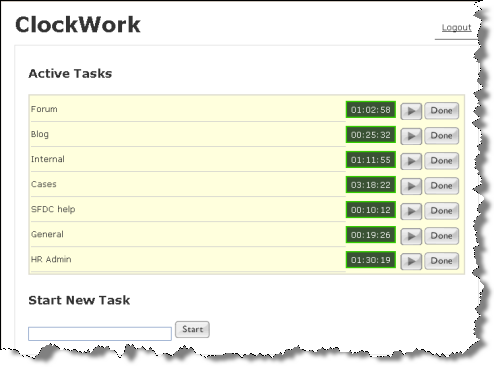
After a few abortive attempts at time-tracking, we’re rolling out a new time-tracking system here in product support. One of the main goals it to understand how much time specialists spend on “reactive” events (responding to support requests) versus “proactive” events (writing KB articles, developing training, blogging, and manning the forums).
The difficulty for me with time tracking is that these days my time and effort is so interrupt-driven. For example, I’ll be drafting a blog post when I see a new scripting question on the mailing list. So I jump on that to try and answer before someone else does 😉 But then one of my support cases is updated, so I jump on that and reply.
Meanwhile a new case comes in, so I take that and start research. Then maybe I have a meeting, or someone needs me to explain how to do something in our help desk system (I’m the local superuser). Eventually I rewind back through everything, possibly being interrupted again at any time. Or being distracted by my almost compulsive checking of my email inbox and the support incoming queue;-)
I admit this may not sound like the best way to work, but it works for me. I know many others on the support team prefer to handle one thing at a time.
I’ve found I need some utility, like the one in the screenshot, that allows me to have multiple timers going. That way I can accurately keep track of what I’m doing.
Here’s a basic Python example that shows how to:
import win32com.client
from win32com.client import constants

oProp = Application.ActiveSceneRoot.AddProperty( "CustomProperty", False, "GridWidgetDemo" )
oProp.AddParameter2("Row",constants.siInt4,1,1,20,0,100,constants.siClassifUnknown,constants.siPersistable + constants.siKeyable)

oParameter = oProp.AddGridParameter( "DemoGrid" )
oGridData = oParameter.Value
oGridData.ColumnCount = 3
oGridData.RowCount = 20

for i in range(0,oGridData.RowCount):
	for j in range(0,oGridData.ColumnCount):
		oGridData.SetCell( j, i, str(i) + "." + str(j) )

oPPGLayout = oProp.PPGLayout
oGridPPGItem = oPPGLayout.AddItem( "DemoGrid" )

oGridPPGItem.SetAttribute( constants.siUINoLabel, True )
oGridPPGItem.SetAttribute( constants.siUIGridSelectionMode, constants.siSelectionHeader )
oGridPPGItem.SetAttribute( constants.siUIGridColumnWidths, "25:100:75:100" )
oGridPPGItem.SetAttribute( constants.siUIGridReadOnlyColumns, "1" )

oPPGLayout.AddRow() ;
oPPGLayout.AddItem( "Row" )
oPPGLayout.AddButton( "SelectRow", "Select Row" )
oPPGLayout.EndRow()


oPPGLayout.Language = "Python"
oPPGLayout.Logic = '''
def SelectRow_OnClicked():
	Application.LogMessage( "Select Row" )
	oGridData = PPG.DemoGrid.Value
	oGridWidget = oGridData.GridWidget
	oGridWidget.ClearSelection()
	oGridWidget.AddToSelection( -1, PPG.Row.Value-1 )
'''


Application.InspectObj( oProp )
 via Car rendered with MentalRay in Softimage on Vimeo.
Here, I use FinalGathering with a system of bright cards for the lighting. For the first time, I also used a bright large cylinder that surrounds the car for added reflectivity and better lighting.
I then found that the lighting looked off and tried to understand why. It was because the car was getting lit via FG by the large cylinder but the “car shader” wasn’t receiving any “traced light” information in that area. This would be especially useful for the “speculars” in the car shader.
I then made a cylindrical light with the same dimensions as the FG cylinder (In area light, chose “geometry”). Now the paint looks more like it’s lit by the cylinder and doesn’t just reflect it.
The effect in the beginning is a “diffuse glow” added in the Softimage Compositor.
Every Friday I’ll post some image or screenshot from Softimage history…
What we know now as Softimage XSI grew out of the Softimage|DS (Digital Studio) product. Here’s a couple of screenshots from March 1997 that shows a prototype of Sumatra (the codename for XSI). Back then, the first version of DS was almost finished, and XSI was taking shape. Although at that point, XSI did have a distinct “DS” feel to it. Note the “SOFTIMAGE|Digital Studio” in the title bar.


Click to view full size
UPDATE: Comment from Luc-Eric:
I think that was not an actual screenshot, but a photoshop mockup, there countless of them.
This is closer to what the software looked like – but still not quite (it’s missing the jewel-like timeline button)
http://www.softimageblog.com/archives/175
we still have some of those bitmaps somewhere in the source tree..
note the Twister room buttom.
By default, buttons are left-aligned.
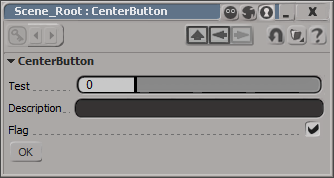
I don’t think there is any way to center a control on a layout. At least not one that I can find. You could set an X position, which will look centered until a user resizes the PPG.
item = oLayout.AddButton( L"MyButton", L"ddd" ) ;
item.PutAttribute( siUICX, <x position in pixels>)
Or you could use this hack, which uses group width percentages to approximate the centering a button.
var oGroup = oLayout.AddGroup("", false, 40);
oLayout.EndGroup();

// button is left-aligned within its group
// so the centering is not 'true'
var oGroup = oLayout.AddGroup("", false, 20);
var oButton = oLayout.AddButton( "OK" );
oLayout.EndGroup();

var oGroup = oLayout.AddGroup("", false, 30);
oLayout.EndGroup();

oLayout.EndRow();


