Register here:
Autodesk – Media & Entertainment Webcast Series: Autodesk Maya and Softimage Interoperability – Thank You.
Autodesk Media & Entertainment Webcast Series: Autodesk Maya and Softimage Interoperability
Reply

In this case, Softimage 2010SP1 stopped rendering one day (but strangely, 7.5 and 2011 still worked). If you drew a render region, nothing would happen for a long time, and then you would get this error:
' ERROR : DISP 0.4 error 211005: timeout waiting for finished rectangles
If you tried to render a frame to file, you’d get the same error, and a truncated image file that couldn’t be read. The mental ray diagnostics looked like this:
' INFO : JOB  0.8  progr:    99.4%    rendered on Example.8
' INFO : JOB  0.9  progr:    99.7%    rendered on Example.9
' INFO : JOB  0.14 progr:   100.0%    rendered on Example.14
' ERROR : DISP 0.4  error  211005: timeout waiting for finished rectangles
' INFO : RC   0.4  info : rendering statistics
' INFO : RC   0.4  info :   type                           number   per eye ray
' INFO : RC   0.4  info :   eye rays                        32900          1.00
' INFO : PHEN 0.4  progr: calling output shaders
' INFO : PHEN 0.4  progr: Writing image file 'C:\Softimage\Softimage_2010_SP1\Data\XSI_SAMPLES\Render_Pictures\Default_Pass_Main.1.pic' (Channel 'Main').
' ERROR : DISP 0.4  error  211005: timeout waiting for finished rectangles
' INFO : RC   0.4  progr: rendering finished
' INFO : RC   0.4  info : wallclock  0:03:59.65 for rendering
' INFO : RC   0.4  info : allocated 17 MB, max resident 18 MB
' INFO : GAPM 0.4  info : triangle count (including retessellation) :         112
' ERROR : 21000-REND-RenderPasses - Unspecified failure
RenderPasses "Passes.Default_Pass", 1, 1, 1, siRenderVerbosityDefault
Command failed, returned -2147467259
Softimage would stop responding shortly afterwards.
Eventually we tracked this down to a conflict with the OGRE Exporter.
We removed the exporter, and Softimage 2010 SP1 was able to render again. We then reinstalled the OGRE addon, and Softimage 2010 SP1 still rendered.
I suspected some sort of application conflict all along, but it took awhile to find the root cause of the problem.
Softimage 2011 Subscription Advantage Pack Hotfix 1 (requires Subscription Center login)
This hotfix is really for people using Arnold. The fixed issues were blocking people from using Arnold with 2011.
Update: The 2011 SP1 version of the hotfix is here.
The performance of a support specialist at Autodesk is measured and tracked in many ways: customer satisfaction scores, net promoter scores, case audit review scores, number of cases closed, average time to resolution, number of backlog cases, and more…
So recently I started tracking my own “performance” in an area that management has no visibility: my activity in the user community.

“Other” includes si-community, cg-talk, and other forums such as the Autodesk install and licensing forum.
The stats helper monkeys at WordPress.com mulled over how this blog did in 2010, and here’s a high level summary of its overall blog health:

The Blog-Health-o-Meter™ reads Wow.

Madison Square Garden can seat 20,000 people for a concert. This blog was viewed about 67,000 times in 2010. If it were a concert at Madison Square Garden, it would have performed about 3 times.
In 2010, there were 136 new posts, growing the total archive of this blog to 243 posts. There were 128 pictures uploaded, taking up a total of 60mb. That’s about 2 pictures per week.
The busiest day of the year was April 7th with 610 views. The most popular post that day was Installing Softimage 2011.
The top referring sites in 2010 were softimage.wiki.softimage.com, usa.autodesk.com, xsibase.com, si-community.com, and area.autodesk.com.
Some visitors came searching, mostly for flexnet licensing error:-125,147, softimage lagoa, flexnet licensing error:-1,359, softimage 2011 lagoa release, and flexnet licensing error:-1,359. system error: 2 “no such file or directory”.
These are the posts and pages that got the most views in 2010.
Installing Softimage 2011 March 2010
13 comments
Face Robot workflow tips for combining heads with bodies October 2009
1 comment
FLEXnet Licensing error:-125,147: A PACKAGE component must be specified January 2010
Lagoa & the Autodesk Subscription Advantage Pack for Softimage 2011 August 2010
5 comments
rctools compiled for 64-bit Softimage 2011 June 2010
19 comments
In Python, use Menu.AddSubMenu to add a submenu.
def SubMenuTest_Menu_Init( in_ctxt ):
	oMenu = in_ctxt.Source
	subMnu = oMenu.AddSubMenu( "Test SubMenu" )
	subMnu.AddCommandItem("Test", "Test")
	return true
Don’t use AddItem, because in Python the derived class methods of the returned object are not resolved properly (it’s an issue with late binding). Basically, with AddItem you end up with a Menu object that supports just the MenuItem interface. So, methods like AddCommandItem, which belong to the derived Menu class, are not resolved and you get errors like this:
# ERROR : Traceback (most recent call last):
#   File "<Script Block 2>", line 55, in Test_Menu_Init
#     subMnu.AddCommandItem("Duplicate Single", "Duplicate Single")
#   File "C:\Program Files\Autodesk\Softimage 2011\Application\python\Lib\site-packages\win32com\client\__init__.py", line 454, in __getattr__
#     raise AttributeError, "'%s' object has no attribute '%s'" % (repr(self), attr)
# AttributeError: '<win32com.gen_py.Softimage|XSI Object Model Library v1.5.MenuItem instance at 0x517703560>' object has no attribute 'AddCommandItem'
Notice how it says that MenuItem instance has no attribute ‘AddCommandItem’.
AddCommandItem is defined by the derived Menu class.
Before the AddSubMenu method was added, you had to workaround this with win32com.client.Dispatch:
subMnu = win32com.client.Dispatch( oMenu.AddItem("Test SubMenu", constants.siMenuItemSubmenu ) )
Here’s how to use a pop-up (transient) explorer to allow users to select multiple objects in the scene.
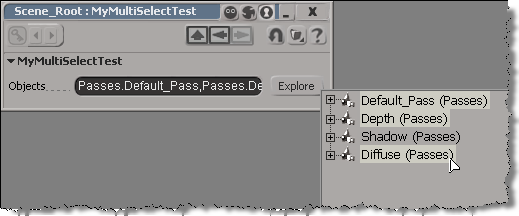
In this approach, you have a text box and a button.
The OnClicked callback for the button would use OpenTransientExplorer to pop up an explorer where the user can select multiple objects. OpenTransientExplorer returns a collection, so you can store that in a string parameter.
null = None
false = 0
true = 1

def XSILoadPlugin( in_reg ):
	in_reg.Author = "blairs"
	in_reg.Name = "MyMultiSelectTestPlugin"
	in_reg.Major = 1
	in_reg.Minor = 0

	in_reg.RegisterProperty("MyMultiSelectTest")
	#RegistrationInsertionPoint - do not remove this line

	return true

def XSIUnloadPlugin( in_reg ):
	strPluginName = in_reg.Name
	Application.LogMessage(str(strPluginName) + str(" has been unloaded."),constants.siVerbose)
	return true

def MyMultiSelectTest_Define( in_ctxt ):
	oCustomProperty = in_ctxt.Source
	oCustomProperty.AddParameter2("Objects",constants.siString,"",null,null,null,null,constants.siClassifUnknown,constants.siPersistable + constants.siKeyable)
	return true

# Tip: Use the "Refresh" option on the Property Page context menu to
# reload your script changes and re-execute the DefineLayout callback.
def MyMultiSelectTest_DefineLayout( in_ctxt ):
	oLayout = in_ctxt.Source
	oLayout.Clear()
	oLayout.AddRow()
	oLayout.AddItem("Objects")
	oLayout.AddButton("Explore")
	oLayout.EndRow()
	return true

def MyMultiSelectTest_OnInit( ):
	Application.LogMessage("MyMultiSelectTest_OnInit called",constants.siVerbose)

def MyMultiSelectTest_OnClosed( ):
	Application.LogMessage("MyMultiSelectTest_OnClosed called",constants.siVerbose)

def MyMultiSelectTest_Param_OnChanged( ):
	Application.LogMessage("MyMultiSelectTest_Param_OnChanged called",constants.siVerbose)
	oParam = PPG.Param
	paramVal = oParam.Value
	Application.LogMessage(str("New value: ") + str(paramVal),constants.siVerbose)

def MyMultiSelectTest_Param1_OnChanged( ):
	Application.LogMessage("MyMultiSelectTest_Param1_OnChanged called",constants.siVerbose)
	oParam = PPG.Param1
	paramVal = oParam.Value
	Application.LogMessage(str("New value: ") + str(paramVal),constants.siVerbose)

def MyMultiSelectTest_Explore_OnClicked( ):
	Application.LogMessage("MyMultiSelectTest_Explore_OnClicked called",constants.siVerbose)
	sel = Application.OpenTransientExplorer( Application.ActiveProject.ActiveScene.Passes, constants.siSEFilterAllNodesNoParams, 0, False, True )
	PPG.Objects.Value = sel
For testing, I use the Plugin Tree (in the Plugin Manager) to create an instance of the property: just right-click the custom property and click Create.
That runs this command:
Application.SIAddProp("MyMultiSelectTest", "", "siDefaultPropagation", "", "")
If you want to find the groups that contain an object, you have to look through the Owners collection. Look for owners of type = “#group”. Note that you can filter the Owners collection by type, but when you filter by “#group”, you’ll also get layers and partitions, because they are types of groups.
import win32com.client
oGroups = win32com.client.Dispatch( "XSI.Collection" )

o = Application.Selection(0)

oOwners = o.Owners.Filter( "#Group" )

for g in oOwners:
	if g.Type == "#Group":
		#Application.LogMessage( ''.join([g.FullName, ' ', g.Type] ) )
		oGroups.Add( g )

Application.LogMessage( oGroups.GetAsText() )
If you had a naming convention for your groups, you could use the third argument to Filter. For example, if all group names started with “grp”, then could do this:
from win32com.client import constants

object = Application.Selection(0)

# Filter by type and then by name
groups = object.Owners.Filter( "#Group", '', "grp*" )
print groups.GetAsText()

# OR filter by family and then by name
groups = object.Owners.Filter( '', constants.siGroupFamily, "grp*" )
print groups.GetAsText()
In this case, the customer had several different license servers set up in his company, and he noticed that one license server in particular was very slow. When he used that license server, all his Autodesk software took a long time to start up.
Also, there was another symptom: he had to use the IP address to specify the [slow] license server location. If he used the name of the license server, the software wouldn’t find the license server.
Ultimately, the problem was solved by installing the IPv6 update for the Autodesk Network License Manager.
Disabling IPv6 on the client may have also worked.
I don’t know that there is a general problem related to IPv6, but I did find a handful of other, similar support cases logged over the last couple of years. There were a couple about slow license checkouts, and a couple about having to use the IP address instead of the computer name.
 eX-SI
eX-SI 