Visit and subscribe @ http://www.youtube.com/softimagehowtos


By default, buttons are left-aligned.
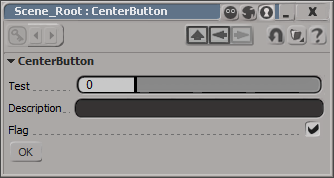
I don’t think there is any way to center a control on a layout. At least not one that I can find. You could set an X position, which will look centered until a user resizes the PPG.
item = oLayout.AddButton( L"MyButton", L"ddd" ) ;
item.PutAttribute( siUICX, <x position in pixels>)
Or you could use this hack, which uses group width percentages to approximate the centering a button.
var oGroup = oLayout.AddGroup("", false, 40);
oLayout.EndGroup();

// button is left-aligned within its group
// so the centering is not 'true'
var oGroup = oLayout.AddGroup("", false, 20);
var oButton = oLayout.AddButton( "OK" );
oLayout.EndGroup();

var oGroup = oLayout.AddGroup("", false, 30);
oLayout.EndGroup();

oLayout.EndRow();

In an article on the latest release of CINEMA 4D, the reviewer wrote something I found kinda interesting:
CINEMA 4D … [is] now up to version 11.5, which is just as many versions, if not more, than the older Maya, Max, and Houdini (I’d mention Softimage, but that went through some weird period akin to the Dark Ages after the destruction of the Library in Alexandria, so its timeline isn’t accurate).
Disabling desktop composition, either for a specific app or globally, or using a non-Aero theme, may result in refresh problems in some editors.
From the dev team: “Areo must be on otherwise the clipping regions are broken”
Interesting thread on some of the problems people have encountered…
fickle events, and automated workgroup switching – Google Groups.
In previous versions of Softimage, you could use Parameter.Source to get the shader/texture connected to a material parameter such as the diffuse port.
As of 2011, Source returns a ShaderParameter. To get the connected shader, use ShaderParameter.Parent (in C++, GetSource().GetParent()).
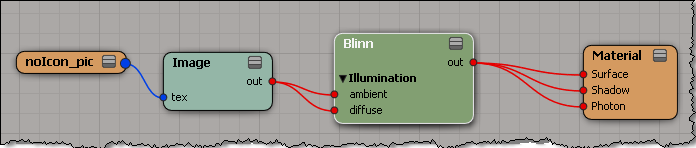
var m = Dictionary.GetObject( "Sources.Materials.DefaultLib.Material.Blinn" );
var p = m.Parameters("diffuse");
LogMessage( p.Source );
// INFO : Sources.Materials.DefaultLib.Material.Image.out

LogMessage( ClassName( p.Source ) );
// INFO : ShaderParameter

LogMessage( p.Source.Parent );
// INFO : Sources.Materials.DefaultLib.Material.Image

LogMessage( ClassName( p.Source.Parent ) );
// INFO : Texture
Learn how to use particle sprites with ICE in Softimage – the sprite technique is a cost-effective way to give the illusion of detail by mapping 2D texture onto a plane.
via Softimage tutorial: How to use particle sprites with ICE in 7 easy steps.
An Ola Madsen tutorial at 3D World. I don’t see it on his site yet, so I linked it.
720deg slerp ICE compound
via Mr_doOo’s 3D stuff.
Update: Drag-and-drop didn’t work with IE, but it did with Firefox.
In a recent case, a customer was using an ICE tree in the Modeling stack to create a fixed number of particles. Then, he used an animated scalar value in the ICE tree to drive changes in the particle positions. Basically, it was a bunch of “spokes” rotating in a circle.
The problem was that there was no motion blur when he rendered with mental ray (but there was motion blur with 3Delight).
To get motion blur in this type of scene, you have to set the PointVelocity attribute to a value that indicates the direction and distance/second of travel.
Unlike 3Delight, mental ray only takes the motion from the velocity attribute. There’s no delta comparison done.

