Combining license files


This keeps coming up in the support queue, often in this form: “I have 12 licenses but I can only run Softimage on 3 machines at a time”. This happens because somebody tried to combine license files.

You cannot combine license files of the same product. For example, if you have one Softimage Advanced license for 9 seats, and another Advanced license for 3 seats, you cannot put them together in one .lic file. You’ll end up either with 9 or 3 licenses, depending on the order of the licenses in the .lic. The last license in the file supersedes the others.

You can combine licenses of different products. For example, Max 2010 and Softimage 2010. Or Softimage and Softimage Advanced.

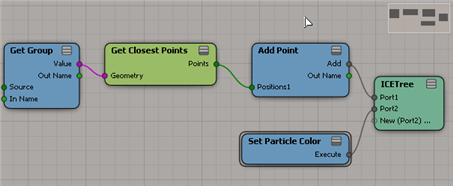
Add points to cloud at geometry vertices


Suppose you have several objects, and you want to use ICE to add a point at each vertex of each object. If all your objects had the same number of vertices, you could do it by plugging Get Group.PointPositions into Add Point:

Group_AddPoint

But this works only if all the objects have the same number of vertices. Otherwise you won’t get points at all vertices of all objects.

Note that you have to either freeze the transforms on the objects or, as shown above, convert from local coordinates to global coordinates.

To add points on the vertices of any group of objects, you can use Get Closest Points. Just adjust the cutoff distance until you get all the points on the objects.

Group_AddPoint_GetClosestPoints

UPDATE: You can also use Generate Sample Set.

Hat tip: CiaranM

Home Use licenses


Home Use is a Subscription benefit that allows you to install a second copy of Softimage. For example, you could install Softimage at home, either for work or for personal education and training. A Home Use license is a standalone license.

To get a Home Use license, you can fill out a request form on the Subscription Center. Login, click Contract Administration, and then click Request Home Use.

Note To request a Home Use license, you must be the Contract Administrator for your account. If you are not the Contract Administrator, you won’t see the Request Home Use form.

If you have problems with the request form, log a Business Service Request and tell them you want to apply for a Home Use license of Softimage.

  1. Go to the Support Request page
  2. Click Subscription Help, and then click New.

Getting the selected nodes in an ICE Tree


You can get the selected ICE nodes through the selection view attribute.

First, you have to get the ICE Tree view. You could try to get the view by name:

var oLayout = Application.Desktop.ActiveLayout;
var oICETreeView = oLayout.Views( "ICE Tree" );

but if the ICE Tree view is part of a layout (like the ICE layout) that won’t work, because the view has a different name (for example, in the ICE layout, the view name is “lower_panel”). To be sure you get the ICE Tree view, whether it is floating or embedded, filter by the Views by type.

// Get the ICE Tree views
var oLayout = Application.Desktop.ActiveLayout;
var oICETreeViews = oLayout.Views.Filter( "ICE Tree" );

// Now get the selected nodes 
// and log the names of the selected nodes
var x = oICETreeViews(0);
var a = x.GetAttributeValue( "selection" ).split(",");
LogMessage( a.length );

for ( var i in a )
{
	var oNode = Dictionary.GetObject( a[i] );
//	LogMessage( classname(oNode) );
	LogMessage( oNode.Name );
}

FLEXnet Licensing error:-1,359. System Error: 2 “No such file or directory”


This FLEXLM_DIAGNOSTIC error indicates that the @ symbol is missing. For example, you will see this error if setenv.bat has this:

set _ADSK_LicServers=mtl-licserver

instead of this;

set _ADSK_LicServers=@mtl-licserver

When there is no @ symbol, “mtl-licserver” is interpreted as a file path, not as the name of a computer. Softimage 7.5 used this syntax to specify that the file C:\Softimage\Softimage_7.5_x64\adlm\licenses\Autodesk.lic contained the location of the license server.

Here’s the actual FLEXLM_DIAGNOSTIC message. Notice how it lists “Filename” and “License path”, which indicate that Softimage is trying to find a file.

—————————
FLEXible License Manager
—————————
FLEXnet Licensing checkout error: Cannot find license file.
The license files (or license server system network addresses) attempted are
listed below. Use LM_LICENSE_FILE to use a different license file,
or contact your software provider for a license file.
Feature: 84000SFTIM_2010_0F
Filename: mtl-server
License path: mtl-server;
FLEXnet Licensing error:-1,359. System Error: 2 “No such file or directory”
For further information, refer to the FLEXnet Licensing documentation,
available at “www.acresso.com”.
—————————
OK
—————————

Getting ICE attributes through scripting


You can get at the ICE attributes of a point cloud through PointCloudGeometry.ICEAttributes or PointCloudGeometry.GetICEAttributeFromName.

To get the attribute values for every point in a point cloud, you get the DataArray of the attribute.

Here’s some sample JScript that shows how to get ICE attributes. Run it once, and then randomize the initial shapes of the particles and run the script again. See the difference? (Look at the difference in IsConstant and the contents of DataArray for the Shape attribute).

Remember that in the script editor you can double-click a method or property name (like “DataArray”) and press F1 to go to the SDK reference page.

var pc = Dictionary.GetObject( "PointCloud" );
var oPointCloudGeometry = pc.ActivePrimitive.Geometry;

// Get the NbPoints attribute
var oIceAttrib = oPointCloudGeometry.GetICEAttributeFromName( "NbPoints" );
logAttributeInfo( oIceAttrib );
logDataArray( oIceAttrib.DataArray );

// Get the Shape attribute
var oIceAttrib = oPointCloudGeometry.GetICEAttributeFromName( "Shape" );
logAttributeInfo( oIceAttrib );
logDataArray( oIceAttrib.DataArray );

// Utility functions
function logAttributeInfo( oIceAttrib )
{
    LogMessage( oIceAttrib.Name + "ICE attribute");
    LogMessage( "\tIsConstant=" + oIceAttrib.IsConstant );
    LogMessage( "\tContextType=" + oIceAttrib.ContextType );
    LogMessage( "\tDataType=" + oIceAttrib.DataType );
}

function logDataArray( dataArray )
{
    // DataArray is a safe array
    // So, convert it to a JScript array
    var a = new VBArray( dataArray ).toArray();
    LogMessage( "\tDataArray.length=" + a.length );
    for ( var i in a )
    {
        if ( typeof(a[i])=="object" )
        {
            LogMessage( "\tDataArray["+i+"].Type=" + a[i].Type );
			LogMessage( ClassName( a[i] ) );	// Shape
        }
        else
        {
            LogMessage( "\tDataArray["+i+"]=" + a[i] );
        }
    }
}

Firewall, ports, and licensing


Autodesk licensing uses the ports 2080 and 27000-27009, so check that your firewall does not block these ports. Check the firewalls both on the workstations and on the license server.

If 2080 is blocked, you’ll see this error in the FLEXLM_DIAGNOSTICS output:

FLEXnet Licensing error:-15,570. System Error: 10035 “WinSock: Operation would block”

Passing a safe array into a method from JScript


In the XSI SDK, when a method or command returns an array, it returns a safe array.
So, in JScript, you have to use VBArray.toArray() to convert the safe array to a JScript array.

When you go in the other direction, and pass in an array, the XSI SDK automatically converts the JScript array to a safe array. That’s good, because you can’t build safe arrays in JScript, or convert JScript arrays to safe arrays.

Unfortunately for me, a customer came across a case where PPGItem.SetAttribute wouldn’t work with a JScript. Sure, it was with an undocumented attribute, but still…

I knew the JScript attribute was the problem because I could set the attribute in VBScript, but not JScript.

So I came up with a hack to get a safe array in JScript. I used ExecuteScriptCode to call a VBScript function that returned a safe array, which I could then pass to SetAttribute.

var s = "function a( val )\n" + 
	"a = Array( val )\n" +
	"end function";

var sa = Application.ExecuteScriptCode( 
			s, "VBScript", "a", val );

Another way to get a safe array in JScript is to use the Scripting.Dictionary. The Items method returns a safe array:

d = new ActiveXObject("Scripting.Dictionary"); 
d.Add( 0, val )
var sa = d.Items();

Changing the vendor port number from 2080


A network license (.lic) file includes this line

VENDOR adskflex port=2080

which suggests [to me] that you can change the port number.

So I changed the port number in the .lic, saved the file, and restarted the license server.
But adskflex still used 2080:

8:33:58 (lmgrd) License file(s): C:\Program Files\Autodesk Network License Manager\SFTIMA2010.lic
8:33:58 (lmgrd) lmgrd tcp-port 27000
8:33:58 (lmgrd) Starting vendor daemons ... 
8:33:58 (lmgrd) Starting vendor daemon at port 2080
8:33:58 (lmgrd) Using vendor daemon port 2080 specified in license file

That last log entry “Using vendor daemon port 2080 specified in license file” makes it look like I didn’t save my changes, but I know I did. My license file says 2082, not 2080.

After a little research, I found this KB article, which explains that the port 2080 is officially registered to Autodesk through the IANA, and you should “reassign the port in the conflicting application, or unblock the port”.

If for some reason you must use a different port, delete the “port=2080” from your license file. The adskflex vendor daemon will automatically find an available TPC/IP port.

Checking for Character Key Sets part 3


We’ve already seen two ways to get at the IsCharacterKeySet parameter: 1) using the GetValue command, and 2) using XSICollection.Items.

Now, here’s a third way, using Dictionary.GetObject(). Dictionary.GetObject takes a string name and returns the corresponding object:

var oProp = Selection(0);
var oParam = Dictionary.GetObject( oProp + ".IsCharacterKeySet" );
LogMessage( oParam.Value );

So what’s the best way to get IsCharacterKeySet? One thing to consider is that GetValue and Dictionary.GetObject both fail if the string does not resolve to an object. XSICollection.Items, on the other hand, won’t fail; you just have to check the .Count property after to see whether you got the parameter.