Friday Flashback #108


Hmmm…last Friday was the 19th anniversary of the Microsoft purchase of Softimage (15 Feb 1994). I really missed it on that one. Now I’ll have to wait for the 20th anniversary; hopefully I’ll still be doing Friday Flashbacks this time next year.

Anyways, on to this week’s flashback…From Jurassic Park (1993) to Gladiator (2001), a “representative sample” of motion pictures created with Softimage products.

TITLE CUSTOMER YEAR
Gladiator Mill Film 2001
Jurassic Park 3 Industrial Light & Magic 2001
Moulin Rouge 2001
The Mummy Returns 2001
Shadows Mitch Levine Director 2000
Star Wars: Episode 1 The Phantom Menace Industrial Light & Magic 2000
X-MEN Pacific Ocean Post 2000
Fight Club Pixel Liberation Front & BUF 1999
Forces of Nature Dreamworks Pictures 1999
Galaxy Quest Industrial Light & Magic 1999
Stuart Little Centropolis FX 1999
The Mummy 1999
Antz Pacific Data Images & Dreamworks Pictures 1998
Babe: Pig in the City Animal Logic 1998
Deep Impact Industrial Light & Magic 1998
Deep Rising Industrial Light & Magic 1998
Fear & Loathing in Las Vegas Peerless Camera 1998
Flubber Industrial Light & Magic 1998
Godzilla Centropolis 1998
Jack Frost Industrial Light & Magic and Warner Bros 1998
Jurassic Park 2 Industrial Light & Magic 1998
Lost in Space Framestore 1998
Matrix Animal Logic 1998
Meet Joe Black Industrial Light & Magic 1998
My Favorite Martian Tippett Studio 1998
Prince of Egypt Dreamworks Pictures 1998
Saving Private Ryan Industrial Light & Magic 1998
Small Soldiers Industrial Light & Magic 1998
Snake Eyes Industrial Light & Magic 1998
Species II Digital Magic & Transfer 1998
Sphere Cinesite 1998
The Borrowers Framestore 1998
The Thin Red Line Animal Logic 1998
What Dreams May Come Pacific Ocean Post 1998
A Simple Wish Blue Sky 1997
Air Force One Cinesite 1997
Alien Resurrection Blue Sky – VIFX 1997
An American Werewolf in Paris Santa Barbara Studios 1997
Anastasia Fox Animation Studio 1997
Batman and Robin BUF Compagnie 1997
Contact Sony Pictures Imageworks and Weta Ltd. 1997
Men in Black Industrial Light & Magic 1997
Mortal Kombat:Annihilation The Digital Magic 1997
Spawn Industrial Light & Magic 1997
Speed 2 Industrial Light & Magic 1997
Starship Troopers Tippett Studio 1997
Star Wars Trilogy Industrial Light & Magic 1997
The Edge Peerless Camera 1997
The Fifth Element Digital Domain 1997
The Lost World Industrial Light & Magic 1997
The Relic VIFX 1997
Titanic Digital Domain 1997
101Dalmations Industrial Light & Magic 1996
12 Monkeys Peerless Camera 1996
Dragonheart Industrial Light & Magic 1996
Eraser Mass Illusion 1996
Joe’s Apartment Blue Sky 1996
Mars Attack! Industrial Light & Magic 1996
Mission Impossible Industrial Light & Magic 1996
Space Jam Industrial Light & Magic 1996
Star Trek:First Contact Industrial Light & Magic 1996
Surviving Picasso Peerless Camera 1996
T2-3D Digital Domain 1996
The Adventures ofPinocchio MediaLab 1996
The Frighteners Weta Ltd. 1996
The Island of Dr. Moreau Digital Domain 1996
Balto Amblimation 1995
Casper Industrial Light & Magic 1995
Judge Dredd 1995
Jumanji Industrial Light & Magic 1995
La Cite des Enfants Perdus BUF Compagnie 1995
Star Trek:Generations Industrial Light & Magic 1994
The Flinstones Industrial Light & Magic 1994
The Mask Industrial Light & Magic 1994
The Shadow R/Greenberg & Associates 1994
Death Becomes Her Industrial Light & Magic 1993
Jurassic Park Industrial Light & Magic 1993

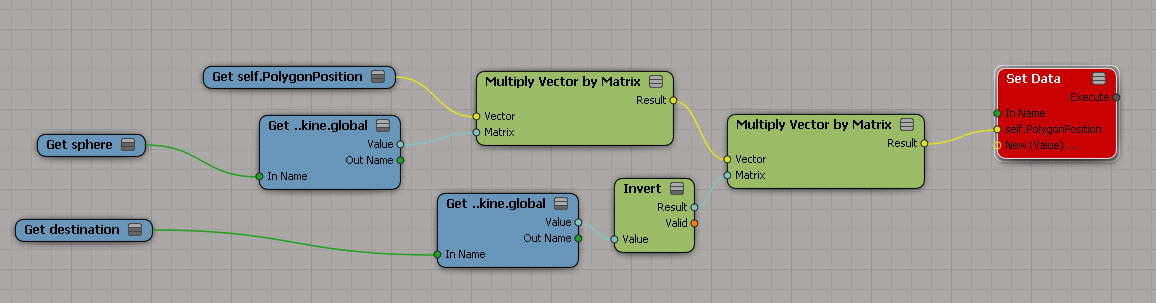
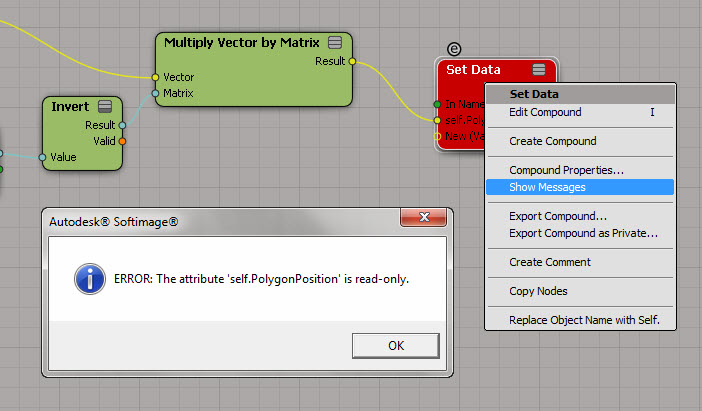
PolygonPosition is read-only


Too bad, I had such big plans for this 🙂
PolygonPosition_red

So, now that I’m at a dead end, let’s go over the different ways to figure out why a node is red…

Point to the node and wait for the tooltip to show the first error:
PolygonPosition_tooltip

Right-click the node and click Show Messages.
(Log port type details can be useful sometimes, but not in this particular case.)
ShowMessages

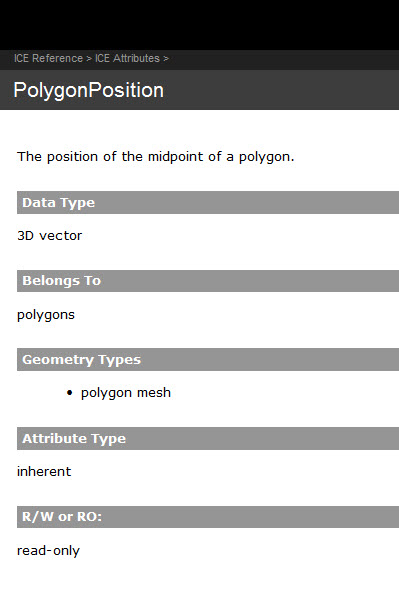
Read the documentation.
PolygonPosition_doc

ICE: adding consecutive elements in an array


I was hoping to do something more complicated, but I ran out of time…

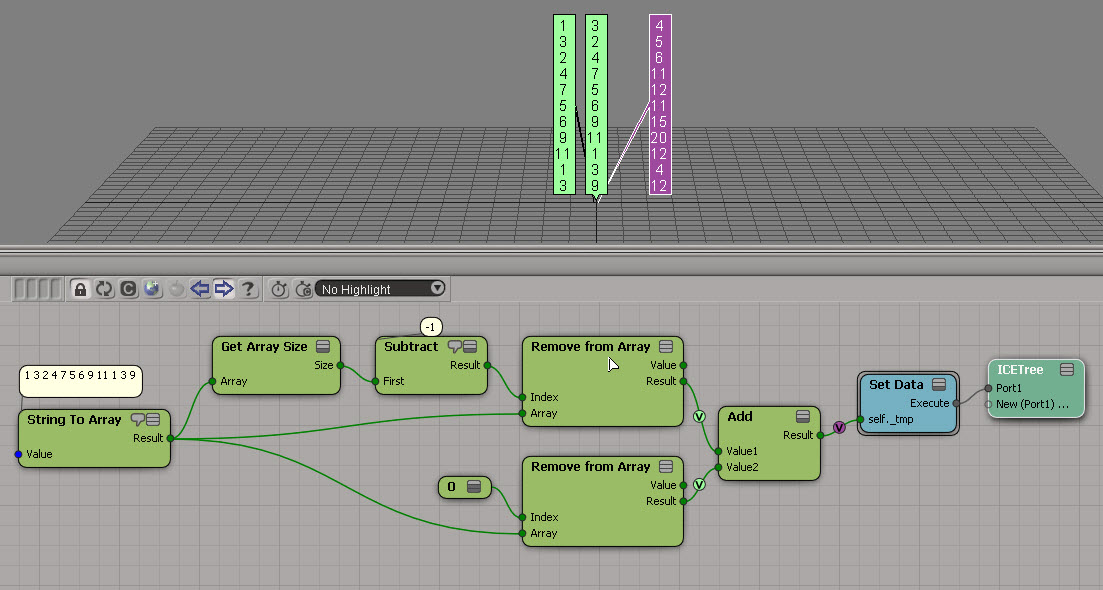
Here’s the exercise: Take an array and build a new array by adding consecutive elements in the original array.
For example, given this array:

1 3 2 4 7 5 6 9 11 1 3 9

construct this array:

1+3, 3+2, 2+4, 4+7, ..., 3+9

array_sum_consecutive_elements

Summing up three consecutive elements will hopefully be more interesting…

Using Generate Sample Set to avoid the Repeat node


Hat tip to Oleg who posted this tip on the mailing list some time ago.

The basic ideas is that instead of looping over an array with a Repeat with Counter, you use Generate Sample Set to get a data set, and you do everything in a per-generated element context.

GenerateSampleSEt_vs_Repeat

As an example, let’s revisit the problem of taking one array and creating a new array where each element is the sum of the elements before it.

Array_accumulation

The old way, with a Repeat with Counter node, looks like this:
RepeatWithCounter

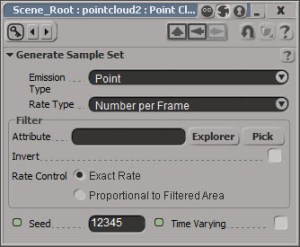
Using Generate Sample Set, you can work with a data set and use that to access the array elements:
GenerateSampleSet

Generate Sample Set is set up to give an exact number of samples:
GenerateSampleSet-PPG

Screenshots of the week


Particle clumping
by Andy Moorer
example_particleClumps

MatCap (litsphere) shading in Softimage 2013
by Andy Moorer
metaSL_litsphere7

Matcap render tree
by Gustavo E Boehs
matcap_nodes

MatCap Mirror ball/Map ball
by Gustavo E Boehs
matcap

Paint polygons by weightmap delete holes
by Tekano
paintpolygon_by_weightmap_delete_holes

Layers
by Maximus
layerv

by msktkhs
x26n
sabl
vdms

How to convert weightmap to geometry in softimage ICE tutorial

Old school Quantum Teleportation

Saturday Snippet: Getting data from a DataArray2D ICE attribute


I wanted to do this JScript, but I had to do it in Python first, to establish that it was actually possible (with JScript, you’ve got to mess around with VBarrays and such).

# Using one of the CrowdFX sample scenes:
Application.SelectObj("Pedestrian_Mesh.Actor_Copies", None, None);
o = Application.Selection(0)

a = o.ActivePrimitive.Geometry.GetICEAttributeFromName("Materials")
print len(a.DataArray2D)
print len(a.DataArray2D[0] )
print a.DataArray2D[0][0]
for s in a.DataArray2D[0][0]:
    print s

# 1
# 1
# (u'', u'Sources.Materials.PedestrianLib.Shoes', u'Sources.Materials.PedestrianLib.Hair', u'Sources.Materials.PedestrianLib.Legs', u'Sources.Materials.PedestrianLib.Skin', u'Sources.Materials.PedestrianLib.Shirt')
# Sources.Materials.PedestrianLib.Shoes
# Sources.Materials.PedestrianLib.Hair
# Sources.Materials.PedestrianLib.Legs
# Sources.Materials.PedestrianLib.Skin
# Sources.Materials.PedestrianLib.Shirt

After I had it working in Python, I was able to figure it out in JScript:

// Using one of the CrowdFX sample scenes:
SelectObj("Pedestrian_Mesh.Actor_Copies", null, null);
o = Selection(0);

a = o.ActivePrimitive.Geometry.GetICEAttributeFromName("Materials");

x = new VBArray( a.DataArray2D ).toArray();
y = new VBArray( x[0] ).toArray();
for ( var i = 0; i < y.length; i++ )
{
    LogMessage( y[i] );
}

Softimage announce and release dates


It’s getting to be that time of year when people start asking about the next version…

You can probably get a pretty good idea of when to expect Softimage 2014 by looking backwards. So, here’s the dates that previous versions were announced and released (data gathered via google).

Release Announced Released
2013 27 March 2012 12 April 2012
2012 01 March 2011 07 April 2011
2011 15 March 2010 06 April 2010
2010 03 August 2009 14 Sept 2009
7.5 23 Feb 2008 23 Feb 2008

Hexagon tiling with ICE


hexagon_tiling_rr
Here’s a relatively simple ICE tree that arranges hexagons on the XZ plane. The “difficult” part was creating the arrays of position coordinates. For that I used the standard modulo technique. It’s funny, it all makes perfect sense when you’re plugging stuff together, but afterwards it’s hard to make heads or tail of what you did 🙂
hexagon_tiling_1

To understand what’s going on here, it helps to look at the final arrays that are built:
hexagon_tiling_show_values

The math for arranging the hexagon tiles is pretty simple. I started with a simple test point cloud to make sure I understood what I needed to do. After that, it was just a question of setting up the arrays.
hexagon_tiling_testing

If you want to take a look at the ICE trees, here’s some compounds. Note that this isn’t a finished piece of work. It’s more of a draft version. For example, my hexagon has a side length of 5 and that’s hardcoded into the ICE tree right now.
Hexagon_Tiler.xsicompound
Hexagon_Math_Tester.xsicompound