Another look at IsElement problems


I’ve had some problems with IsElement lately, so I took another look at how to work around problems with IsElement, especially when you’re using it with ICE topology. Also, a quick look under the covers at the connections in the construction stack (aka operator history).

http://vimeo.com/47605597

Here’s the script I was using to print the connection stack info:

#
# This script works in 2013 SP1 only because it uses sipyutils 
#
from sipyutils import si			# win32com.client.Dispatch('XSI.Application')
from sipyutils import siut		# win32com.client.Dispatch('XSI.Utils')
from sipyutils import siui		# win32com.client.Dispatch('XSI.UIToolkit')
from sipyutils import simath	# win32com.client.Dispatch('XSI.Math')
from sipyutils import log		# LogMessage
from sipyutils import disp		# win32com.client.Dispatch
from sipyutils import C			# win32com.client.constants

si=si()
siut =siut()

sisel = si.Selection


from xml.etree import ElementTree as ET

prim = sisel(0).ActivePrimitive if si.ClassName(sisel(0)) ==  'X3DObject' else sisel(0)


stackInfo = siut.DataRepository.GetConnectionStackInfo( prim )
#log( stackInfo )
connections = ET.XML(stackInfo)
currentMarker =''

print "Connections for %s" % prim.FullName
for connection in connections:
		o = connection.find('object').text
		if o == currentMarker:
			continue
	
		if o.endswith('marker'):
			currentMarker = o
			
		print "%s (%s)" % (connection.find('object').text, connection.find('type').text)

Bullet Rigid Body Simulation with States


Softimage 2013 SP1 included a fix for a problem (aka a crash) with the Simulate Bullet Rigid Bodies nodes and states.

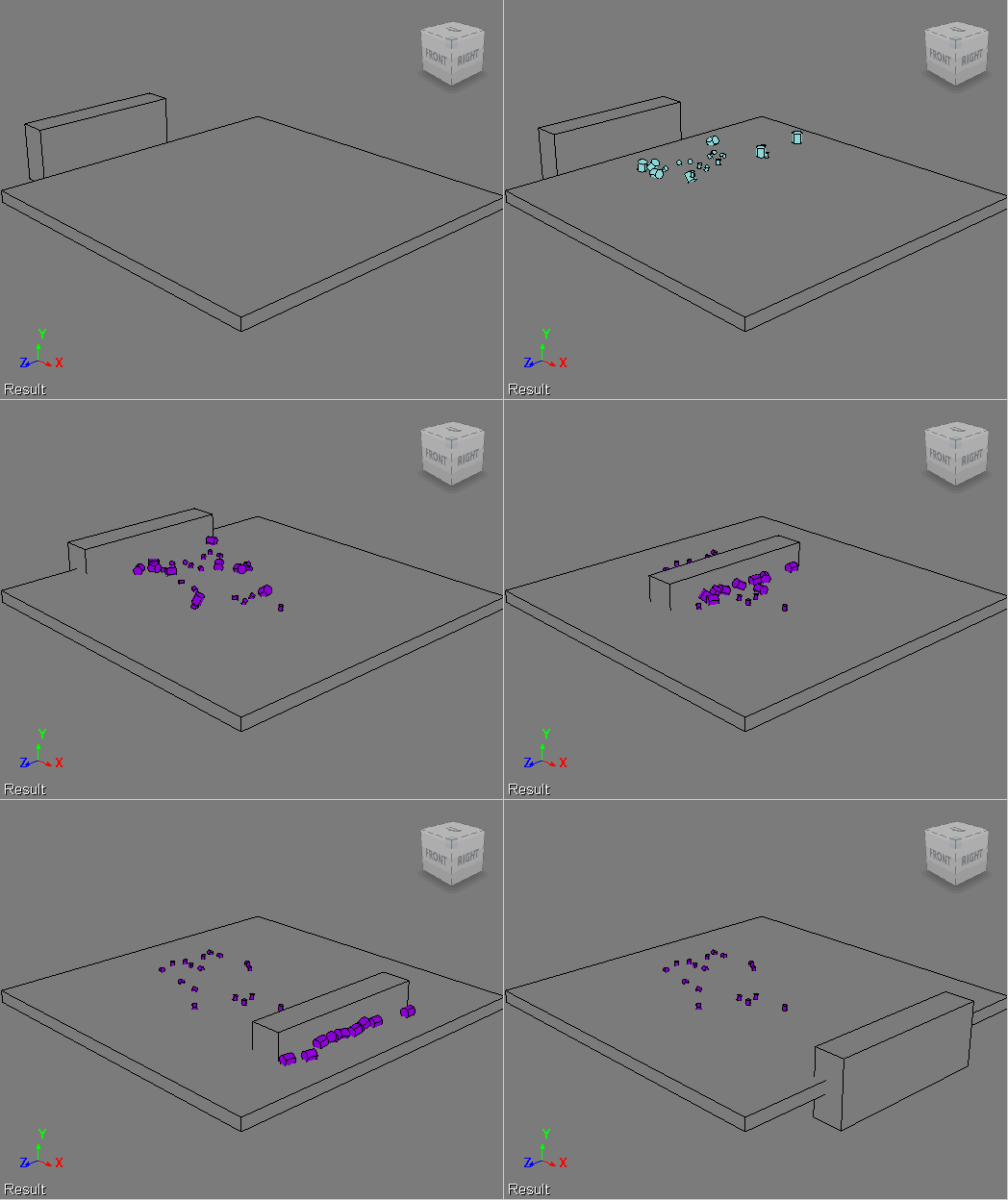
So, when a customer asked us how to do a two-part simulation, I gave Bullet + States a try. In the first part, the objects drop onto an obstacle, and in the second part, another obstacle comes along and pushes some of the objects away. Like this:

Here’s the ICE tree. I used Test Current Frame to trigger the state change. I did try some other triggers, like Test Particle Velocity and Test Particle Size, but I got some weird results with those triggers. By weird, I mean things like some, but not all, of the small cylinders being pushed away, even though they were still in the first state.

The idea here is to push just the big cubes. I make all the little cubes passive, so they get left behind.

Context matters: point versus polygon


Since the introduction of ICE modeling, you may have hit context mismatches like this:

or this:

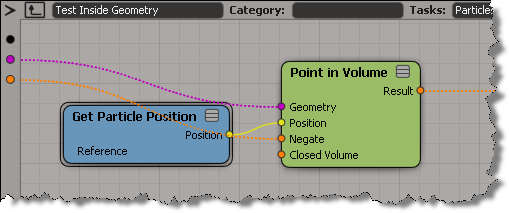
That’s because compounds like Test in Geometry and Randomize Around Value are built to work with points/particles. For example, if you look inside Test Inside Geometry, you’ll see it is getting the point position.

So, when you want to use these convenience compounds in a different context, you’ll have adapt them.

ICE powers of 10 array


In ICE, how would you generate an array like [1, 10, 100, 1000, 10000, 100000, …] without using a Repeat node ?

It might help to look at it this way:

1
10
100
1000
10000
100000

Once you recognize that you are looking at powers of 10, and recall that the basic Math nodes can handle arrays just as well as single values, the rest follows easily:

Getting actor data from CrowdFX


Update: oops, it looks like my script below works only in simple cases where you just one actor proxy. The ActorID seems to be a constant (perhaps unused???) and it looks like you have to take the point ID and then look up the corresponding entry in the CrowdFX_Actor_Indices array.

If you need to get info like the actor ID, the X and Z positions, and the animation frame from CrowdFX, you can get it from the Simulation Cloud.
In the screenshot below, I used three Attribute Display properties to display the following:

  • Actor ID (I have only one actor)
  • PointPosition
  • CrowdFX_Actor_CurrentFrameInCycle (an array for each action aka pose on the actor)
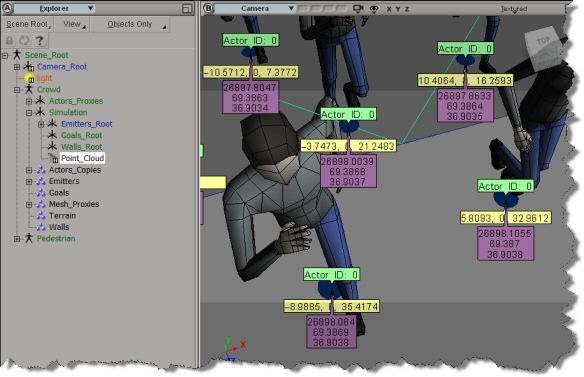
Here’s a little Python snippet that logs a comma-separated string that contains the Actor ID, X, and Z positions, PoseID, and CurrentFrameInPose.

Note the use of the logf function from the sipyutils.

#
# SOFTIMAGE 2013
#
from sipyutils import si			# win32com.client.Dispatch('XSI.Application')
from sipyutils import siut		# win32com.client.Dispatch('XSI.Utils')
from sipyutils import siui		# win32com.client.Dispatch('XSI.UIToolkit')
from sipyutils import simath	# win32com.client.Dispatch('XSI.Math')
from sipyutils import log		# LogMessage
from sipyutils import disp		# win32com.client.Dispatch
from sipyutils import C			# win32com.client.constants

from sipyutils import logf

si = si()

pc = si.Dictionary.GetObject( "Crowd.Point_Cloud" ).ActivePrimitive
aPtPos = pc.ICEAttributes("PointPosition")
log( len(aPtPos.DataArray) )

pos = pc.ICEAttributes("PointPosition").DataArray
ids = pc.ICEAttributes("CrowdFX_Actor_ID").DataArray
poses = pc.ICEAttributes("CrowdFX_PoseState_ID").DataArray
frames = pc.ICEAttributes("CrowdFX_Actor_CurrentFrameInCycle").DataArray2D

# ID, X, Y, Z, PoseState, CurrentFrameInCycle
for i in range( len(pos) ):
	logf( "%d, %f, %f, %d, %d", ids[i], pos[i].X, pos[i].Z, poses[i], frames[i][poses[i]] )

The output of this script for frame 126 of the CrowdFX_FooFighters sample scene looks like this:

# INFO : 0, -100.000000, 0.000000, 8.531111, 2, 154
# INFO : 0, -85.714279, 0.000000, 6.684280, 1, 111
# INFO : 0, -71.428574, 0.000000, 7.442898, 2, 131
# INFO : 0, -57.142853, 0.000000, -2.251395, 2, 132
# INFO : 0, -42.857143, 0.000000, 11.363565, 2, 97
# INFO : 0, -28.571426, 0.000000, 7.302890, 2, 149
# INFO : 0, -14.285706, 0.000000, 13.759472, 5, 217
# INFO : 0, 0.000000, 0.000000, 11.584186, 5, 186
# INFO : 0, 14.285721, 0.000000, 9.853815, 3, 167
# INFO : 0, 28.571442, 0.000000, 8.366404, 2, 141
# INFO : 0, 42.857147, 0.000000, 21.238329, 5, 163
# INFO : 0, 57.142868, 0.000000, 6.831881, 5, 222
# INFO : 0, 71.428589, 0.000000, -2.667232, 2, 201
# INFO : 0, 85.714294, 0.000000, 16.321472, 3, 236
# INFO : 0, 100.000000, 0.000000, 10.077105, 2, 93
# INFO : 0, -100.000000, 0.000000, -10.505310, 2, 154
# INFO : 0, -85.714279, 0.000000, -17.066412, 1, 83
# INFO : 0, -71.428574, 0.000000, -11.711117, 5, 152
# INFO : 0, -57.142853, 0.000000, -22.719725, 2, 142
# INFO : 0, -42.857143, 0.000000, -7.311695, 5, 127
# INFO : 0, -28.571426, 0.000000, -11.755372, 2, 151
# INFO : 0, -14.285706, 0.000000, -3.648053, 5, 191
# INFO : 0, 0.000000, 0.000000, -6.797891, 5, 177
# INFO : 0, 14.285721, 0.000000, -8.881895, 5, 101
# INFO : 0, 28.571442, 0.000000, -10.384384, 5, 158
# INFO : 0, 42.857147, 0.000000, 4.351840, 5, 166
# INFO : 0, 57.142868, 0.000000, -11.661755, 2, 178
# INFO : 0, 71.428589, 0.000000, -22.718691, 2, 171
# INFO : 0, 85.714294, 0.000000, -1.260182, 5, 127
# INFO : 0, 100.000000, 0.000000, -8.947992, 5, 123

The Foo Fighter pose state IDs are set here (there are actually eight Action Sources in the ActorProxy property, but not all of them are used).
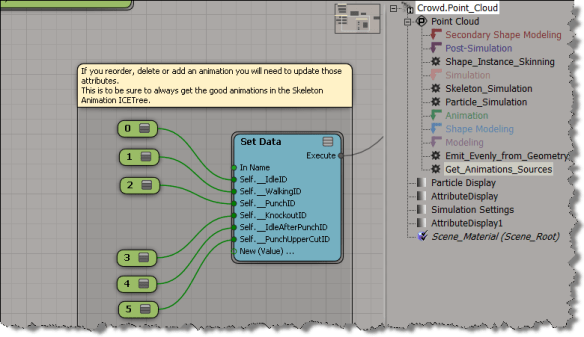
BTW, is it just me, or do the Attribute Display properties not work with the sample CrowdFX scenes? I was using the Foo Fighters sample at first, but I wasn’t able to show any attribute values, which made it a little harder to figure out what info was where.

Extruding random polygons with random lengths and random insets


Last month, Guillaume Laforge posted a Random Extrusion compound that can extrude polygons with random lengths and insets.

Guillaume noted that this compound was for Softimage 2013 only, but it appears that [with a tweak] you can get it to work in 2012 SAP.

When you import the compound into 2012, you’ll see a warning in the status bar/script history:

// WARNING : 3000-EDIT-AddICECompoundNode - Could not find node : BuildArrayFromSetNode

All you have to do is put back the missing Build Array from Set node, then the compound appears to work in 2012 SAP.

This week in video


A round-up of some of the Softimage videos posted this past week.

emTools 1.33 – Walk Through New Stuff

ICE Node for reading images at given UV coordinates

compositing images in ICE!

Manipulating colour in images

Psyop Softimage ICE Workshops

ICE-Rope-Rig (with Dynamic Controler Count and nice SubdivisionInterpolation)

Secondary deformations in Ice
http://vimeo.com/45047412

Maxscript Modifiers VS Softimage Ice

Softimage – A guide to better reflections