In this video, I take a look at why context matters when you try to do
Get Point Position > Set in Array > Set Point Position.
Here’s a screencast version:
http://www.screencast.com/t/Z5vF72IqXS

In this video, I take a look at why context matters when you try to do
Get Point Position > Set in Array > Set Point Position.
Here’s a screencast version:
http://www.screencast.com/t/Z5vF72IqXS
In this video, I take a look at how to offset ICE simulations, and I look into the role of the Simulation Environment.
Some interesting-looking voxel videos and compounds from 2nd reality on Vimeo
Haven’t had a chance to check them out myself yet…
Here’s the most recent video.
I’d recommend going to Vimeo so you can see all the vids and download the related compounds.
In the Mimicking the Constraining Object Using Nulls section of the docs, it says that you can
…use a null’s size, shape, and location (animated or not) to determine the area of the cloth’s or curve’s vertices that are constrained. All the vertices that are within the null object’s space are used for mimicking the constraining object, which can be deforming. You could then animate the location or size of the null to create different constraint effects.
That sounds easy enough, but the other day a customer reported that he couldn’t get this to work. It seemed that Syflex Mimic Null was using only the vertices within the null at the start of the simulation.
He sent along a nice test scene for us to work with, so we were able to get him an answer pretty quickly: you need to go into the Syflex Mimic Null compound and select the Reset checkbox on the syflexIMimic node.

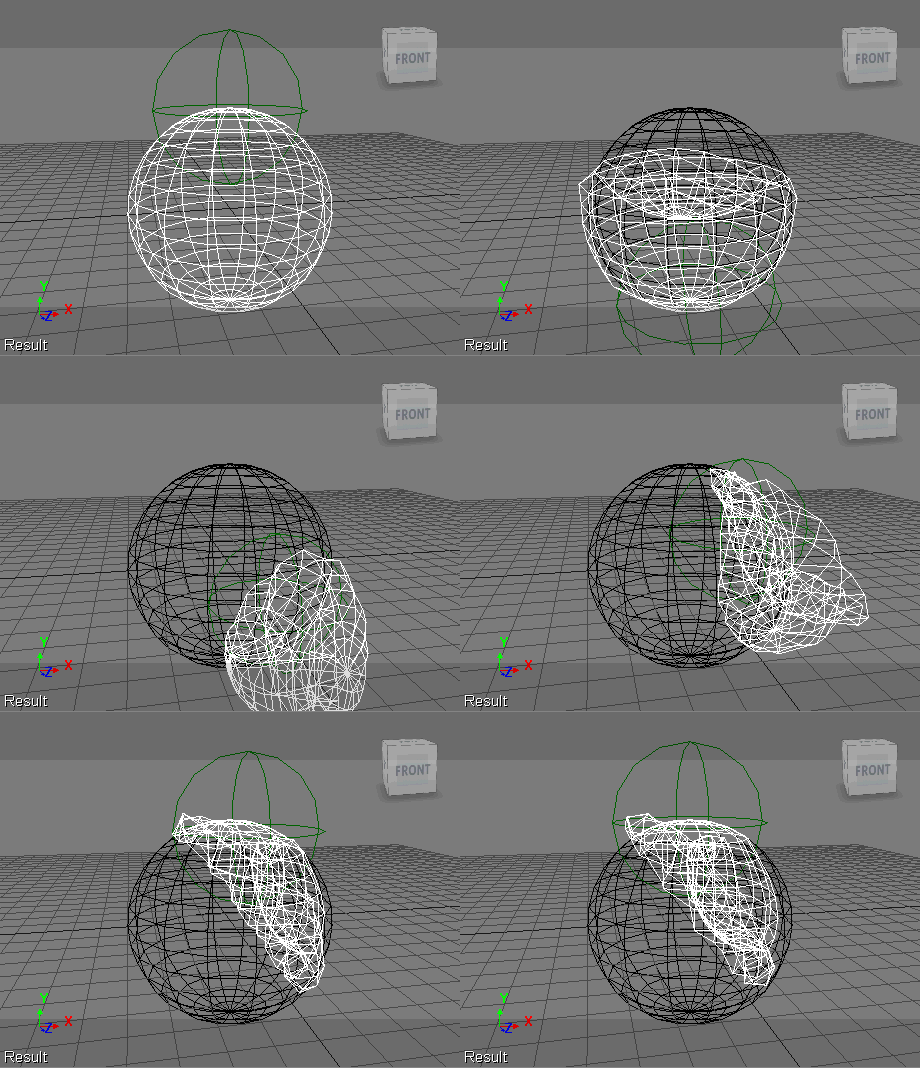
Do that, and you’ll get this kind of effect, where as the null position and scaling change, different vertices are constrained to the object being mimicked.
I had posted something on this before, but I used a Repeat node because Get Curve Distance from Curve Location doesn’t take an array of Distance Values.
Recently, Gray posted another approach on the XSI mailing list. While using Curve Distance to Curve Location will give you greater accuracy, this approach has the advantage of simplicity and no Repeat node:

The other day it occurred to me that maybe I could get rid of my Repeat node by using a point cloud:
Here’s my ICE tree (which is on the point cloud, not the curve):

It looks like it should work, but it doesn’t. Something goes wrong when I do the Set Point Position…all the odd-numbered points end up positioned at the end of the curve.

If I disconnect the Set Point Position node, and debug the tree, it looks like I’m getting all the right locations and points. So, for now, I’m stuck thinking I’m doing something wrong, but I haven’t figured it out yet…
On the XSI mailing list last week, there was a question about “resizing an array using interpolation”.
The goal was to resize an array by interpolating between the elements of the original array.
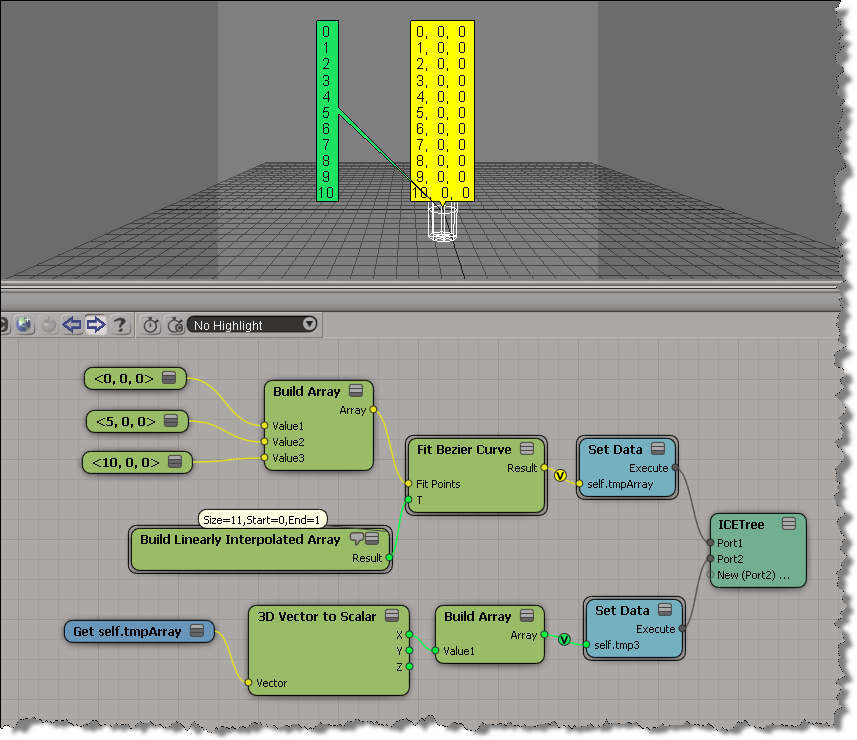
For example, given this array:
[0, 5, 10]
how to you get this array ?
[0, 1, 2, 3, 4, 5, 6, 7, 8, 9, 10]
Alan Fregtman suggested bezier interpolation with the Fit Bezier Curve compound. I gave it a try, and here’s a screenshot. I added a branch to go back to a scalar array from the vector array.
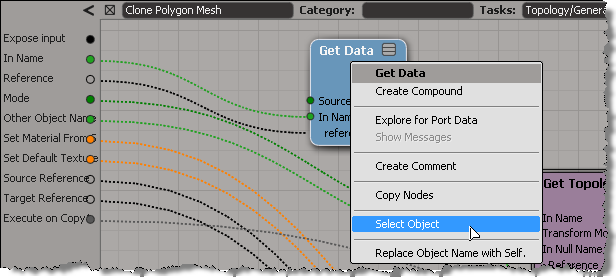
ICE tree views are typically locked, so that they don’t constantly update while you’re working with a scene and selecting different objects. But what do you do if you want to select an object referenced in the ICE tree? Do you have to hunt down the object in the explorer?
Nope. As of 2011.5, you can right-click a Get Data node to select the referenced object.

This works with the self, this_model and this_parent tokens too.
It also works on an Get Data inside a compound, if the Get Data In Name is connected to a valid reference. So, you don’t need to exit a compound just to select an input object.
hat tip: Guillaume Laforge
In this video, I show how to package a collection of ICE compounds as an addon (.xsiaddon).
The compounds I use are by Piotrekm.
http://vimeo.com/30782703
This came up last week on the XSI mailing list. The goal, as I understand it, was this: for each polygon, build an array that contains the indices of all polygon neighbors.
So, to start, you can get an array of vertex locations for each polygon:

But when try to use those locations to get VertexToPolygons, that’s when you hit a problem:
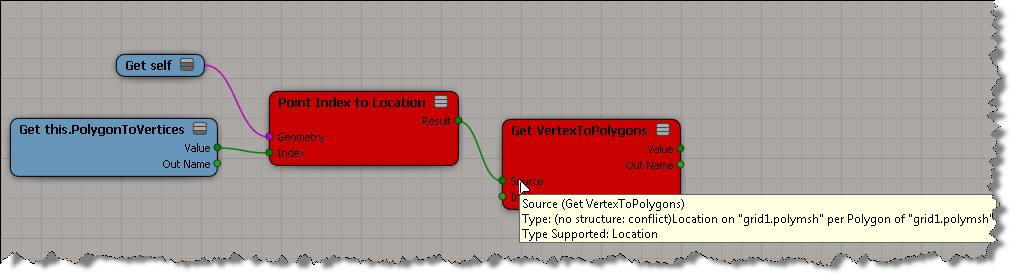
Usually if it’s a context mismatch, you won’t be able to plug in the connection. In this situation, you can plug the result of Point Index to Location into the Get VertexToPolygons, but as soon as you do, both nodes go red. The tooltip indicates that ICE cannot figure out the structure of the data, that is, is this a single value or an array of values? The error goes back up to the Index port on Point Index to Location (if you right-click Point Index to Location and click Show Messages, you’ll get “ERROR: The type of port ‘Index’ is not defined.”).
If you unplug Get PolygonToVertex, then things are ok:

So, it is possible to use a Repeat node to build the per-polygon array of neighbor polygons.

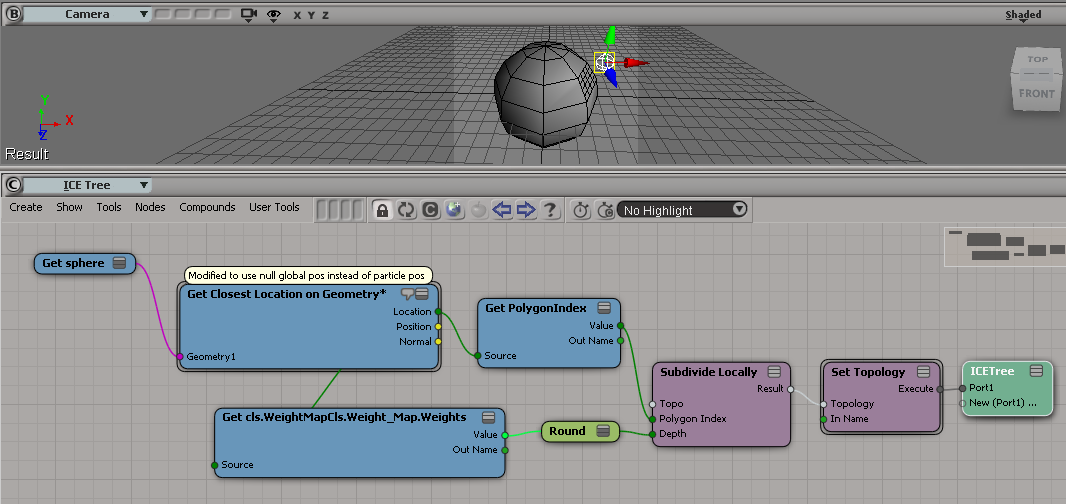
I saw a few questions about context recently, so I thought I’d try to work my way through those questions, starting with some basic scenarios. First up, then, is a question about using weight maps to control subdivision.
In this case, we’re dealing with per-point and per-polygon contexts.
A problem with using weight maps to control subdivision is that weight maps are per-point:

So you’ll end up with a context mismatch if you try to do something like this:

The context mismatch makes sense, since every polygon has more than one point, so what can a per-point weight map value mean for a polygon? One way around this would be to do something like this, and use the average of the per-point weight map values, but in a per-polygon context:

Here’s the full ICE tree:

Another approach would be to somehow use a per-polygon location, because with a location you can get the interpolated value of the weight map values:
 eX-SI
eX-SI 