ICE: Doing an element-wise stretch on an array


I’m not sure “element-wise stretch” is the right terminology, but what I mean is suppose you want to build a new array by repeating the original elements N times. For example, suppose you have the array [1,2], and you want to turn it into [1,1,1,1,2,2,2,2].

Here’s a little ICE technique to do just that:
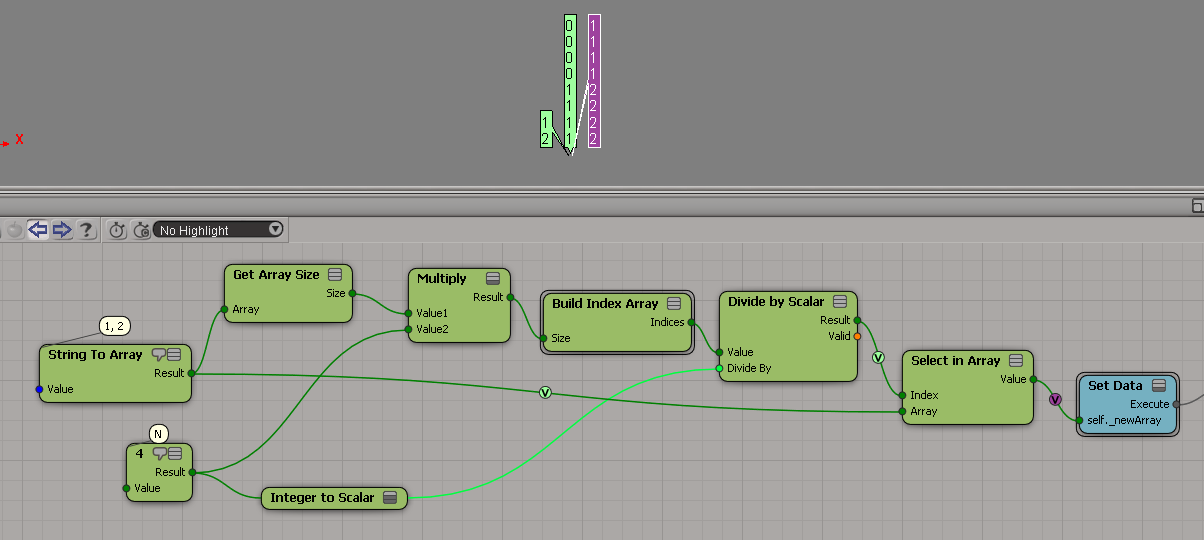
elmentwisestretch

This tree relies on Divide by Scalar truncating the scalar result to make it an integer.

Setting the DataArray2D attribute in scripting


Last time I tried this, I gave up on JScript (it seemed impossible) and got something to work in Python.

In JScript, I kept getting errors like “# WARNING : 3392 – Invalid offset specified while extracting data from this attributeÈ.

si = Application
from win32com.client import constants as C            # win32com.client.constants

oObj = si.Selection(0)
oICEAttrMats = oObj.ActivePrimitive.AddICEAttribute("MyString", C.siICENodeDataString, C.siICENodeStructureArray, C.siICENodeContextSingleton)
oICEAttrMats.DataArray2D = [["a", "b", "c", "d"]]

x = oICEAttrMats.DataArray2D
print x
print len(x)
print len(x[0])
print len(x[0][0])

for d in x[0][0]:
    print d


# (((u'a', u'b', u'c', u'd'),),)
# 1
# 1
# 4
# a
# b
# c
# d

See also this Getting DataArray2D attribute values post.

ICE: Storing vectors in a color at vertices property


The ICE trees for something suggested by Pooby in this Storing initial values thread on si-community. In this example, I’m trying to store per-point data into a per-sample attribute, so I have do a little extra work. I’m actually storing the point position multiple times for each vertex (one vertex had N samples), but I don’t know if it’s worth the effort to try and avoid that.
StoreVectorInCAV

Getting the stored vectors back out:
GetVectorFromCAV

Getting the DataArray2D for the Materials ICE attribute


Here’s the Python way:

Application.SelectObj("Pedestrian_Mesh.Actor_Copies", None, None);
o = Application.Selection(0)

a = o.ActivePrimitive.Geometry.GetICEAttributeFromName("Materials")
print len(a.DataArray2D)
print len(a.DataArray2D[0] )
print a.DataArray2D[0][0]
for s in a.DataArray2D[0][0]:
    print s

# 1
# 1
# (u'', u'Sources.Materials.PedestrianLib.Shoes', u'Sources.Materials.PedestrianLib.Hair', u'Sources.Materials.PedestrianLib.Legs', u'Sources.Materials.PedestrianLib.Skin', u'Sources.Materials.PedestrianLib.Shirt')
# Sources.Materials.PedestrianLib.Shoes
# Sources.Materials.PedestrianLib.Hair
# Sources.Materials.PedestrianLib.Legs
# Sources.Materials.PedestrianLib.Skin
# Sources.Materials.PedestrianLib.Shirt

And here’s how to do it in JScript:

o = Selection(0);

a = o.ActivePrimitive.Geometry.GetICEAttributeFromName("Materials");

x = new VBArray( a.DataArray2D ).toArray();
y = new VBArray( x[0] ).toArray();
for ( var i = 0; i < y.length; i++ )
{
    LogMessage( y[i] )
}

ICE: Removing duplicates from arrays


Here’s an ICE tree that removes all duplicate elements from an array. It uses Generate Sample Set, so there’s no repeat nodes. But it relies on the fact that you can feed in an array of indices into Remove from Array, and Remove from Array doesn’t care if that array of indices itself contains duplicate. So, if you plug the array [1,1,1,2,2,2,3,3,3] in the Index port, Remove from Array will nicely remove elements 1, 2, and 3 with no complaints.

GenerateSampleSet_Remove_Duplicates

Unlike some other methods, this works with scalars too:

GenerateSampleSet_Remove_Duplicates_Scalar

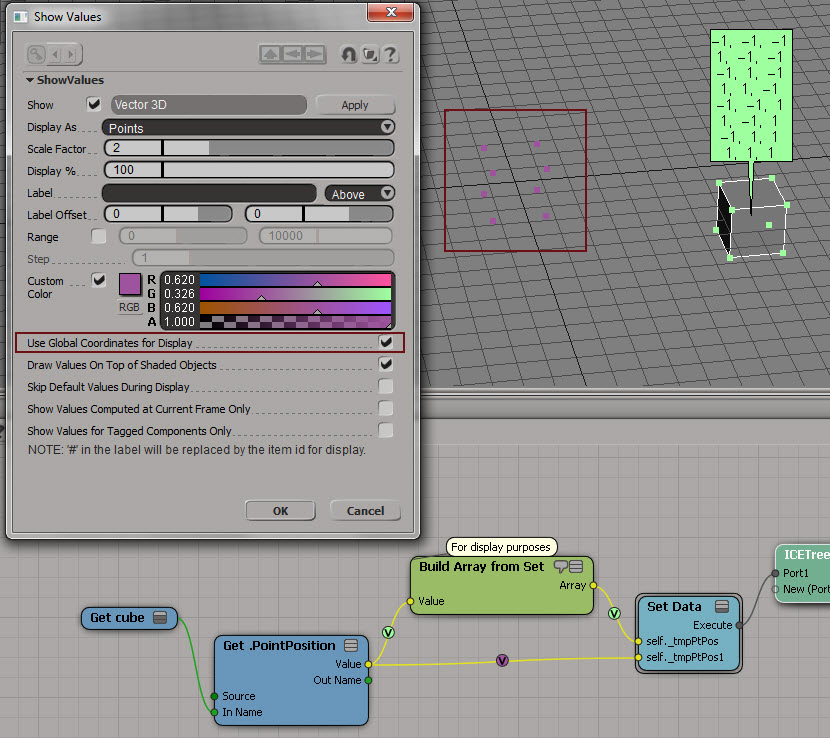
Use Global Coordinates for Display


Sometimes it can be useful to turn on Use Global Coordinates for Display. Because otherwise you’re going to be looking at points in local space, and that can mess up your thinking.

Here’s a simple example to show the difference. Purple is global, light green is local. As you can see, the purple points match up with the actual coordinates.
UseGlobalCoordsForDisplay

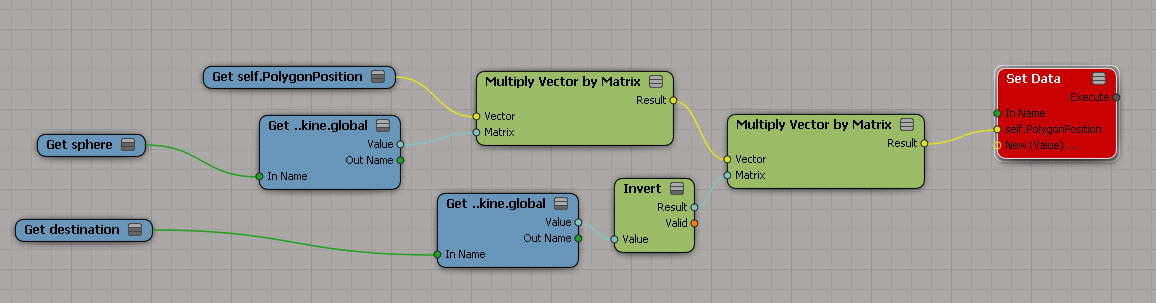
Now here’s a better example of the usefulness of Use Global Coordinates for Display. Red is local (and misleading). Yellow is global. Imagine you’re doing all kinds of coordinate system conversions in a complicated tree, and then you decide to show values as points. If you’re not careful, like me sometimes, you end up doubting everything you’ve done and pulling it all apart.
UseGlobalCoordsForDisplay1

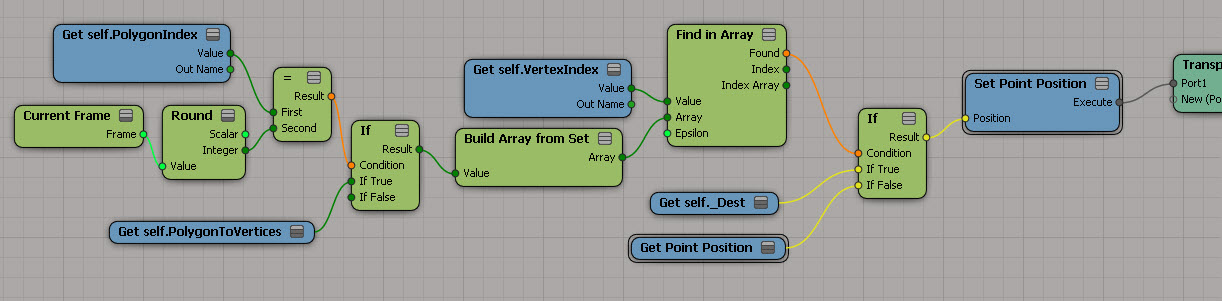
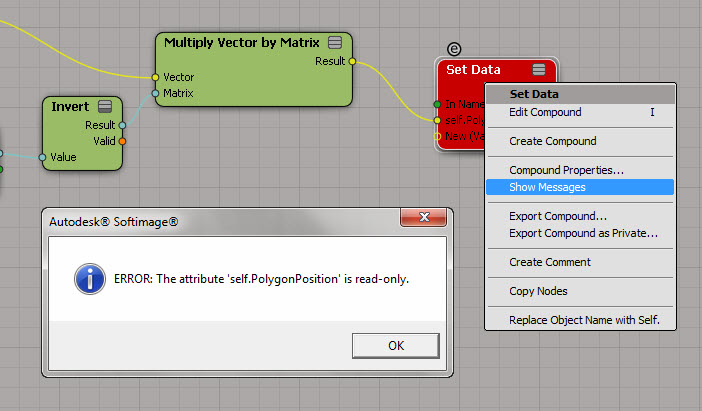
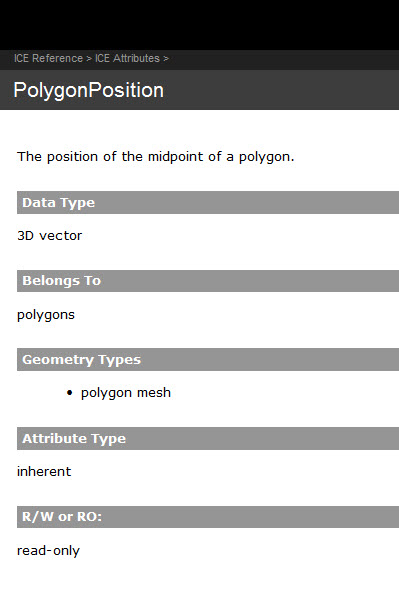
PolygonPosition is read-only


Too bad, I had such big plans for this 🙂
PolygonPosition_red

So, now that I’m at a dead end, let’s go over the different ways to figure out why a node is red…

Point to the node and wait for the tooltip to show the first error:
PolygonPosition_tooltip

Right-click the node and click Show Messages.
(Log port type details can be useful sometimes, but not in this particular case.)
ShowMessages

Read the documentation.
PolygonPosition_doc

ICE: adding consecutive elements in an array


I was hoping to do something more complicated, but I ran out of time…

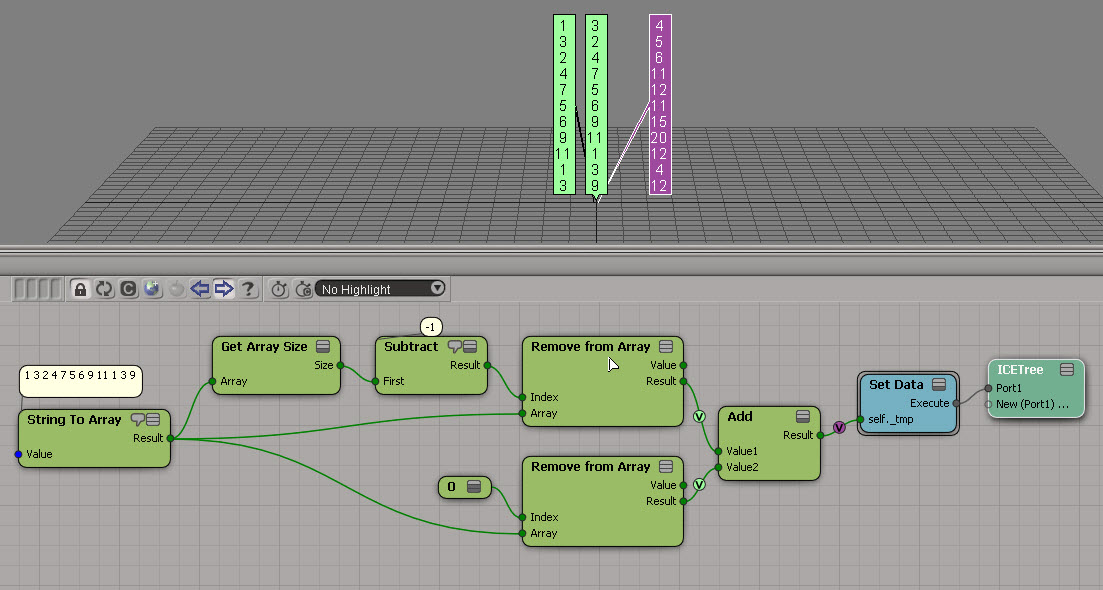
Here’s the exercise: Take an array and build a new array by adding consecutive elements in the original array.
For example, given this array:

1 3 2 4 7 5 6 9 11 1 3 9

construct this array:

1+3, 3+2, 2+4, 4+7, ..., 3+9

array_sum_consecutive_elements

Summing up three consecutive elements will hopefully be more interesting…