Softimage network licenses explained…visually with ICE


A couple of weeks ago on si-community, there was a discussion of Softimage licensing and someone wished there was a graphic that explained Softimage licensing…

A network license includes one Softimage license, and five Batch licenses.

  • The Softimage license is the “interactive” license: it allows you to run xsi.exe on one computer.
  • The Batch licenses run xsibatch, and are used for command-line rendering on render nodes. One Batch license = one render node.

Each instance of xsi.exe and xsibatch.exe can use up to four satellite computers for satellite rendering.
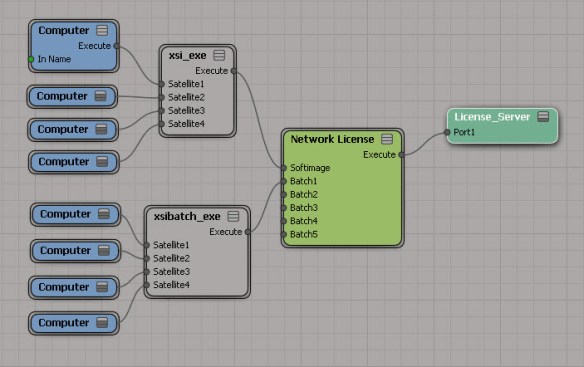
network-licenses-satellite

You can run multiple copies of xsi.exe or xsibatch.exe on the same computer. A license is shared as long as processes are running under the same user account and on the same host (aka computer).
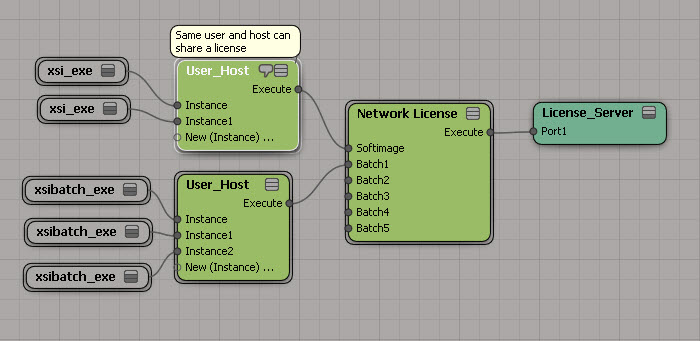
You can run an unlimited number of xsibatch -processing jobs. With xsibatch -processing, you can do anything except render. Typically you use it to run script jobs on scene files.

And finally, you can also use the Softimage license to run xsibatch.
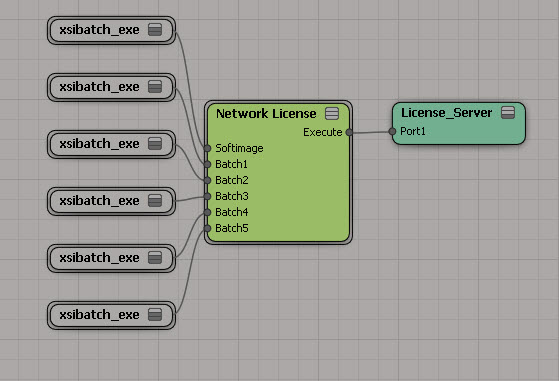
Update: As requested in the comments, here’s six render nodes, each using four satellite computers:
network-license-rendernodes-w-satellite

Getting the ICE tree view from a menu callback


How do you get the ICE Tree view in a menu callback? For example, if you add a menu item to the ICE Tree > User Tools, how does the menu item callback get the ICE Tree view?

The answer is actually in code I posted before, but that was in a blog post titled Getting the selected ICE nodes. So, with that title, you wouldn’t necessarily think to look there.

So what’s the answer? Uses Context.GetAttribute( “Target” ). For custom menus in the views like the ICE Tree view, the Fcurve Editor, and the Material Manager, the Target attribute is the View object. And once you have the View object, you can get the View attributes.

#
# Callback added to the menu item with Menu.AddCallbackItem
#
def My_menuItem_Callback( in_ctxt ):

	# Get the ICE Tree view
	oView = in_ctxt.GetAttribute("Target")
	
	# 
	LogMessage( 'View: ' + oView.Name )
	
	# get the selected nodes
	nodes = oView.GetAttributeValue('selection')
	LogMessage( 'Selected nodes: ' + nodes )

Soapbox alert…
This post illustrates why indexes are a good thing…with them, you can find information no matter what page or heading contains the information.
For ICE trees, you’d have index entries something like this:

  • ICE tree
    • view attributes
      • target
      • container
    • selected nodes, getting
    • view, getting
    • ICETree node, getting

Boolean operations on ICE arrays


While it is true that non-zero values are considered True, this applies only to input values. ICE nodes that return a boolean value will always return either 1 or 0.

Based on this, you can do an element-wise logical operation on array by summing up the array elements.

If the sum is greater than zero, then you know there was at least one True value, so a logical OR would return True. And if the sum was less than the array size, then at least one boolean element is False, so a logical AND would return False.

Saturday snippet – Wrapping an Undo


Two ways…

OneUndo decorater by Cesar Saez

from functools import wraps  
    
def OneUndo(function):  
   @wraps(function)  
   def _inner(*args, **kwargs):  
     try:  
       Application.BeginUndo()  
       f = function(*args, **kwargs)  
     finally:  
       Application.EndUndo()  
       return f  
   return _inner
#
# And a basic example...
# 
@OneUndo 
def CreateNulls(p_iCounter=100):
     lNulls = []
     for i in range(p_iCounter):
       lNulls.append( Application.ActiveSceneRoot.AddNull() )
     return lNulls

CreateNulls()

Undo with statement by ethivierge

from win32com.client import constants as c
from win32com.client.dynamic import Dispatch as d
 
xsi = Application
log = xsi.LogMessage
collSel = xsi.Selection
 
 
class xsiUndo():
    def __enter__(self):
        xsi.BeginUndo()
 
    def __exit__(self, type, value, traceback):
        xsi.EndUndo()
 
 
def testFunc():
    log("running test")
 
 
with xsiUndo():
    testFunc()