This week in video


A round-up of some of the Softimage videos posted this past week.

emTools 1.33 – Walk Through New Stuff

ICE Node for reading images at given UV coordinates

compositing images in ICE!

Manipulating colour in images

Psyop Softimage ICE Workshops

ICE-Rope-Rig (with Dynamic Controler Count and nice SubdivisionInterpolation)

Secondary deformations in Ice
http://vimeo.com/45047412

Maxscript Modifiers VS Softimage Ice

Softimage – A guide to better reflections

The case of the SIDeploy install that silently fails


In this case, a customer was trying to install Softimage 2013 using SIDeploy -i, but the install silently failed.

What’s SIDeploy you may ask?

It’s an [unsupported backdoor] way to install Softimage without running the full installer (the real installer does a lot of other stuff, plus it runs SIDeploy). People use it to do things like:

  • Set a custom install path by editing SIDeploy.ini
  • Work around the file path length limitation that can stop a network deployment.
  • Avoid using network deployments to install on many machines

To use SIDeploy, you’d download the setup, extract the contents, and then do something like this:

set SIDEPLOYPATH=C:\Autodesk\Autodesk_Softimage_2013_English_Japanese_Win_64bit\x64\Softimage
%SIDEPLOYPATH%\SIDeploy.exe -i -f %SIDEPLOYPATH%\SIDeploy.ini

So why did SIDeploy fail?

Because it’s unsupported 🙂 Seriously, the problem was that SIDeploy doesn’t install any prerequisites, like the Visual C++ 2010 runtimes.

Softimage 2013 switched up to Visual C++ 2010, so you need to have those prereqs installed already for SIDeploy to work.

You can find a list of prerequisites in C:\Autodesk\Autodesk_Softimage_2013_English_Japanese_Win_64bit\setup.ini.

(C:\Autodesk is where the installer extracts itself by default.)

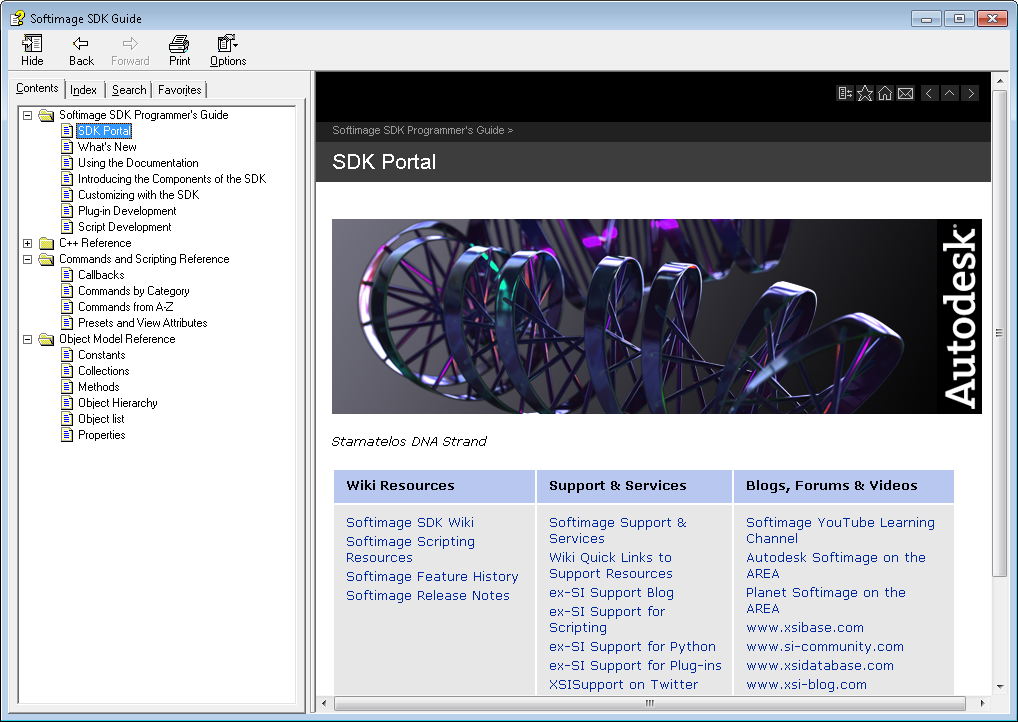
Compiled CHM version of the Softimage 2013 SDK guide


The other day, somebody asked whether there was a CHM version of the SDK help. There isn’t. So I downloaded a copy of the [aging and neglected] HTML Help workshop, installed the local version of the Softimage 2013 documentation, and compiled the SDK help into a CHM file.

Get the xsisdk.chm file here

  • You get full-text search.
  • I created the TOC manually, so it has only two levels. But clicking one of the sub-levels (like “Customizing with the SDK” or “Objects A to Z”) takes you to a page with more links.
  • I even added an index, but it has entries only for the commands, objects, methods, and properties. No C++. (I used a Python script to generate the index from some HTML pages in the help.)
  • Some pages will give a script error (because they have an apostrophe in the page title, and that title is used in a script). You can ignore those errors and continue on.
  • Some of the icons at the top of pages, like Home and Add to Favorites will pop up a browser page. I didn’t take the time to update every page to get rid of them.

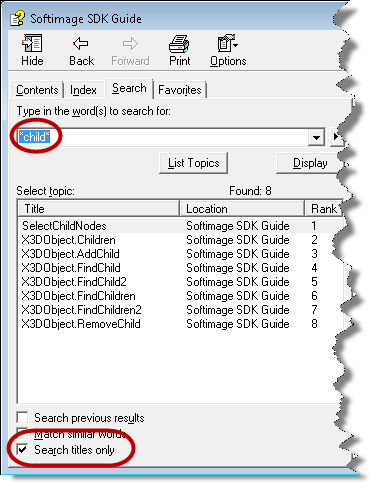
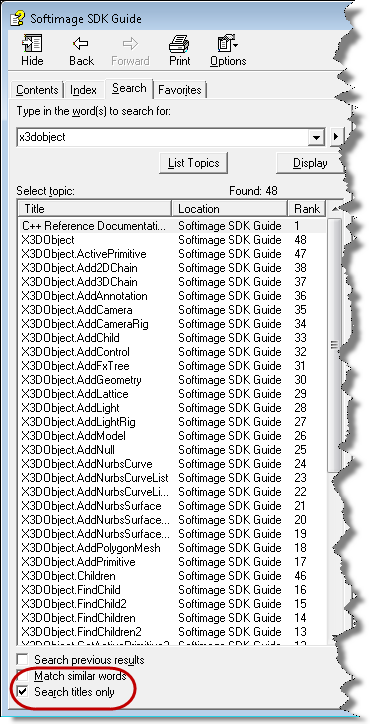
I almost didn’t bother with the index, because I think you can usually get the same thing with the Search, as long as you enable Search titles only. It’s always bothered me that there’s no index entries like “children, adding” or “polygon meshes, creating” and that you have to somehow know the verb part of the method or command name if you want to find it in the index.

Here’s a few examples of using Search titles only:

The case that wouldn’t clone points


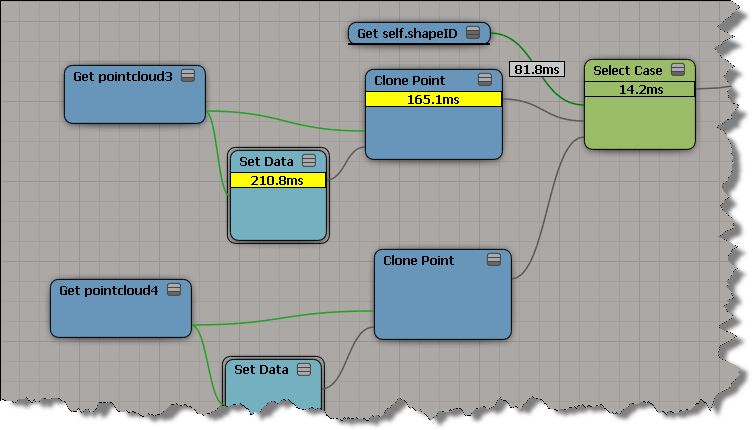
Select Case doesn’t want to clone points. Suppose you have a set up like this:

If you plug Clone Point nodes into two consecutive Case ports, the first Clone Point only is executed.

If you plug something else into a Case port, between two Clone Points, then both Clone Points work:

But unfortunately I couldn’t trick ICE by multiplying the shapeID by 2. When I did that, ICE went back to evaluating the first Clone Point only.

Searching the SDK docs


For the searching the current SDK documentation, I would install the SDK docs locally. The local docs use a different search that works better.

To download a single installer for both the User Guide and SDK Guide:
http://www.autodesk.com/softimage-documentation

Just the SDK:
http://images.autodesk.com/adsk/files/softimage-2013-sdk-doc0.zip

Local search results are much better than the online search:

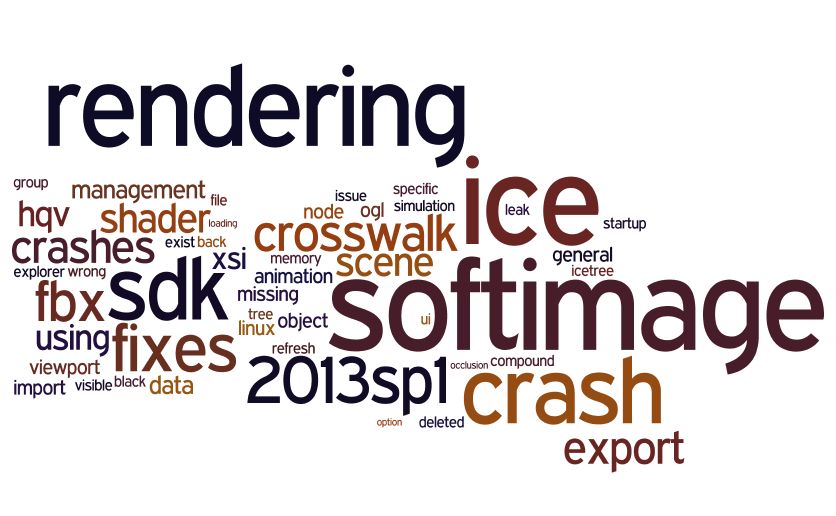
Visual representation of Softimage 2013 SP1 Fixes


As a word cloud

Full list of fixes

I had added the words “Softimage” and “2013SP1” and “Fixes” to the word cloud on purpose, as a sort of title tags for the cloud. Here’s a cloud without them. Note that some words, like “SDK” and “Crosswalk” and “Rendering”, are there because I added an occurrence of those words for each fix in that category.

Creating XSI objects in Netview


If you want to use objects like XSIApplication, XSIMath, XSIUtils, and XSIFactory in NetView scripts, you need to know the [mostly undocumented] progIDs of those objects.

window.onload = onLoadHandler;

//-------------------------------------------
// OnLoadHandler for any HTML page 
// that includes this .js file
//-------------------------------------------
function onLoadHandler() {

	//-------------------------------------------
	// Create instances of Softimage objects.
	//-------------------------------------------

	try {
		var Application = new ActiveXObject('XSI.Application');
		var XSIUtils = new ActiveXObject('XSI.Utils');
		var XSIMath = new ActiveXObject('XSI.Math');
		var XSIFactory = new ActiveXObject('XSI.Factory');
	} catch ( e ) {
		alert( e );
	}
}

Here’s a script that uses WMI to find the progIDs of XSI COM automation objects:

var sComputer = XSIUtils.Environment("COMPUTERNAME");

ListCOM( sComputer );

function ListCOM( computer )
{ 
	var wmistr = "winmgmts:{impersonationLevel=impersonate}!\\\\"; 
	wmistr += computer + "\\root\\cimv2";
	var wmi = GetObject( wmistr );
	var query = "SELECT * FROM Win32_ClassicCOMClassSetting";
	var com = wmi.ExecQuery( query );
	var ecom = new Enumerator( com );
	for( ; !ecom.atEnd(); ecom.moveNext() )
	{
		var icom = ecom.item();  
		if ( icom.Caption != null && icom.Caption.indexOf( "XSI" ) > -1 && icom.VersionIndependentProgId != null)
		{
			LogMessage( "name   : " + icom.Caption );
			LogMessage( "progid : " + icom.VersionIndependentProgId );
			LogMessage( "" );   
		}
	} 
}

And here’s the script output on my machine:

// INFO : name   : XSIDialog Class
// INFO : progid : XSIDial.XSIDialog
// INFO : 
// INFO : name   : XSI Framebuffer List Widget Class
// INFO : progid : FramebufferListWidget.FramebufferListWidget
// INFO : 
// INFO : name   : XSI Factory Object
// INFO : progid : XSI.Factory
// INFO : 
// INFO : name   : XSI Scripting Environment Object
// INFO : progid : Scripting.Environment
// INFO : 
// INFO : name   : XSI Utility Object
// INFO : progid : XSI.Utils
// INFO : 
// INFO : name   : XSI Plugin Helper Object
// INFO : progid : XSI.PluginHelper
// INFO : 
// INFO : name   : XSIFileConverter Object
// INFO : progid : XSI.XSIFileConverter
// INFO : 
// INFO : name   : XSIFileService Object
// INFO : progid : XSI.XSIFileService
// INFO : 
// INFO : name   : XSI UIToolkit Object
// INFO : progid : XSI.UIToolkit
// INFO : 
// INFO : name   : XSI Application Object
// INFO : progid : XSI.Application
// INFO : 
// INFO : name   : XSI Math Module
// INFO : progid : XSI.Math
// INFO : 
// INFO : name   : XSI Render Channel List Widget Class
// INFO : progid : RenderChannelListWidget.RenderChannelListWidget
// INFO : 
// INFO : name   : XSIFileFormat Object
// INFO : progid : XSI.XSIFileFormat
// INFO : 
// INFO : name   : XSI Image Format Chooser Class
// INFO : progid : ImageFormatChooser.ImageFormatChooser
// INFO : 

Unable to create object[CLSID\{A8BF89CA-1025-11D2-006094EB029C}] : %SUMATRAPATH%\moaudio.dll, Cleanup will be performed


After all these years, this one still pops up from time to time: most recently from an XSI 7.0 user who emailed the old Softimage Licensing inbox.

The solution: run runonce.bat. And, just don’t use registry cleaners unless you like having to run runonce.bat to fix up Softimage or XSI.