New view attributes in 2012


For the Scene Layer Manager, there is a selectedlayer attribute.

For the Schematic view, there are two view attributes: AnchorPointID and Target.
Target is available for the node context menu only.

Here’s some code from the new Schematic example in the XSI SDK workgroup:

def XSILoadPlugin( in_reg ):
	#...
	in_reg.RegisterMenu(C.siMenuSchematicNodeContextID,"LogNodeInfo_Menu",False,False)	
	#...

def LogNodeInfo_Menu_Init( in_ctxt ):
	oMenu = in_ctxt.Source
	oMenu.AddCallbackItem("Log Node Info","log_info_cb")	
	return True

def log_info_cb( ctxt ):

	Application.LogMessage("log_info_cb called")

	# Returns the view object or a list with the view object and the target node (siMenuSchematicNodeContextID only)		
	target = ctxt.GetAttribute('Target')
	anchorPtID = ctxt.GetAttribute('AnchorPointID')
	# ...

Notes from here and there on the frontline


Misc notes from frontline support…

  • Shaders disconnecting when you open scene
    Ack! This gave me a scare initially, but it turned out to be something else (not the dreaded “disconnected shaders” problem).
    The reported problem was that the Particle_Renderer node was losing its connection to the Volume port on the material.

    The actual problem was the Constant node. Nodes like Constant and Blinn are material type shaders, not textures.
    The parameters in a shader (like Color) are designed to work with texture-type shaders. That’s why plugging a material node like Constant into the Particle Renderer doesn’t work.

  • too many literal bytes for texture
    For a specific TIF texture, mental ray standalone was giving an error that looked like this:

    API 0.0 error 301098: c:\test.72.mi, line 1484: too many literal bytes for texture (null)
    

    xsibatch didn’t complain, btw.

    The only previous reports of that error that I could find were from 10 years ago.

    The customer converted the image to another format to get around the error.

  • Disappearing point clouds when you remove the initial state
    A customer sent in a scene where, if you removed the initial state, all the particles disappeared.
    I did find a workaround: go into the Emit from Curve compound, open the Generate Points PPG, and change the Seed value. That would force the particles to emit again.

  • Empty nodes in the render and ICE trees
    This was reported by a customer running on Linux: no text in the render tree and ICE tree nodes.

    We tried the following with no success:
    – Run cmdreg -f XSICOMDLLs.lst (the Linux version of runonce.bat)
    – Run mwcleanup
    – Remove ~/Autodesk/Softimage_2012 and /var/tmp/Mw_{username}
    A graphic card or display driver issue is my best guess; I didn’t hear back from the customer so eventually I had to close the case “unconfirmed”.

  • Combining a Syflex simulation and shape animation
    Can’t be done. The Cluster Shape Combiner is lower in the stack, so it won’t be evaluated each frame of the simulation (just once right before the simulation starts). Even if you remove the Syflex ICE tree, the shape animation won’t happen as long as the Simulation stack is there.

Displaying topics from compiled help files (CHM)


Using an undocumented preference value, you can use the undocumented XSIUtils.DisplayHtmlHelp method to open compiled help files. To find the undocumented preference value, I had to go into the Softimage source and find the implementation of DisplayHtmlHelp().

Prior to 2012, DisplayHtmlHelp worked with CHM files, since the Softimage help itself was compiled. But as of 2012, DisplayHtmlHelp now works with HTML files by default.

// Set the helplocationtype to CHM
var tmp = Preferences.GetPreferenceValue( "General.helplocationtype" );
Preferences.SetPreferenceValue( "General.helplocationtype", 3 );

// Open a specific topic in a compiled help file
var s = "C:\\Program Files\\7-Zip\\7-zip.chm::/fm/plugins/7-zip/options.htm";
XSIUtils.DisplayHtmlHelp( s );

// IMPORTANT: Restore pref after
Preferences.SetPreferenceValue( "General.helplocationtype", tmp );

Registry cleaners, Softimage, and runonce.bat


If you use a registry cleaner, you’re most likely going to have to run runonce.bat to restore the Softimage registry entries. For example, see here and here.

A recent thread on xsibase touched upon whether or not registry cleaners are necessary. Personally, I doubt it. I recently googled “registry cleaners” and went through the first 20 pages of results. Most of the hits were sites selling registry cleaners, and most of the URLs had “registry cleaner” in them. In those 20 pages of google hits, I found only a handful of pages that had a substantive dicussion of registry cleaners, and I didn’t find any performance metrics or results.

Customer Error Reports (CER)


Sometimes customers ask questions like this about the error reports:

Is there a way we can subscribe to the CER reports? like if i enabled it could we get reports that mean something to us? or is it always going to be low-level debug info for developers only?

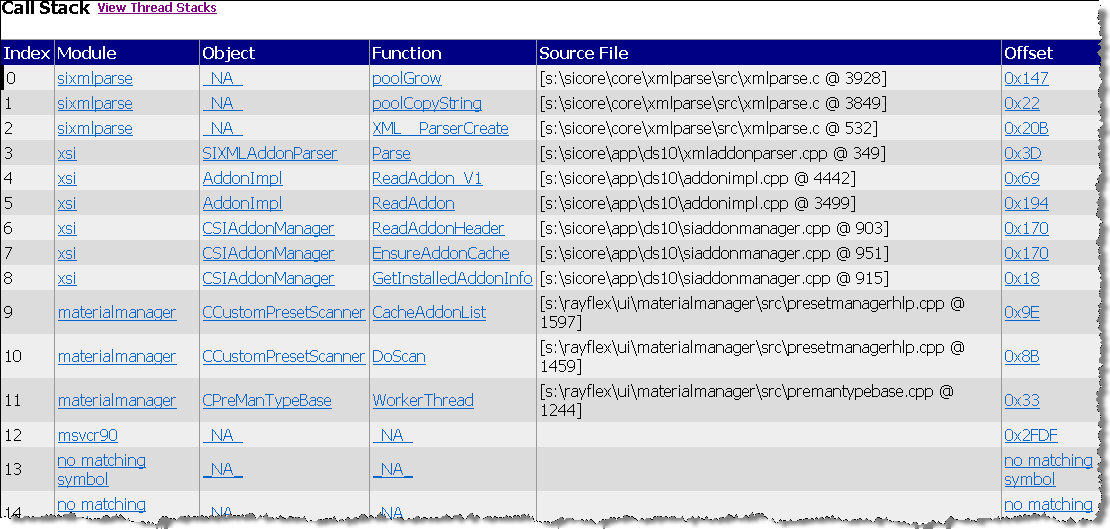
Well, the CER reports are mostly low-level details, like call and thread stacks, that are useful only to our developers. But sometimes these can provide an obvious clue (for example, Softimage is crashing while parsing an addon XML file). Other times they don’t tell a non-developer like me [or maybe you] much.
Call stack

Thread stack

CER reports are basically call stacks (like the one I sent before) and crash dump files (which are saved in the user folder after a crash). The reports do also include some info about the OS and the graphics card, which can be useful to the support agent.

Our internal CER tools do some grouping of crash reports based on the area of the code where the crash happened, which can be useful as an aggregate measure. You can read more about CER here.

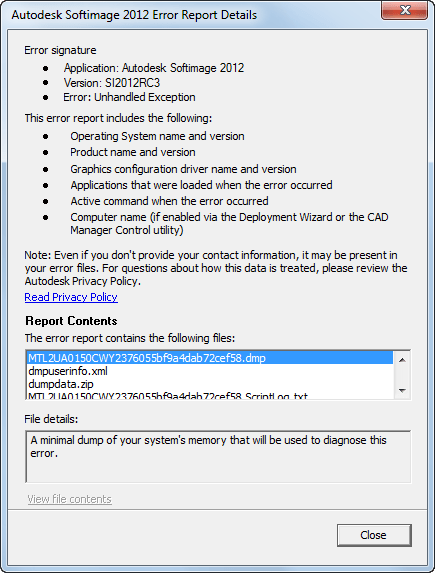
If you want to view the CER files, you can do that before you send or cancel the report. Just click View Report Details. You can even grab the report files if you want: some are in your Softimage user folder, and others are in the %TEMP% folder (in a XSI_Temp subfolder that is removed when XSI.exe exits).
Friday Flashback #22


From “Fuel For The Mind”, edition 1, La Cite des Enfants Perdus—Buf Compagnie 1995
(aka The City of Lost Children)

http://vimeo.com/24917633

I remember watching this back in the old days when I worked at Softimage/Microsoft.
Many thanks to Miquel Campos for giving me this CD.

What’s this flea made of anyway? It’s not an electronic model, not a digitized photo, it’s a cute little chimera concocted in C. G. I., modelled, dreaded, and animated by his creators at the Buf Compagnie, using a mythological method of mathematics that took hundreds of hours on the computer.

The surface texture was obtain-ed by using several layers of lovely materials such as beach pebbles, green beans, snake skin, pig skin, leather, etc. The animators studied hours and hours of documentary films to find out how fleas act out there in nature. Now they know everything about how fleas hop, skip, jump, land, sting and drink, and do scores of dirty itchy tricks that have earned them a worldwide reputation.

Given the variety of shots where the flea would star, the animators modelled a series of fleas with varying degrees of definition. The most sharply defined had no less than 800.000 polygons.

Prix Ars Electronica 1996

City of Lost Children trailer

3d World: In depth: Autodesk Project Skyline


Autodesk looks to build the future of game development with Project Skyline, first shown at GDC 2011

Without a vision, the people perish. It’s a situation that can even affect digital media creation software companies like Autodesk; or perhaps that should be, especially affect companies like Autodesk.

As a giant of the industry, the company has been acquiring major rivals such as Alias and Softimage over the last few years, resulting in a more tempered product management approach to the major 3D applications.

But the big fish of the pond is running out of water to swim in. Where does Autodesk’s vision lie?

via Autodesk Project Skyline | Game development.