Update: oops, it looks like my script below works only in simple cases where you just one actor proxy. The ActorID seems to be a constant (perhaps unused???) and it looks like you have to take the point ID and then look up the corresponding entry in the CrowdFX_Actor_Indices array.
If you need to get info like the actor ID, the X and Z positions, and the animation frame from CrowdFX, you can get it from the Simulation Cloud.
In the screenshot below, I used three Attribute Display properties to display the following:
- Actor ID (I have only one actor)
- PointPosition
- CrowdFX_Actor_CurrentFrameInCycle (an array for each action aka pose on the actor)
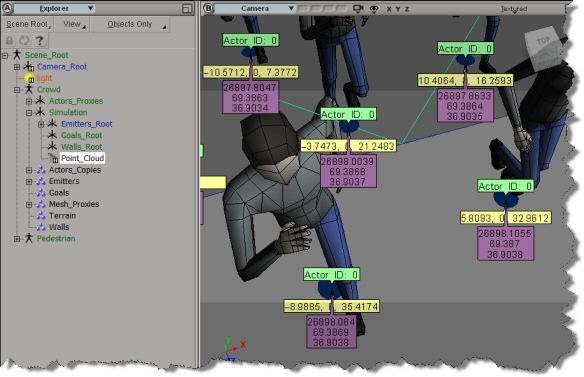
Here’s a little Python snippet that logs a comma-separated string that contains the Actor ID, X, and Z positions, PoseID, and CurrentFrameInPose.
Note the use of the logf function from the sipyutils.
#
# SOFTIMAGE 2013
#
from sipyutils import si			# win32com.client.Dispatch('XSI.Application')
from sipyutils import siut		# win32com.client.Dispatch('XSI.Utils')
from sipyutils import siui		# win32com.client.Dispatch('XSI.UIToolkit')
from sipyutils import simath	# win32com.client.Dispatch('XSI.Math')
from sipyutils import log		# LogMessage
from sipyutils import disp		# win32com.client.Dispatch
from sipyutils import C			# win32com.client.constants

from sipyutils import logf

si = si()

pc = si.Dictionary.GetObject( "Crowd.Point_Cloud" ).ActivePrimitive
aPtPos = pc.ICEAttributes("PointPosition")
log( len(aPtPos.DataArray) )

pos = pc.ICEAttributes("PointPosition").DataArray
ids = pc.ICEAttributes("CrowdFX_Actor_ID").DataArray
poses = pc.ICEAttributes("CrowdFX_PoseState_ID").DataArray
frames = pc.ICEAttributes("CrowdFX_Actor_CurrentFrameInCycle").DataArray2D

# ID, X, Y, Z, PoseState, CurrentFrameInCycle
for i in range( len(pos) ):
	logf( "%d, %f, %f, %d, %d", ids[i], pos[i].X, pos[i].Z, poses[i], frames[i][poses[i]] )
The output of this script for frame 126 of the CrowdFX_FooFighters sample scene looks like this:
# INFO : 0, -100.000000, 0.000000, 8.531111, 2, 154
# INFO : 0, -85.714279, 0.000000, 6.684280, 1, 111
# INFO : 0, -71.428574, 0.000000, 7.442898, 2, 131
# INFO : 0, -57.142853, 0.000000, -2.251395, 2, 132
# INFO : 0, -42.857143, 0.000000, 11.363565, 2, 97
# INFO : 0, -28.571426, 0.000000, 7.302890, 2, 149
# INFO : 0, -14.285706, 0.000000, 13.759472, 5, 217
# INFO : 0, 0.000000, 0.000000, 11.584186, 5, 186
# INFO : 0, 14.285721, 0.000000, 9.853815, 3, 167
# INFO : 0, 28.571442, 0.000000, 8.366404, 2, 141
# INFO : 0, 42.857147, 0.000000, 21.238329, 5, 163
# INFO : 0, 57.142868, 0.000000, 6.831881, 5, 222
# INFO : 0, 71.428589, 0.000000, -2.667232, 2, 201
# INFO : 0, 85.714294, 0.000000, 16.321472, 3, 236
# INFO : 0, 100.000000, 0.000000, 10.077105, 2, 93
# INFO : 0, -100.000000, 0.000000, -10.505310, 2, 154
# INFO : 0, -85.714279, 0.000000, -17.066412, 1, 83
# INFO : 0, -71.428574, 0.000000, -11.711117, 5, 152
# INFO : 0, -57.142853, 0.000000, -22.719725, 2, 142
# INFO : 0, -42.857143, 0.000000, -7.311695, 5, 127
# INFO : 0, -28.571426, 0.000000, -11.755372, 2, 151
# INFO : 0, -14.285706, 0.000000, -3.648053, 5, 191
# INFO : 0, 0.000000, 0.000000, -6.797891, 5, 177
# INFO : 0, 14.285721, 0.000000, -8.881895, 5, 101
# INFO : 0, 28.571442, 0.000000, -10.384384, 5, 158
# INFO : 0, 42.857147, 0.000000, 4.351840, 5, 166
# INFO : 0, 57.142868, 0.000000, -11.661755, 2, 178
# INFO : 0, 71.428589, 0.000000, -22.718691, 2, 171
# INFO : 0, 85.714294, 0.000000, -1.260182, 5, 127
# INFO : 0, 100.000000, 0.000000, -8.947992, 5, 123
The Foo Fighter pose state IDs are set here (there are actually eight Action Sources in the ActorProxy property, but not all of them are used).
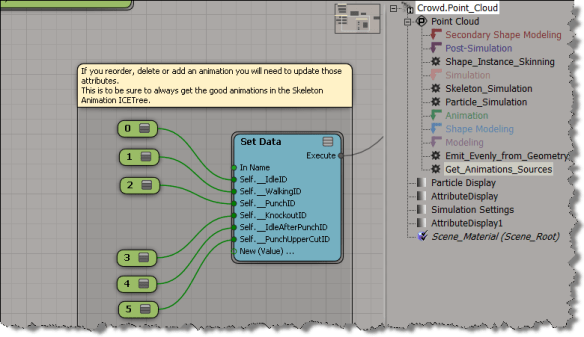
BTW, is it just me, or do the Attribute Display properties not work with the sample CrowdFX scenes? I was using the Foo Fighters sample at first, but I wasn’t able to show any attribute values, which made it a little harder to figure out what info was where.





 eX-SI
eX-SI 