ActiveX component can’t create object: ‘Scripting.FileSystemObject’


Looking back, I find this error popping up in my case notes once or twice every year.
Sometimes we’re able to help fix the problem, sometimes not, because it’s a problem with their system, not with Softimage itself.

Typically, a user will report seeing errors like this at start up:

// ERROR : Automation server can't create object - [line 22 in c:\Program Files\Autodesk\Softimage 2012 SP1\Addons\ICEFlowBuilder\Application\Plugins\ICEFlowCreateParticlesPlugin.js]
// ERROR : Automation server can't create object - [line 70 in c:\Program Files\Autodesk\Softimage 2012 SP1\Addons\sdkui\Application\Plugins\AddonDoc.js]
// ERROR : Automation server can't create object - [line 141 in c:\Program Files\Autodesk\Softimage 2012 SP1\Application\Commands\GlobalVarPlugin.js]
// ERROR : 2006-SetGlobal - Unexpected failure.
// ERROR : Automation server can't create object - [line 141 in c:\Program Files\Autodesk\Softimage 2012 SP1\Application\Commands\GlobalVarPlugin.js]
// ERROR : 2006-GetGlobal - Unexpected failure.
// ERROR : Automation server can't create object - [line 141 in c:\Program Files\Autodesk\Softimage 2012 SP1\Application\Commands\GlobalVarPlugin.js]
// ERROR : 2006-GetGlobal - Unexpected failure.
// ERROR : Automation server can't create object - [line 141 in c:\Program Files\Autodesk\Softimage 2012 SP1\Application\Commands\GlobalVarPlugin.js]
// ERROR : 2006-GetGlobal - Unexpected failure.

Sometimes users miss the startup errors and report seeing the error when they try to do something in Softimage, such as import dotXSI.

// ERROR : ActiveX component can't create object: 'Scripting.FileSystemObject' - [line 352 in c:\Program Files\Autodesk\Softimage 2012 SP1\Application\DSScripts\Model.vbs]
ImportDotXSI(null, null);

Note that the errors all give a line number in a specific file. If you check any of these, you’ll see that all the errors happen when Softimage tries to create an ActiveX object like
Scripting.Dictionary or Scripting.FileSystemObject. These are standard objects in the Microsoft Windows Script runtime, so these errors indicate that something’s wrong with Windows.

If you’re lucky, you can fix this by re-registering C:\windows\system32\scrrun.dll with regsvr32.

If that doesn’t work, then my guess would be that it’s some kind of registry or permissions problem. In the past (on XP systems), I’ve seen cases where it was specific to a user profile, and where it was because the Scripting.FileSystemObject registry key didn’t have an owner assigned.

If you don’t believe it’s a general Windows problem, try this. It should give the same error.

  • Open a command prompt.
  • Run this command: notepad test.vbs
  • In notepad, paste in this VBScript and save the file:
    set fso = CreateObject("Scripting.FileSystemObject")
    set fout = fso.CreateTextFile("c:\Test.txt", true)
    fout.WriteLine Now
    fout.Close
    WScript.Echo "Testing"
    
  • In the command prompt, run this command: cscript test.vbs

Crash recovery in Softimage


Successfully saved scene before system failure
When Softimage crashes, it tries to save a crash recovery file. When you start up Softimage again, it asks you if you want to recover (“Improper exit detected. Do you want to recover?”)

If the crash recovery file isn’t usable, Softimage will try to load an AutoSave file, if there are any available (see this softimage-blog article on AutoSave).

Crash recovery files (and auto save files) are located in the [hidden] system\USER folder of the active project. For example:

C:\Users\blairs\Documents\Support_Project\system\blairs

where

  • Support_Project is the PROJECT name.
  • C:\Users\blairs\Documents\Support_Project is the project location.
  • blairs is the USER name.

Crash recover creates:

  • A system\blairs\CrashSave file
  • A system\blairs\CrashBackup folder with AutoSave files (AutoSave files are scene files without the .scn)

NOTE There’s a Scene Debugging preference for turning Crash Recovery on or off.

Softimage startup times


Here’s a few things you can do to diagnose slow startups.

First, try starting Softimage in the factory-default configuration. The quickest way to do that is to simply rename your Softimage User folder. If you see a difference in startup times, then it may be due to workgroups or the addons and plugins you have installed.

You can use the XSI_LOG_LOAD_TIME environment variable to log the load times for libraries and plug-ins at startup. Add this line to your setenv.bat, or set it in a Softimage command prompt before you run xsi.exe:

set XSI_LOG_LOAD_TIME=1

That will get you something like this in the history log:

// Initialize Mental Ray: Elapsed time (ms): 563.28
// Load Command Definitions: Elapsed time (ms): 1293.66
// Project List Initialization: Elapsed time (ms): 53.00
// Load Views and Shelfs: Elapsed time (ms): 1453.46
// Scan for Custom SPDLs: Elapsed time (ms): 74.33
// Load Layouts: Elapsed time (ms): 356.29
// Loading User plug-ins: Elapsed time (ms): 239.25
// Loading User addon plug-ins: Elapsed time (ms): 0.28
// Loading Workgroup plug-ins: Elapsed time (ms): 0.00
// Loading Workgroup addon plug-ins: Elapsed time (ms): 0.00
// Loading Factory plug-ins: Elapsed time (ms): 2173.86
// Loading Factory addon plug-ins: Elapsed time (ms): 2611.39
// Loading setup plug-ins: Elapsed time (ms): 0.03
// XSI Init: Elapsed time (s): 31.92

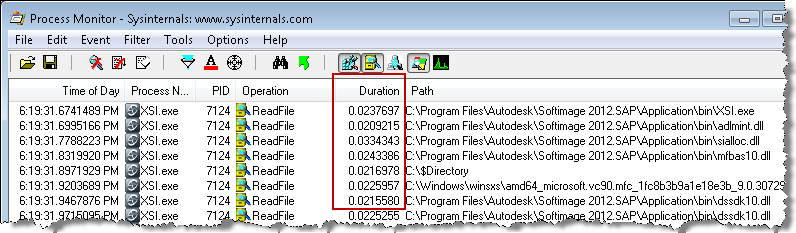
Another thing you could do is run Process Monitor to capture a log of all XSI.exe startup activity, and then check the log for any “suspicious” activity. All the entries are time-stamped, and you add a Duration column to see how long activity took.

You can even filter on the Duration, to quickly check for anything that took excessively long (for example, Duration more than 0.02). The Tools menu also has some useful stuff, like a File Summary:

and a Process Activity Summary:

NOTE The time spent can vary from startup to startup, so I wouldn’t jump to conclusions based on just one log. I’d log multiple startups to see if there was a definite pattern. For example, one time I saw xsi.exe spend three seconds reading adlmint.dll, the next time it was less than .001s.

The case of the missing registry values


Problem: On 64-bit Windows 7, 32-bit Softimage 2012 crashes instantly & silently as soon as the UI appears. But xsibatch also crashes instantly, so this is unlikely to be a graphic card problem.

Solution: Import missing HKCR\Wow6432Node\CLSID\{B54F3741-5B07-11cf-A4B0-00AA004A55E8} values from another computer.

Case Notes:

This one had me stumped for awhile.

To repro a customer problem, I installed 32-bit Softimage 2012 SP1 on my 64-bit Windows 7 computer, but 32-bit Softimage won’t run. It just crashed silently after showing the UI, and xsibatch did nothing except print its version number banner (so I knew it wasn’t a graphics driver issue).

I checked things out with Process Monitor and I saw that Softimage was crashing shortly after loading jscript.dll. So I did a runonce, and I re-registered jscript.dll and vbscript.dll, but to no avail. I did, however, get a chance to debug after the next crash, and that showed that XSI.exe was crashing in the scripthost after loading jscript.dll.

I eyeballed the JScript registry entries, but they looked ok to me.

Finally I installed a debug version, and then I got a line number for an assert. And that showed me that Softimage was failing to get the VBscript ProgID. So I checked out the VBScript registry entries under

HKEY_CLASSES_ROOT\Wow6432Node\CLSID\{B54F3741-5B07-11cf-A4B0-00AA004A55E8}

and sure enough, the values were all missing. So all I had to do was get the missing values from another computer, import them into my registry, and case solved!

http://vimeo.com/28213347

Troubleshooting Softimage on Linux


On Windows, I use Process Monitor, Process Explorer, and Dependency Walker.

On Linux, the primary troubleshooting tool is strace. strace is a tool that traces all the system calls that a running process makes. When a program is experiencing problems associated with I/O, strace can often help in quickly isolating the problem, since (almost) all I/O happens through system calls.

Here’s the basic syntax:

strace -o /tmp/out -f XSI 

-o writes the output to a log file
-f tells strace to follow forks, and trace all child processes
-p can be used to attach to an already running process

As well as system calls, strace also tracks signals that were thrown in the process. If a process is crashing due to a segmentation fault, it is worth investigating what was happening before the fault occurred; you can find where the fault occurred by searching for — SIGSEGV in the strace output.

strace output has been added as an XSI history log client under Linux. If you search the output of strace for the string write(-1, you should see all the scripting commands as they are executed. This is useful for associating system calls with the commands that caused them to execute.

There’s also ltrace ltrace is a tool that traces all the calls to shared library functions. It can be extremely useful with XSI because almost all of the XSI code lies in shared libraries. Note that calls from a given library to itself are generally not traced because the call is address-relative. Some useful options to ltrace are:

-C: remove leading underscores from C-linkage symbols and demangle C++-linkage symbols
-o and -f: same as for strace

20 Linux System Monitoring Tools Every SysAdmin Should Know

runonce.bat to the rescue yet again


Another couple of cases for runonce.bat!

  • First, there was the case of the messed up Render Manager.
    The Render Manager was slow to display and doesn’t show the properties in the right-hand panel.
    The customer originally had this problem in 2011, and then is started happening in 2012 too.
  • Second, the case of the Softimage 2012 that hung at startup, even after several reinstalls.
    The installer does run runonce.bat, so it’s a bit surprising that a reinstall didn’t fix the problem.

The case of the pass that wouldn’t duplicate


In this case, CTRL+D on a pass would appear to work, but the pass wouldn’t show up in the explorer.

The problem turned out to be in the Duplicate options (the Hierarchy pref was set to None: hat tip to Chinny for spotting that). To duplicate passes, Hierarchy has to be set to Share Parent.

We confirmed this by looking at what was logged in the script history.

The problem is the 4th argument to Duplicate. That’s the Hierarchy argument, and 0 means siNoParent.
So the Duplicate command was creating a pass with no parent, so the new pass was just sort of “floating” around in the scene, until it was discarded during a save operation.

// Duplicate a pass but don't give it a parent
var x = Duplicate("Passes.Default_Pass", null, 2, 0, 1, 0, 0, 1, 0, 1, null, null, null, null, null, null, null, null, null, null, 0);

// It was created, but not placed in the pass list:
LogMessage( x.Count );
LogMessage( x(0).FullName );
InspectObj( x(0) );

The case of the slow render, low CPU usage, and framebuffers


In this case, a customer reported low CPU usage and long render times for a pass that had many framebuffers.

After some investigation, we found that disabling On-Disk Framebuffers (mental ray settings, Framebuffer tab, under Advanced Settings) made a big difference:

// Disable On-Disk Framebuffers so framebuffers are stored in memory
SetValue("Passes.mentalray.VirtualFramebuffers", false, null);
OpenView("Render Preview", null);
// INFO : RC   0.4  info : wallclock  0:00:07.27 for rendering


// Enable On-Disk Framebuffers
// Slows down the render, and CPU usage is much lower on all cores
SetValue("Passes.mentalray.VirtualFramebuffers", true, null);
OpenView("Render Preview", null);
// INFO : RC   0.4  info : wallclock  0:01:15.31 for rendering

EAGAIN Resource temporarily unavailable for tmp/.X11-unix/X0


This post is for Softimage 2011.5 on Linux, and for Google (I’ve posted about this before, but I didn’t include the strace output that time).

If Softimage doesn’t seem to want to start, or if it is taking forever to start, and you see something like this in your strace log. Note lines 02,03, and 18:

socket(PF_FILE, SOCK_STREAM|SOCK_CLOEXEC, 0) = 19
connect(19, {sa_family=AF_FILE, path=@"/tmp/.X11-unix/X0"}, 20) = 0
getpeername(19, {sa_family=AF_FILE, path=@"/tmp/.X11-unix/X0"}, [20]) = 0
uname({sys="Linux", node="homer", ...}) = 0
access("/var/run/gdm/auth-for-xxx-Q2I4go/database", R_OK) = 0
open("/var/run/gdm/auth-for-xxx-Q2I4go/database", O_RDONLY) = 20
fstat(20, {st_mode=S_IFREG|0600, st_size=50, ...}) = 0
mmap(NULL, 4096, PROT_READ|PROT_WRITE, MAP_PRIVATE|MAP_ANONYMOUS, -1, 0) = 0x7f3360deb000
read(20, "\1\0\0\5homer\0\0010\0\22MIT-MAGIC-COOKIE-1"..., 4096) = 50
close(20)                               = 0     
munmap(0x7f3360deb000, 4096)            = 0
getsockname(19, {sa_family=AF_FILE, NULL}, [2]) = 0
fcntl(19, F_GETFL)                      = 0x2 (flags O_RDWR)
fcntl(19, F_SETFL, O_RDWR|O_NONBLOCK)   = 0
fcntl(19, F_SETFD, FD_CLOEXEC)          = 0
poll([{fd=19, events=POLLIN|POLLOUT}], 1, -1) = 1 ([{fd=19, revents=POLLOUT}])
writev(19, [{"l\0\v\0\0\0\22\0\20\0\0\0", 12}, {"", 0}, {"MIT-MAGIC-COOKIE-1", 18}, {"\0\0", 2}, {"\367\371\200\336\321\\\37\4\22\0324\274\3356|\313", 16}, {"", 0}], 6) = 48
read(19, 0x27ae690, ) = -1 EAGAIN (Resource temporarily unavailable)
poll([{fd=19, events=POLLIN}], 1, -1)   = 1 ([{fd=19, revents=POLLIN}])

then you probably need to put back our x11 patch.

Green points in the viewport???


Now and again a customer will report that they’re getting these green points in the viewport, and they can’t get rid of them.
“Green points” are how “affected points” are displayed in the Shape Manager, but they shouldn’t show up in the viewport.

This usually happens with reference models.
The solution is to clear the Clusters check box in the Delta, and re-load the model.

hat tip: User hamairon on xsibase.