Here’s an updated XSISDK.CHM.
The updates include:
- Top-level index entries for OM methods (for example, for “FindChild2”)
- Index entries for the C++ API
Also, there’s a Japanese version available too.

Here’s an updated XSISDK.CHM.
The updates include:
Also, there’s a Japanese version available too.
In this case, a Softimage user running Composite 2013 was getting the following error when he started Composite:
---------------------------
composite.exe - Entry Point Not Found
---------------------------
The procedure entry point
?Initialize@CMLFacade@@SAXPEAVCMLWaypoint@@PEB_W11HI_J2_N1@Z
could not be located in the dynamic link library MC3.dll.
---------------------------
OK
---------------------------
The short story is that 3ds Max 2010 was causing this problem with Composite 2013. Here’s the long story…
A “procedure entry point” is basically a function (or method) defined in the DLL. In this case, Composite is trying to call a certain Initialize function in MC3.dll, but that Initialize function isn’t there.
More specifically, Composite is trying to call the Initialize member function of a CMLFacade object. All the other stuff (@@SAXPEAVCMLWaypoint@@PEB_W11HI_J2_N1@Z) that you see in the error message is part of the decorated name generated by the C++ compiler. Different versions of a DLL will have different decorated names for entry points, so it’s reasonable to assume that this error probably means that Composite is loading the wrong version of MC3.dll.
Using Dependency Walker, I verified that the MC3.DLL that ships with Composite 2013 does not include the entry point specified in the error message. You can see that the 2013 version of MC3.dll has a different entry point name for Initialize:

However, I got a Process Monitor log from the customer, and it showed that Composite 2013 was loading right version of MC3.dll.
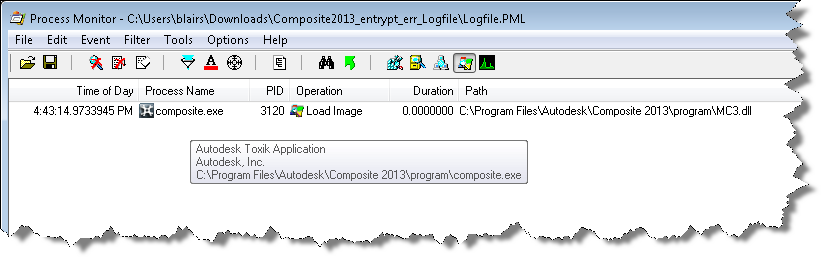
So, right DLL but wrong entry point. Using Dependency Walker again on older versions of MC3.dll, I found that the Composite was looking for an entry point that was in an older version of MC3.dll. But why???
I spent an hour or two looking over the Process Monitor logs, but everything looked normal…except for one thing: Composite 2013 was loading lots of 3ds Max 2010 files. So I renamed the 3ds Max install folder (so Composite wouldn’t find it) and the entry point error went away. My guess is that one of those older Max DLLs was bringing in a reference to the old MC3 entry point, and that was what was causing the problem in Composite.
Renaming the 3ds Max 2010 install folder just to run Composite is pretty hacky, so I tried to find another way. The best I came up with was this:
Value Name: C:\Program Files\Autodesk\3ds Max 2010\UPI\upiconfig.xml
Value Data: C:\Program Files\Autodesk\3ds Max 2010xxx\UPI\UPI.dll
After I did that, I didn’t get the entry point error in Composite, and 3ds Max 2010 still ran ok (well, it started ok, I didn’t really exercise Max after that).
Autodesk products use a cascading sequence to define the order in which they try to check out licenses. Here’s the cascade sequence as an ICE tree 😉

When Softimage tries to get a license, it will “cascade” from one license type to the next in the specified order. For example, if you have five Softimage licenses and one Entertainment Creation Suite Ultimate license, then the first five users to start Softimage will take Softimage licenses, and the sixth user to start Softimage will get the Suite license.
Here’s the Softimage cascade sequence as a plain-old numbered list:
Note that if you start Softimage and check out a Softimage license, and then start a Suite app like Maya, then Softimage will switch over to the Suite license and free up that Softimage license it was using.
I always forget whether licenses cascade up or down. To verify the order, I pointed Softimage at a license server that had just Maya licenses, set FLEXLM_DIAGNOSTICS=3, and started xsi.exe. That gave me this sequence of error messages, which shows that the cascade order starts with a basic Softimage license (85934SFTIM_2013_0F), and then works its way through the different suite licenses.
---------------------------
FLEXible License Manager
---------------------------
FLEXnet Licensing checkout error: License server system does not support this feature.
Feature:       85934SFTIM_2013_0F
License path:  @mtl2ua0150cwy;@127.0.0.1;
FLEXnet Licensing error:-18,147
For further information, refer to the FLEXnet Licensing documentation,
available at "www.flexerasoftware.com".
---------------------------
OK
---------------------------


---------------------------
FLEXible License Manager
---------------------------
FLEXnet Licensing checkout error: License server system does not support this feature.
Feature:       85932SIECS_2013_0F
License path:  @mtl2ua0150cwy;@127.0.0.1;
FLEXnet Licensing error:-18,147
For further information, refer to the FLEXnet Licensing documentation,
available at "www.flexerasoftware.com".
---------------------------
OK
---------------------------


---------------------------
FLEXible License Manager
---------------------------
FLEXnet Licensing checkout error: License server system does not support this feature.
Feature:       85918MXECSP_2013_0F
License path:  @mtl2ua0150cwy;@127.0.0.1;
FLEXnet Licensing error:-18,147
For further information, refer to the FLEXnet Licensing documentation,
available at "www.flexerasoftware.com".
---------------------------
OK
---------------------------


---------------------------
FLEXible License Manager
---------------------------
FLEXnet Licensing checkout error: License server system does not support this feature.
Feature:       85928MYECSP_2013_0F
License path:  @mtl2ua0150cwy;@127.0.0.1;
FLEXnet Licensing error:-18,147
For further information, refer to the FLEXnet Licensing documentation,
available at "www.flexerasoftware.com".
---------------------------
OK
---------------------------


---------------------------
FLEXible License Manager
---------------------------
FLEXnet Licensing checkout error: License server system does not support this feature.
Feature:       85926ENCSU_2013_0F
License path:  @mtl2ua0150cwy;@127.0.0.1;
FLEXnet Licensing error:-18,147
For further information, refer to the FLEXnet Licensing documentation,
available at "www.flexerasoftware.com".
---------------------------
OK
---------------------------


---------------------------
FLEXible License Manager
---------------------------
FLEXnet Licensing checkout error: License server system does not support this feature.
Feature:       85922AAA_2013_0F
License path:  @mtl2ua0150cwy;@127.0.0.1;
FLEXnet Licensing error:-18,147
For further information, refer to the FLEXnet Licensing documentation,
available at "www.flexerasoftware.com".
---------------------------
OK
---------------------------


---------------------------
FLEXible License Manager
---------------------------
FLEXnet Licensing checkout error: License server system does not support this feature.
Feature:       85924ESEC_2013_0F
License path:  @mtl2ua0150cwy;@127.0.0.1;
FLEXnet Licensing error:-18,147
For further information, refer to the FLEXnet Licensing documentation,
available at "www.flexerasoftware.com".
---------------------------
OK
---------------------------
If you think Softimage is not following the right cascade sequence, then this is one way to check what’s really happening.
Another thing to try if you’re having problems (like Softimage taking a Suite license instead of a Softimage license) is to delete the Cascade.cas file and restart Softimage.
If you run both these lines in the script editor, you’ll see scripting.cmdlog=false is logged.
Preferences.SetPreferenceValue( "scripting.cmdlog", false );
LogMessage( "scripting.cmdlog="+Preferences.GetPreferenceValue( "scripting.cmdlog" ) );
So you might think that command logging is disabled. But as soon as your script finishes executing that last LogMessage line, Softimage will turn command logging back on.
Try running this script several times in the script editor:
LogMessage( "scripting.cmdlog="+Preferences.GetPreferenceValue( "scripting.cmdlog" ) );
Preferences.SetPreferenceValue( "scripting.cmdlog", false );
Every time, it will log // INFO : scripting.cmdlog=true.
Softimage always resets scripting.cmdlog, because we can’t let any script just leave command logging disabled. Over the years, it’s been the cause of too many support calls and complaints. So, you can disable command logging for the duration of your script, but not permanently.
Align particles to UV
by Vincent Ullmann
Array of random values
by Peter Agg


Array of random values
by Vincent Ullmann

Leviathan uses Autodesk Softimage in their pipeline for a Skrillex concert
Modulo
by iamvfx

Constraint to curve
by darkvertex

This Python snippet will get the version numbers for the different versions of Softimage installed on the local system.
#http://docs.python.org/library/_winreg.html
from _winreg import *
t = OpenKey(HKEY_LOCAL_MACHINE, r"SOFTWARE\Softimage\CoExistence", 0, KEY_READ )

try:
    count = 0
    while 1:
		name = EnumKey(t, count)
		sKey = "SOFTWARE\Softimage\CoExistence\%s" % name
		t1 = OpenKey( t, name, 0, KEY_READ )
		value = QueryValueEx(t1, "AppVersion" )
		Application.LogMessage( "%s: %s" % (name.rsplit('|',3)[1], value[0]) )
		count = count + 1
except WindowsError:
    pass
On my machine, the script output looks like this:
# INFO : Softimage 2011 SP1: 9.1.91.0
# INFO : Softimage 2011 SP2: 9.2.102.0
# INFO : Softimage 2011 Subscription Advantage Pack SP1: 9.6.194.0
# INFO : Softimage 2011: 9.0.243.0
# INFO : Softimage 2012.SAP: 10.5.98.0
# INFO : Softimage 2012: 10.0.422.0
# INFO : Softimage 2013 SP1: 11.1.1.0
# INFO : Softimage 2013: 11.0.525.0
# INFO : Softimage_2010_SP1_x64: 8.0.249.0
# INFO : Softimage_2010_x64: 8.0.201.0
# INFO : Softimage_7.5_x64: 7.5.191.0
# INFO : XSI_7.01_x64: 7.01.698.0
I found this screenshot in an 1999 interview on gamedev.net:
Sumatra multibot

Here’s the interview:
Recently I had the pleasure of speaking with some representatives from Softimage about their new versions of Softimage 3D and Sumatra and their uses for game developers. The following is taken from a recording of a phone conversation with Michael David Smith (Program Manager 3D Model), Gareth Morgan (Program Manager of 3D Interactive Media Tools) and Véronique Froment (Public Relations Manager) as a precursor to an interview we’ll be conducting at the GDC.
GDNet: A lot of our readers probably know you by reputation as a leader in the 3d modelling and animation world. For those who aren’t familiar with your products, which are you targeting to be used by game developers?
SI: We’ve got a new product coming up called Sumatra that we’ve been working on for a few years and that’s going to have some pretty good stuff in it, both for game development and our more traditional work.
Actually the game market has become quite a significant part of our focus and we’ve been very successful in the Japanese game market.
GDNet: Do you think that’s because the Japanese market is more console oriented and they have more budget for their games?
SI: That may be true, I don’t know exactly the real reason, but we are working with a number of game companies in North America, but perhaps we are more successful with companies in Japan.
GDNet: You’re starting to do a game SDK, for plugins for exporting data from Softimage. Can you tell us a little about that?
SI: We’ve had an SDK for plugins for Softimage for a few of years now, and a number of games companies told us it was too low level. So responding to that we produced the GDK (Game Development Kit), which is closely tied into C++ to provide powerful access to data that can be used in a game.
There are a whole bunch of functions for optimizing and filtering the data, as well as ASCII based file formats with a host of parsing functions. For low level the SDK goes a lot deeper, allowing people to implement their own topologies as well as tool interfaces.
GDNet: Have you thought about in the future as hardware evolves, possibly providing any kind of real time engine support as well as your content creation tools?
SI: As time goes on and the systems get more powerful, we can do more things on-target, but its not something we are looking at doing in the short term. We’ve always done on-target viewing on the Nintendo and PSX, so developers could see it there using a playback engine. That is a very different thing than having a full game engine though. So, we have experience with on target platforms, and have a good idea on how to do that, but right now our focus is on getting the new generation of our tools out there.
GDNet: Sounds like a good plan, you guys are already doing a great job with your content creation so far; from the feedback I’ve gotten Softimage is considered the premier high end content creation tool. One of the issues I know of is that the tools are priced over what a lot of people can afford, are you looking at doing any different pricing models to open up the availability for more users?
SI: In the new technology we will have the opportunity to do something with this as its much more modular. We don’t have any specific plans right now, as we just want to roll it out, but it will be easier to do this with the Sumatra technology than in the past.
With Sumatra you can manipulate larger amounts of data, without having to deal with all the underlying details and this will also allow us to work with the modular system. It can be used separately for people with limited experience to do animations.

GDNet: For people who only get updates at the conventions every year or so, what would you say are the biggest changes for your software in the past year?
SI: The Sumatra tools and some high level animation tools that allow character animation to be created in a shorter period of time, with a higher level of control. We are now developing ways to get that high level of quality for video, down to working in a way that can be used for the game platforms. We’re concentrated on creating a set of tools and a file format for rich interactive media and game file formats, to take information from Softimage or Sumatra and import it into the game with parsers. We offer lots of examples that are designed to help game developers get things into their games quickly. In terms of what’s coming, we are on the verge of shipping Beta 3 of Sumatra which looks like its going to be the final beta.
An example of how Sumatra is going to help with gaming is that you can use a variety of scripting languages to get in and massage the data that is created. Because the Sumatra architecture is modular, you can use the tools more easily with your pipeline. Sumatra allows you to integrate your data into your pipeline by taking just the information that you need which will help game developers transition into using it easier.
GDNet: Thanks for taking the time for the interview, I’m sure our readers are looking forward to hearing more about your products and seeing an evaluation review as well!
Interview by Geoff Howland.
In ICE, how would you generate an array like [1, 10, 100, 1000, 10000, 100000, …] without using a Repeat node ?
It might help to look at it this way:
1
10
100
1000
10000
100000
Once you recognize that you are looking at powers of 10, and recall that the basic Math nodes can handle arrays just as well as single values, the rest follows easily:

For reference, here are the Build Versions for the Autodesk Softimage releases:
| Release | Build Version |
|---|---|
| 2013 SP1 | 11.1.1.0 |
| 2013 | 11.0.525.0 |
| 2012 SAP | 10.5.98.0 |
| 2012 SP1 | 10.1.62.0 |
| 2012 | 10.0.422.0 |
| 2011 SAP SP1 | 9.6.194.0 |
| 2011 SP2 | 9.2.102.0 |
| 2011 SP1 | 9.1.91.0 |
| 2011 | 9.0.243.0 |
| 2010 SP1 | 8.0.249.0 |
| 2010 | 8.0.201.0 |
| 7.5 | 7.5.191.0 |
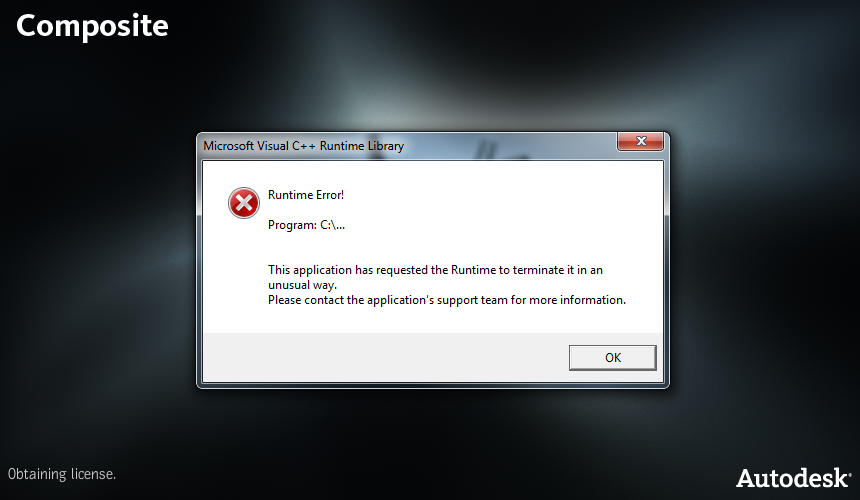
My version of Composite 2013 never did start. It always gave me a Runtime Error at startup:
So I removed it and installed Composite 2013 SP1. That version silently failed: in fact, I wasn’t sure it was even running until I used Process Monitor to watch composite.exe. Process Monitor showed me that Composite was writing log files in %LOCALAPPDATA%\Temp\toxik\logs, and I found this in the stdout.log:
Exception encountered: Cannot determine a product license to use.
This suggested to me that I needed to set the environment variable ADSK_COMPOSITE_LICENSE to Softimage, and that did the trick (when I checked, that environment variable was set to 3DSMAXDESIGN, and that’s why Composite was silently failing).
As a bonus, I also found the Composite Licensing log file %LOCALAPPDATA%\Temp\toxik\adlm.Composite.2013.log. The log entries make me think that my Runtime Error was caused by a Product Information (PIT) file problem. That’s why installing Composite 2013 SP1 fixed the problem.
584	2012/07/06	11:19:44	Reason=Fatal error
584	2012/07/06	11:19:44	ComputerName=MTL2UA0150CWY
584	2012/07/06	11:19:44	OS=6.1.7600.
584	2012/07/06	11:19:44	File=AdlmIntLicense.cpp,Line=584
584	2012/07/06	11:19:44	VendorID=6 [ADLMPIT]
584	2012/07/06	11:19:44	VendorError=12 [The root information in Product Information Table XML file is missing]
584	2012/07/06	11:19:44	Reason=Fatal error
584	2012/07/06	11:19:44	ComputerName=MTL2UA0150CWY
584	2012/07/06	11:19:44	OS=6.1.7600.
584	2012/07/06	11:19:44	File=AdlmIntLicense.cpp,Line=585
584	2012/07/06	11:19:44	AdlmIntError=25 [The product key was not found]
9448	2012/07/06	11:23:17	Reason=Fatal error
9448	2012/07/06	11:23:17	ComputerName=MTL2UA0150CWY
9448	2012/07/06	11:23:17	OS=6.1.7600.
9448	2012/07/06	11:23:17	File=AdlmIntLicense.cpp,Line=584
9448	2012/07/06	11:23:17	VendorID=6 [ADLMPIT]
9448	2012/07/06	11:23:17	VendorError=12 [The root information in Product Information Table XML file is missing]
9448	2012/07/06	11:23:18	Reason=Fatal error
9448	2012/07/06	11:23:18	ComputerName=MTL2UA0150CWY
9448	2012/07/06	11:23:18	OS=6.1.7600.
9448	2012/07/06	11:23:18	File=AdlmIntLicense.cpp,Line=585
9448	2012/07/06	11:23:18	AdlmIntError=25 [The product key was not found]
13860	2012/07/10	16:03:29	Reason=Fatal error
13860	2012/07/10	16:03:29	ComputerName=MTL2UA0150CWY
13860	2012/07/10	16:03:29	OS=6.1.7600.
13860	2012/07/10	16:03:29	File=AdlmIntLicense.cpp,Line=584
13860	2012/07/10	16:03:29	VendorID=6 [ADLMPIT]
13860	2012/07/10	16:03:29	VendorError=12 [The root information in Product Information Table XML file is missing]
13860	2012/07/10	16:03:29	Reason=Fatal error
13860	2012/07/10	16:03:29	ComputerName=MTL2UA0150CWY
13860	2012/07/10	16:03:29	OS=6.1.7600.
13860	2012/07/10	16:03:29	File=AdlmIntLicense.cpp,Line=585
13860	2012/07/10	16:03:29	AdlmIntError=25 [The product key was not found]
8368	2012/07/17	09:50:58	Reason=Fatal error
8368	2012/07/17	09:50:58	ComputerName=MTL2UA0150CWY
8368	2012/07/17	09:50:58	OS=6.1.7600.
8368	2012/07/17	09:50:58	File=AdlmIntLicense.cpp,Line=584
8368	2012/07/17	09:50:58	VendorID=6 [ADLMPIT]
8368	2012/07/17	09:50:58	VendorError=12 [The root information in Product Information Table XML file is missing]
8368	2012/07/17	09:50:58	Reason=Fatal error
8368	2012/07/17	09:50:58	ComputerName=MTL2UA0150CWY
8368	2012/07/17	09:50:58	OS=6.1.7600.
8368	2012/07/17	09:50:58	File=AdlmIntLicense.cpp,Line=585
8368	2012/07/17	09:50:58	AdlmIntError=25 [The product key was not found]
 eX-SI
eX-SI 