The case of the write-protected disk


Here’s the answer to the Cannot create projects or scenes – The disk is write-protected case I mentioned in my last week on the frontline post.

If you get this “the disk is write protected” error when you try to save a scene, it’s probably because you are trying to save your scene in the XSI_SAMPLES project. The XSI_SAMPLES folder is in the Softimage installation folder (in C:\Program Files\Autodesk), so you usually don’t have write permissions to XSI_SAMPLES.

You need a project to save a scene, so create a new project somewhere where you have write permissions, for example, in your Documents folder.

Then save your scene.

New in Softimage 2013: Script the codec for viewport captures


In Softimage 2013, you can use the ViewportCapture.DSCodec parameter to set the codec for your viewport captures.

http://vimeo.com/39630053

DSCodec is an string that encodes the codec ID and parameters. To get the DSCodec value, do a viewport capture and set the Codec. Softimage will log the DSCodec value in the script history:

# INFO : ViewportCapture.DSCodec: AAAAFnNwdGxycHphAAAAAAAQAAACAAAAABR0cHJsAAACAAAeAAAAAAAYAAAAGGRyYXQAAAAAAAAAUwAAAQAAAAEAAAAACW1wc28AAAAADG1mcmEAAAAAAAAADHBzZnIAAAAAAAAACWJmcmEAAAAACm1wZXMAAAAAABxoYXJkAAAAAAAAAAAAAAAAAAAAAAAAAAAAAAAKc2RuZQAAAAAADGNtZnJhcHBsAAAAAA==

Here’s a Python snippet that shows how to set the DSCodec parameter:

from siutils import si
si = si()					# win32com.client.Dispatch('XSI.Application')
from siutils import log		# LogMessage
from siutils import disp	# win32com.client.Dispatch
from siutils import C		# win32com.client.constants

def dispFix( badDispatch ):
	    import win32com.client.dynamic
	    # Re-Wraps a bad dispatch into a working one:
	    return win32com.client.dynamic.Dispatch(badDispatch)

oViewportCapture = dispFix(si.Dictionary.GetObject( "ViewportCapture" ))
oViewportCapture.NestedObjects("File Name").Value = "C:\\test.mov";

oDSCodec = oViewportCapture.NestedObjects("DSCodec")

#log( oDSCodec.Value )
# INFO : ViewportCapture.DSCodec: AAAAFnNwdGxycHphAAAAAAAQAAACAAAAABR0cHJsAAACAAAeAAAAAAAYAAAAGGRyYXQAAAAAAAAAUwAAAQAAAAEAAAAACW1wc28AAAAADG1mcmEAAAAAAAAADHBzZnIAAAAAAAAACWJmcmEAAAAACm1wZXMAAAAAABxoYXJkAAAAAAAAAAAAAAAAAAAAAAAAAAAAAAAKc2RuZQAAAAAADGNtZnJhcHBsAAAAAA==

oDSCodec.Value = "AAAAFnNwdGxycHphAAAAAAAQAAACAAAAABR0cHJsAAACAAAeAAAAAAAYAAAAGGRyYXQAAAAAAAAAUwAAAQAAAAEAAAAACW1wc28AAAAADG1mcmEAAAAAAAAADHBzZnIAAAAAAAAACWJmcmEAAAAACm1wZXMAAAAAABxoYXJkAAAAAAAAAAAAAAAAAAAAAAAAAAAAAAAKc2RuZQAAAAAADGNtZnJhcHBsAAAAAA=="

Screenshots of the week


Shed: Making of Bell Fibe

Neural net
by Mossman

Changing contexts
by gustavoeb

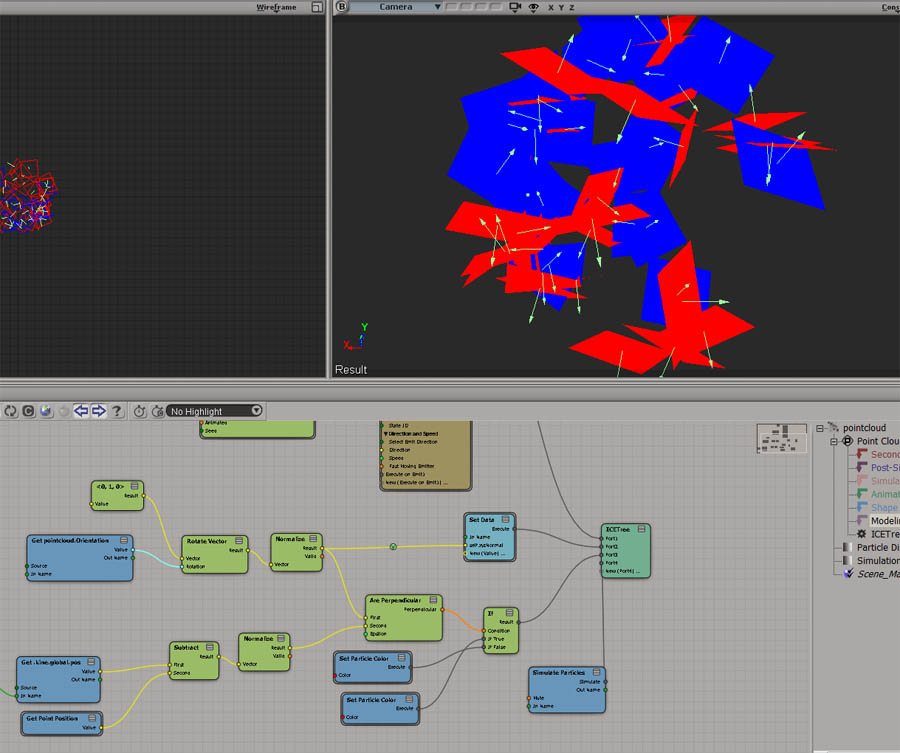
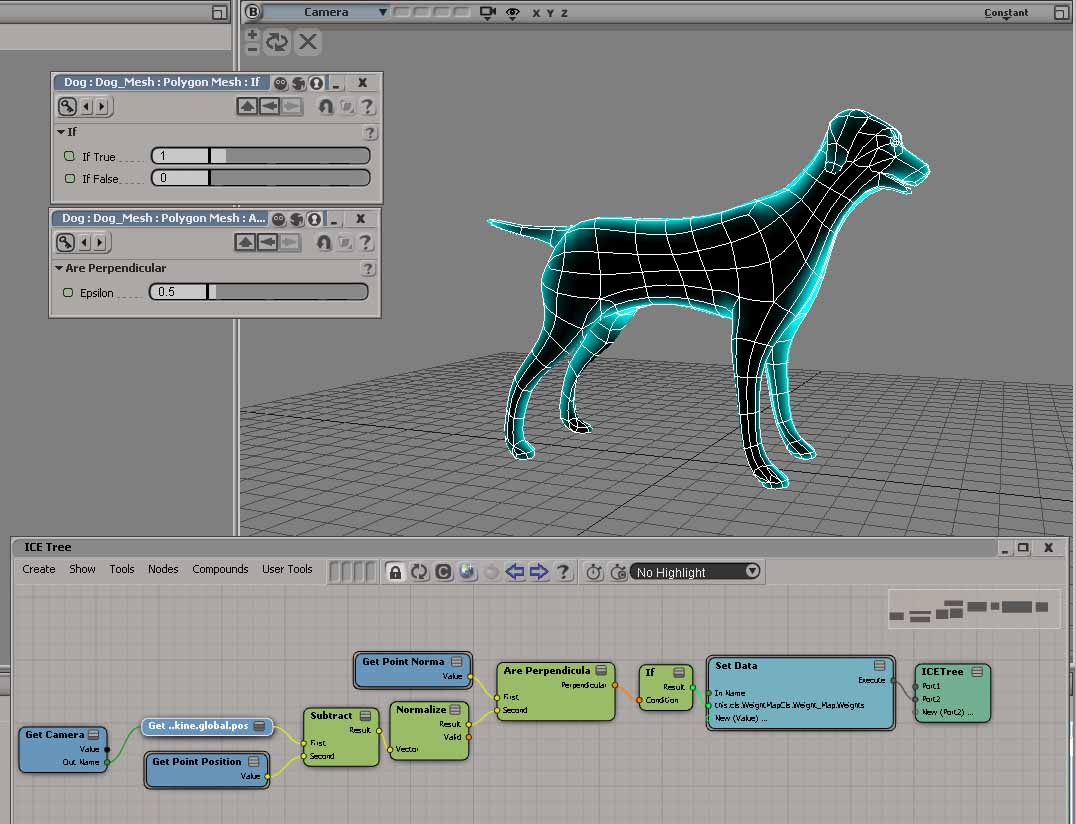
ICE trig maths, camera facing angles
by Rob Chapman

ICE trig maths, camera facing angles
by peter_b
“with the combination of the normal at the surface, the orientation of the particle and the vector from point to camera – and dot / cross products, you can do plenty different things.”

Motion Tools v0.3
by gustavoeb

Filter volume emission by weightmap
by patrick nethercoat

LK Lightning 1.5.0 is out!

New in Softimage 2013: Filtering XSICollections


In Softimage 2013, the XSICollection object now has a Filter method, so you can filter XSICollections by type, family, or path name.

oFilteredCollection = XSICollection.Filter( [Type], [Families], [Path] )

I updated my find all cameras script to use XSICollection.Filter, and here’s the timing results (form the same scene, but in 2013).

# INFO : getCameras_FindObjects finished in 0.033000 seconds
# INFO : Found 8301 cameras
# INFO : getCameras_FindObjects_w_Filter finished in 0.269000 seconds
# INFO : Found 24 cameras
# INFO : getCameras_FindObjects_w_SIFilter finished in 0.044000 seconds
# INFO : Found 24 cameras
# INFO : getCameras_FindObjects2 finished in 0.001000 seconds
# INFO : Found 49 cameras
# INFO : getCameras_FindObjects2_w_Filter finished in 0.003000 seconds
# INFO : Found 24 cameras
# INFO : getCameras_FindChildren2 finished in 0.149000 seconds
# INFO : Found 24 cameras
# INFO : getCameras_SelectAllUsingFilter finished in 0.035000 seconds
# INFO : Found 24 cameras
  • FindObjects2 is fastest, with SelectAllUsingFilter a mildly surprising second (again note that I’m calling SelectAllUsingFilter with AffectSelectionList=False, so I’m not actually selecting anything).
    FindObjects2_w_Filter		0.003000 seconds
    SelectAllUsingFilter		0.035000 seconds
    FindObjects_w_SIFilter		0.044000 seconds
    FindChildren2			0.149000 seconds
    FindObjects_w_Filter		0.269000 seconds
    
  • FindObjects finds a lot more than just cameras; it finds lots of nulls too because that GUID isn’t unique to cameras
  • In this context, SIFilter is faster than the XSICollection.Filter method

Here’s the updated script for Softimage 2013:

import time
si = Application
log = si.LogMessage
from win32com.client import constants as C

import win32com.client
oCameraColl = win32com.client.Dispatch( "XSI.Collection" )

si.SetValue("preferences.scripting.cmdlog", False, "")


def timeExecution(func):
    def closure(*args, **kwargs):
        startTime = time.time()
        try:
            ret = func(*args, **kwargs)
        except Exception, e:
            delta = time.time() - startTime
            log('Failed in %f seconds' % delta)
            raise
        delta = time.time() - startTime
        log('%s finished in %f seconds' % (func.__name__, delta))
        return ret
    return closure 

@timeExecution
def getCameras_FindObjects():
	oCameraColl = Application.FindObjects( "", "{5FC0CCAE-3DC8-11D0-9449-00AA006D3165}" )
	return oCameraColl.Count

@timeExecution
def getCameras_FindObjects_w_Filter():
	oCameraColl = Application.FindObjects( "", "{5FC0CCAE-3DC8-11D0-9449-00AA006D3165}" )
	oCameraColl = oCameraColl.Filter( "camera" )
	oCameraColl.RemoveItems( oCameraColl.Filter( "", "", "CopyPaste*" ) )
	oCameraColl.RemoveItems( oCameraColl.Filter( "", "", "View*" ) )
	return oCameraColl.Count

@timeExecution
def getCameras_FindObjects_w_SIFilter():
	oCameraColl = Application.FindObjects( "", "{5FC0CCAE-3DC8-11D0-9449-00AA006D3165}" )
	oCameraColl = si.SIFilter( oCameraColl, "camera" )
	oCameraColl.RemoveItems( oCameraColl.Filter( "", "", "CopyPaste*" ) )
	oCameraColl.RemoveItems( oCameraColl.Filter( "", "", "View*" ) )
	return oCameraColl.Count


@timeExecution
def getCameras_FindObjects2():
	c = si.FindObjects2( C.siCameraID )
	return c.Count

@timeExecution
def getCameras_FindObjects2_w_Filter():
	cams = si.FindObjects2( C.siCameraID )
	oCameraColl.Items = cams
	oCameraColl.RemoveItems( cams.Filter( "", "", "CopyPaste*" ) )
	oCameraColl.RemoveItems( cams.Filter( "", "", "View*" ) )
	return oCameraColl.Count


@timeExecution
def getCameras_FindChildren2():
	cams = si.ActiveSceneRoot.FindChildren2("", "camera")
	return cams.Count

@timeExecution
def getCameras_SelectAllUsingFilter():
	cams = si.SelectAllUsingFilter("Camera", "siIgnoreComponentVisibility", False, "")
	return cams.Count


@timeExecution
def getCameras_Model_FindObjects():
	cams = si.ActiveSceneRoot.FindObjects( C.siCameraID )
	return cams.Count


log( 'Found %d cameras' % getCameras_FindObjects() )
log( 'Found %d cameras' % getCameras_FindObjects_w_Filter() )
log( 'Found %d cameras' % getCameras_FindObjects_w_SIFilter() )
log( 'Found %d cameras' % getCameras_FindObjects2() )
log( 'Found %d cameras' % getCameras_FindObjects2_w_Filter() )
log( 'Found %d cameras' % getCameras_FindChildren2() )
log( 'Found %d cameras' % getCameras_SelectAllUsingFilter() )

Friday Flashback #63


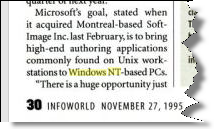
Microsoft buys Softimage – the press release and some news clippings about the 14 Feb 1994 acquisition

The press release:

Microsoft Corporation to Acquire SOFTIMAGE Inc.

REDMOND, Washington Ð February 14, 1994 Ð Microsoft Corporation today announced that the company has signed a definitive agreement to acquire SOFTIMAGE, a leading developer of high performance 2D and 3D computer animation and visualisation software. The $130 million stock transaction has been approved by the Board of Directors of both Microsoft and SOFTIMAGE.

“The market for digital media is growing rapidly and SOFTIMAGE is a technology leader in this area. We are committed to continuing this development of leading-edge professional authoring tools which accelerate the creation of high-quality digital content,” said Bill Gates, Chairman and Chief Executive Officer of Microsoft. “We are very excited at the prospect of combining their expertise with ours,” said Gates.

“We share with Microsoft a common vision of the role that authoring tools will play as the digital media marketplace unfolds. Microsoft has a wealth of experience in supporting open operating systems and building great software tools, and we will provide specialised expertise and experience in professional quality digital media tools. We believe that as a part of Microsoft we can more quickly realise our vision,” said Daniel Langlois, Chairman, Chief Executive Officer and founder of SOFTIMAGE. Langlois will continue to head the development organisation located in Montreal, Quebec, which will operate as a part of the Advanced Technology division which directs Microsoft’s long- term technology vision.
Under the terms and conditions of the combination plan, each share of SOFTIMAGE stock will be exchangeable for 0.279 of a share of Microsoft stock, with an adjustment factor designed to provide not less than $21 and not more than $24 of value per SOFTIMAGE share. The agreement is subject to the approval of the shareholders of SOFTIMAGE, and the directors of SOFTIMAGE have unanimously agreed to vote the shares they own, which represent approximately 30% of the outstanding shares, in favour of the transaction.

SOFTIMAGE (Nasdaq-NMS: SFTIF), founded in 1986, is an innovative developer of high-performance 2D and 3D animation and simulation software. The company markets its sophisticated flagship product for 3D animation, the Creative Environmentª and a complete line of high-end 2D applications, including post- production editing and the integration of visual images, text, sound and special effects technology. SOFTIMAGE products are used by loading film studios, animation houses, broadcasters, graphic artists, product designers and engineers around the world.

Founded in 1975, Microsoft (Nasdaq-NMS: MSFT) is the world leader in software for personal computers. The company offers a wide range of products and services for business and personal use, each designed with the mission of making it easier and more enjoyable for people to take advantage of the full power of personal computing every day.

Commentary on the acquisition of Softimage by Microsoft

Seattle Times: Microsoft To Purchase Softimage — Software Giant Gains Access To Graphics For Interactive TV

“You don’t just hire folks that have this stuff [Jurassic Park-type graphics technology],” said Dain Bosworth analyst Glenn Powers. “It’s the type of thing where there are 100 people that are good. If you want to get a bunch of them at once, this is the way you grab them.”

Nathan Myhrvold, Microsoft senior vice president, said yesterday that the acquisition will give Microsoft a tool to create sophisticated computer-generated graphics that are going into movies, video games and commercials. Also, he said, “This kind of technology is the minimum (needed) to create effective CD-ROM titles.”


Microsoft Buying Maker of Animation Software

In a move underscoring its commitment to digital multimedia, Microsoft Corp said it has agreed to acquire Montreal-based Softimage Inc, a developer of computer animation software, in a $130-million stock deal. The acquisition, the software giant’s second biggest ever, increases by nearly 50% the size of the Microsoft’s 18-month-old Advanced Consumer Technology division, which is leading its efforts to help shape the information highway.

Software Industry Report, 21 Feb 1994

The buy is considered very important for Microsoft, which to date has not made any significant inroads in the emerging market for interactive television and multimedia production. Daniel Langlois, the Softimage founder and CEO, will continue to head the development organization, which will operate as part of the Microsoft advanced technology division.

In a recent press interview, Microsoft Chairman Bill Gates said his Redmond, Wash., software company will vigorously pursue opportunities in the multimedia field. How the Softimage buy will play out remains to be seen. Softimage makes tools for Silicon Graphics Inc. workstations, and its software was used in the special effects for the movie “Jurassic Park.”

http://www.immersence.com/publications/1996/1996-PLunenfeld.html

Davies is the director of visual research at SoftImage, a high-end computer graphics software group that was recently purchased by Bill Gates in his quest to have Microsoft own everything in North America that the Disney Company does not.

Microsoft Morphs into a Media Company –
Mr. Bill makes a billion-dollar bet on interactive entertainment

Wired 1994
Microsoft has been gradually creating or acquiring crucial pieces of media technology, which alone or in combination with others have the potential to spawn powerful new forms of media. Softimage 3-D animation and product tools now being ported to the PC, for example,

Excerpted from the book, “Becoming a Computer Animator” by Michael Morrison

ADVANCES OF THE 1990s In February 1994, Microsoft Corporation acquired Softimage for 130 million dollars. Microsoft’s initial use of TDI technology will be internal, to enhance their multimedia CD-ROM products and interactive TV programs. Microsoft also plans to port the Softimage software over to its Windows NT operating system. This may be the first move in starting a trend for the shifting of high-end graphics software from workstations to personal computers.

Commentary on the release of Softimage 3D for Windows NT

Graphics and Windows NT 4.0 – A Diamond Multimedia White Paper

Microsoft helped to pave the way to Windows NT for many applications by porting the highly regarded Softimage animation studio from Silicon Graphics workstations to Windows NT. For many creators of digital content in the highly competitive worlds of advertising and film, the existence of Softimage on Windows NT has proven the PC is ready for the big time.

1996: Microsoft delivers high-end 3-D animation software for Microsoft Windows NT; Softimage 3D for Windows NT provides workstation-class capabilities and performance at approximately half the system cost

“Today marks an important milestone in making high-end 3-D animation capabilities widely available,” said Daniel Langlois, senior director at Microsoft and founder of Softimage. “Because Windows NT offers the same high-performance graphics capabilities as UNIX(r)-based workstations and all of the benefits of a highly competitive ‘PC economy,’ many more content creators will be able to take advantage of high-end 3-D animation software. And these compelling price/performance figures will get even better over time.”


MICROSOFT’S SOFTIMAGE STRESSES LOW-COST HARDWARE AS IT LAUNCHES SOFTIMAGE 3D FOR WINDOWS NT

Published 06 February 1996

Microsoft Corp’s SoftImage Inc has opened up the market for its three-dimensional modeling and animation software, Microsoft SoftImage 3D, by launching a version for Windows NT (CI No 2,831). The software, which traditionally ran on Silicon Graphics Inc workstations under the Irix Unix operating system, will now run on any personal computer supporting NT.

Montreal-based SoftImage founder Daniel Langolois said the NT system has all the functionality of the Unix-based system, but enables users to choose much lower cost hardware as an option. He insisted that his aim was not to knock Silicon Graphics, but simply to open up choice for the users, and to enable more animators to use SoftImage’s three-dimensional animation software.

Scripting – Finding all cameras in a scene


In scripting, there’s several ways to find all the cameras in a scene.

I put together a little script to do some timing of the different ways of finding cameras.
Here’s a quick summary (using a scene with about 10k 3d objects). YMMV.

See this related thread on the XSI list. If you need to find scenes cameras frequently, then one suggestion (from Matt Lind) was to tag the scene cameras with a custom property, and then use FindObjects/FindObjects2 on that.

import time
si = Application
log = si.LogMessage
from win32com.client import constants as C

import win32com.client
oCameraColl = win32com.client.Dispatch( "XSI.Collection" )

si.SetValue("preferences.scripting.cmdlog", False, "")

#
# From http://www.softimageblog.com/archives/357
#
def timeExecution(func):
    def closure(*args, **kwargs):
        startTime = time.time()
        try:
            ret = func(*args, **kwargs)
        except Exception, e:
            delta = time.time() - startTime
            log('Failed in %f seconds' % delta)
            raise
        delta = time.time() - startTime
        log('%s finished in %f seconds' % (func.__name__, delta))
        return ret
    return closure 

@timeExecution
def getCameras_Application_FindObjects2():
	c = si.FindObjects2( C.siCameraID )
	return c.Count

@timeExecution
def getCameras_Application_FindObjects2_w_Filter():
	cams = si.FindObjects2( C.siCameraID )
	oCameraColl.Items = cams
	oCameraColl.RemoveItems( cams.Filter( "", "", "CopyPaste*" ) )
	oCameraColl.RemoveItems( cams.Filter( "", "", "View*" ) )

	return oCameraColl.Count


@timeExecution
def getCameras_FindChildren2():
	cams = si.ActiveSceneRoot.FindChildren2("", "camera")
	return cams.Count

@timeExecution
def getCameras_SelectAllUsingFilter():
	cams = si.SelectAllUsingFilter("Camera", "siIgnoreComponentVisibility", False, "")
	return cams.Count

@timeExecution
def getCameras_FindObjects():
	cams = Application.FindObjects( "", "{5FC0CCAE-3DC8-11D0-9449-00AA006D3165}" )

	# That GUID returns lots of other objects besides cameras
	cams = si.SIFilter( cams, 'camera' )

	# Unfortunately, XSICollection doesn't have a Filter method
#	oCameraColl.Items = cams
#	oCameraColl.RemoveItems( cams.Filter( "", "", "CopyPaste*" ) )
#	oCameraColl.RemoveItems( cams.Filter( "", "", "View*" ) )
	return cams.Count

# This finds cameras directly under a model only
@timeExecution
def getCameras_Model_FindObjects():
	cams = si.ActiveSceneRoot.FindObjects( C.siCameraID )
	return cams.Count


log( 'Found %d cameras' % getCameras_FindObjects() )
log( 'Found %d cameras' % getCameras_Application_FindObjects2() )
log( 'Found %d cameras' % getCameras_Application_FindObjects2_w_Filter() )
log( 'Found %d cameras' % getCameras_FindChildren2() )
log( 'Found %d cameras' % getCameras_SelectAllUsingFilter() )

Here’s some numbers from a scene with 9857 objects

# INFO : getCameras_FindObjects finished in 0.034000 seconds
# INFO : Found 68 cameras

# INFO : getCameras_FindObjects2 finished in 0.002000 seconds
# INFO : Found 68 cameras

# INFO : getCameras_FindObjects2_w_Filter finished in 0.005000 seconds
# INFO : Found 24 cameras

# INFO : getCameras_FindChildren2 finished in 0.153000 seconds
# INFO : Found 24 cameras

# INFO : getCameras_SelectAllUsingFilter finished in 0.034000 seconds
# INFO : Found 24 cameras