ICE brain teaser


Early this week, this ICE “brain teaser” was posted on the XSI mailing list.

Given an array like this:
8,8,8,2,2,2,2,5,5,5,5,9,9,9,9,1,1,1,1,1,1
how can can I –without using any loops–convert it to an array like this
1,1,1,2,2,2,2,3,3,3,3,4,4,4,4,5,5,5,5,5,5

Martin Chatterjee came up with a nice solution using arrays.

As an exercise, I tried to do it using a [non-simulated] point cloud. Basically, the idea is to use the particle self.ID data set to index into the array without using a Repeat node.

Here’s what I ended up with. First, I set a boolean flag on each point to indicate whether the corresponding array element is the same as the previous, and then I do a cumulative sum of array elements.

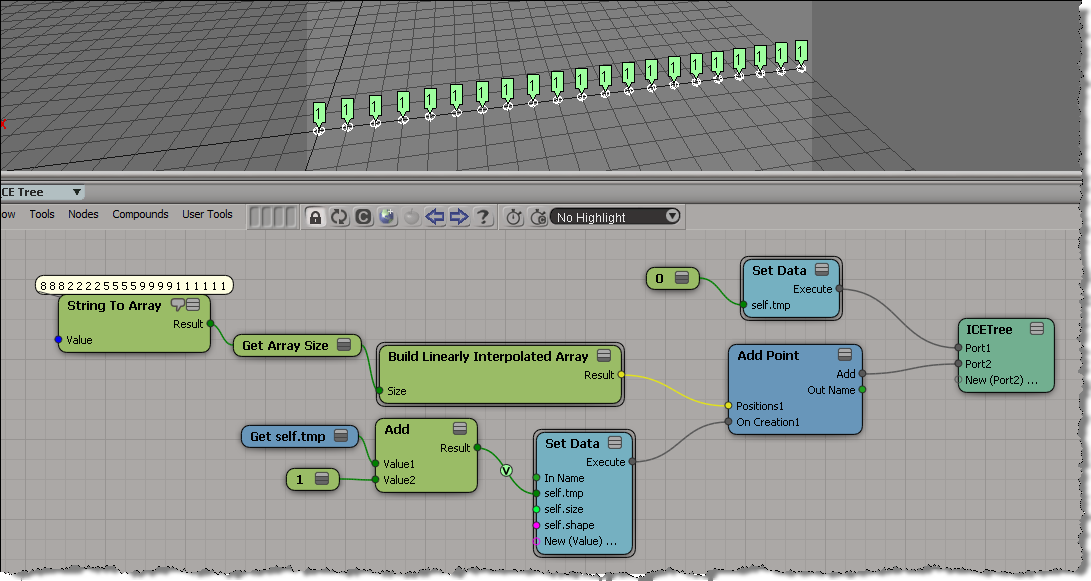
My first try at this ended up as an ICE tree version of this algorithm, plugged into the On Creation port of Add Point.

var a = [8,8,8,2,2,2,2,5,5,5,5,9,9,9,9,1,1,1,1,1,1];
var a1 = new Array(a.length);

var val = -1;
var ix = -1;
for (var i=0;i<a.length;i++)
{
	if ( a[i] != val )
	{
		val = a[i];
		ix++;
	}
	a1[i] = ix;
}
LogMessage( a );
LogMessage( a1 );
// INFO : 8,8,8,2,2,2,2,5,5,5,5,9,9,9,9,1,1,1,1,1,1
// INFO : 0,0,0,1,1,1,1,2,2,2,2,3,3,3,3,4,4,4,4,4,4

But that didn’t work, because as I found out, I wasn’t able to carry attribute values over from one point to the next. In the example below, you can see that self.tmp is local to each point (which means it starts off at zero for each point). Instead of incrementing self.tmp each time, I end up setting it to 1 every time.
Rigid body dynamic (RBD) precision and subframe sampling


About precision and subframe sampling for rigid body dynamics…here’s my understanding of how these two are related. Note that nobody confirmed this when I asked around, but then again nobody gainsaid it either 😉

The precision determines how frequently the simulation is calculated. For example, if Precision=120, then there is at most 1/120 of a second between calculations.

The subframe sampling determines the number of samples per frame.

So, if you are have this:

  • 30 fps
  • Precision = 120 per second
  • Subframe sampling =2 per frame

Then the RBD simulation is updated/calculated 4 times per frame (120/30), and ICE takes 2 samples of those calculated values per frame.

Using ICE to invert weightmap values


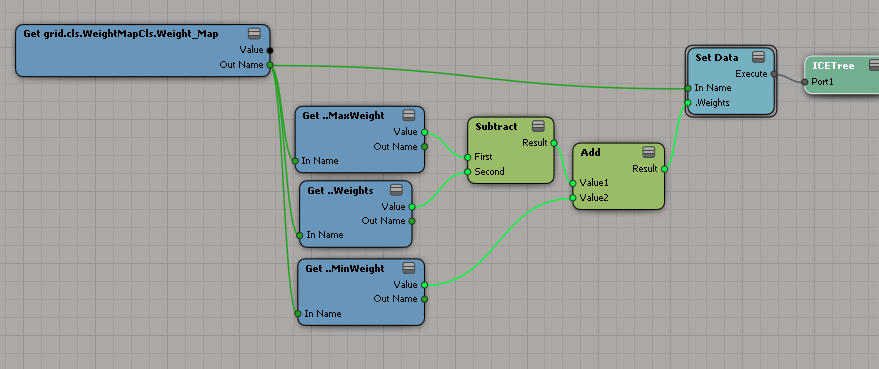
Here’s a more general ICE tree for inverting weightmaps: it handles weightmaps that are not in the 0-1 value.
When I first worked it out in my head I saw it like this:

But that’s just the same as using a Rescale:

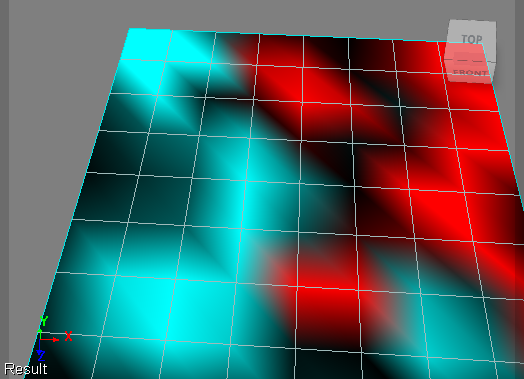
Here’s a weightmap before and after being inverted by the above. In this example, the weightmap has a value range of -1 to 3.
Before:

After (inverted):

Looking at those, maybe I should do something like this:

Which gives this inverted weightmap:

XSI List – 2011 retrospective


In 2011, there were just under 12K posts on the XSI mailing list. Here’s the top posts, posters, and keywords for 2011.

Top 10 posts:
I listed the top 11 because “Friday Flashback” is an ongoing thread.

  1. Friday Flashback (329)
  2. Softimage at Autodesk – an observation (212)
  3. PyQt For Softimage (153)
  4. Softimage 2012 (126)
  5. “Power Extrude” (110)
  6. 2012 AP (66)
  7. GEAR 1.0.0 Released (65)
  8. Requirements for task development? (61)
  9. Mental Ray is it going anywhere? (59)
  10. Clouds – Simul software technology (55)
  11. Ice Tutorials (55)

Top 10 posters:

  1. Alan Fregtman (431)
  2. Steven Caron (428)
  3. Stephen Blair (382)
  4. Eric Thivierge (291)
  5. Matt Lind (258)
  6. Guillaume Laforge (245)
  7. Paul Griswold (217)
  8. Chris Marshall (180)
  9. Ciaran Moloney (179)
  10. Raffaele Fragapane (176)

Top 10 keywords in Subject lines
I removed words like “Softimage”, “Autodesk”, “using”, “getting”, and “SI” before generating this word cloud.

The 2010 list retrospective, for comparison…

If you prefer Top 25 lists, here you go…
Continue reading

2011 in review


The WordPress.com stats helper monkeys prepared a 2011 annual report for this blog.

Here’s an excerpt:

The Louvre Museum has 8.5 million visitors per year. This blog was viewed about 180,000 times in 2011. If it were an exhibit at the Louvre Museum, it would take about 8 days for that many people to see it.

In 2011, there were 475 new posts, growing the total archive of this blog to 722 posts. There were 542 pictures uploaded, taking up a total of 354mb. That’s about a picture per day.

The busiest day of the year was October 21st with 1,182 views. The most popular post that day was Friday Flashback #40.

Click here to see the complete report.

Finding and deleting ICETrees on an object


Here’s a JScript snippet for deleting ICE trees from the objects in a group.

Note that the Primitive.ICETrees property returns all ICE trees that write to the object, including ICE trees on different objects (such as the italicized ICE tree in the screenshot below).

var o = Selection(0);
delICETrees(o, false );

function delICETrees( oGroup, bDelAll )
{

	var bFlag = ( bDelAll == null ) ? false : bDelAll;
	logmessage(bFlag);

	if ( oGroup != null && oGroup.type == "#Group" )
	{
		oGroupEnum = new Enumerator( oGroup.Members ) ;
		for (;!oGroupEnum.atEnd();oGroupEnum.moveNext() )
		{
			var o = oGroupEnum.item() ;
			var p = o.ActivePrimitive;

			oICETreeEnum = new Enumerator( p.ICETrees ) ;
			for (;!oICETreeEnum.atEnd();oICETreeEnum.moveNext() )
			{
				var oICETree = oICETreeEnum.item() ;
				if ( bFlag || oICETree.Parent3DObject.IsEqualTo( o ) )
				{
					LogMessage( oICETree.fullname );
					// DeleteObj( oICETree );
				}
			}
		}
	}
	else
	{
		LogMessage("Select a group" );
	}
}

Finding closest point with boolean flag equal True


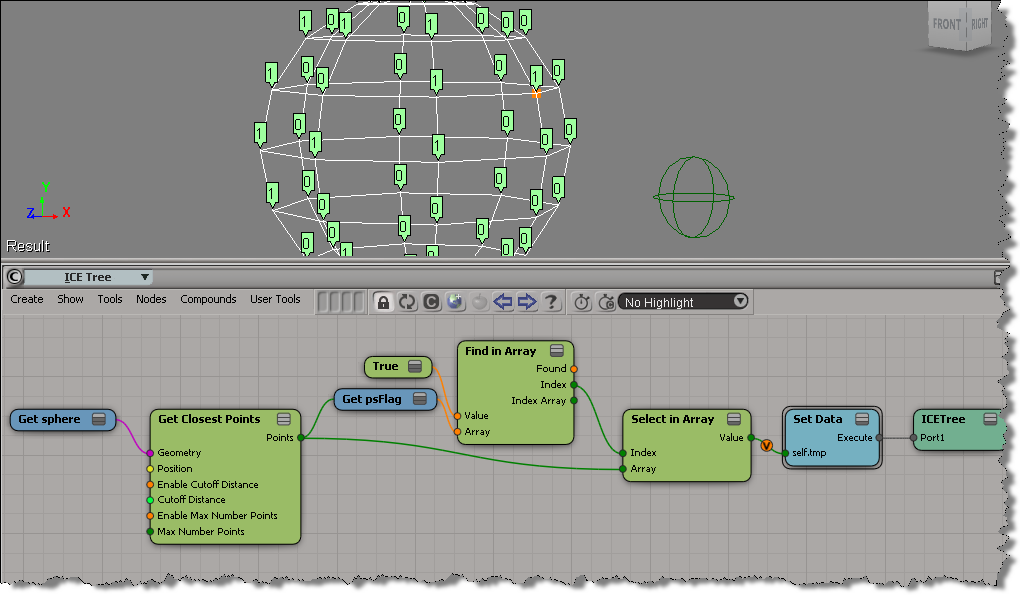
Here’s an example (from a question posted on the XSI list back in 2009) that illustrates some aspects of using arrays in ICE.

  • Get Closest Points returns a sorted array of locations, with the closest locations coming first in the array.
  • Find in Array finds the index of the first (and hence closest) point with the psFlag attribute set to True.
  • With that index, you use Select in Array to get the location of the closest point with psFlag=True.

Tip: Use compounds to organize your ICE trees


Compounds are useful for organizing your ICE trees. Even if you don’t intend to reuse or distribute your compounds, using compounds can help make your ICE trees readable and understandable. Kinda like paragaraphs in written text. Use compounds to separate blocks of functionality, and give your compounds meaningful names. It’ll help later when you come back to an ICE tree you haven’t worked on for awhile.

Consider this basic emission. Looks pretty simple, right? You can tell at a glance what’s happening, and what scene references are used in this ICE tree.

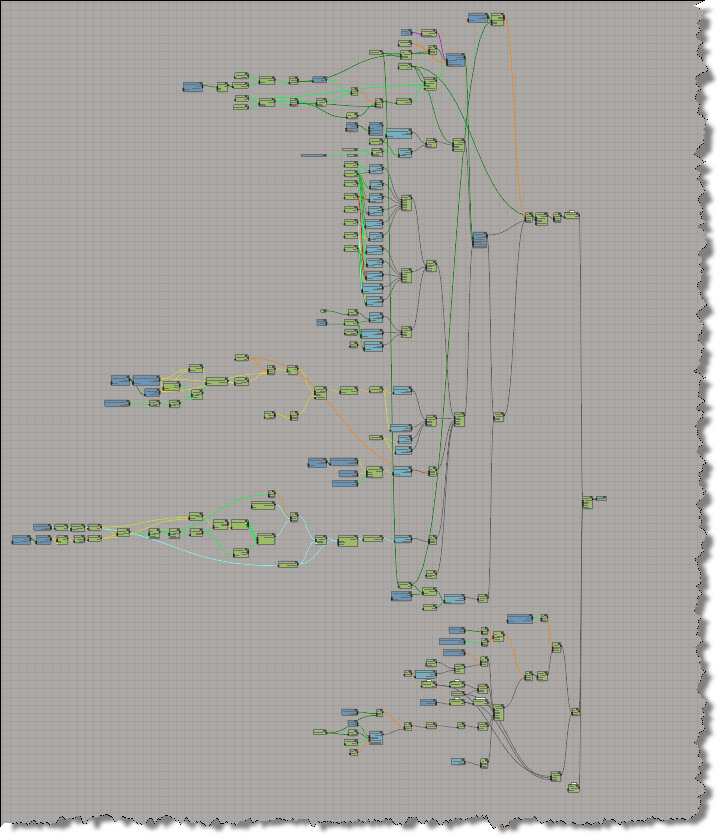
If you explode all the compounds in a Basic Emission, you get something a lot more complicated looking:

Without any compounding, you’re looking at a 195 total nodes (and 46 different nodes).