As usual all cgi is done in Softimage 🙂
Polynoid MTV EMA 2011
1

Here’s a simple, low-tech way to connect to specific workgroups at startup:
Instead of xsibatch -w or xsi -w, you could modify setenv.bat to create another .xsipref file in %XSI_USERHOME%\Data\Preferences. Whatever is in that file will override what is in default.xsipref.
So, for example, you could do this:
echo data_management.workgroup_appl_path = C:\Users\blairs\MyWorkgroup > %XSI_USERHOME%\Data\Preferences\workgroups.xsipref
or you could use an environment variable:
echo data_management.workgroup_appl_path = %MY_XSI_WORKGROUPS% > %XSI_USERHOME%\Data\Preferences\workgroups.xsipref
This does require you to edit setenv.bat, which isn’t so useful if you have a lot of seats. In that case, if you use a network deployment, you could deploy a %XSI_BINDIR%\SiteDeploy.bat file and use that to echo out the workgroup preference.
Courtesy of Vladimir Jankijevic on the XSI mailing list, here’s how to accumulate values in a weightmap:

The nice thing about his tree is how it sets things into per-point context so nicely. My own attempt seems crude in comparison:

The thing about setting weight map values is that you can’t do it like this:

ICE will evaluate this tree just once, even if it is in the Simulation stack. Perhaps this is a case of mistaken optimization? (branch is a scalar constant, so no need to reeval?)
If you replace the scalar node with any of these branches, then the weightmap values will change as your play through the timeline.

In this video, I take a look at why context matters when you try to do
Get Point Position > Set in Array > Set Point Position.
Here’s a screencast version:
http://www.screencast.com/t/Z5vF72IqXS
Emit from location – filter by Texture Map
tarkovsky

Multiple UV sets
by xuanprada

Add point every 6 frames
by César Sáez

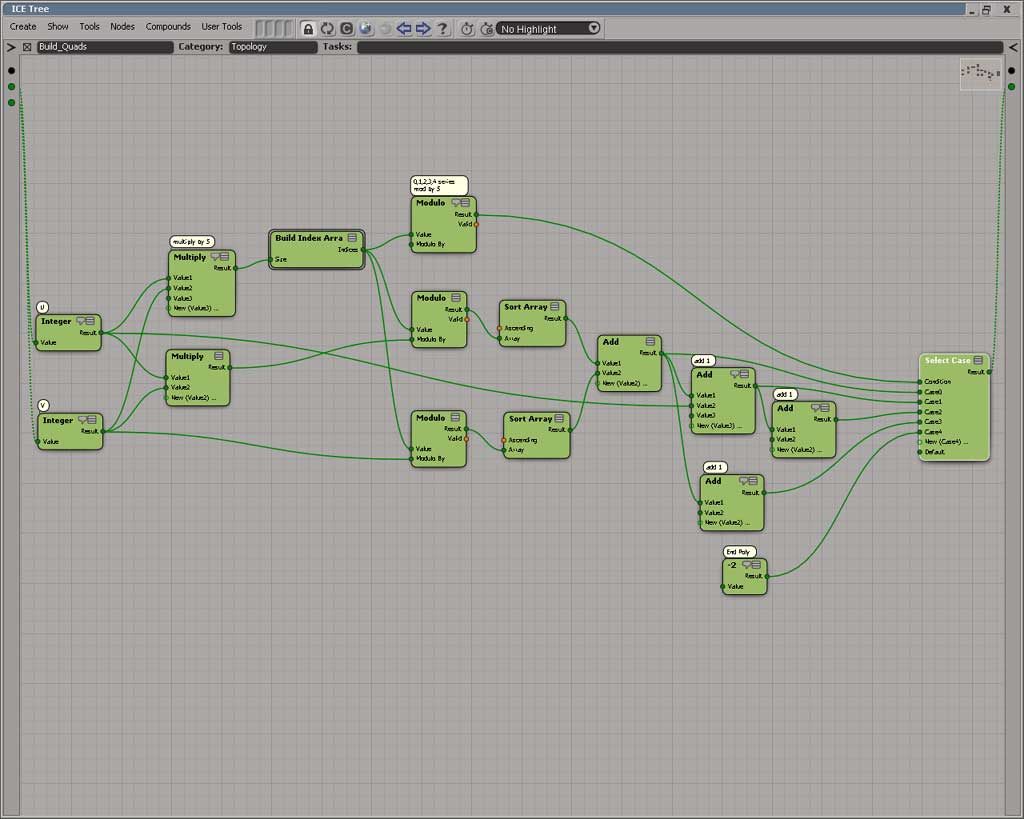
Using modulo to create the polygon description of a grid topology of any U and V size
by Daniel Brassard
Wobble by size and speed
by Tekano

Here’s a quick way to repeat the scripting commands logged for something you just did in Softimage:

After last Friday’s flashback post, Len Krenzler posted a link to the Def Leppard “Let’s get rocked” video, which was done in 1992 with Softimage|3D:
Came across this old Def Leppard piece, it was on the Softimage3D demo
reel the first time I saw it. Modeling has come a long way since then
but it was quite impressive at the time.
Luc-Eric pointed out that at 1:14 of the vid, you can see Softimage Eddie (click through the screenshot below to see an animated gif of a node connection operation):

At other points in the video, you can see Softimage|3D:

Googling “def leppard” and “softimage” quickly led me to the Reboot series from MainFrame, where I found this bit of info:
|
Ian Pearson flew out to Los Angeles, spending the next year sleeping on Chris Brough’s couch during which time Pearson, assisted by a couple of demo animators from Softimage, put together the Def Leppard promo ‘Let’s Get Rocked’. Not only did the video serve as a test of the new Softimage animation software and SGI hardware but the kid in the promo served as a prototype for Enzo. |

|
There’s also a few interesting mentions of Softimage in the history of the Reboot series:
|
In bringing the series to life technical issues dogged them every step of the way. Although the systems were sound, a combination of Silicon Graphics, Onyx and Indigo hardware, the software was not. Despite being open-ended, allowing them to add to existing programs and write their own programs in-house, the main package Softimage was tempermental and not designed to handle the information being thrown at it, unpredicably crashing at random intervals. During the first year of production ReBoot animators were hit with over 15,000 software bugs, sometimes losing entire profiles or erasing over three weeks’ worth of rendering. “We made every mistake possible,” says Dan Didio, who at the time was a programming executive for ABC and later, ReBoot’s story editor. “That’s the only way you’re going to learn, and we wound up thriving for it. We were charting new territory, which made it kind of fun. We didn’t understand the production problems at the time. ‘ReBoot Inc.’ were pushing programs further than ever before. We became pretty much a beta test site for computer software that was applied later on down the line.” |
|
|
“When we started out, nobody had done what we were doing so there was nobody else’s lessons to learn from.”, says former Director of Communications Mairi Welman, “We were inventing the wheel. We made our mistakes, people worked obscene 18 hours days and slept under desks.” Some even slept in front of their workstations in sleeping bags to maximize time, “While things were rendering, they you would wake up, animate a little more, sleep some more.” Blair recalls. At the same time they had to keep their ABC liason sweet, “I started at ABC Childrens Television and the first show that I was assigned was ReBoot,” says Didio, “Nobody knows what’s going on, nobody knows how it’s been done. I remember stepping in on the first day, seeing the tests and how incredible it was and getting swept up in a lot of what happened.” Gavin Blair now freely admits that for the most part, “We were making it up as we went along.” |

|
In this video, I take a look at how to offset ICE simulations, and I look into the role of the Simulation Environment.
As I posted yesterday, an ICE compound with no category and no task will not show up in the Preset Manager. Here’s a Python script that checks .xsicompound files and reports any that are missing both the category and tasks attributes.
I use ElementTree to parse the .xsicompound XML, and get the category and tasks attributes from the xsi_file element, which looks something like this:
<xsi_file type="CompoundNode" name="abScatter" author="Andreas Bystrom" url="http://www.wurp.net" formatversion="1.4" compoundversion="1.0" constructionmode="Modeling" backgroundcolor="7765887">
Here’s the script.
from siutils import si		# Application
from siutils import sidict	# Dictionary
from siutils import sisel	# Selection
from siutils import siuitk	# XSIUIToolkit
from siutils import siut	# XSIUtils
from siutils import log		# LogMessage
from siutils import disp	# win32com.client.Dispatch
from siutils import C		# win32com.client.constants

from xml.etree import ElementTree as ET
import os, fnmatch


#
# Generator function for finding files
#
def find_files(directory, pattern):
     for root, dirs, files in os.walk(directory):
         for basename in files:
             if fnmatch.fnmatch(basename, pattern):
                 filename = os.path.join(root, basename)
                 yield filename


#
# Check .xsicompound file for category and tasks attributes
#
def check_xsicompound( f ):
	try:
		tree = ET.parse( f )
	except Exception, inst:
		print "Unexpected error opening %s: %s" % (f, inst)

	# Get the xsi_file element
	xsi_file = tree.getroot()

#	name = xsi_file.attrib['name']

	# Check the category and task elements
	cat = False
	tasks = False

	if 'category' in xsi_file.attrib and xsi_file.attrib['category'] != '':
		cat = True

	if 'tasks' in xsi_file.attrib and xsi_file.attrib['tasks'] != '':
		tasks = True

	# return False if both are blank
	return cat or tasks


#
#
#

# list of compounds with no category and no tasks
compounds = []

# check all compounds in all workgroups
for wg in si.Workgroups:
	d = siut.BuildPath( wg, "Data", "Compounds" );

	for filename in find_files(d, '*.xsicompound'):
		b = check_xsicompound( filename )
		if not b:
			compounds.append( filename )

log( "%d compounds found with no category and no tasks:" % (len(compounds)) )
for f in compounds:
	log( f )
I’ve seen a few customers reporting that they put .xsicompound files in the Data\Compounds folder of a workgroup, but the compounds don’t show up in the Preset Manager.
This can happen when the compound doesn’t specify anything for Category or Tasks. From the docs:
If a compound is exported without a category or task, it is not available in the preset manager or nodes menu. This allows you to create utility nodes that perform specific functions inside other compounds but that are not meant to be used generally. You can add such nodes to an ICE tree using Compounds Import Compound or by dragging the compound file from a Softimage file browser or folder window.
Here’s a quick review of the Category and Tasks values:

 eX-SI
eX-SI 