Autodesk Softimage Hardware Certification FAQ


From the Autodesk Softimage Hardware Certification FAQ:

Q: What version of Linux does Autodesk use in the Softimage graphics certification process?
A: Autodesk Softimage 2012 graphics certification testing was performed using Fedora Core 14.

OS: Fedora 14 64bit OS
Kernel Version: 2.6.35.11-83.fc14.x86_64
Xorg Version: 1.9.4-1.fc14.x86_64
Glibc Version: 2.13-1.x86_64

The glibc version is missing from the FAQ page, but it’s a safe bet that it’s the same version used for the Maya certification.

What’s a polynode?


The definition of a polynode is not indexed, but you can find it by searching the Softimage User’s Guide. Here’s what I found in the 2011 User Guide (I still tend to use the CHM for searching 😉

“…polynodes (also known as polygon nodes or texture sample points). There is one polynode for every corner of a polygon. At a vertex, there are as many polynodes as there are adjacent polygons.”
–Softimage User’s Guide, About User Normals

“There is one polynode for each polygon attached to a point.”
–Softimage User’s Guide, Displaying Polynode Bisectors

Every polygon has a polynode for each of its corners, so at a given vertex there are as many polynodes as there are polygons that share that vertex.
–Softimage User’s Guide, About Vertex Colors

“Each UV pair in a set of coordinates associates a location on an object, called a “sample point”, to a location on an image. On a polygon object, the sample points are polygon nodes, or polynodes. There is one polynode for each polygon corner. ”
–Softimage User’s Guide, About Texturing in Softimage

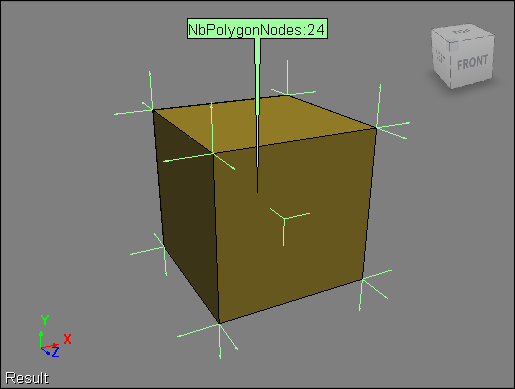
Here’s a default cube with the NbPolygonNodes and NodeNormal attributes displayed. Each of the eight vertices in the cube is shared by three polygons, so there are 8×3=24 polynodes.

ERROR : RCMP 0.4 error: cannot open temporary map file “mrmap0_tmp.a08740” for writing


This is an issue that we recently discovered. When final gathering is enabled, mental ray writes temporary files (such as mrmap0_tmp.a08740) to the Softimage installation folder:

C:\Program Files\Autodesk\Softimage 2012\Application\bin

To workaround this issue, either Run As Administrator (on Vista and Windows 7), or make sure that XSI.exe and xsibatch.exe have write permissions in the Application\bin folder.

In Maya 2012, the file is written in a project folder.
C:\Users\stseve\Documents\maya\projects\default\renderData\mentalray\mrmap1_tmp.a04936

Parent constraint between particles of different point clouds


Based on this xsibase thread, here’s a little video that shows how to make the particles in one cloud act like the children of a particle in another point cloud. Basically, the idea is to have the same behavior as objects in a hierarchy, where the children “inherit” the transformations of the parent.

One thing I forgot to mention in the video is that because both point clouds are at the origin, I don’t have to worry about converting between two different local coordinate systems (aka reference frames).

Example scene here.

http://vimeo.com/23333766

Finding image clip connections in render trees


Here’s a little Python snippet that finds out where image clips are plugged in.

mat = Application.Dictionary.GetObject("Sources.Materials.DefaultLib.Scene_Material")

images = mat.Shaders(0).ImageClips
for img in images:
	for p in img.GetShaderParameterTargets():
		print img.Name + " : " + p.fullname

This script will print out this:

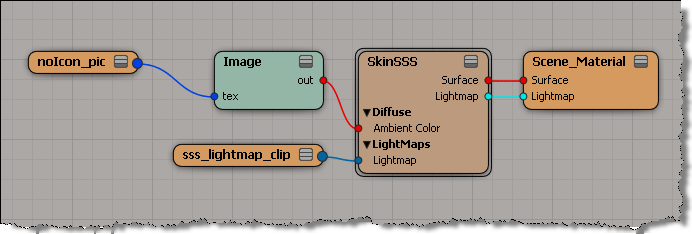
# noIcon_pic : Sources.Materials.DefaultLib.Scene_Material.Image.tex
# sss_lightmap_clip : Sources.Materials.DefaultLib.Scene_Material.SkinSSS.light

for this render tree:

Entertainment Webcast Series: Autodesk Softimage 2012 – The Incredible Power of ICE


Entertainment Webcast Series: Autodesk Softimage 2012 – The Incredible Power of ICE

Date & Time: Wednesday, May 11, 2011, 11:00 a.m. – 12:00 p.m. PST

Keynote Speakers: Mark Schoennagel

To register for this webcast, simply fill out the form below.

Description:

In this webcast, technical specialist Mark Schoennagel will take you through a comprehensive tour of the Autodesk® Softimage® Interactive Creative Environment, better known in the 3D industry as ICE. ICE is a powerful, node-based, multi-threaded visual programming language found only in Autodesk Softimage 2012. ICE is used by studios around the globe for creating stunning particle effects, deformations, character rigs, and now with 2012, procedural modeling effects.

During the webcast Mark will take viewers through the basics of ICE, creating and deploying user created tools as well as dive into some of the more advanced capabilities of this amazing technology. If you are in to visual effects this will be one webcast you wont want to miss!

via Autodesk – Entertainment Webcast Series: Autodesk Softimage 2012 – The Incredible Power of ICE.

Autodesk bike-to-work challenge


At Autodesk, we have a friendly bike-to-work competition to see which Autodesk city could save the most carbon emissions. Last year, we [Montreal] beat our nearest competition, San Rafael by a factor of 1.5 and we saved almost 2000 kg in carbon emissions, showing how environmentally-conscious and biking-friendly Montreal is.

Me, I just like to bike;-) and I’ve got a pretty nice 28k commute (some pics here).
Last year, I got the bragging rights for most “commute miles”, with 3274 miles (5269 km).

This year’s challenge started on Monday, but the season is not off to a great start, weather wise, in Montreal: