Customizing ICE compound property pages (PPGs)


Q: Can I use groups and tabs to organize the exposed ports on my compound PPG? Can I add PPG logic (callbacks)?

A: Yes, you can add groups, but not tabs or PPG logic.

Most of what you can customize on a ICE compound PPG is available in the UI through the exposed port properties.

Unlike shader compounds, you’ll notice there’s no way to specify groups, tabs, or PPG logic.

To define groups, you’ll have to edit the .xsicompound file and manually add your groups in the layout element.

For example, here’s the layout for the Deform by Curve compound. This xml shows the full available syntax for the layout section. No other elements (like ) are supported: I checked the code that loads ICE .xsicompound files.

<layout>
	<item type="input" name="Mute"> </item>
	<item type="input" name="Curve_Name"> </item>
	<item type="input" name="Reference"> </item>
	<item type="input" name="Axis" min="0" max="0">
		<enum value="0"><![CDATA[X Axis]]></enum>
		<enum value="1"><![CDATA[Y Axis]]></enum>
		<enum value="2"><![CDATA[Z Axis]]></enum>
	</item>
	<group type="input" name="Scaling Along">
		<item type="input" name="Scale_Curve" min="-10" max="20"> </item>
		<item type="input" name="Scale_Normal" min="-10" max="20"> </item>
		<item type="input" name="Scale_BiNormal" min="-10" max="20"> </item>
	</group>
	<group type="input" name="Roll">
		<item type="input" name="Roll" min="-360" max="360"> </item>
	</group>
	<group type="input" name="Translate">
		<item type="input" name="Along_Curve" min="-20" max="20"> </item>
		<item type="input" name="Along_Normal" min="-2" max="2"> </item>
		<item type="input" name="Along_Binormal" min="-2" max="2"> </item>
	</group>
	<group type="input" name="Constraint">
		<item type="input" name="Constrain_To_Deformer"> </item>
		<item type="input" name="Constrain_To_Deformee"> </item>
	</group>
	<group type="input" name="Profiles">
		<item type="input" name="Use_Scale_Profile"> </item>
		<item type="input" name="Scale_Profile"> </item>
		<item type="input" name="Use_Roll_Profile"> </item>
		<item type="input" name="Roll_Profile"> </item>
	</group>
	<item type="output" name="result"> </item>
</layout>

Friday Flashback #5


Someone on the XSI Mailing list asked about the old “10 reasons to try XSI”, which was published back in 2007 I believe. I managed to find a copy.

Here’s a comparison of the “10 reasons to try XSI” with the top reasons to buy Autodesk Softimage 2011

2007 (XSI 6)

  1. Non-destructive everything
  2. Gigapolygon processing
  3. Modeling that feels like sculpting
  4. Delta Referencing: breakthrough collaborative 3D animation
  5. Commitment to scripting & development standards
  6. Animation Mixer
  7. Asset reuse made simple
  8. Render Passes
  9. Built-in XSI Illusion compositor
  10. Custom Display Host

2010 (Softimage 2011)

  1. A Powerful Companion to Maya
  2. Node-Based Interactive Creative Environment (ICE)
  3. GigaCore High-Performance 3D Engine
  4. Complete Face Robot Toolset
  5. Nondestructive Workflow
  6. Interoperability
  7. Industry-Leading Nonlinear Animation and Mixing
  8. Production-Proven Solution
  9. Extensibility
  10. Autodesk Subscription and Support

And here are some other top 10 (or 9 or 11) lists:

Top ten new features in SOFTIMAGE|XSI v.5.0

  1. Work with ten times the detail (Gigapolygon core)
  2. Gator – property transfer that just works
  3. Film-quality normal map generation
  4. Easy migration from Maya
  5. Integrated Tools Development Environment (β€œTDE”)
  6. Native mental ray v.3.4
  7. Shape manager for easy shape creation and animation
  8. Tweak component tool for fast freeform modeling
  9. High-performance rigid-body dynamics

Top Ten Key Features in SOFTIMAGE|XSI v.4.2

  1. [NLA] SOFTIMAGE|BEHAVIOR v.2.0 In XSI Advanced
  2. [FX] Compositing and Hybrid Vector and Raster Paint In Essentials
  3. Character Development Kit
  4. Rigid Body Dynamics
  5. XSI Rendering and mental ray v.3.3
  6. Construction Modes
  7. [rendercore] AAF/MXF HD for Avid Editors
  8. [workforce] Alienbrain Studio 7.1 Plug-in
  9. Custom Display Host
  10. UV Unwrapping

Top 10 Reasons to Care About XSI 3.0

Long-Form Film/Series Broadcast

  1. Fastest development rate in the industry
  2. Fully integrated hair and fur simulation subsystem
  3. Unique fully integrated professional film quality compositing environment
  4. XSI SDK
  5. Unique fully integrated high-end interactive rendering
  6. Legendary Softimage character animation tools
  7. Native non-linear animation
  8. Crowd simulation tools
  9. Fully integrated, internet-enabled workflow (Net View, Synoptic View, ActiveX Scripting Technology)
  10. XSI Batch and XSI BatchUniversal (purchased separately)
  11. Lowest cost high-end technology on the market (versus A/W Maya and RenderMan)

Subaru “Car Parts” Commercial – Some insights into the workflow


Thanks a lot for interest and the great response regarding the Subaru “Car Parts” Commercial. I will try to give you some insides about our workflow in addition to the info Sebastian allready gave you More…

Florian Bruchhaeuser, ceo/founder/TD of Lafourmi Postproduction.


via Subaru “Car Parts” Commercial – Softimage Mailing List Archive | Google Groups.

Hacking the name of the Softimage install folder


Not everyone likes folder names like “Softimage 2011 Subscription Advantage Pack” πŸ˜‰ For example, if you’re creating a deployment, it’s pretty common to exceed the Windows path length limit and hit an error.

The setup doesn’t allow you to change the name of the install folder (you can change the location from the default C:\Program Files\Autodesk, but you can’t change the root folder of the Softimage install).

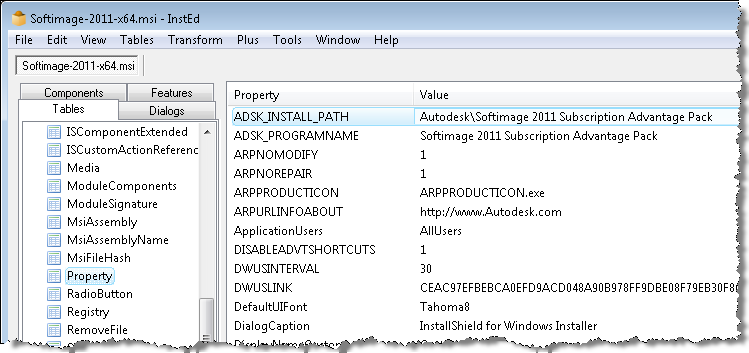
However, you can use any MSI editor (such as InstEd) to change the install folder. All you have to do is edit the ADSK_INSTALL_PATH property. I thought it would be INSTALLDIR, but after a few tries, I figured out that it was ADSK_INSTALL_PATH.

Use at your own risk.

Subaru “Car Parts” Commercial


the whole production was about 8 weeks long, and softimage only. it was a really crazy time. like you can see in the credits we were a rather small team, but the greatest ive worked with so far. so big up to my “geile typen” ;p

it was the first big project with arnold as render, and our new pipeline (in house project, asset and render management).

as the idea was to create worlds consisting out of car parts we were facing a lot of diffuse reflection..there is glossy all over the place. and instancing. it is incredible how fast arnold chew through all this data. our farm was rendering for 3 weeks non stop *without* any failed frames. i really doubt we could do that with mental ray

– Sebastian Kowalski

via Subaru “Car Parts” Commercial – Softimage Mailing List Archive | Google Groups.

Director’s cut

Autodesk iPad Game Attempts to Make Engineering Fun | PadGadget


via Autodesk iPad Game Attempts to Make Engineering Fun | PadGadget.

Tinkerbox is an entertaining physics app designed to spark the interest of teens and get them curious about mechanical engineering.

Tinkerbox requires players to get creative and think outside the box in order to solve a series of physics puzzles in Puzzle Mode. Players are presented with problems and must then insert parts, assemble systems, test their inventions and finally find out whether or not they were successful.

Think you’re ready to tackle something more advanced? Then get creative in Invent Mode and design your own systems. Creative something original, test your invention and then show it off to your friends.

Composite 2011 SAP: Error while initializing plugin libDLofxUi.dlmodule


A customer reported that Composite crashed while loading libDLofxUi.dlmodule:

Error while initializing plugin: C:/Program Files/Autodesk/Composite 2011 Subscription Advantage Pack/plugins/libDLofxUi.dlmodule :

Before we could do any investigation, he emailed back to say that he found the problem: it was a conflict with Furnace 4.2. When he removed the Furnace ofx plugins from the system, Composite started without error.

I downloaded and installed Furnace 4.2 for Nuke, but I couldn’t repro the problem at first.

By default, Furnace 4.2 for Nuke installs in the folder C:\Program Files\Common Files\OFX\Nuke\Furnace_4.2_Nuke, and that doesn’t cause any problems for Composite.

However, I knew that Composite searches the following folders:

  • C:\Program Files\Common Files\OFX\Toxik
  • C:\Program Files\Common Files\OFX\Plugins
  • C:\Program Files (x86)\Common Files\OFX\Plugins
  • C:\Program Files (x86)\Common Files\OFX\Toxik

so I moved the contents of the Nuke\Furnace_4.2_Nuke folder into C:\Program Files\Common Files\OFX\Plugins, and Composite would not start, and in the logs I found this error:

00:00:48.17 [Fatal Error   ] [Messages       ] Error while initializing plugin: C:/Program Files/Autodesk/Composite 2011 Subscription Advantage Pack/plugins/libDLofxUi.dlmodule : Input srcColourSpace received null policy.

BTW, the Composite logs are in %LOCALAPPDATA%\Temp\toxik\logs.

The discussion in this AREA thread also mentions that OFX plugin conflicts do happen with Toxik/Composite. The error mentioned in the original post is a different libDLofxUi.dlmodule error:

Error while initializing plugin: C:/Program Files/Autodesk/Composite 2011 Subscription Advantage Pack/plugins/libDLofxUi.dlmodule : Assertion β€˜_sortedPairs.find( defaultVal ) != _sortedPairs.end()’ failed.. 

PS – The shotgun approach to solving a Composite error like this is to rename the offending plugin file, so that it is no longer loaded.