Feature videos for Autodesk Softimage 2011 Subscription Advantage Pack
3

This video shows you how to assign a keyboard shortcut to a custom script command.
One thing I forgot to mention was the View in Browser feature: that’s a good way to search for commands and shortcuts, because it displays the complete keyboard mapping in a single html page.
The version I uploaded on screencast looks sharper.
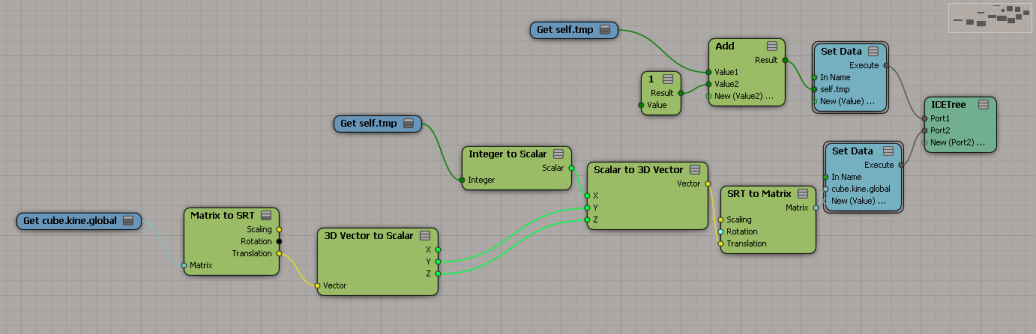
Sticking an ICE tree on a mesh and then getting the kine.global, updating it, and setting the kine.global doesn’t really work. And I’m not sure it should. Between ICE optimizations and the way the XSI evaluation model works, I don’t think you’ll get consistent updates. SCOPs are similar, but they have that Always Evaluate flag to force evaluations.

Second attempt. I also have an ICE Tree in the Modeling region that initializes self.tmp.
Here’s how to switch from one material library to another. This script could be useful when you have a corrupted material library (eg missing render tree connections), but you have a backup copy of the material library. For example, you could export a good version of the material library from a backup copy of the scene, and then import the matlib into the current version of the scene.
// Material Library with bad render trees (missing connections)
var oMatLib = Dictionary.GetObject( "Sources.Materials.DefaultLib" );

// Material Library with good render trees
var oMatLib1 = Dictionary.GetObject( "Sources.Materials.DefaultLib1" );


oEnum = new Enumerator( oMatLib.Items ) ;
for (;!oEnum.atEnd();oEnum.moveNext() )
{
        var oMat = oEnum.item() ;
        if ( oMat.UsedBy.Count > 0 )
        {
                var oMat1 = oMatLib1.Items(oMat.Name);
                if ( oMat1 == null )
                {
                        LogMessage( "Cannot find " + oMat.Name + " in " + oMatLib1.Name );
                }
                else
                {
                        LogMessage( "Repacing " + oMat.FullName + " with " + oMat1.FullName );

                        // Groups
                        var g = oMat.Owners.Filter( "#Group" );
                        SIAssignMaterial( g.GetAsText(), oMat1 );

                        // Objects
                        SIAssignMaterial( oMat.UsedBy.GetAsText(), oMat1 );
                }
        }

}
Here’s a snippet that shows how to loop through all material libraries and materials and delete unconnected shaders:
var oMatLibs = ActiveProject.ActiveScene.MaterialLibraries;
oEnum = new Enumerator( oMatLibs ) ;
for (;!oEnum.atEnd();oEnum.moveNext() )
{
	var oMatLib = oEnum.item() ;
	oEnum1 = new Enumerator( oMatLib.Items ) ;
	for (;!oEnum1.atEnd();oEnum1.moveNext() )
	{
		var oMat = oEnum1.item() ;
		DeleteUnusedShaders( oMat );
	}

}
The same thing but in Python.
oMatLibs = Application.ActiveProject.ActiveScene.MaterialLibraries
for lib in oMatLibs:
	for mat in lib.Items:
		Application.DeleteUnusedShaders( mat )
|
Commenter mindFreeArtists asks
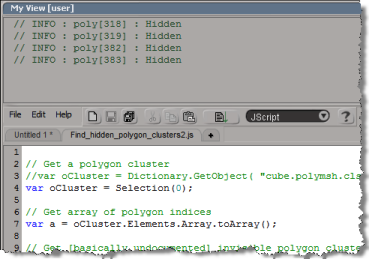
Sure, but you can’t do it all through the UI. The Script History view is not listed by the relational view editor, so you have to create a view and then hand edit the .xsivw file. Here’s the .xsivw that goes with the screenshot in this post. Note the <frame name="log" type="Script History" part: that’s what adds the script history log.
<?xml version="1.0" encoding="iso-8859-1"?>
<xsi_file type="RelationalView" xsi_version="9.5.172.0" syntax_version="1.1">
	<relationalview clsid="{E968166E-F924-46F4-AD4D-452EEB963F84}" name="My View" height="521" width="479">
		<definition maxinstances="10000" acceptfocus="true" private="false" defaultsize="100,100,500,500" cmdmap="{00000000-0000-0000-0000-000000000000}" supportedtypes="6" category=""> </definition>
		<relations>
		</relations>
		<frameset orientation="vertical" name="Frameset1" buttonsize="80,30" splitter="movable" sizechild="200,*">
			<frame name="log" type="Script History" primary="true" toolbar="own"> </frame>
			<frame name="pane2" type="Text Editor" primary="false" toolbar="own"> </frame>
		</frameset>
	</relationalview>
</xsi_file>
|
I notice the SR number for my last service request was 1-10019581901.
Has Autodesk really had 10 billion service requests?
I checked out the SRs (service request) for today, I see that the SR numbers aren’t sequential:
1-10003606461
1-10003606471
1-10003606481
1-10003606501
1-10003606521
1-10003606541
1-10003606560
1-10003606566
1-10008631466
1-10010742572
…and so on
So “no”, we haven’t handled over 10 billion service requests.
A customer mentioned to me the other day that the PPG didn’t pop up when he created a null.
It turns out we never pop-up the PPG when you create a null. I just never noticed that.
To verify that, I checked the implementation of GetPrim, which is the script GetPrimProc in %XSI_HOME%\Application\DSScripts\primitives.vbs.
In GetPrimProc, you’ll see that we skip nulls when we call AutoInspect:
'--------------------------------------------------------------------
' Inspect the new object
'--------------------------------------------------------------------
if Not TypeName (out_primitive) = "Nothing" then
	if  Not out_primitive.type = "null" then
		AutoInspect GetPrimProc, ,, "General"
	end if
end if
The customer also had another problem: pressing ENTER didn’t open up the PPG either, or if it did, all he got was a numeric slider for setting the Icon. Restarting Softimage fixed this; my guess is that the cached PPG layout was corrupted somehow (Softimage caches PPG layout definitions–if you’ve spent any time coding custom properties you’ve probably noticed how the PPGs of existing properties don’t change when you change the layout code).

|
Start Softimage. Right-click the Softimage icon on the task bar, and click Pin this program to taskbar. |

|
In the task bar, right-click the Softimage icon. In the pop-up menu, right-click the Softimage icon and click Properties. |

|
In the shortcut properties, change the Target from XSI.exe to XSI.bat. |
 eX-SI
eX-SI 