Saturday snippet: Python classes, __getattr_, lambda, and-or trick, and getattr


Here’s a snippet of some python posted on the Softimage mailing list this week.

from win32com.client import constants
class Softimage:
    __getattr__ = lambda x, a: getattr(Application, a, False) or getattr(constants, a)
softimage = Softimage()

Let’s break this down…

First, this snippet defines a class named Softimage (lines 1 and 2) and then instantiates an instance of that class (line 4).

Once you have an instance of a class, you can access the attributes of the class. Now this Softimage class doesn’t define any attributes, but it does provide a __getattr__ method. For example, if you ask for softimage.GetValue, then that __getattr__ method gives you back the function object Application.GetValue. If you ask for softimage.ActiveSceneRoot, you get back the value of the Application.ActiveSceneRoot property. And if you ask for softimage.siX3DObjectID, you get back constants.siX3DObjectID.

So, how does that work?

__getattr__ is a method that is called when an attribute isn’t found on a class instance.
If you define __getattr__ without using lambda or the and-or trick, it could look something like this:

from win32com.client import constants
class Softimage:
#    __getattr__ = lambda x, a: getattr(Application, a, False) or getattr(constants, a)
    def __getattr__( self, name ):
        a = getattr(Application, name, False) 
        if not a:
            a = getattr(constants, name)
        return a

getattr is a built-in Python function that gets an attribute on a specified object. Here, we’re getting an attribute of the Softimage Application object. For example:

# Get the scene root
a = getattr(Application, "ActiveSceneRoot", False)
print a
print a.Parameters.Count

# Get the selection with the GetValue command
a = getattr(Application, "GetValue", False)
print a
print a( 'SelectionList' )

Friday Flashback #109


Softimage started with $350,000 in venture capital funding. Here’s some comments from Loudon Owen, who with John Eckert helped finance and advise Softimage in its growth.

Proceedings of the Standing Senate Committee on Banking, Trade and Commerce
Issue 51 – Evidence
TORONTO, Thursday, April 29, 1999
The Standing Senate Committee on Banking, Trade and Commerce met this day at 9:00 a.m. to consider the present state of the financial system in Canada (equity financing).

From the opening comments by Mr. Loudon F. Owen, Managing Partner, McLean Watson Capital Inc.:

When we started, we were trying to raise money for a company in Montreal called Softimage. We were carrying around our little flip books but nobody wanted to give us money. We were quite astonished because we thought it was an exciting opportunity. We spoke to American venture capital firms, we spoke to Canadian venture capital firms and we decided there was an opportunity for a highly specialized venture group, so that is what we set up. We invest exclusively in software companies. We were highly focused, driven by what we perceived to be a market need. That was quite a few years ago and I think the market has changed dramatically in the last five years. However, that was what gave us the impetus to go forward.

I do not know if you have heard about Softimage. It is an animation software company. If you have seen Titanic, Jurassic Park, Death Becomes Her or most of the commercials on the television, you will have seen Softimage’s technology. The company was funded with $350,000. The shares which we receive from Microsoft are today worth $2.2 billion. It has 400 employees in Montreal and it was instrumental in building the animation industry in Montreal. There have been a variety of spinoff companies such as Discreet Logic and other companies in Montreal, so the company grew pretty dramatically. The only venture capital that went in was $350,000. After that it went public on the NASDAQ.

Our role was to invest. John Eckert and I share the duties of chief operating officer, and took it public on the NASDAQ. It was the first Quebec company to make its initial public offering on the NASDAQ. We considered the Canadian markets and elected not to go public here. We then sold it to Microsoft. We took the company from the initial point of investment, with its four employees, including the founder, Daniel Langois, to over 200 when we sold it to Microsoft.

On the question of whether Quebec was a hot of entrepreneurship [at that point in time, 1999] due to a more favourable regulatory and tax climate or just because people are more into the culture of entrepreneurship:

Do hotbeds of technology or clusters grow naturally because they are sponsored and supported? Again, it is a combination. I think Montreal’s animation, post-production and special effects community grew without any government support. For example, neither Softimage nor Discreet Logic had any significant government support or tax breaks. In fact, we tried to sell our first product to the CBC, and they would not buy it. They bought a French product, so we had to go to France and sell our first product there.

These companies grew up indigenously through their own creative efforts. What is happening now to sustain those industries and help them grow with their larger working capital requirements is assisted by government efforts.

Loudon Owen is co-founder of McLean Watson Capital. Prior to establishing McLean Watson Capital, Loudon and John Eckert financed and advised Softimage, a world leader in high-end 3D animation, in its growth from 4 to 250 employees, its IPO on Nasdaq in 1992 and the sale to Microsoft in 1994. Loudon and John served as the Joint COO for Softimage from 1993 to its sale.

Getting all visibility.viewvis parameters


From a discussion on the mailing list today, a few of the different ways to get every instance of a specific parameter, and some [crude] timing of the different methods.

I was also glad to see confirmation that using wildcards like “*.visibility” pick up everything (because I’ve never got any variation of “*#3dobject” to pick up all objects).

si = Application
import time
from win32com.client import Dispatch as disp
from win32com.client import constants as c


t = time.clock()
oObj = disp("XSI.Collection")
oObj.Items = "*.visibility"
for o in oObj:
	v = o.viewvis.Value
print 'XSICollection.Items  : count=%s, time=%s' % ( oObj.Count, time.clock() - t )


t = time.clock()
oObj.Items = "*.visibility.viewvis"
for o in oObj:
	v = o.Value
print 'XSICollection.Items  : count=%s, time=%s' % ( oObj.Count, time.clock() - t )


t = time.clock()
items = si.ActiveSceneRoot.FindChildren2()
for obj in items:
    vis = obj.GetPropertyFromName2("Visibility")
    v = vis.viewvis.value
print 'GetPropertyFromName2 : count=%s, time=%s' % ( items.Count, time.clock() - t )


t = time.clock()
items = si.ActiveSceneRoot.FindChildren2()
for obj in items:
    v = obj.Properties('visibility').Parameters('viewvis').Value   
print 'Properties.Parameters: count=%s, time=%s' % ( items.Count, time.clock() - t )


t = time.clock()
items = si.ActiveSceneRoot.FindChildren2()
for item in items:
    si.Tag(item.fullname + '.visibility.viewvis', c.siTag1)
print 'Tag()                : count=%s, time=%s' % ( items.Count, time.clock() - t )

t = time.clock()
items = si.ActiveSceneRoot.FindChildren2()
for item in items:
	p = item.Properties( "Visibility" ).Parameters( "viewvis" )
	p.Tags = c.siTag1
print 'Parameter.Tag        : count=%s, time=%s' % ( items.Count, time.clock() - t )


t = time.clock()
val = si.ActiveSceneRoot.TaggedParameters(c.siTag1, False)
for v in val:
    v = v.value
print 'TaggedParameters     : count=%s, time=%s' % ( items.Count, time.clock() - t )

Notice how turning off command logging speeds up those two commands:

# XSICollection.Items  : count=4367, time=1.18428964264
# XSICollection.Items  : count=4367, time=1.00415073153
# GetPropertyFromName2 : count=4367, time=2.07334397855
# Properties.Parameters: count=4367, time=4.38064481075
# Tag()                : count=4367, time=20.6681847681
# Parameter.Tag        : count=4367, time=5.11316244631
# TaggedParameters     : count=4367, time=0.705648810261
Application.SetValue("preferences.scripting.cmdlog", False, "")
# XSICollection.Items  : count=4367, time=1.16849869148
# XSICollection.Items  : count=4367, time=0.988541493731
# GetPropertyFromName2 : count=4367, time=2.03344763365
# Properties.Parameters: count=4367, time=4.33773781962
# Tag()                : count=4367, time=7.47015675041
# Parameter.Tag        : count=4367, time=4.99573667863
# TaggedParameters     : count=4367, time=0.687065751859

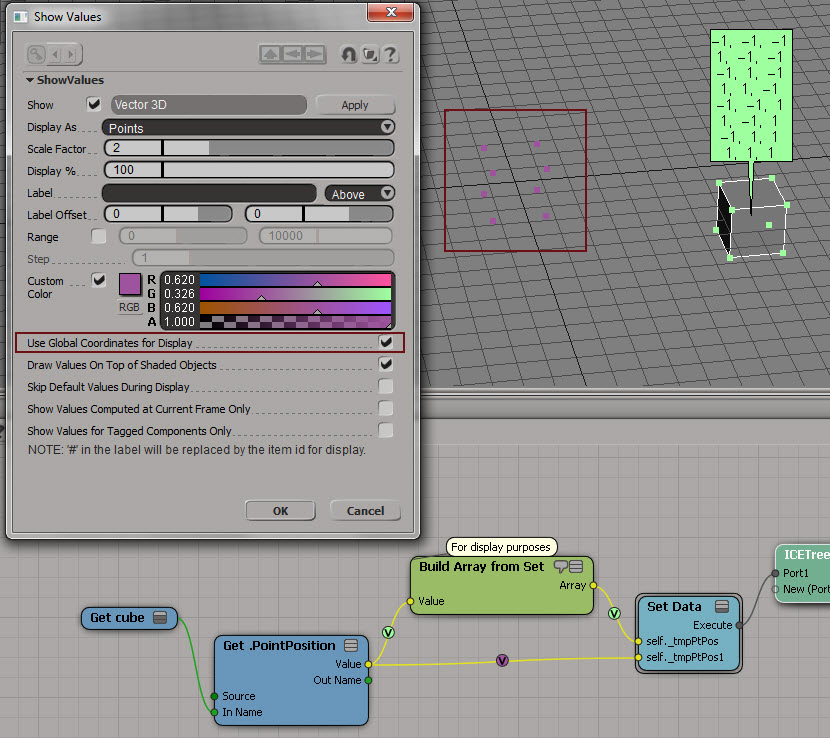
Use Global Coordinates for Display


Sometimes it can be useful to turn on Use Global Coordinates for Display. Because otherwise you’re going to be looking at points in local space, and that can mess up your thinking.

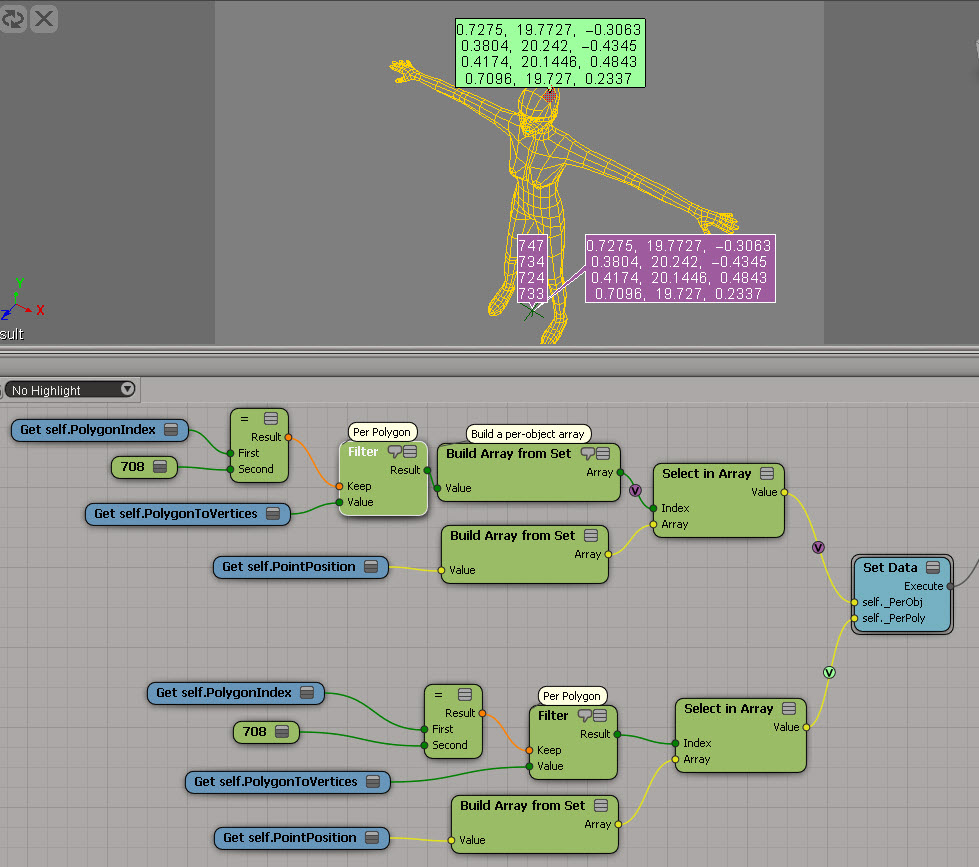
Here’s a simple example to show the difference. Purple is global, light green is local. As you can see, the purple points match up with the actual coordinates.
UseGlobalCoordsForDisplay

Now here’s a better example of the usefulness of Use Global Coordinates for Display. Red is local (and misleading). Yellow is global. Imagine you’re doing all kinds of coordinate system conversions in a complicated tree, and then you decide to show values as points. If you’re not careful, like me sometimes, you end up doubting everything you’ve done and pulling it all apart.
UseGlobalCoordsForDisplay1

Getting selected text from the script history


Here’s how to get the selection from the script history. This is how the Repeat command works.

def GetScriptHistoryView():
	oLayout = Application.Desktop.ActiveLayout

	# See if the script history is a view of it's own
	oViews = oLayout.Views.Filter( "Script History" )
	if oViews.Count == 0:
		oViews = oLayout.Views.Filter( "Script Editor" )

	return oViews(0)

oLog = GetScriptHistoryView()
text = oLog.GetAttributeValue( "historyline" ) if oLog else "<Nothing>"
print text

Saturday Snippet: Selecting a range of polygons by polygon index


Given a selected polygon, add the next 5 polygons to the selection. For example, if polygon 22 is selected, then add polygons 23,24,25,26, and 27 to the selection.

You can do this without using any loops, by using a string expression for the polygon components.

Here’s some JScript that shows two ways to do it. Method 1 uses a string expression. Method 2 is a loop, which can either use the Polygons collection or a string expression.

var o = Selection(0).SubComponent.Parent3DObject
var p = Selection(0).SubComponent.ComponentCollection(0)
var LAST = o.ActivePrimitive.Geometry.Polygons.Count;

// Method 1
// SelectGeometryComponents("grid.poly[22-27]", null, null);

var sPoly = ".poly["+p.Index+"-"+Math.min( p.Index+5,LAST-1 )+"]"
//SelectGeometryComponents( o.FullName + sPoly );
//Selection.SetAsText( o.FullName + sPoly  );

// Method 2
//for ( var i = p.Index+1 ; i < Math.min( p.Index+5,LAST ) ; i++ )
//{
//	ToggleSelection( o.ActivePrimitive.Geometry.Polygons(i) );
// -or-
//	ToggleSelection( o.FullName + ".poly["+i+"]" )
//}

Here’s some Python that does something similar but different:

si = Application
o = si.Selection(0).SubComponent.Parent3DObject
p = si.Selection(0).SubComponent.ComponentCollection(0)
LAST = o.ActivePrimitive.Geometry.Polygons.Count

s = ".poly[%s-%s]" % ( p.Index, min( p.Index+5,LAST-1 ) )
si.SelectGeometryComponents( s )

Friday Flashback #108


Hmmm…last Friday was the 19th anniversary of the Microsoft purchase of Softimage (15 Feb 1994). I really missed it on that one. Now I’ll have to wait for the 20th anniversary; hopefully I’ll still be doing Friday Flashbacks this time next year.

Anyways, on to this week’s flashback…From Jurassic Park (1993) to Gladiator (2001), a “representative sample” of motion pictures created with Softimage products.

TITLE CUSTOMER YEAR
Gladiator Mill Film 2001
Jurassic Park 3 Industrial Light & Magic 2001
Moulin Rouge 2001
The Mummy Returns 2001
Shadows Mitch Levine Director 2000
Star Wars: Episode 1 The Phantom Menace Industrial Light & Magic 2000
X-MEN Pacific Ocean Post 2000
Fight Club Pixel Liberation Front & BUF 1999
Forces of Nature Dreamworks Pictures 1999
Galaxy Quest Industrial Light & Magic 1999
Stuart Little Centropolis FX 1999
The Mummy 1999
Antz Pacific Data Images & Dreamworks Pictures 1998
Babe: Pig in the City Animal Logic 1998
Deep Impact Industrial Light & Magic 1998
Deep Rising Industrial Light & Magic 1998
Fear & Loathing in Las Vegas Peerless Camera 1998
Flubber Industrial Light & Magic 1998
Godzilla Centropolis 1998
Jack Frost Industrial Light & Magic and Warner Bros 1998
Jurassic Park 2 Industrial Light & Magic 1998
Lost in Space Framestore 1998
Matrix Animal Logic 1998
Meet Joe Black Industrial Light & Magic 1998
My Favorite Martian Tippett Studio 1998
Prince of Egypt Dreamworks Pictures 1998
Saving Private Ryan Industrial Light & Magic 1998
Small Soldiers Industrial Light & Magic 1998
Snake Eyes Industrial Light & Magic 1998
Species II Digital Magic & Transfer 1998
Sphere Cinesite 1998
The Borrowers Framestore 1998
The Thin Red Line Animal Logic 1998
What Dreams May Come Pacific Ocean Post 1998
A Simple Wish Blue Sky 1997
Air Force One Cinesite 1997
Alien Resurrection Blue Sky – VIFX 1997
An American Werewolf in Paris Santa Barbara Studios 1997
Anastasia Fox Animation Studio 1997
Batman and Robin BUF Compagnie 1997
Contact Sony Pictures Imageworks and Weta Ltd. 1997
Men in Black Industrial Light & Magic 1997
Mortal Kombat:Annihilation The Digital Magic 1997
Spawn Industrial Light & Magic 1997
Speed 2 Industrial Light & Magic 1997
Starship Troopers Tippett Studio 1997
Star Wars Trilogy Industrial Light & Magic 1997
The Edge Peerless Camera 1997
The Fifth Element Digital Domain 1997
The Lost World Industrial Light & Magic 1997
The Relic VIFX 1997
Titanic Digital Domain 1997
101Dalmations Industrial Light & Magic 1996
12 Monkeys Peerless Camera 1996
Dragonheart Industrial Light & Magic 1996
Eraser Mass Illusion 1996
Joe’s Apartment Blue Sky 1996
Mars Attack! Industrial Light & Magic 1996
Mission Impossible Industrial Light & Magic 1996
Space Jam Industrial Light & Magic 1996
Star Trek:First Contact Industrial Light & Magic 1996
Surviving Picasso Peerless Camera 1996
T2-3D Digital Domain 1996
The Adventures ofPinocchio MediaLab 1996
The Frighteners Weta Ltd. 1996
The Island of Dr. Moreau Digital Domain 1996
Balto Amblimation 1995
Casper Industrial Light & Magic 1995
Judge Dredd 1995
Jumanji Industrial Light & Magic 1995
La Cite des Enfants Perdus BUF Compagnie 1995
Star Trek:Generations Industrial Light & Magic 1994
The Flinstones Industrial Light & Magic 1994
The Mask Industrial Light & Magic 1994
The Shadow R/Greenberg & Associates 1994
Death Becomes Her Industrial Light & Magic 1993
Jurassic Park Industrial Light & Magic 1993

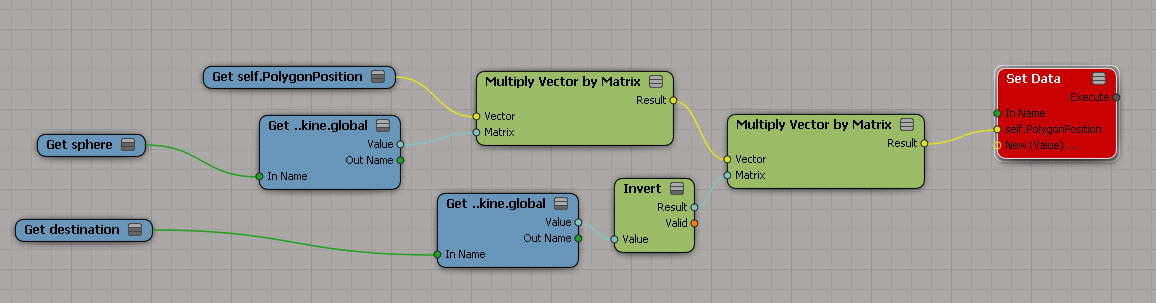
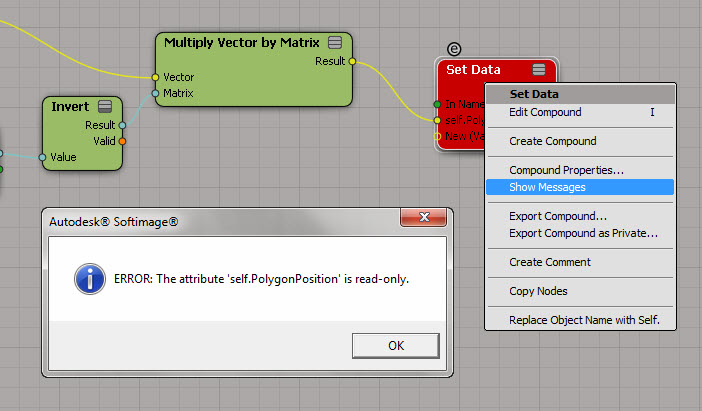
PolygonPosition is read-only


Too bad, I had such big plans for this 🙂
PolygonPosition_red

So, now that I’m at a dead end, let’s go over the different ways to figure out why a node is red…

Point to the node and wait for the tooltip to show the first error:
PolygonPosition_tooltip

Right-click the node and click Show Messages.
(Log port type details can be useful sometimes, but not in this particular case.)
ShowMessages

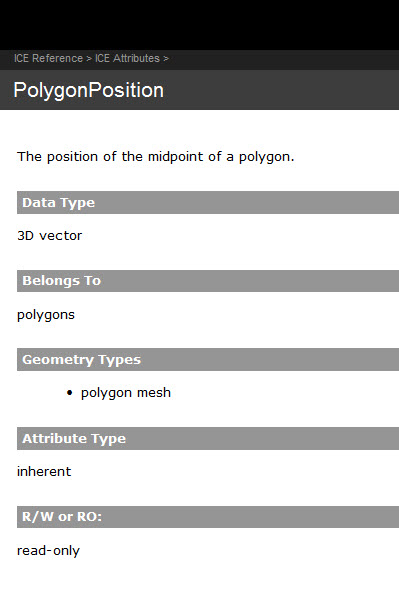
Read the documentation.
PolygonPosition_doc