Saturday snippet – simple example of Python list comprehensions


Here’s something I was trying to do in ICE (without using any Repeats).

Given an array like

a = [ 5, 2 ,3 ]

create an array like

b = [ 0, 0, 0, 0, 0, 1, 1, 2, 2, 2 ]

See the pattern? (a[0] is 5, so array b has five elements with value 0).

In Python, using list comprehension, you can do it like this:

a = [ 5, 2, 3 ]

print [ i for i in range( len(a) ) for j in range( a[i] )]

The list comprehension is the equivalent of:

for i in range( len(a) ):
	for j in range( a[i] ):
		print i

Friday Flashback #98


3d.archive.9712.Sumatra.revisited-header

3d.archive.9712.Sumatra.revisitedWhat were they talking about 15 years ago on the SOFTIMAGE|3D discussion group? Well, for one thing, they were wondering about “Sumatra (codename)” and whether they’d lose the beloved spartan SOFTIMAGE|3D interface:

Aside from the possibility of losing certain favorite tools I am very concerned with what Sumatra’s design will be like. I really love the spartan modular SI interface. It’s elegant, clean and very responsive.

I agree about the Interface. I really don’t care if they change the “look” of the interface, do that goofy rounded thing with the buttons, as long as they keep the functionality and general layout: The menu cells along eachside of the four views.

My vote is to KEEP THE SPARTAN INTERFACE. 10-15 hrs/day, I really don’t want to be looking at colorful icons and layers of hidden functionality collapsed into an insufficient number of modules.

The answer back from Softimage makes for interesting reading (keep in mind that “Sumatra (codename)” wouldn’t be released for another couple of years):

Subject: RE: Sumatra… revisited
From: Dan Kraus
Date: Mon, 22 Dec 1997 10:45:21 -0500

——————————————————————————–

>I think we should all think about it and be a little concerned that
>after SIGGRAPH SI has not even whispered the word ‘Sumatra.’

Although we’ve been coding hard since well before Siggraph ’96, we
haven’t spoken too much about it, except at the yearly Siggraph users’
group, because we want to be certain of our ship date before starting to
set concrete user expectations.

Sumatra is a complete replacement for the currently 3D product –
modelling, animation, rendering, particle, mental ray, etc, all
integrated into a single, seamless multi-threaded environment. We’re
coding Sumatra simultaneously both on IRIX and NT – there’s no ‘port’
involved this time, which also means that we get to take max advantage
of the hardware on both sides. Of course, there’s a lot of new tools –
performance, modelling/animation, etc – but our first priority is the
v3.7 toolset, to guarantee that you can use Sumatra for exactly the same
thing for which you use SI3D today.

Sumatra will actually be preceded by Twister – a standalone rendering
product which uses the Sumatra interface/architecture, and also
incorporates the next-gen of mental ray (v2.0). Twister is designed to
be used in tandem with SI3D, so you can start using/learning the new
interface as you’re comfortable, and integrate it into your current
workflow.

We currently expect Twister to ship in Q3 (Calendar) of ’98, and Sumatra
(Q4). This is behind our original target dates, but we want to be
completely certain that Sumatra is a true replacement for the current 3D
product. From the upgrade point of view, we’ll be treating Sumatra as
the release version of SI3D, which means users under maintenance will
recieve an automatic upgrade, just as you would to a point release or
service pack.

>>I wanna know what the interface will look like

Can’t blame you 😉 One of the most time-consuming tasks of the
Sumatra/Twister effort has actually been understanding and replicating
the existing user model. This extends way beyond pure interface issues,
and it’s taken us almost 2 years of work with our PM and internal
development teams (including several professional animators) to
guarantee that we understand why and how data is passed through Soft,
and propose an interface re-design which improves on what we have today.
We also have the benefit of having a true in-house production team (the
Softimage Content Group), who works closely with us on tool design,
putting things into immediate practice as soon as they’re coded.

Here’s a peek at a few of the key UI issues, and what’s happening:

Speed of Access – things like parent, cut etc are not available in all
the modules in Soft. One of the things you’ll notice when working with
Sumatra is that the right-hand panel provides you with all the general
controls you need – all the time.

Tools Organization – The Sumatra UI puts things in more sensible and
intuitive places, yet respecting where the most important controls (ex keyframe)
sit today.

Quick Selection Model – Sumatra has filters and presets which make life
much easier by not just making them ‘unselectable’ as is the case in
v3.7SP1, but actually letting you pre-select the type of objects you
want to grab. Makes repeated actions on a certain object type a whole
lot easier

Existing Workflow – The Sumatra UI has been designed with a constant
preoccupation (‘obsession’ is probably more accurate, actually 🙂 with
maintaining the existing workflow. Specifically, things like keeping all
the major tools two clicks away, providing contextual menus (ok, that’s
new :-), work-centric focus (manage your character, not the tools) – and
most of all, pure interface speed.

Please keep the comments coming, and keep an eye on our web page early next year – we’ll start rolling out the info as we draw closer to ship.

Cheers,
Dan

____________________________________________
Dan Kraus Softimage/Microsoft
Product Manager, 3D Montreal, Quebec

There was also a side-discussion of whether or not a context-sensitive UI would be a good thing; surprisingly (to me at least), opinion seemed to be split on that.

Showing per-sample colors in ICE


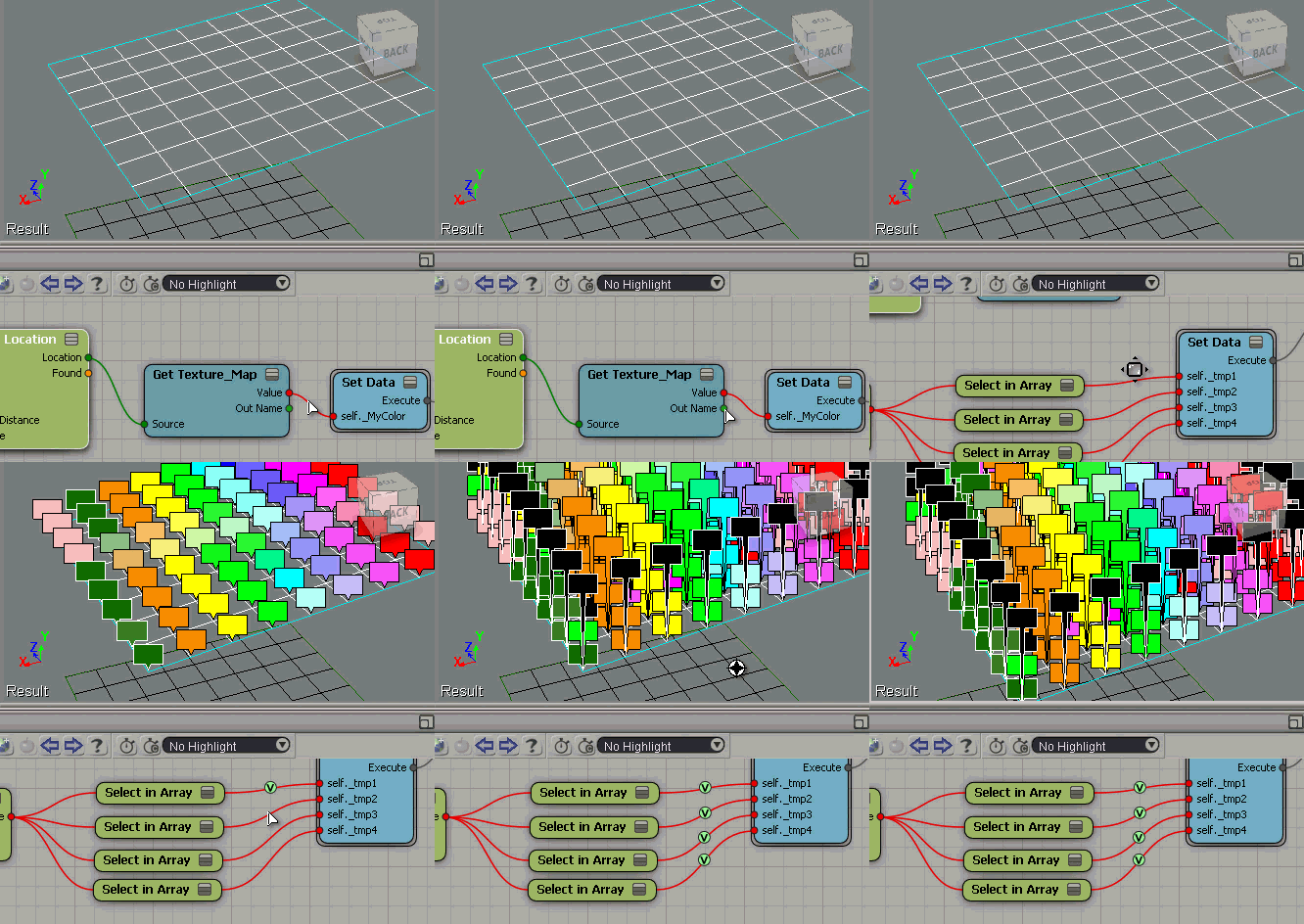
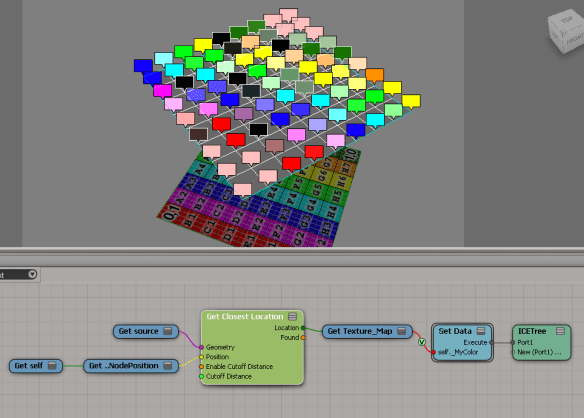
Suppose you have some per-sample attributes on a mesh. For example, suppose you’re getting the texture map colors from another mesh like this:
nodeLocation-TextureMap-ShowValues-1
The Show Values makes it look like you’re getting one color per vertex, but that’s not true.

If you do a Show Values like this (numeric), you’ll see that you’re getting multiple values (one per sample).
nodeLocation-TextureMap-ShowValues-1a

To see all the values as colors, you need to offset each Show Value. Otherwise they just stack up on each other, and it looks like just one color.
nodeLocation-TextureMap-ShowValues-2

The case of McAfee antivirus, VBScript, and the Softimage startup crash


As I’ve mentioned before, Softimage cannot run without VBScript. You won’t get any errors with xsi.exe, just a crash, usually sometime after the splash screen. But xsibatch will give you some errors that tell you what the problem is:

C:\Program Files\Autodesk\Softimage 2013\Application\bin>xsibatch -processing -script %TEST%\test.vbs
======================================================
Autodesk Softimage 11.0.525.0
======================================================

ERROR : 2000 - Failed creating scripting engine: VBScript.
ERROR : 2000 - Failed creating scripting engine: JScript.

It turns out the problem is related to McAfee antivirus, which for some reason has overwritten some important VBScript and JScript registry values.

To fix this, you need to get back the VBScript and JScript registry entries. I haven’t had to do this myself, but I think this page gives a good explanation of the problem and what to do:
http://windowsexplored.com/2012/01/04/the-case-of-the-disabled-script-engines/

You’ll find a number of other pages on the Web about this. For example, here’s a thread on sevenforums.com. Note that fixing just VBScript is probably sufficient to get Softimage to start, but you’d still be missing JScript.

Related post: The case of the missing vbscript

Randomizing with weighted probabilities


The question came up the other day of how to use Randomize Value by Range so that some values were more likely to come up than others. For example, suppose you wanted some shapes to be instanced 4 more times than some other shape…

From http://docs.python.org/3.2/library/random.html

A common task is to make a random.choice() with weighted probabilities.

If the weights are small integer ratios, a simple technique is to build a sample population with repeats:

>>>
>>> weighted_choices = [('Red', 3), ('Blue', 2), ('Yellow', 1), ('Green', 4)]
>>> population = [val for val, cnt in weighted_choices for i in range(cnt)]
>>> random.choice(population)
'Green'

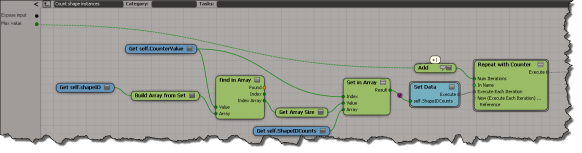
So basically, if I want shape 1 to have a weight of 4 (so that roughly it is used 40% of the time), I would build an array that looks something like this:
[0, 0, 1, 1, 1, 1, 2, 2, 3, 3]
Then I generate a random integer and use it to select from that array. Because the “1” appears more often in the array, in the long run it should be more likely to be randomly selected.

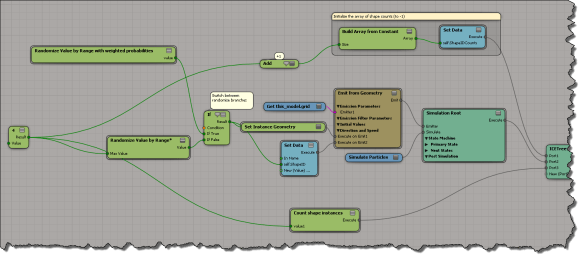
Here’s an ICE tree where I apply this technique:
weighted-random
scn file here if you want it

This is what goes on inside the compound where I randomly select from the “weighted array” of possible shape IDs:
weighted-randomize

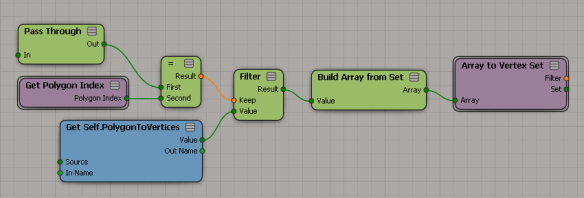
And here’s how I build an array with repeated values (the number of repetitions corresponds to the weight):
weighted-random3

To get an idea of whether this works on not, I keep track of the number of instances of each shape:
weighted-count-shapes

For example:
weight-example

Scripting – Finding the objects in different SimulationEnvironments


Here’s a script that goes through the SimulationEnvironments of a scene and find the 3d objects in each SimulationEnvironment. This snippet builds a dictionary of 3d objects, indexed by simulation environment.

from siutils import si
si = si()					# win32com.client.Dispatch('XSI.Application')
from siutils import log		# LogMessage
from siutils import disp	# win32com.client.Dispatch
from siutils import C		# win32com.client.constants

from xml.etree import ElementTree as ET

# Use a dictionary to store the 3d objects keyed by Environmen
dict = {}
for e in si.ActiveProject2.ActiveScene.SimulationEnvironments:
	stack = XSIUtils.DataRepository.GetConnectionStackInfo( e.SimulationTimeControl )
	xmlRoot = ET.fromstring( stack )
	for xmlConnections in xmlRoot.findall('connection'):
		o = xmlConnections.find( 'object' )
		dict[ si.Dictionary.GetObject( o.text ).Parent3DObject.FullName ] = e.FullName
		
log( "3DObjects and their SimulationEnvironments" )
for key, value in dict.items():
	log( "\t%s, %s" % (key,value) )

log( "" )

log( "SimulationEnvironments and 3DObjects" )
dictvals = set( dict.values() )
for env in dictvals:
	log( "\t%s" % env )
	list = [k for k, v in dict.iteritems() if v == env]
	for o in list:
		log( "\t\t%s" % o )

Here’s some sample output from the script:

# INFO : 3DObjects and their SimulationEnvironments
# INFO : 	pointcloud1, Environments.Environment
# INFO : 	Point_cloud_chaser.pointcloud2, Environments.Environment1
# INFO : 	grid, Environments.Environment
# INFO : 	Point_cloud_chaser.pointcloud1, Environments.Environment1
# INFO : 	pointcloud, Environments.Environment
# INFO : 	Point_cloud_chaser.pointcloud, Environments.Environment1
# INFO : 
# INFO : SimulationEnvironments and 3DObjects
# INFO : 	Environments.Environment1
# INFO : 		Point_cloud_chaser.pointcloud2
# INFO : 		Point_cloud_chaser.pointcloud1
# INFO : 		Point_cloud_chaser.pointcloud
# INFO : 	Environments.Environment
# INFO : 		pointcloud1
# INFO : 		grid
# INFO : 		pointcloud

Friday Flashback #97


I came across this SOFTIMAGE|3D photo in an article on rotoscoping. It shows ILM co-supervisor Tom Bertino working on one of ILM’s Flubber shots.
bertinoatwork

Once the background plate was scanned into ILM’s Silicon Graphics computers, the match movers went to work. “We’re able to bring up that clip in the computer in a Softimage 3-D environment,” says Bertino. “The matchmovers then took what’s seen on film and recreated it in primitive wireframe models.”
Breaking the Mold:Physics of Jell-O Inspires CGI Stars of Flubber

A little more time on Google led me to some postings on vimeo from Philip Edward Alexy, who was the lead technical animator on Flubber.

First of all, sorry for the quality: this was ripped from a DVD copy of a D-beta tape.
As you can see, there is a heck of a lot more going on that you would think for this shot. As you see at the beginning, there is the Blob Flubber sitting in the matchmove representation of Robin William’s hand. Now keep in mind, back then, all of the matchmove stuff, both camera and object geometry, was HAND-ANIMATED. There was a crew of guys from the old practical ILM shop who transferred into the digital side: some of these guys worked on “Empire Strikes Back” and onwards, so they knew how cameras worked and were able to use this experience to do the one thing that made ILM stand out back then, properly reconstruct scene and camera information into the computer.
So we have the Blob sitting there, with what appears to be somesort of orthopedic back-brace and a black fuzzy alien sitting in its belly. Well, the “brace” is in fact the up-vector construct I had to develop because the Meta-Clay elements that made up the Blob Flubber where not spherical, they were shaped like overlapping mass of blobby M&Ms because when the client want to get away from the “pear-shaped” Flubber that spherical Meta-Clay created. BUT, Softimage3|D didn’t have up-vector constraint and (of if it it, it did not work well at all) when they were lined up on the cluster-deformed path spline that held them in place, they would start flipping randomly along the shortest axis. This was bad because it looked like the Flubber was having a seizure when animated. So I had to invent an up-vector constraint that worked consistently. So that’s what the “brace” is, which had to be, at times, key-framed to prevent the flipping.
So what’s that alien? Why it’s the Puppy Flubber rig, elements and geometry, all compressed, waiting for the moment Robin Williams sticks his fingers into the Blob Flubber. Presto-change-o, without any quick cutting or changing of the scene file because of the nature of Meta-Clay, the Puppy Flubber pops up, all ready and IK-rigged, and the Blob Flubber lines up inside the body part of the Puppy.

The puppy design, by Scott Leberecht, had to be envisioned with the tools at the time, which was Meta-Clay balls in Softimage 3|D. If you had ever used that tool, you would understand what a task it was to get the right shape, and then rig it so it could be animated.

At the time, it was the densest CGI structure ever made. There were about three hundred Meta-Clay elements, all spine/spline/cluster controlled. It took about two minutes just to refresh to the next frame. It took me about two months to build and rig.

A bit of test animation, to show that ILM could actually DO the Character Flubber, that ended up in the official Disney trailer.
Little bit of trivia: all those bubbles you see? They’re not part of the shader: those are all individual pieces of geometry that are parented to the rig. Sometimes, because they would fly out of the mesh depending of the pose, they had to be key-framed

This one shot took a year to do. Seriously.

Finally, in a Word document at ncca.bournemouth.ac.uk, I found this. It’s attributed to a no-longer existing page at Philip Edward Alexy’s web site.

“We had thought of doing something where we could use B-spline patches that we could shape animate over time. But, that wasn’t practical because Flubber changed so much within a sequence that it would have been too time-prohibitive to model all the different forms. Even when he was just a little blob he changed so much that to do it using patches, shape animation and lattices just wouldn’t work.”

“Since the Flubber character was composed almost entirely of metaballs, the animators could easily turn him into anything from a pair of lips to a tail-wagging puppy to a hip-shaking mambo dancer. In addition to Softimage, ILM developed several custom effects to turn a blob into everything that blobs could possibly become within the animators’ collective imagination. Several Flubber models were developed: the Basic Blob, a male and female Actor-Flubber, a Scare-Flubber, a Puppy-Flubber, a Fingers-Flubber, a Bubble-Flubber and several others – each more difficult to pronounce in rapid succession.”
http://www.flyingsheep.org/work/resume/html/resume_pub_flub.html

Checking the environment of a running program


Sometimes when you’re troubleshooting, it’s a good idea to check the environment in which Softimage is running.
You can check specific environment variables in the script editor like this:

import os
print os.getenv( "XSI_USERHOME" )
print os.getenv( "TEMP" )

or like this:

print XSIUtils.Environment("XSI_BINDIR")

But I would typically use Process Explorer to see the full environment:
ProcessExplorer_Environment
or Process Monitor (in Process Monitor, you just have to find the Process Start operation for XSI.exe and double-click it).
ProcessMonitor_Environment