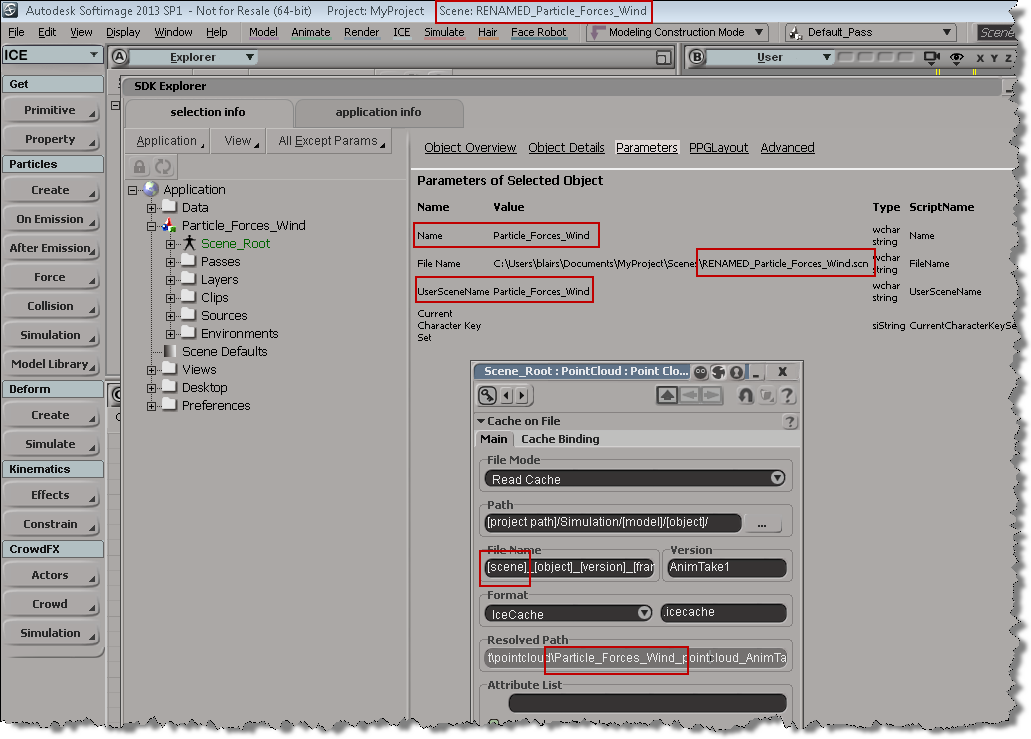
Some insight into how MatchMover (and Composite) network licensing works, and a “how to set environment variables” for those who don’t normally have to mess around with that sort of thing.
http://vimeo.com/48365527
LMTOOLS: Putting the debug log in append mode
By default, every time you restart the license server, it overwrites the existing debug log file.
You can put the license server into “append” mode for logging, so that the log file isn’t cleared every time you restart the server.
To put the log into “append” mode, just add a plus sign (+) before the name of the file.
You won’t be able to View Log from LMTOOLS, but you can open the log file with your favorite text editor.
Screenshots of the week
CrowdFX
by Mark Schoennagal
UI display problems that can be fixed by updating graphic driver
by Maximus

Quick Muscle
by Paul Smith
Bend Paper
by Ендукъ

Making rotational shapes
by Paul Smith
Licensing troubleshooting on Linux
Troubleshooting licensing problems on a Softimage Linux workstation? Here’s a quick summary of some things to look for on the workstation:
- The Location of the license server is specified by the ADSKFLEX_LICENSE_FILE environment variable that is specified in /usr/Softimage/Softimage_2013/.xsi_2013.
- The file ~/.flexlmrc can also be used to specify the license server location:
ADSKFLEX_LICENSE_FILE=@example:@mtlicserver
If Softimage can’t check out a license from the server specified in .xsi_2013, then it tries the servers listed in ~/.flexlmrc. The .flexlmrc lists all the license servers from which Softimage has checked out licenses.
- There is a licensing log file named /var/tmp/SoftimageLicense.log. This log file will contain entries that look like this:
18377 2011/06/23 19:18:59 Reason=Fatal error 18377 2011/06/23 19:18:59 ComputerName=localhost.localdomain 18377 2011/06/23 19:18:59 OS=2.6.35.6-45.fc14.x86_64 18377 2011/06/23 19:18:59 File=AdlmIntNWFBLicense.cpp,Line=766 18377 2011/06/23 19:18:59 VendorID=3 [FLEXLM-NW] 18377 2011/06/23 19:18:59 VendorError=-18 [Server does not support this feature] 18377 2011/06/23 19:18:59 FLEXLM-NW=v11.9.0.0 build 87342 x64_lsb 18377 2011/06/23 19:18:59 Reason=Fatal error 18377 2011/06/23 19:18:59 ComputerName=localhost.localdomain 18377 2011/06/23 19:18:59 OS=2.6.35.6-45.fc14.x86_64 18377 2011/06/23 19:18:59 File=AdlmIntNWFBLicense.cpp,Line=749 18377 2011/06/23 19:18:59 AdlmIntError=20 [License check out failed]
- Setting FLEXLM_DIAGNOSTICS to 3 didn’t get me any diagnostics messages or logs, but I did find those diagnostics in the strace log (just search for “FLEXnet”). See this post for more info on the FLEXLM diagnostics in the strace log.
Friday Flashback #84
Scripting – How to get the active objects for component selection
When you’re in a component selection mode (such as Edge, Polygon, or Point), the active objects are highlighted in orange. The “active objects” are the objects that are “active for component selection”.

When Softimage is in a component selection mode, the Selection will either by empty or it will contain CollectionItems (one for each object with selected components).
So, how do you get the active objects? Here’s one way, using the little known, magical “.[obj].”:
# Python import win32com.client oActiveObjects = win32com.client.Dispatch( "XSI.Collection" ) oActiveObjects.Items = ".[obj]."
// JScript var oActiveObjects = new ActiveXObject( "XSI.Collection" ); oActiveObjects.Items = ".[obj].";
Using wildcards and string expressions to find objects by name
From Ciaran on the XSI mailing list, here’s a good example of how to find all light nulls whose names contain “lamp” or “light”:
oLightNulls = oModel.FindChildren2("{*light*,*lamp*}",c.siNullPrimType)
The curly brackets {} are used in a string expression to specify a list of objects.
That String Expressions page still looks pretty much the same as it did back in 1999, when I first wrote it!
About the Selection Change Command
In the Selection preferences, there’s a Selection Change Command text box where you can type in a command to run when the selection changes.

Here are two important points about the Selection Change Command:
- Use the VBScript syntax to enter the command. It doesn’t matter what the current scripting language is, the preference expects VBScript (so something like Application.LogMessage( “Hello %s” % Application.Selection(0) ) will end up logging an error when you select something).
- The Selection Change Command is triggered when you select something in a 3D viewport. The command isn’t triggered when you select an object in the explorer.
Whoops I guess Softimage did need that sitecustomize.py file…
Awhile back, I wrote a little script that used ElementTree to parse the XML returned by GetConnectionStackInfo. I posted the 2013sp1 version of the script here.
Anyway, I was a little surprised when I couldn’t get the script to run in 2012 SAP. I was sure that it used to work, but now it was giving me this error:
# ERROR : Traceback (most recent call last): # File "<Script Block >", line 17, in <module> # connections = ET.XML(stackInfo) # File "C:\Program Files\Autodesk\Softimage 2012.SAP\Application\python\Lib\xml\etree\ElementTree.py", line 962, in XML # parser = XMLTreeBuilder() # File "C:\Program Files\Autodesk\Softimage 2012.SAP\Application\python\Lib\xml\etree\ElementTree.py", line 1118, in __init__ # "No module named expat; use SimpleXMLTreeBuilder instead" # ImportError: No module named expat; use SimpleXMLTreeBuilder instead # - [line 17]
After digging into the problem a bit, I found that the Softimage install did indeed include expat, but Softimage wasn’t finding it…because I had deleted the Application\python\Lib\sitecustomize.py file!!! Doh.
I had deleted sitecustomize.py while investigating a problem report from a customer, and then I didn’t bother putting it back, because Python was still working in general.
sitecustomize.py adds paths like %XSI_HOME%\Application\python\DLLs to the sys.path, and pyexpat.pyd is in that DLLs folder.
Screenshots of the week
Bake ICE data
by Oleg

Align center using faces
by Alan Fregtman

ICE: Emulating Maya Bones
by Alan Fregtman

No Rig muscles
by Paul Smith