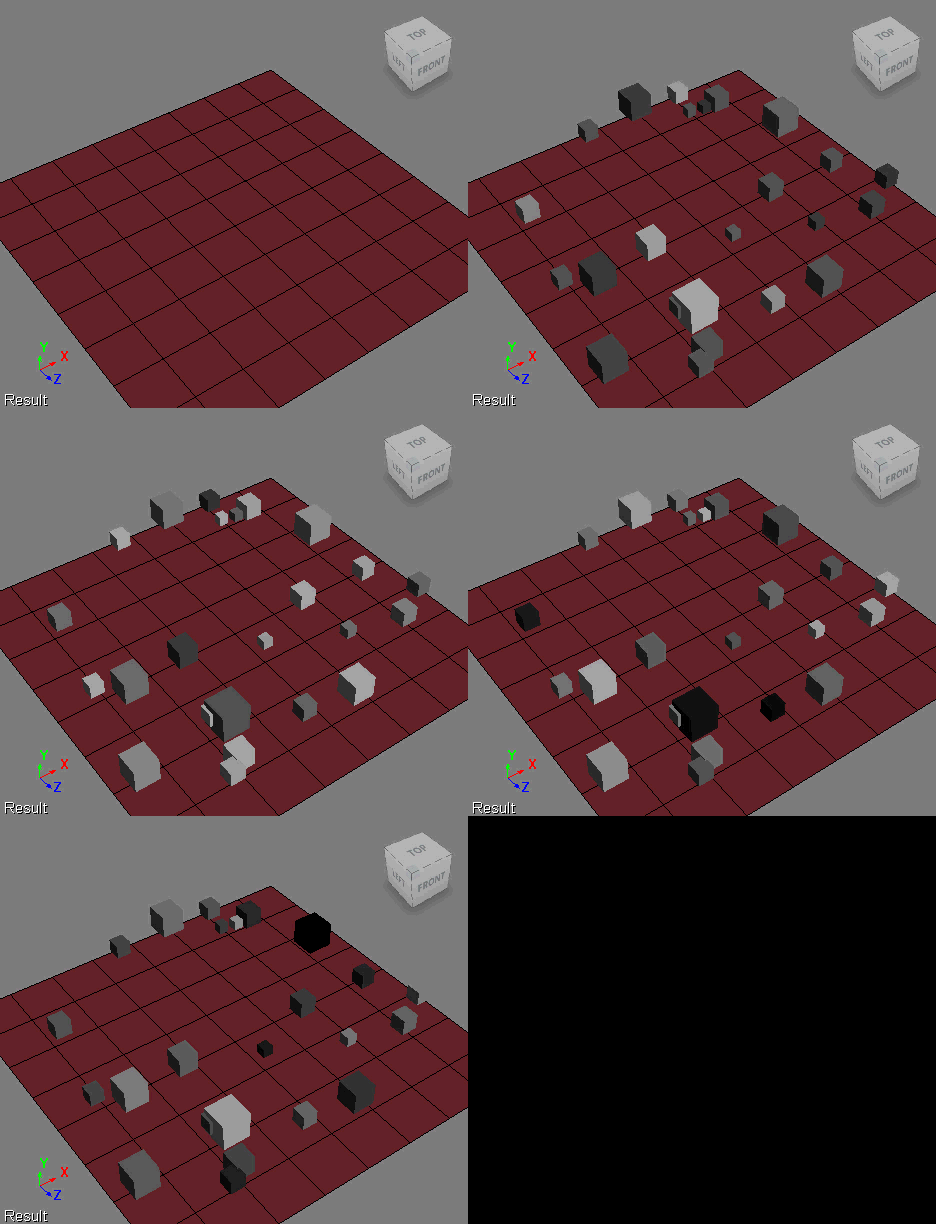
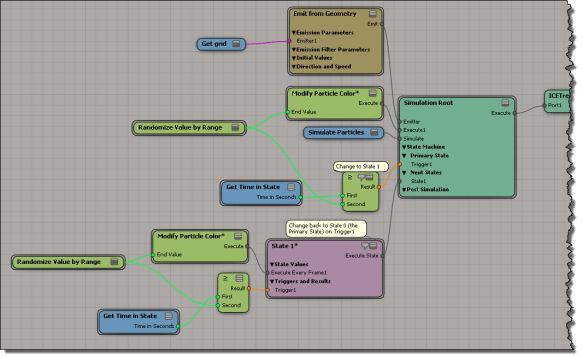
Here’s an ICE tree that uses a simple two-state setup to gradually move particle colors through two gradients (in State 0, the gradient is from black to white, and in State 1, from white to black). Randomizing the End Time gives me some variation between particles, and I customized the Modify Particle Colors to use “time in state” so I could use that as the trigger test.
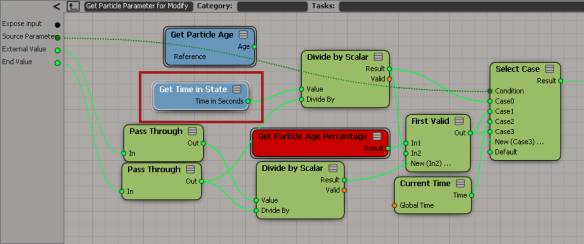
In the Modify Particle Color compound, I simply swapped Get Particle Age for Get Time in State.

Tag Archives: Softimage
Building an array for weighted random selection
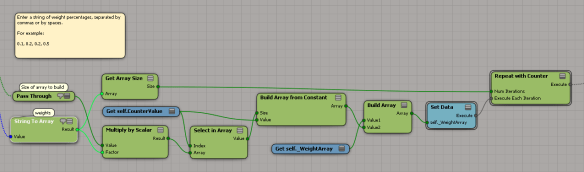
Here’s a little ICE tree that takes an array like
[ 0.1, 0.2, 0.2, 0.5 ]
and builds an array where
- 10% of the elements have value 0
- 20% of the elements have value 1
- 20% of the elements have value 2
- 50% of the elements have value 3
This is something I wanted to do for randomizing with weighted probabilities. The array [ 0.1, 0.2, 0.2, 0.5 ] is the weights I want to use for the values 0, 1, 2, and 3. The idea is that if I randomly select from the larger array, the weights will determine how likely I am to get each value (eg if 50% of the elements have value 3, then I’ll be much more likely to get that value when I randomly select).
To automatically build the array, I had to use a Repeat with Counter; I didn’t see around that.
So, for example, in an array of 1000 elements, I would have 100 elements with the value 0, 200 elements with the value 1, 200 elements with the value 2, and 500 elements with the value 3.
That works fine if the input array of weights adds up to 1, but what if I start with an array like [2 4 2 8 16] ?
To handle that, I need to make a small change:
Scripting – Shuffling a collection to randomly select by percentage
Via a tech-artists.org tweet, I came across some MAXScript for randomly selecting a specified percentage of mesh elements (for example, give me a random selection that includes 35% of all vertices).
I converted it to Python in Softimage. Note that I don’t really shuffle a collection: you can’t set items in a collection, so there’s no way to swap items. Instead, I put the collection in a list and shuffle the list.
Shuffling actually makes this harder than it has to be. Check out Alan’s nice script for a better way to do this.
si = Application
log = si.LogMessage
sisel = si.Selection
#http://creativescratchpad.blogspot.ca/2011/06/select-random-elements-by-percentage.html
import random
#
# Return a list that includes a randomly selected
# percentage of the items in a collection
#
def get_random_percentage( collection, percentage ):
v = [x for x in collection]
# random shuffle
for i in range( len(v) ):
j = random.randint( i, len(v)-1 )
v[i], v[j] = v[j], v[i]
# select by percentage
step = 100/percentage
w = []
for i in xrange( 0, len(v), step ):
w.append( v[i] )
# print len(w)
# print (percentage/100.0) * len(v)
return w
Application.SelectObj("torus", "", True)
# Select a random 50% of the vertices
x = get_random_percentage( sisel(0).ActivePrimitive.Geometry.Vertices, 50 )
si.SelectObj(x)
print sisel(0).SubComponent.ComponentCollection.Count
# Suppose you had 2000 cubes.
# Select a random 25% of those 2000...
Application.SelectObj("cube*", "", True)
x = get_random_percentage( sisel, 25 )
si.SelectObj(x)
I learned a couple of things about MAXScript:
- MAXScript arrays are 1-based
- In the MaxScript docs, there aren’t any function/method reference pages. You have to go to a “value” page (eg Number Values) and there you’ll find all the methods. That’s fine once you know, but it was confusing at first when I didn’t see anything in the TOC for Functions or Methods.
Saturday Snippet – XSICollections and CollectionItems
When you stick something, like say a Vertex, into an XSICollection, you get a CollectionItem. But you can get back to the Vertex if you know how (via the SubComponent
).
si = Application log = si.LogMessage sisel = si.Selection import win32com.client oColl = win32com.client.Dispatch( "XSI.Collection" ) o = sisel(0) print si.ClassName( o.ActivePrimitive.Geometry.Vertices(0) ) # Vertex #oColl.Add( o.ActivePrimitive.Geometry.Vertices(0) ) oColl.AddItems( o.ActivePrimitive.Geometry.Vertices ) print si.ClassName( oColl(0) ) # CollectionItem print si.ClassName( oColl(0).SubComponent.ComponentCollection(0) ) # Vertex a = o.ActivePrimitive.Geometry.Vertices(0) b = oColl(0).SubComponent.ComponentCollection(0) print a.IsEqualTo(b) # True print b.IsEqualTo(a) # True
Friday Flashback #99
In Dec 2012, there’s a rumor that ICE is “going to Maya” that’s causing some concern. Nobody wants to lose ICE 🙂
Let’s flash back five years to Dec 2007 when, in something of an ironic counterpoint, there was concern that rampant speculation about Moondust (aka ICE) would result in disappointment and a negative backlash.
…looking at all the nonsense floating around on the forums about Moondust, I already can see the negative posts when people realize it doesn’t do feature XYZ…
…It’s not going to go well for Softimage at launch if Moondust doesn’t meet expectations, and at this point, I’d be willing to bet that it won’t…
…Although it’s fun to speculate about Moondust, the over excited anticipation can only lead to disappointment…
Looking back, I don’t think that ICE did disappoint. What do you think?
The case of the dotXSISceneConverter that wouldn’t load into Maya
In this case, a customer installed Crosswalk for Maya, but he got “Unable to dynamically load dotXSISceneConverter.mll” errors when he tried to load the plugin.
// Error: line 1: Unable to dynamically load : C:/Program Files/Autodesk/Maya2013/bin/plug-ins/dotXSISceneConverter.mll The specified module could not be found. // // Error: line 1: The specified module could not be found. // // Error: pymel : Failed to get controlCommand list from dotXSISceneConverter // // Error: pymel : Failed to get modelEditorCommand list from dotXSISceneConverter // // Error: pymel : Failed to get command list from dotXSISceneConverter // // Error: pymel : Failed to get constraintCommand list from dotXSISceneConverter // // Error: pymel.core : Failed to get depend nodes list from dotXSISceneConverter // // Error: line 1: The specified module could not be found. (dotXSISceneConverter) //
Now, this is pretty much the same error you get in Softimage if your PATH is missing the C:\Program Files\Common Files\Softimage location. That’s where the main Crosswalk DLL is installed. To verify this, I fired up Dependency Walker and loaded dotXSISceneConverter.mll (the Maya Crosswalk plugin). And sure enough, I saw that the Maya plugin depends on Crosswalk_2013.0.64.dll (the other errors are for Maya DLLs, so they can be safely ignored, and anything about IESHIMS.DLL can always be ignored).
So the fix is to add the missing Common Files\Softimage path to the PATH environment variable. The Crosswalk installer is supposed to take care of adding C:\Program Files\Common Files\Softimage to the PATH environment variable, but in this case, it apparently didn’t.
Tip: Middle-click ICE tree connections to hide and show values
Screenshots of the week
Exploring the power of Non-Linear Character Setup with Autodesk Softimage
by Adam Sale

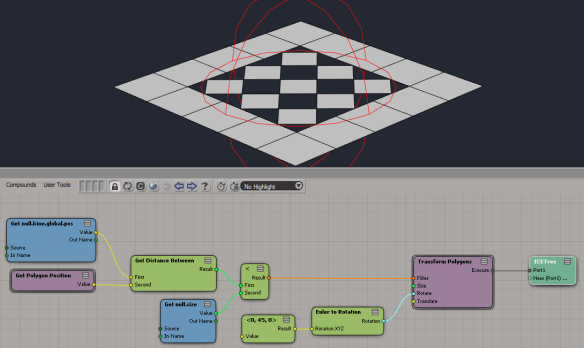
Transform polygons (from the PolygonTopoPack)
by iamVFX

Triple subdivide (with the latest PolygonTopoPack)
by iamVFX

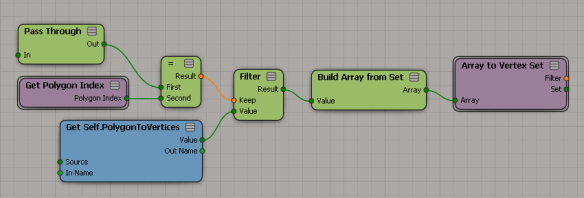
Change context from polygons to vertices (with the latest PolygonTopoPack)
by iamVFX

Squash Stretch Volume Preservation with ICE (Fstretch like)
Negative scalar slider range
by NNois

Friday Flashback #98
What were they talking about 15 years ago on the SOFTIMAGE|3D discussion group? Well, for one thing, they were wondering about “Sumatra (codename)” and whether they’d lose the beloved spartan SOFTIMAGE|3D interface:
Aside from the possibility of losing certain favorite tools I am very concerned with what Sumatra’s design will be like. I really love the spartan modular SI interface. It’s elegant, clean and very responsive.
I agree about the Interface. I really don’t care if they change the “look” of the interface, do that goofy rounded thing with the buttons, as long as they keep the functionality and general layout: The menu cells along eachside of the four views.
My vote is to KEEP THE SPARTAN INTERFACE. 10-15 hrs/day, I really don’t want to be looking at colorful icons and layers of hidden functionality collapsed into an insufficient number of modules.
The answer back from Softimage makes for interesting reading (keep in mind that “Sumatra (codename)” wouldn’t be released for another couple of years):
Subject: RE: Sumatra… revisited
From: Dan Kraus
Date: Mon, 22 Dec 1997 10:45:21 -0500——————————————————————————–
>I think we should all think about it and be a little concerned that
>after SIGGRAPH SI has not even whispered the word ‘Sumatra.’Although we’ve been coding hard since well before Siggraph ’96, we
haven’t spoken too much about it, except at the yearly Siggraph users’
group, because we want to be certain of our ship date before starting to
set concrete user expectations.Sumatra is a complete replacement for the currently 3D product –
modelling, animation, rendering, particle, mental ray, etc, all
integrated into a single, seamless multi-threaded environment. We’re
coding Sumatra simultaneously both on IRIX and NT – there’s no ‘port’
involved this time, which also means that we get to take max advantage
of the hardware on both sides. Of course, there’s a lot of new tools –
performance, modelling/animation, etc – but our first priority is the
v3.7 toolset, to guarantee that you can use Sumatra for exactly the same
thing for which you use SI3D today.Sumatra will actually be preceded by Twister – a standalone rendering
product which uses the Sumatra interface/architecture, and also
incorporates the next-gen of mental ray (v2.0). Twister is designed to
be used in tandem with SI3D, so you can start using/learning the new
interface as you’re comfortable, and integrate it into your current
workflow.We currently expect Twister to ship in Q3 (Calendar) of ’98, and Sumatra
(Q4). This is behind our original target dates, but we want to be
completely certain that Sumatra is a true replacement for the current 3D
product. From the upgrade point of view, we’ll be treating Sumatra as
the release version of SI3D, which means users under maintenance will
recieve an automatic upgrade, just as you would to a point release or
service pack.>>I wanna know what the interface will look like
Can’t blame you 😉 One of the most time-consuming tasks of the
Sumatra/Twister effort has actually been understanding and replicating
the existing user model. This extends way beyond pure interface issues,
and it’s taken us almost 2 years of work with our PM and internal
development teams (including several professional animators) to
guarantee that we understand why and how data is passed through Soft,
and propose an interface re-design which improves on what we have today.
We also have the benefit of having a true in-house production team (the
Softimage Content Group), who works closely with us on tool design,
putting things into immediate practice as soon as they’re coded.Here’s a peek at a few of the key UI issues, and what’s happening:
Speed of Access – things like parent, cut etc are not available in all
the modules in Soft. One of the things you’ll notice when working with
Sumatra is that the right-hand panel provides you with all the general
controls you need – all the time.Tools Organization – The Sumatra UI puts things in more sensible and
intuitive places, yet respecting where the most important controls (ex keyframe)
sit today.Quick Selection Model – Sumatra has filters and presets which make life
much easier by not just making them ‘unselectable’ as is the case in
v3.7SP1, but actually letting you pre-select the type of objects you
want to grab. Makes repeated actions on a certain object type a whole
lot easierExisting Workflow – The Sumatra UI has been designed with a constant
preoccupation (‘obsession’ is probably more accurate, actually 🙂 with
maintaining the existing workflow. Specifically, things like keeping all
the major tools two clicks away, providing contextual menus (ok, that’s
new :-), work-centric focus (manage your character, not the tools) – and
most of all, pure interface speed.Please keep the comments coming, and keep an eye on our web page early next year – we’ll start rolling out the info as we draw closer to ship.
Cheers,
Dan____________________________________________
Dan Kraus Softimage/Microsoft
Product Manager, 3D Montreal, Quebec
There was also a side-discussion of whether or not a context-sensitive UI would be a good thing; surprisingly (to me at least), opinion seemed to be split on that.
Showing per-sample colors in ICE
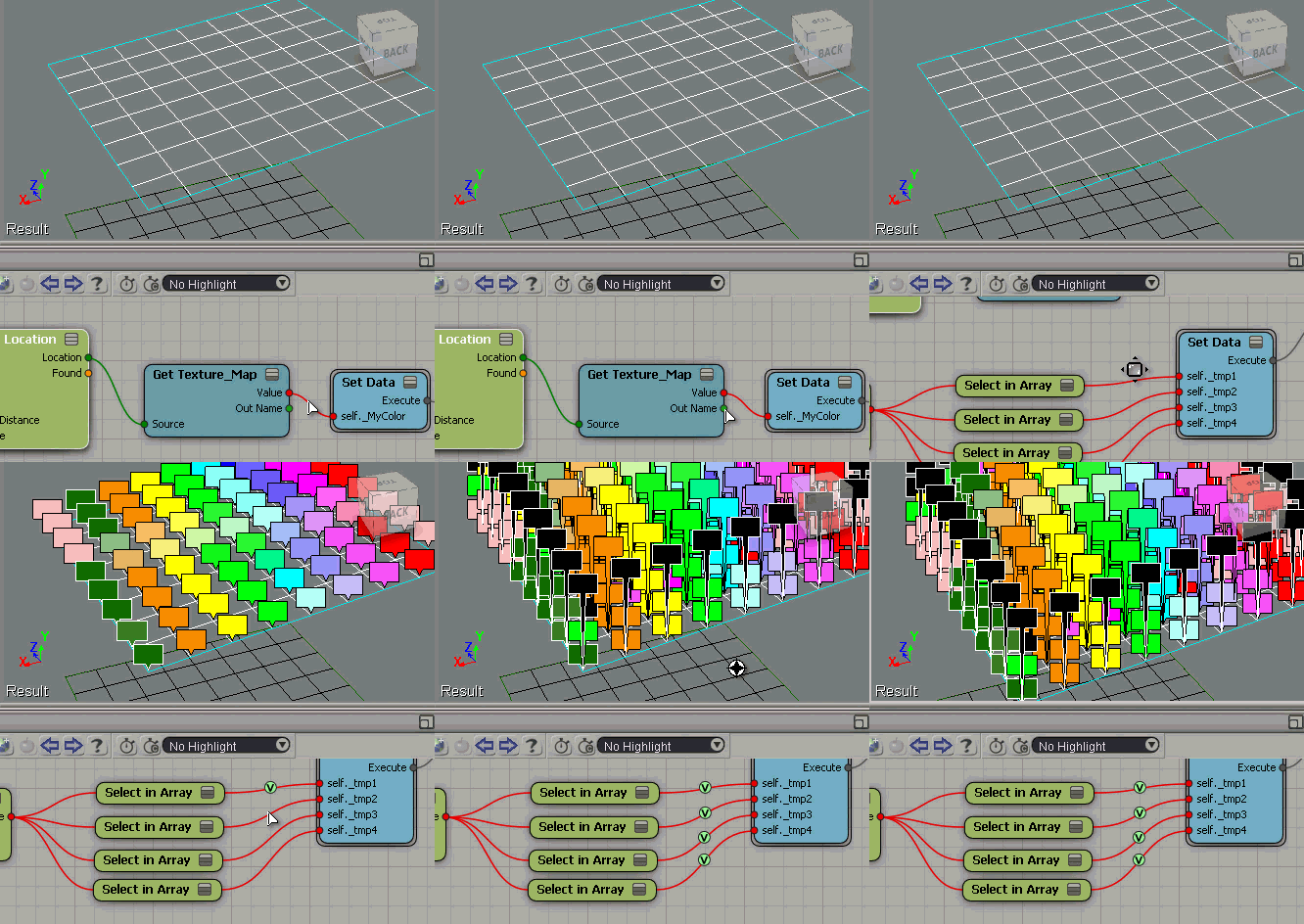
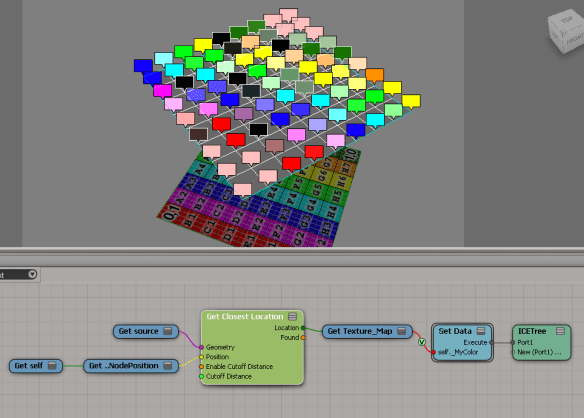
Suppose you have some per-sample attributes on a mesh. For example, suppose you’re getting the texture map colors from another mesh like this:

The Show Values makes it look like you’re getting one color per vertex, but that’s not true.
If you do a Show Values like this (numeric), you’ll see that you’re getting multiple values (one per sample).

To see all the values as colors, you need to offset each Show Value. Otherwise they just stack up on each other, and it looks like just one color.