Python – Getting the Softimage version numbers from the registry


This Python snippet will get the version numbers for the different versions of Softimage installed on the local system.

#http://docs.python.org/library/_winreg.html
from _winreg import *
t = OpenKey(HKEY_LOCAL_MACHINE, r"SOFTWARE\Softimage\CoExistence", 0, KEY_READ )

try:
    count = 0
    while 1:
		name = EnumKey(t, count)
		sKey = "SOFTWARE\Softimage\CoExistence\%s" % name
		t1 = OpenKey( t, name, 0, KEY_READ )
		value = QueryValueEx(t1, "AppVersion" )
		Application.LogMessage( "%s: %s" % (name.rsplit('|',3)[1], value[0]) )
		count = count + 1
except WindowsError:
    pass

On my machine, the script output looks like this:

# INFO : Softimage 2011 SP1: 9.1.91.0
# INFO : Softimage 2011 SP2: 9.2.102.0
# INFO : Softimage 2011 Subscription Advantage Pack SP1: 9.6.194.0
# INFO : Softimage 2011: 9.0.243.0
# INFO : Softimage 2012.SAP: 10.5.98.0
# INFO : Softimage 2012: 10.0.422.0
# INFO : Softimage 2013 SP1: 11.1.1.0
# INFO : Softimage 2013: 11.0.525.0
# INFO : Softimage_2010_SP1_x64: 8.0.249.0
# INFO : Softimage_2010_x64: 8.0.201.0
# INFO : Softimage_7.5_x64: 7.5.191.0
# INFO : XSI_7.01_x64: 7.01.698.0

Friday Flashback #79


I found this screenshot in an 1999 interview on gamedev.net:

Sumatra multibot

Here’s the interview:

Recently I had the pleasure of speaking with some representatives from Softimage about their new versions of Softimage 3D and Sumatra and their uses for game developers. The following is taken from a recording of a phone conversation with Michael David Smith (Program Manager 3D Model), Gareth Morgan (Program Manager of 3D Interactive Media Tools) and Véronique Froment (Public Relations Manager) as a precursor to an interview we’ll be conducting at the GDC.

GDNet: A lot of our readers probably know you by reputation as a leader in the 3d modelling and animation world. For those who aren’t familiar with your products, which are you targeting to be used by game developers?

SI: We’ve got a new product coming up called Sumatra that we’ve been working on for a few years and that’s going to have some pretty good stuff in it, both for game development and our more traditional work.

Actually the game market has become quite a significant part of our focus and we’ve been very successful in the Japanese game market.

GDNet: Do you think that’s because the Japanese market is more console oriented and they have more budget for their games?

SI: That may be true, I don’t know exactly the real reason, but we are working with a number of game companies in North America, but perhaps we are more successful with companies in Japan.

GDNet: You’re starting to do a game SDK, for plugins for exporting data from Softimage. Can you tell us a little about that?

SI: We’ve had an SDK for plugins for Softimage for a few of years now, and a number of games companies told us it was too low level. So responding to that we produced the GDK (Game Development Kit), which is closely tied into C++ to provide powerful access to data that can be used in a game.

There are a whole bunch of functions for optimizing and filtering the data, as well as ASCII based file formats with a host of parsing functions. For low level the SDK goes a lot deeper, allowing people to implement their own topologies as well as tool interfaces.

GDNet: Have you thought about in the future as hardware evolves, possibly providing any kind of real time engine support as well as your content creation tools?

SI: As time goes on and the systems get more powerful, we can do more things on-target, but its not something we are looking at doing in the short term. We’ve always done on-target viewing on the Nintendo and PSX, so developers could see it there using a playback engine. That is a very different thing than having a full game engine though. So, we have experience with on target platforms, and have a good idea on how to do that, but right now our focus is on getting the new generation of our tools out there.

GDNet: Sounds like a good plan, you guys are already doing a great job with your content creation so far; from the feedback I’ve gotten Softimage is considered the premier high end content creation tool. One of the issues I know of is that the tools are priced over what a lot of people can afford, are you looking at doing any different pricing models to open up the availability for more users?

SI: In the new technology we will have the opportunity to do something with this as its much more modular. We don’t have any specific plans right now, as we just want to roll it out, but it will be easier to do this with the Sumatra technology than in the past.

With Sumatra you can manipulate larger amounts of data, without having to deal with all the underlying details and this will also allow us to work with the modular system. It can be used separately for people with limited experience to do animations.

GDNet: For people who only get updates at the conventions every year or so, what would you say are the biggest changes for your software in the past year?

SI: The Sumatra tools and some high level animation tools that allow character animation to be created in a shorter period of time, with a higher level of control. We are now developing ways to get that high level of quality for video, down to working in a way that can be used for the game platforms. We’re concentrated on creating a set of tools and a file format for rich interactive media and game file formats, to take information from Softimage or Sumatra and import it into the game with parsers. We offer lots of examples that are designed to help game developers get things into their games quickly. In terms of what’s coming, we are on the verge of shipping Beta 3 of Sumatra which looks like its going to be the final beta.

An example of how Sumatra is going to help with gaming is that you can use a variety of scripting languages to get in and massage the data that is created. Because the Sumatra architecture is modular, you can use the tools more easily with your pipeline. Sumatra allows you to integrate your data into your pipeline by taking just the information that you need which will help game developers transition into using it easier.

GDNet: Thanks for taking the time for the interview, I’m sure our readers are looking forward to hearing more about your products and seeing an evaluation review as well!

Interview by Geoff Howland.

ICE powers of 10 array


In ICE, how would you generate an array like [1, 10, 100, 1000, 10000, 100000, …] without using a Repeat node ?

It might help to look at it this way:

1
10
100
1000
10000
100000

Once you recognize that you are looking at powers of 10, and recall that the basic Math nodes can handle arrays just as well as single values, the rest follows easily:

Getting actor data from CrowdFX


Update: oops, it looks like my script below works only in simple cases where you just one actor proxy. The ActorID seems to be a constant (perhaps unused???) and it looks like you have to take the point ID and then look up the corresponding entry in the CrowdFX_Actor_Indices array.

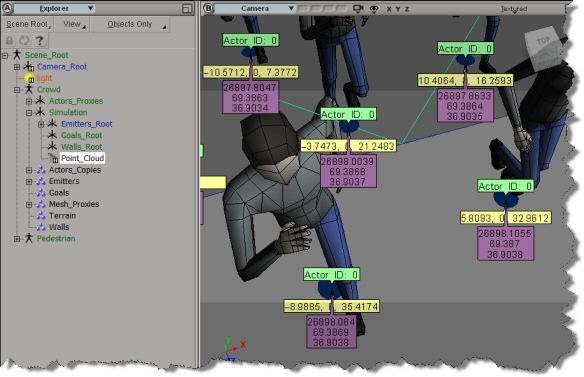
If you need to get info like the actor ID, the X and Z positions, and the animation frame from CrowdFX, you can get it from the Simulation Cloud.
In the screenshot below, I used three Attribute Display properties to display the following:

  • Actor ID (I have only one actor)
  • PointPosition
  • CrowdFX_Actor_CurrentFrameInCycle (an array for each action aka pose on the actor)
Here’s a little Python snippet that logs a comma-separated string that contains the Actor ID, X, and Z positions, PoseID, and CurrentFrameInPose.

Note the use of the logf function from the sipyutils.

#
# SOFTIMAGE 2013
#
from sipyutils import si			# win32com.client.Dispatch('XSI.Application')
from sipyutils import siut		# win32com.client.Dispatch('XSI.Utils')
from sipyutils import siui		# win32com.client.Dispatch('XSI.UIToolkit')
from sipyutils import simath	# win32com.client.Dispatch('XSI.Math')
from sipyutils import log		# LogMessage
from sipyutils import disp		# win32com.client.Dispatch
from sipyutils import C			# win32com.client.constants

from sipyutils import logf

si = si()

pc = si.Dictionary.GetObject( "Crowd.Point_Cloud" ).ActivePrimitive
aPtPos = pc.ICEAttributes("PointPosition")
log( len(aPtPos.DataArray) )

pos = pc.ICEAttributes("PointPosition").DataArray
ids = pc.ICEAttributes("CrowdFX_Actor_ID").DataArray
poses = pc.ICEAttributes("CrowdFX_PoseState_ID").DataArray
frames = pc.ICEAttributes("CrowdFX_Actor_CurrentFrameInCycle").DataArray2D

# ID, X, Y, Z, PoseState, CurrentFrameInCycle
for i in range( len(pos) ):
	logf( "%d, %f, %f, %d, %d", ids[i], pos[i].X, pos[i].Z, poses[i], frames[i][poses[i]] )

The output of this script for frame 126 of the CrowdFX_FooFighters sample scene looks like this:

# INFO : 0, -100.000000, 0.000000, 8.531111, 2, 154
# INFO : 0, -85.714279, 0.000000, 6.684280, 1, 111
# INFO : 0, -71.428574, 0.000000, 7.442898, 2, 131
# INFO : 0, -57.142853, 0.000000, -2.251395, 2, 132
# INFO : 0, -42.857143, 0.000000, 11.363565, 2, 97
# INFO : 0, -28.571426, 0.000000, 7.302890, 2, 149
# INFO : 0, -14.285706, 0.000000, 13.759472, 5, 217
# INFO : 0, 0.000000, 0.000000, 11.584186, 5, 186
# INFO : 0, 14.285721, 0.000000, 9.853815, 3, 167
# INFO : 0, 28.571442, 0.000000, 8.366404, 2, 141
# INFO : 0, 42.857147, 0.000000, 21.238329, 5, 163
# INFO : 0, 57.142868, 0.000000, 6.831881, 5, 222
# INFO : 0, 71.428589, 0.000000, -2.667232, 2, 201
# INFO : 0, 85.714294, 0.000000, 16.321472, 3, 236
# INFO : 0, 100.000000, 0.000000, 10.077105, 2, 93
# INFO : 0, -100.000000, 0.000000, -10.505310, 2, 154
# INFO : 0, -85.714279, 0.000000, -17.066412, 1, 83
# INFO : 0, -71.428574, 0.000000, -11.711117, 5, 152
# INFO : 0, -57.142853, 0.000000, -22.719725, 2, 142
# INFO : 0, -42.857143, 0.000000, -7.311695, 5, 127
# INFO : 0, -28.571426, 0.000000, -11.755372, 2, 151
# INFO : 0, -14.285706, 0.000000, -3.648053, 5, 191
# INFO : 0, 0.000000, 0.000000, -6.797891, 5, 177
# INFO : 0, 14.285721, 0.000000, -8.881895, 5, 101
# INFO : 0, 28.571442, 0.000000, -10.384384, 5, 158
# INFO : 0, 42.857147, 0.000000, 4.351840, 5, 166
# INFO : 0, 57.142868, 0.000000, -11.661755, 2, 178
# INFO : 0, 71.428589, 0.000000, -22.718691, 2, 171
# INFO : 0, 85.714294, 0.000000, -1.260182, 5, 127
# INFO : 0, 100.000000, 0.000000, -8.947992, 5, 123

The Foo Fighter pose state IDs are set here (there are actually eight Action Sources in the ActorProxy property, but not all of them are used).
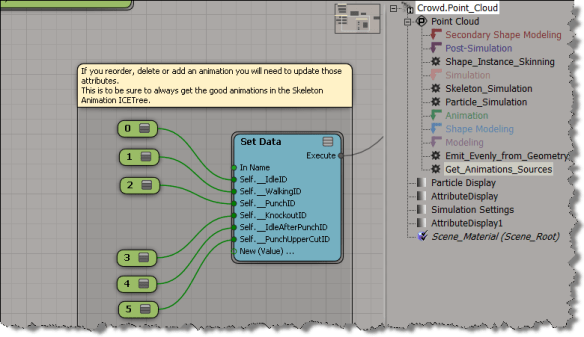
BTW, is it just me, or do the Attribute Display properties not work with the sample CrowdFX scenes? I was using the Foo Fighters sample at first, but I wasn’t able to show any attribute values, which made it a little harder to figure out what info was where.

Number of Undo Levels reset to zero


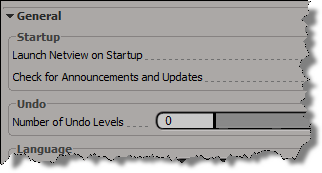
If you’re having problems with your Undo Levels being reset to zer0, it could be a C++ plugin that’s doing it (or less likely, a NetView page). C++ plugins (and NetView pages) that set the Undo Levels to 0 and then don’t restore it, either by oversight or because of a crash/error, can leave you with your Undo Levels set to 0.

In constrast, we prevent scripts and script-based plugins from changing the Undo Level permanently: as soon as the script finishes execution, Softimage resets the General.undo preference to its default value.

For example, if you run this in the script editor:

Application.SetValue("preferences.General.undo", 0, "")

You’ll see this logged in the script history:

# VERBOSE : Restoring preference changed by script: General.undo

Extruding random polygons with random lengths and random insets


Last month, Guillaume Laforge posted a Random Extrusion compound that can extrude polygons with random lengths and insets.

Guillaume noted that this compound was for Softimage 2013 only, but it appears that [with a tweak] you can get it to work in 2012 SAP.

When you import the compound into 2012, you’ll see a warning in the status bar/script history:

// WARNING : 3000-EDIT-AddICECompoundNode - Could not find node : BuildArrayFromSetNode

All you have to do is put back the missing Build Array from Set node, then the compound appears to work in 2012 SAP.

Custom wire colors in the palette revisited


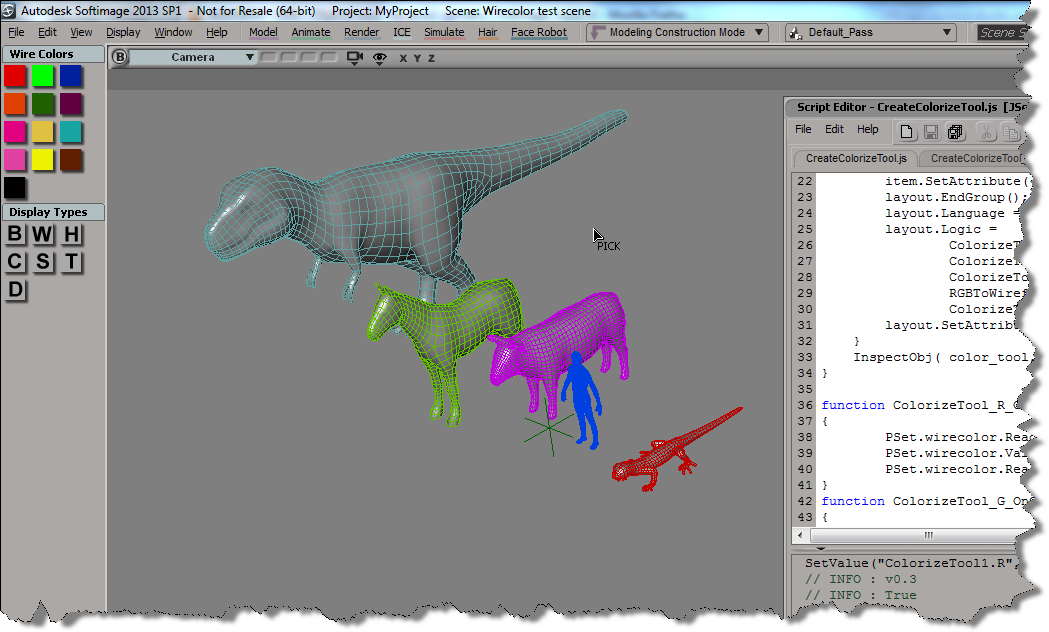
Here’s some updates to the wire frame color script I posted last week. See that post for info on how to add a button to the color palette.

First, I wanted to be able to pick multiple objects, one after the other. So I simplified the script by replacing most of the code with a single call to ColorizeObject, which does let you pick a sequence of objects.

CreateColorizeTool();
function CreateColorizeTool()
{
		var color_tool = XSIFactory.CreateObject( "CustomProperty" )
        if (color_tool)
        {
			var r = color_tool.AddParameter( "R", siDouble );
			var g = color_tool.AddParameter( "G", siDouble );
			var b = color_tool.AddParameter( "B", siDouble );
			var a = color_tool.AddParameter( "A", siDouble );
			
			var layout = color_tool.PPGLayout ;

			layout.AddGroup( "Color" );
			item = layout.AddColor( "R", "",true );
			item.SetAttribute( "NoLabel", true );
			layout.EndGroup();

			layout.AddRow();
			layout.AddButton( "ColorizeObject", "Colorize object" );
			layout.EndRow();

			layout.Language = "JScript" ;
			layout.Logic = ColorizeTool_ColorizeObject_OnClicked.toString();

			layout.SetAttribute( "LogicPrefix", "ColorizeTool_" ) ;
        }
        InspectObj( color_tool, "Colorize Tool", "", siLock ); 
}
function ColorizeTool_ColorizeObject_OnClicked()
{
		LogMessage( "v0.5" );
		ColorizeObject( PSet.R.Value,PSet.G.Value,PSet.B.Value );
}			

But this code doesn’t let you change the color in-between picks. So I modified the original example script and put a while loop around the call to PickObject (line 62), and I changed the script to get the colors directly from the color widget (line 78). That way, you can set the wire color, pick an object to apply the wire color, set another wire color, pick another object, and so on…

CreateColorizeTool();
function CreateColorizeTool()
{
	var color_tool = XSIFactory.CreateObject( "CustomProperty" )
    if (color_tool)
    {
		var color_tool = ActiveSceneRoot.AddCustomProperty( "ColorizeTool" );
		var wirecolor = color_tool.AddParameter( "wirecolor", siInt4 );
		wirecolor.ReadOnly = true;
		var r = color_tool.AddParameter( "R", siDouble );
		var g = color_tool.AddParameter( "G", siDouble );
		var b = color_tool.AddParameter( "B", siDouble );
		var a = color_tool.AddParameter( "A", siDouble );
		var layout = color_tool.PPGLayout ;
		layout.AddRow();
		var item = layout.AddItem( "wirecolor", "wirecolor" );
		item.SetAttribute( "NoSlider", true );
		layout.AddButton( "ColorizeObject", "Colorize object" );
		layout.EndRow();
		layout.AddGroup( "Color" );
		item = layout.AddColor( "R", "",true );
		item.SetAttribute( "NoLabel", true );
		layout.EndGroup();
		layout.Language = "JScript" ;
		layout.Logic = 
				ColorizeTool_R_OnChanged.toString() + 
				ColorizeTool_G_OnChanged.toString() + 
				ColorizeTool_B_OnChanged.toString() + 
				RGBToWireframeColor.toString() + 
				ColorizeTool_ColorizeObject_OnClicked.toString();
		layout.SetAttribute( "LogicPrefix", "ColorizeTool_" ) ;
	}
	InspectObj( color_tool, "Colorize Tool", "", siLock ); 
}

function ColorizeTool_R_OnChanged()
{
        PSet.wirecolor.ReadOnly = false;
        PSet.wirecolor.Value = RGBToWireframeColor(PSet.R.Value,PSet.G.Value,PSet.B.Value);
        PSet.wirecolor.ReadOnly = true;
}
function ColorizeTool_G_OnChanged()
{
        PSet.wirecolor.ReadOnly = false;
        PSet.wirecolor.Value = RGBToWireframeColor(PSet.R.Value,PSet.G.Value,PSet.B.Value);
        PSet.wirecolor.ReadOnly = true;
}
function ColorizeTool_B_OnChanged()
{
        PSet.wirecolor.ReadOnly = false;
        PSet.wirecolor.Value = RGBToWireframeColor(PSet.R.Value,PSet.G.Value,PSet.B.Value);
        PSet.wirecolor.ReadOnly = true;
		PSet.Refresh();
}
function ColorizeTool_ColorizeObject_OnClicked()
{
		LogMessage( "v0.3" );
        var color = PSet.wirecolor.Value;
        var o = null;
        var siRMB = 0;
        var button = -1, modifier;
        while (button != siRMB )
        {
				LogMessage( button != siRMB );
                Application.StatusBar ="Pick object to colorize";
                var rtn = PickObject( "Select object", "");
				button = rtn.Value("ButtonPressed");
				modifier = rtn.Value("ModifierPressed");
				o = rtn.Value("PickedElement");
				
				if ( o != null )
				{
					var display = o.Properties("Display");
					if (display.isa(siSharedPSet))
					{
							display = MakeLocal( display, siNodePropagation )(0);
					}
					display.wirecol.Value = RGBToWireframeColor(PSet.R.Value,PSet.G.Value,PSet.B.Value);
				}
        }
        if ( button == siRMB )
                return;

        return color;
}
// Convert wireframe color index to double-precision RGB color
function WireframeColorToRGB(lWireframeColor)
{
        var aColor = new Array(3);
        aColor[0] = ((lWireframeColor >>> 1) & 0x7)/7;
        aColor[1] = ((lWireframeColor >>> 4) & 0x7)/7;
        aColor[2] = ((lWireframeColor >>> 7) & 0x7)/7;
        return aColor;
}
// Convert double-precision RGB color to wireframe color index
function RGBToWireframeColor(dR,dG,dB)
{
        // Convert RGB to wirecolor
        var wirecolR, wirecolG, wirecolB;
        wirecolR = (Math.round(dR * 7)) << 1
        wirecolG = (Math.round(dG * 7)) << 4
        wirecolB = (Math.round(dB * 7)) << 7
        return wirecolR | wirecolG | wirecolB;
}