Here’s a little intro video that shows how to chain together some ICE Modeling nodes to build extrusions on top of extrusions.
See Extrude and extrude and extrude… on si-community.

Here’s a little intro video that shows how to chain together some ICE Modeling nodes to build extrusions on top of extrusions.
See Extrude and extrude and extrude… on si-community.
A few people have asked me about the new “Python-specific” methods added in the Softimage 2013 SDK.
Basically, these new “Python-specific” methods are wrappers for the existing methods. What the new, Python-specific versions do is make sure you get back an object that supports all the advertised methods and properties of the class hierarchy.
For example, Menu is a subclass of MenuItem, and Menu adds new methods like AddCommandItem().
Menu.AddItem() returns a Menu object that supports all the MenuItem methods and properties, but doesn’t support the Menu methods and properties, such as Menu.AddCommandItem().
Menu.AddItem2() , on the other hand, returns an object that supports all the MenuItem and Menu methods and properties.
I blogged about the Menu.AddItem() problem awhile back.
Python-specific methods
Crowd coloring
by Steve Caron

Softimage 2013, HQVP test
by Siddharth Bolurker
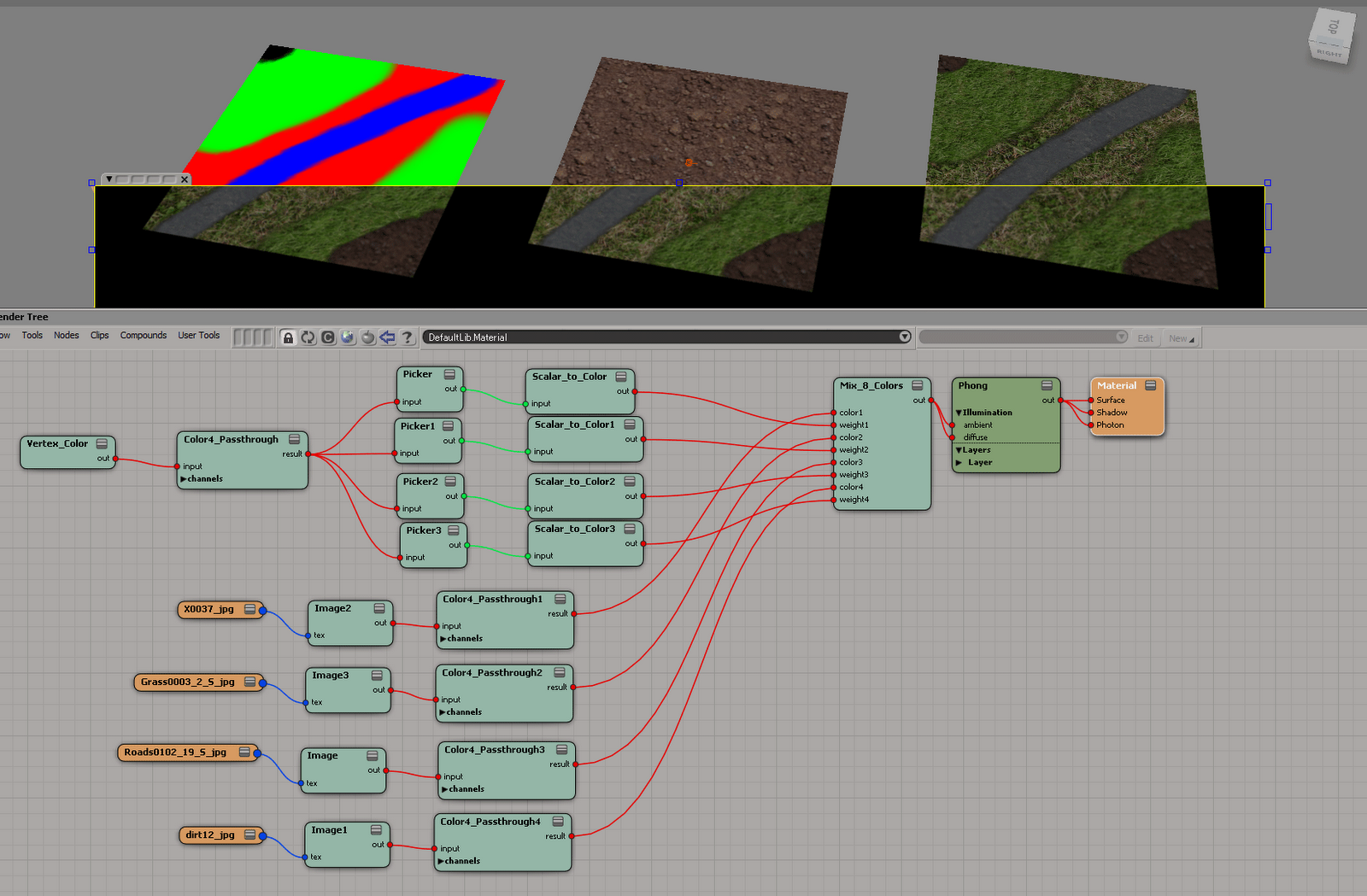
Masks in vertex colors
by p-diary
Partial Gator
by Nabe
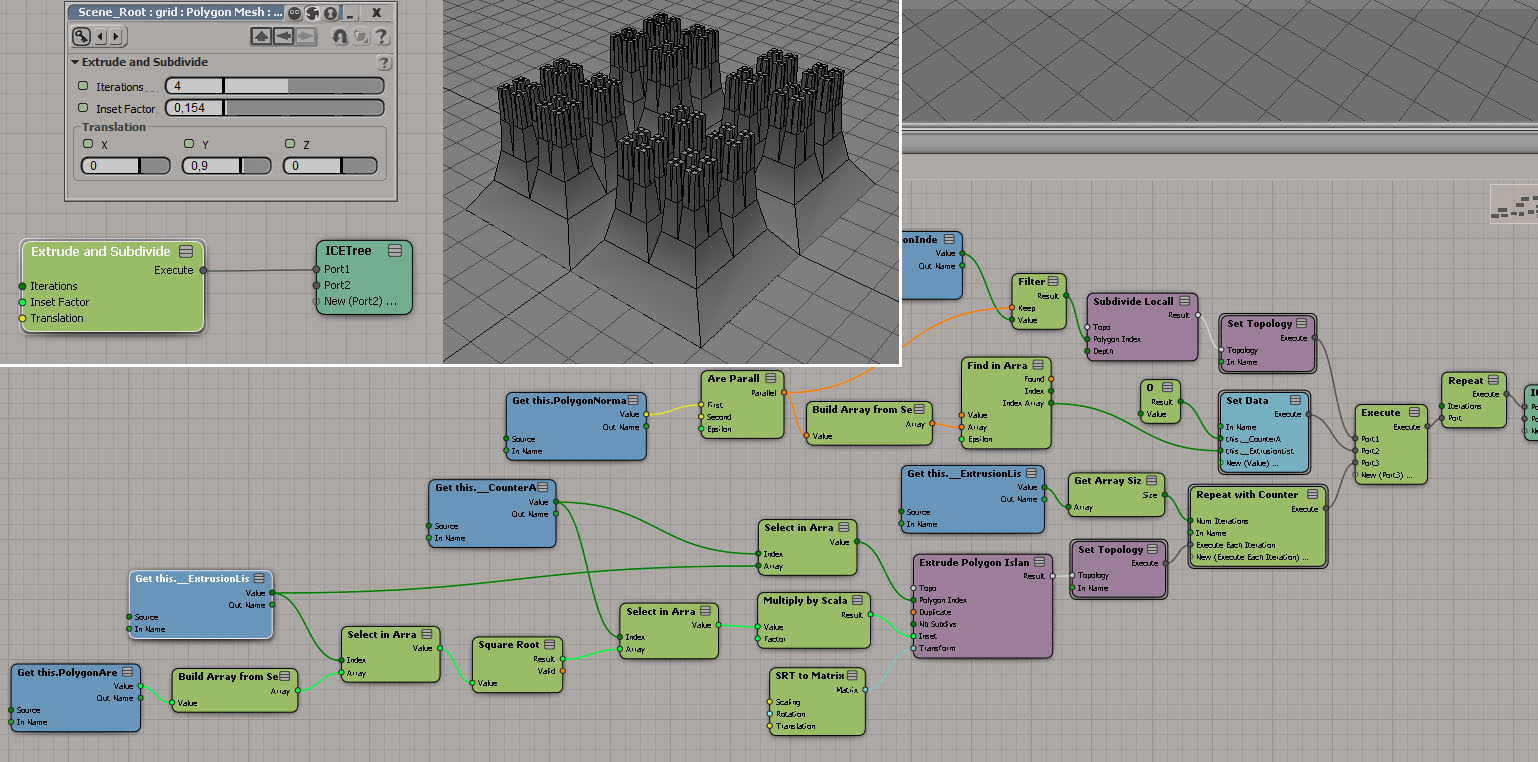
Extrude and subdivide
by Chris_TC
Test if a point is inside, on the surface or outside.
by Daniel Brassard


Finding values in array
by iamVFX

Here’s another workaround to force the evaluation of ICE attributes:
Use a material with GetAttribute shaders pointing to the ICE attributes that you want to to be evaluated.
You can plug them into a color pass-through shader channel ports, so it won’t affect the render.
–Guillaume Laferriere

Here’s a simple example that extrudes the polygons in a grid, and then applies a second extrude op to the extruded polygons.
I modified the Disconnect compound to output the Topo, just to make it easter to connect things. Really, I should probably daisy-chain everything in this example.
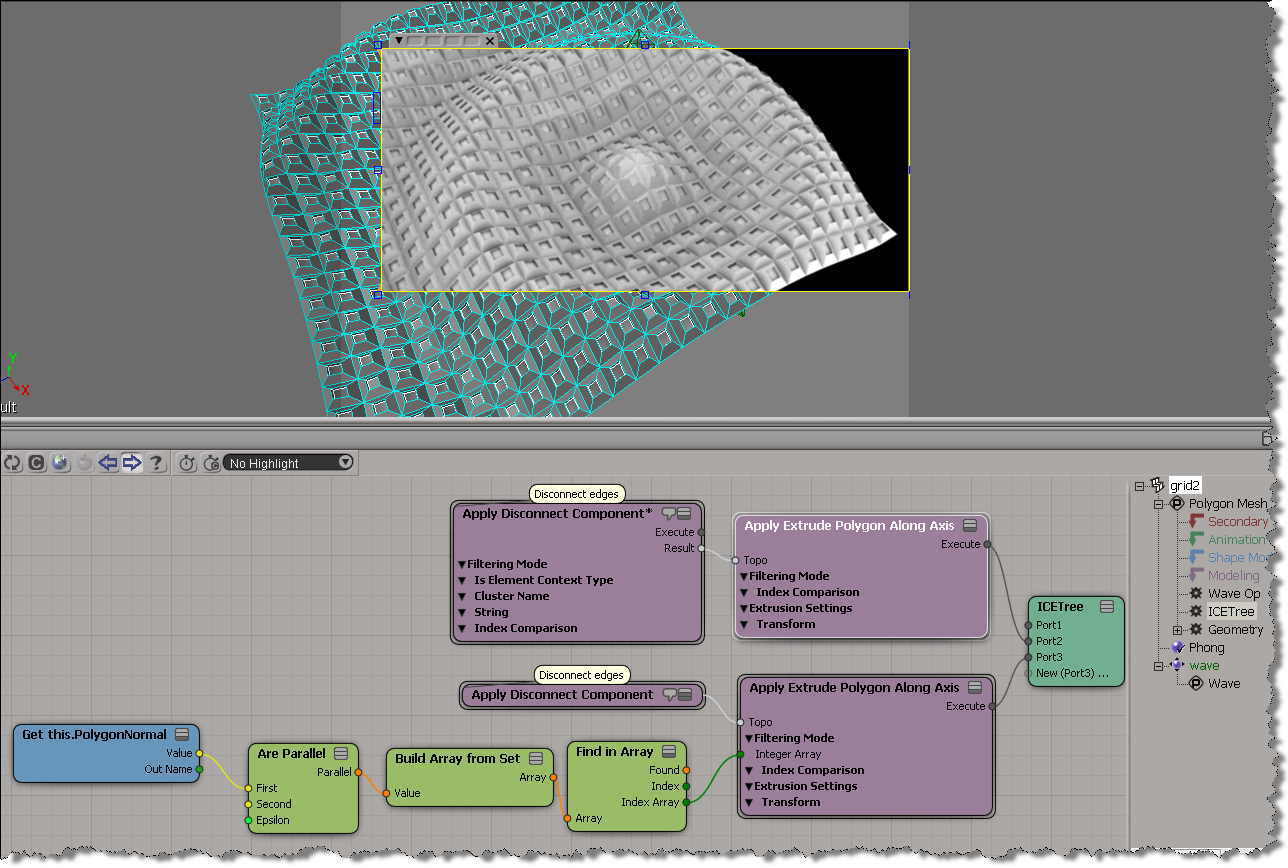
Chris_TC did something more sophisticated here.
You can drop scene objects or other ICE nodes onto existing ICE tree nodes, and if possible, Softimage will automatically connect the nodes.
As an exercise, I built this ICE tree that prevents any overlapping particles (for non-rotated particles only). It works by comparing the X, Y, and Z values of the vector between two points with the combined size of the two particle shapes (which are boxes in this example).
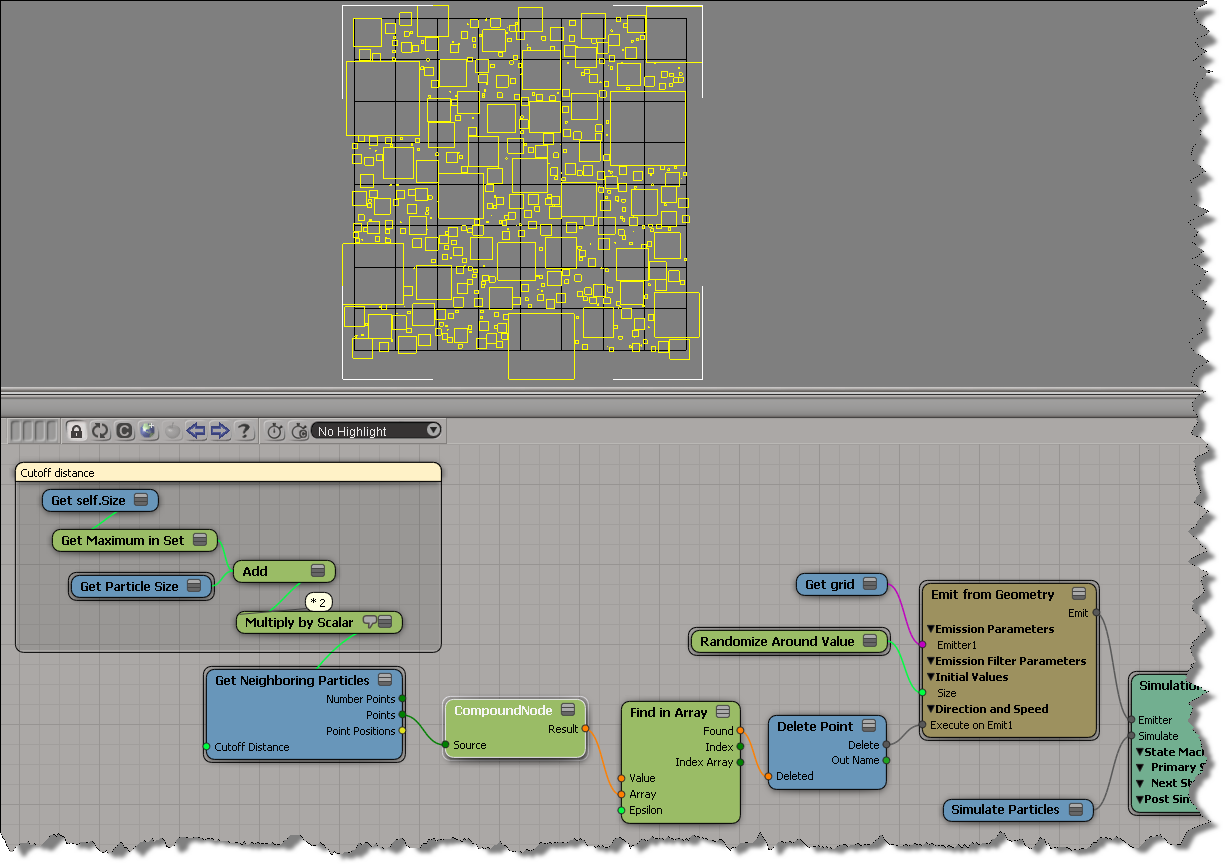
The compound node returns an array of booleans, one for each neighbour. The boolean flags indicate whether or not the particles would overlap, so if at least one is True, then I delete the particle. If you must see it, here’s the compound:

In general, we’d prefer you didn’t disable the CER reports. But if you’re in the middle of debugging a plugin that constantly crashes, for example, you might want to temporarily disable the CERs.
To disable CER reporting, edit the Softimage setenv.bat file and add this:
SI_DISABLE_CER=1
Maya, and presumbably 3ds Max, work the same way.
MAYA_DISABLE_CER=1
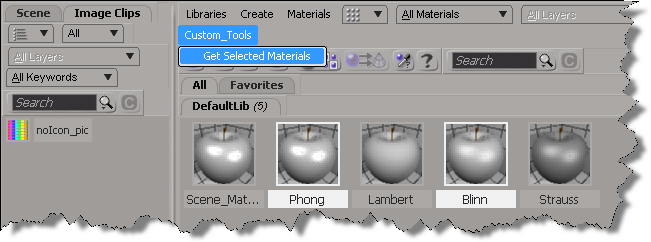
In 2013, you can use the selection view attribute to get the materials that are selected in the Material Manager.
Here’s a python custom menu item that shows how to do it. In summary, you do this:
import win32com.client
from win32com.client import constants

null = None
false = 0
true = 1

def XSILoadPlugin( in_reg ):
	in_reg.Author = "blairs"
	in_reg.Name = "MaterialsManagerPlugin"
	in_reg.Major = 1
	in_reg.Minor = 0

	in_reg.RegisterMenu(constants.siMenuMaterialManagerTopLevelID,"Custom_Tools",false,false)
	#RegistrationInsertionPoint - do not remove this line

	return true

def XSIUnloadPlugin( in_reg ):
	strPluginName = in_reg.Name
	Application.LogMessage(str(strPluginName) + str(" has been unloaded."),constants.siVerbose)
	return true

def Custom_Tools_Init( in_ctxt ):
	oMenu = in_ctxt.Source
	oMenu.AddCallbackItem("Get Selected Materials","OnGetSelected")
	return true

def OnGetSelected( c ):
	view = c.GetAttribute( "Target" )
	Application.LogMessage( view )

	Application.LogMessage( view.GetAttributeValue( "selection" ) )
	for mat in view.GetAttributeValue( "selection" ).split(","):
		Application.LogMessage(  mat )

	return true
In Softimage 2013, the XSICollection object now has a Filter method, so you can filter XSICollections by type, family, or path name.
oFilteredCollection = XSICollection.Filter( [Type], [Families], [Path] )
I updated my find all cameras script to use XSICollection.Filter, and here’s the timing results (form the same scene, but in 2013).
# INFO : getCameras_FindObjects finished in 0.033000 seconds
# INFO : Found 8301 cameras
# INFO : getCameras_FindObjects_w_Filter finished in 0.269000 seconds
# INFO : Found 24 cameras
# INFO : getCameras_FindObjects_w_SIFilter finished in 0.044000 seconds
# INFO : Found 24 cameras
# INFO : getCameras_FindObjects2 finished in 0.001000 seconds
# INFO : Found 49 cameras
# INFO : getCameras_FindObjects2_w_Filter finished in 0.003000 seconds
# INFO : Found 24 cameras
# INFO : getCameras_FindChildren2 finished in 0.149000 seconds
# INFO : Found 24 cameras
# INFO : getCameras_SelectAllUsingFilter finished in 0.035000 seconds
# INFO : Found 24 cameras
FindObjects2_w_Filter		0.003000 seconds
SelectAllUsingFilter		0.035000 seconds
FindObjects_w_SIFilter		0.044000 seconds
FindChildren2			0.149000 seconds
FindObjects_w_Filter		0.269000 seconds
Here’s the updated script for Softimage 2013:
import time
si = Application
log = si.LogMessage
from win32com.client import constants as C

import win32com.client
oCameraColl = win32com.client.Dispatch( "XSI.Collection" )

si.SetValue("preferences.scripting.cmdlog", False, "")


def timeExecution(func):
    def closure(*args, **kwargs):
        startTime = time.time()
        try:
            ret = func(*args, **kwargs)
        except Exception, e:
            delta = time.time() - startTime
            log('Failed in %f seconds' % delta)
            raise
        delta = time.time() - startTime
        log('%s finished in %f seconds' % (func.__name__, delta))
        return ret
    return closure

@timeExecution
def getCameras_FindObjects():
	oCameraColl = Application.FindObjects( "", "{5FC0CCAE-3DC8-11D0-9449-00AA006D3165}" )
	return oCameraColl.Count

@timeExecution
def getCameras_FindObjects_w_Filter():
	oCameraColl = Application.FindObjects( "", "{5FC0CCAE-3DC8-11D0-9449-00AA006D3165}" )
	oCameraColl = oCameraColl.Filter( "camera" )
	oCameraColl.RemoveItems( oCameraColl.Filter( "", "", "CopyPaste*" ) )
	oCameraColl.RemoveItems( oCameraColl.Filter( "", "", "View*" ) )
	return oCameraColl.Count

@timeExecution
def getCameras_FindObjects_w_SIFilter():
	oCameraColl = Application.FindObjects( "", "{5FC0CCAE-3DC8-11D0-9449-00AA006D3165}" )
	oCameraColl = si.SIFilter( oCameraColl, "camera" )
	oCameraColl.RemoveItems( oCameraColl.Filter( "", "", "CopyPaste*" ) )
	oCameraColl.RemoveItems( oCameraColl.Filter( "", "", "View*" ) )
	return oCameraColl.Count


@timeExecution
def getCameras_FindObjects2():
	c = si.FindObjects2( C.siCameraID )
	return c.Count

@timeExecution
def getCameras_FindObjects2_w_Filter():
	cams = si.FindObjects2( C.siCameraID )
	oCameraColl.Items = cams
	oCameraColl.RemoveItems( cams.Filter( "", "", "CopyPaste*" ) )
	oCameraColl.RemoveItems( cams.Filter( "", "", "View*" ) )
	return oCameraColl.Count


@timeExecution
def getCameras_FindChildren2():
	cams = si.ActiveSceneRoot.FindChildren2("", "camera")
	return cams.Count

@timeExecution
def getCameras_SelectAllUsingFilter():
	cams = si.SelectAllUsingFilter("Camera", "siIgnoreComponentVisibility", False, "")
	return cams.Count


@timeExecution
def getCameras_Model_FindObjects():
	cams = si.ActiveSceneRoot.FindObjects( C.siCameraID )
	return cams.Count


log( 'Found %d cameras' % getCameras_FindObjects() )
log( 'Found %d cameras' % getCameras_FindObjects_w_Filter() )
log( 'Found %d cameras' % getCameras_FindObjects_w_SIFilter() )
log( 'Found %d cameras' % getCameras_FindObjects2() )
log( 'Found %d cameras' % getCameras_FindObjects2_w_Filter() )
log( 'Found %d cameras' % getCameras_FindChildren2() )
log( 'Found %d cameras' % getCameras_SelectAllUsingFilter() )
 eX-SI
eX-SI 