Bandai Namco Games uses Softimage for promotional videos of THE IDOLM@STER


This customer story was recently posted on the Japanese autodesk.com.

If, like me, you cannot read Japanese, here’s the Google page translation.

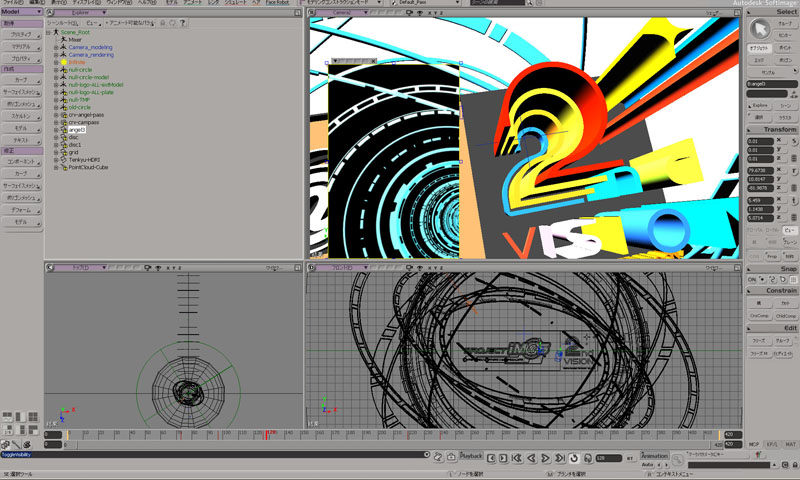
“Bandai Namco Games” used Softimage for creating promotion videos of / THE IDOLM@STER.

Softimage was used to create nifty effects in PV and it was also used for animating in-game cameras to capture idols. All the characters and most of other area works were done in Maya in this game at Bandai Namco.

Anyway, be ready for a unique Japanese culture!

via http://www.autodesk.co.jp/adsk/servlet/item?id=16307549&siteID=1169823

The case of the missing scripting engines


In this case, the customer reported that 64-bit Softimage abruptly shut down just after the splash screen appeared, with no errors and no sign of the actual UI. 32-bit Softimage, however, worked just fine.

This didn’t sound like the usual runonce/rename user folder/reinstall graphic driver case, so I asked him to try to run a script with xsibatch, to see if 1) xsibatch also crashes and 2) whether there is a problem with VBScript (because Softimage cannot run without VBScript).

echo LogMessage "Hello" > %TEMP%\test.vbs
xsibatch -processing -script %TEMP%\test.vbs

It turned out that there were problems with both JScript and VBScript on his system:

=======================================================
Autodesk Softimage 9.5.184.0
=======================================================

' ERROR : 2000 - Failed creating scripting engine: VBScript.
' ERROR : 2000 - Failed creating scripting engine: JScript.

To show that this was system problem, not just a Softimage problem, we tried using wscript to run a VBscript:

echo wscript.echo "Hello" > hello.vbs
wscript hello.vbs

We tried re-registering the VBScript and JScript DLLs with regsvr32, with no luck.

After some googling and experimentation on my own system, I narrowed it down to the specific registry keys:

  • HKCR\CLSID\B54F3741-5B07-11cf-A4B0-00AA004A55E8 (VBscript)
  • HKCR\CLSID\F414C260-6AC0-11CF-B6D1-00AA00BBBB58 (JScript)

So I exported those keys from my registry and sent them to the customer.
And after he imported them, Softimage worked!

I would have preferred to get it working without doing that (manually importing reg values), but it beats reinstalling windows. I guess.

Note that on Windows 7, you may need to change the ownership and permissions on the registry key HKEY_CLASSES_ROOT\CLSID\ before you can edit any keys.

Using Exclude Particles in the Particle Density shader


The Particle Density shader has a Visible in render boolean that can control visibility on a per-particle basis.

So how do you apply this setting on a per-particle basis? One way to access individual particles would be to use an attribute shader to look up a per-particle attribute, and then use that to set the Visible in render value. For example, I used a Color Attribute shader to get the particle color, plugged that into a Color Math Logic, and plugged that into the Visible in render port of the Particle Density shader. In the screenshots below, I’m simply testing whether the particle color is blue.

Getting the contents of docked views


I was recently asked whether it’s possible to find docked FxTree views and figure out 1) what specific tree is loaded, and 2) what nodes are selected in the Fx tree.

You can find docked Fx Tree views, but unfortunately there’s no way to find out what’s in that view.
Here’s a Python snippet that finds docked Fx Tree views:

# Find docked Fx Tree views
oVM = Application.Desktop.ActiveLayout.Views.Filter( "View Manager" )
oFxTreeViews = oVM(0).Views.Filter( "Fx Tree" )

for view in oFxTreeViews:
    Application.LogMessage(view.Name+": "+view.Type)

In the XSI SDK, you use attributes to access the contents of a view, and there are no attributes defined for Fx Tree views.

For example, here’s how it works for an ICE Tree view:

# Find docked ICE Tree views
oVM = Application.Desktop.ActiveLayout.Views.Filter( "View Manager" )
oICETreeViews = oVM(0).Views.Filter( "ICE Tree" )

# Get the ICE tree that is loaded into the view
Application.LogMessage( oICETreeViews(0).GetAttributeValue( "container" ) );

# Get the selected nodes in the ICE tree
Application.LogMessage( oICETreeViews(0).GetAttributeValue( "selection" ) );

Friday Flashback #8


GDC 1997

Theme: STONE FREE – Create any game you think. Think what you want.
Stone free is a rebellious attitude of confidence and freedom

Create any game you think: Softimage has the capabilities help create any game you can think of
Think what you want: With Softimage you do not have to limit your imagination

GDC 2000

Themes:
Softimage Sumatra: Animation redefined
Softimage|3D 3.9: Production proven, 3D workhorse
XSI Viewer Tools: Art pathway for interactive media

GDC 2001

Theme: Innovate. Create. Collaborate.
Softimage games tools offering: Softimage provides a complete, open toolset for game creation that lets users pick and choose functionality to integrate with their existing pipelines and custom engines:

GDC 2004

Theme: Better Faster XSI

GDC 2006

Themes:
Characters at work, characters at play
Getting into characters: building performances for Next-Generation Productions.
All about being the leader in innovation

GDC 2007

Theme: Play Together

GDC 2008

Theme: ??? I don’t remember ???

Documentation moves to the Web for 2012


The shrinking Softimage box set through the years (Softimage|3D, XSI 5, XSI 7, and finally, Softimage 2012).

One of the changes in the 2012 release is that both the User’s Guide and the SDK Guide have moved to the web. There’s no more compiled help files (chm). Everything is now web-based.

The Setup program doesn’t include the help files, but you can download them if you want a local copy.

The General preferences now include some Help Location settings to tell Softimage where to find the online help:

This is part of a wider initiative across all Autodesk products. Some of the potential benefits include:

  • A more dynamic and up-to-date resource (compared to a static copy of the docs shipped with the product). Content can be updated on an on-going basis between releases.
  • Documentation can be integrated with other online resources, such as the KB, blogs, and forums, so users can search across all available content.
  • Standardization of help systems and formats.
  • Reduction of application footprint.

A Syflex on ICE snippet


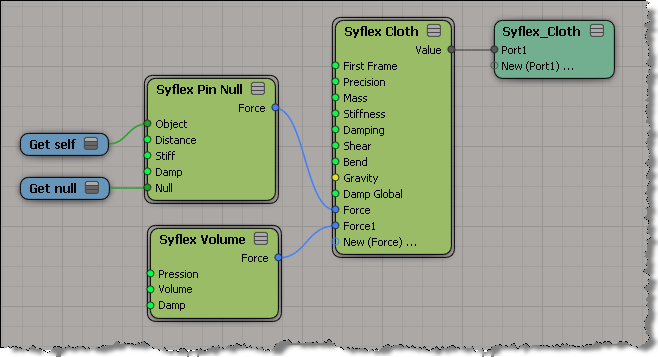
During his Softimage 2012 demo at GDC, Mark Schoennagel has an amusing [to me at least] little bit where he uses Syflex to inflate and deflate a model. I recreated the effect but not the funny balloon noises that Mark makes while the doggie inflates and deflates.

The Syflex setup is pretty simple: I just pinned the tail and added a volume force.

JPGs that won’t load into Softimage


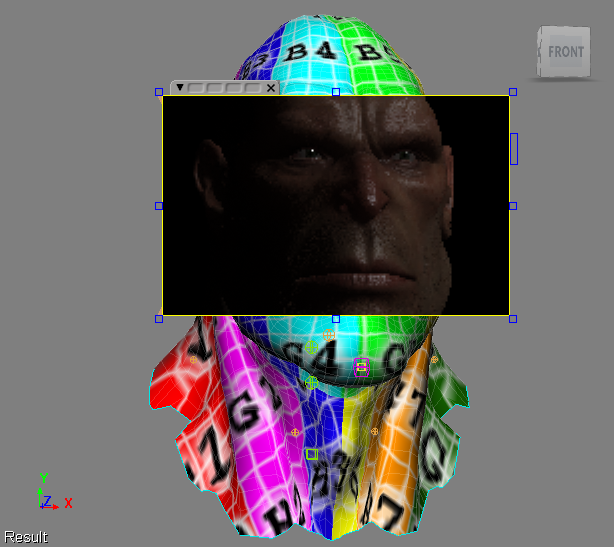
I sometimes wondered why Rock Falcon always had a noIcon texture in my viewport, even though if I did a render region, I could see the texture was really there.
I assumed it was something about the software on my system, because Manny didn’t have the same problem even though he has the exact same hardware.

Then I read this post from Luc-Eric on the mailing list:

I discovered a bug in the standard jpeg library that causes a problem
with some formats of jpeg — probably progressive.
It uses a temp file to decompress them and in Windows that ends up
being a temp file in the root of the drive. If you’re under Vista or
some account with limited privileges that prevent writing to the root
of the drive, the jpegs won’t load.
via JPG Baseline / Progressive – Google Groups.

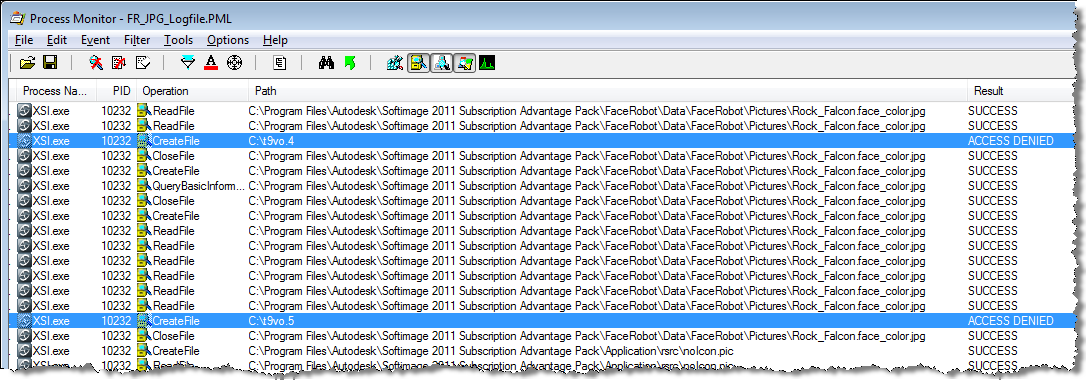
I did a quick check with Process Monitor, and I saw that Softimage was indeed trying to create a file in my C:\ driver, and getting ACCESS DENIED.
I checked Manny’s machine, and he can write to the C:\ drive because he has UAC disabled.