ICE Modeling example – extruding and extruding a grid


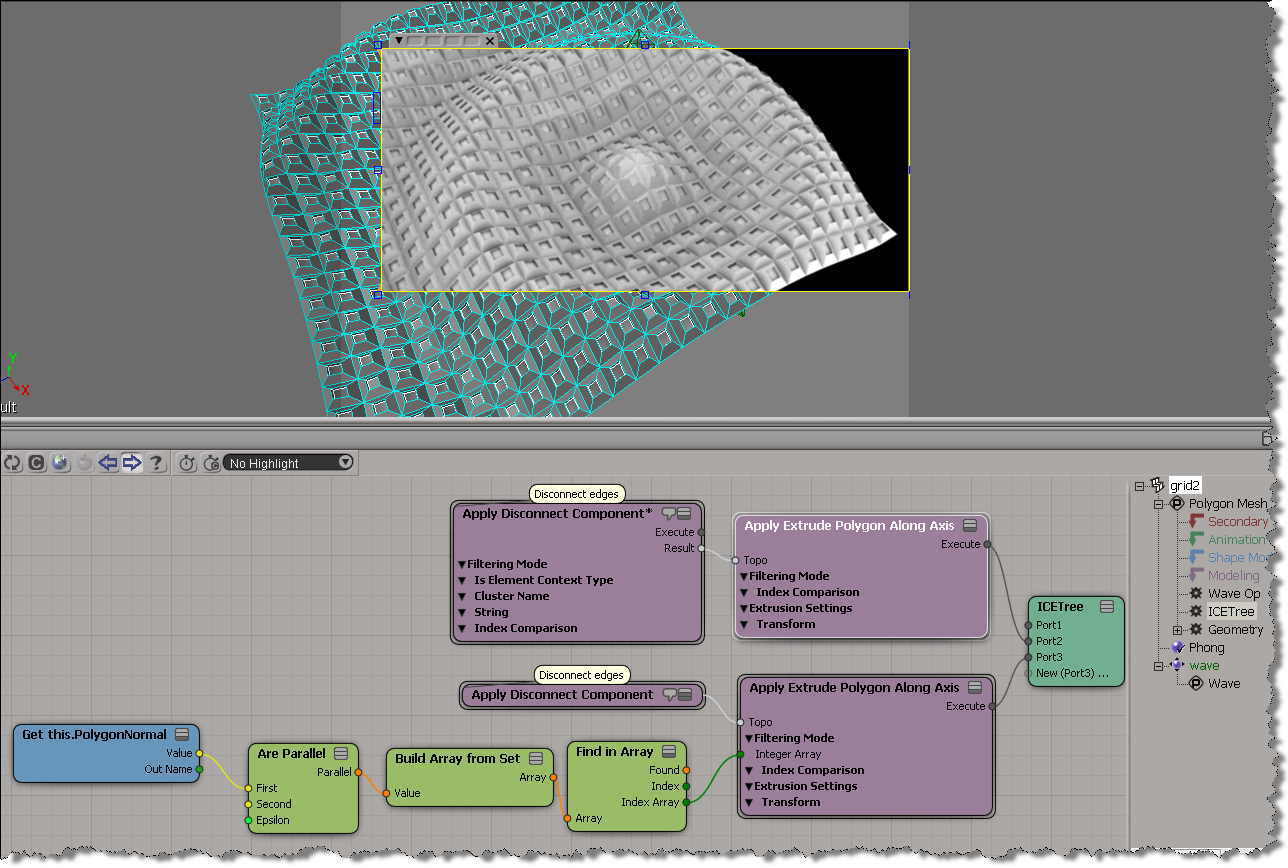
Here’s a simple example that extrudes the polygons in a grid, and then applies a second extrude op to the extruded polygons.
I modified the Disconnect compound to output the Topo, just to make it easter to connect things. Really, I should probably daisy-chain everything in this example.
Chris_TC did something more sophisticated here.

Deleting overlapping particles


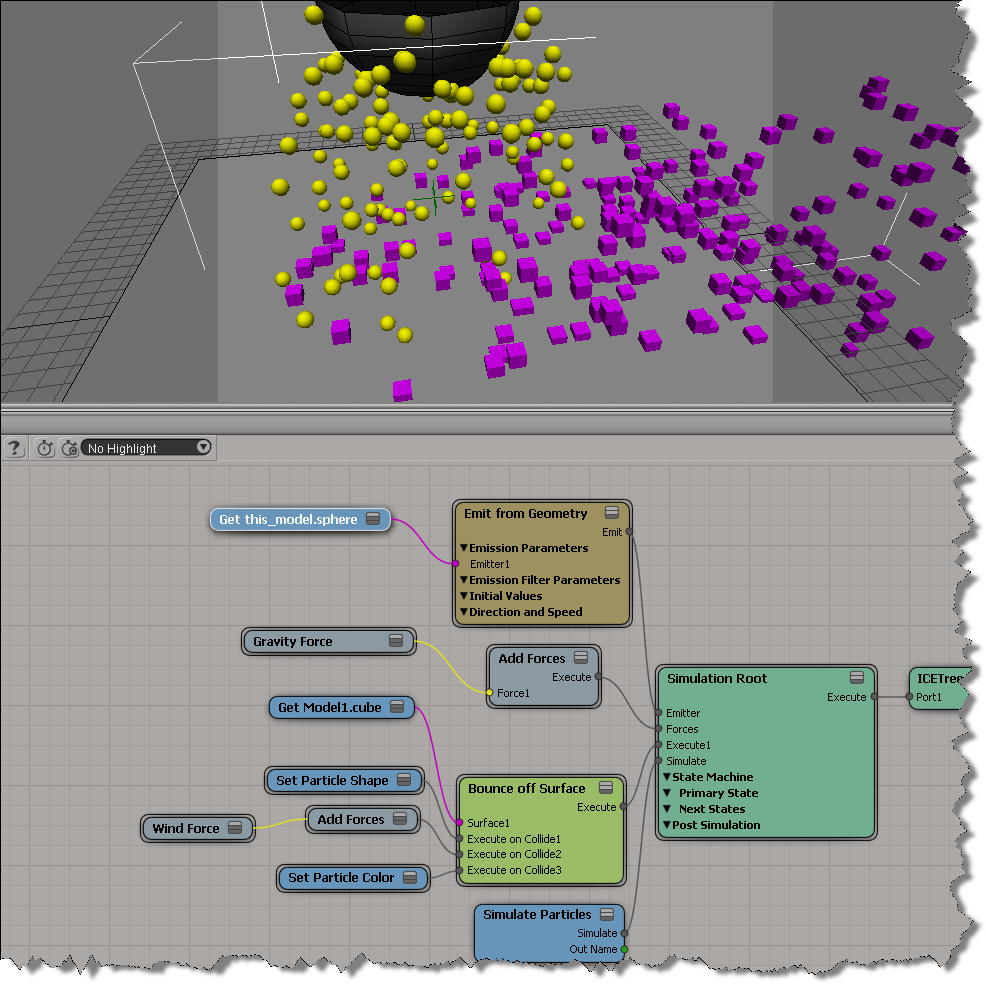
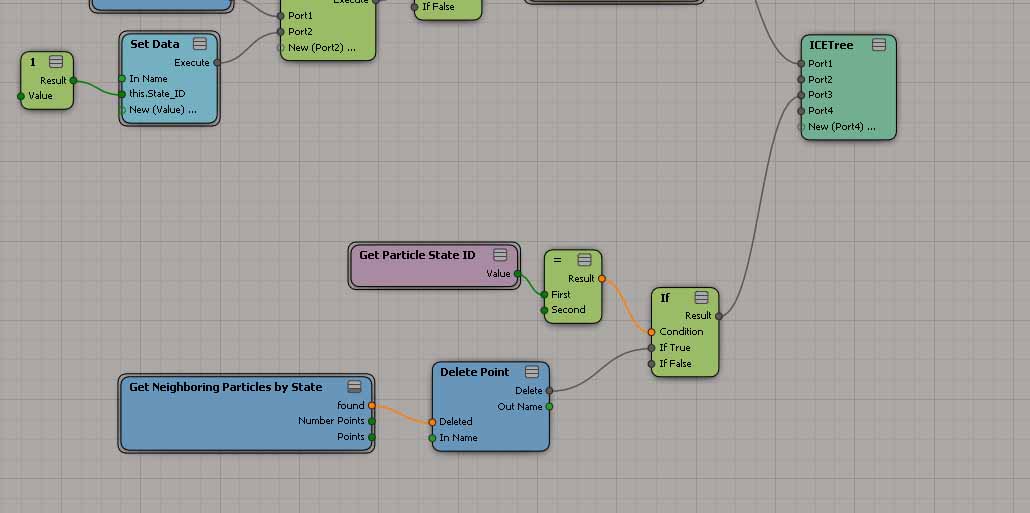
As an exercise, I built this ICE tree that prevents any overlapping particles (for non-rotated particles only). It works by comparing the X, Y, and Z values of the vector between two points with the combined size of the two particle shapes (which are boxes in this example).
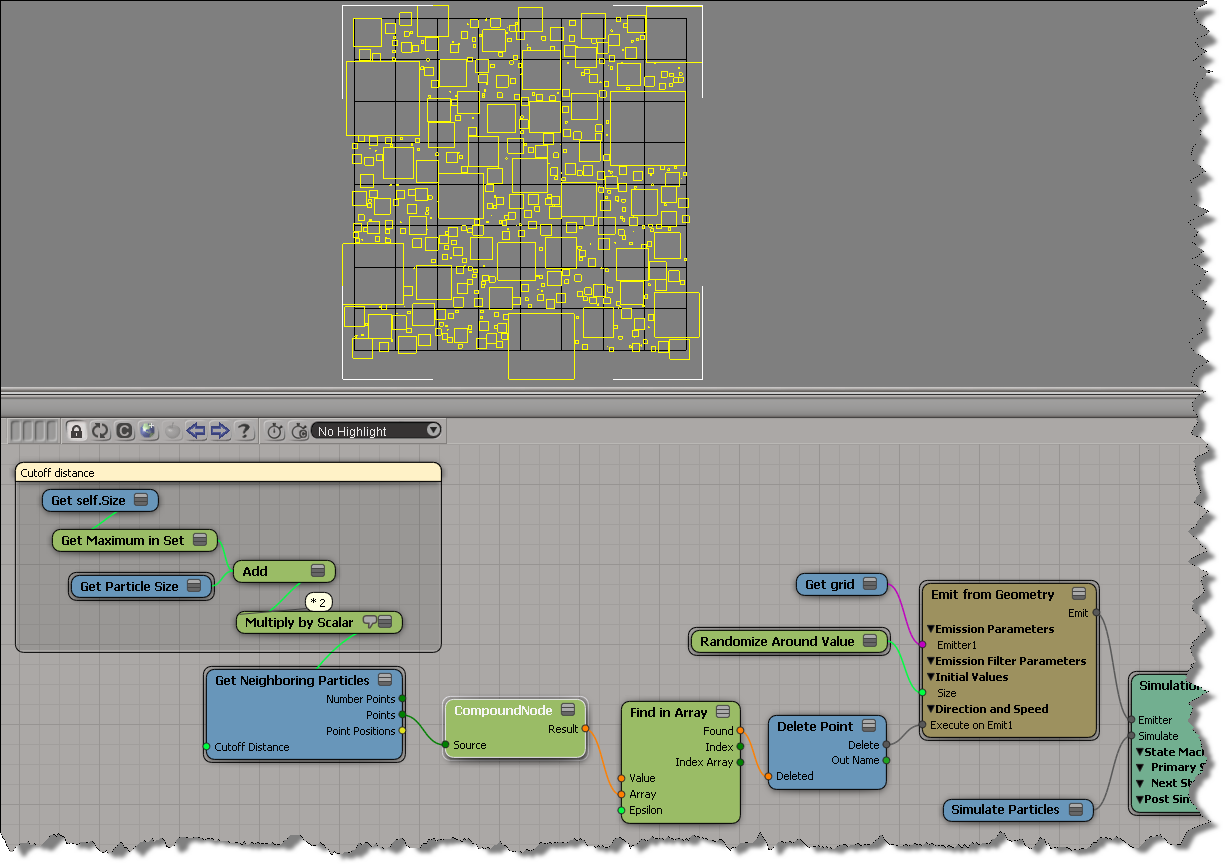
The compound node returns an array of booleans, one for each neighbour. The boolean flags indicate whether or not the particles would overlap, so if at least one is True, then I delete the particle. If you must see it, here’s the compound:

Screenshots of the week


Installer images


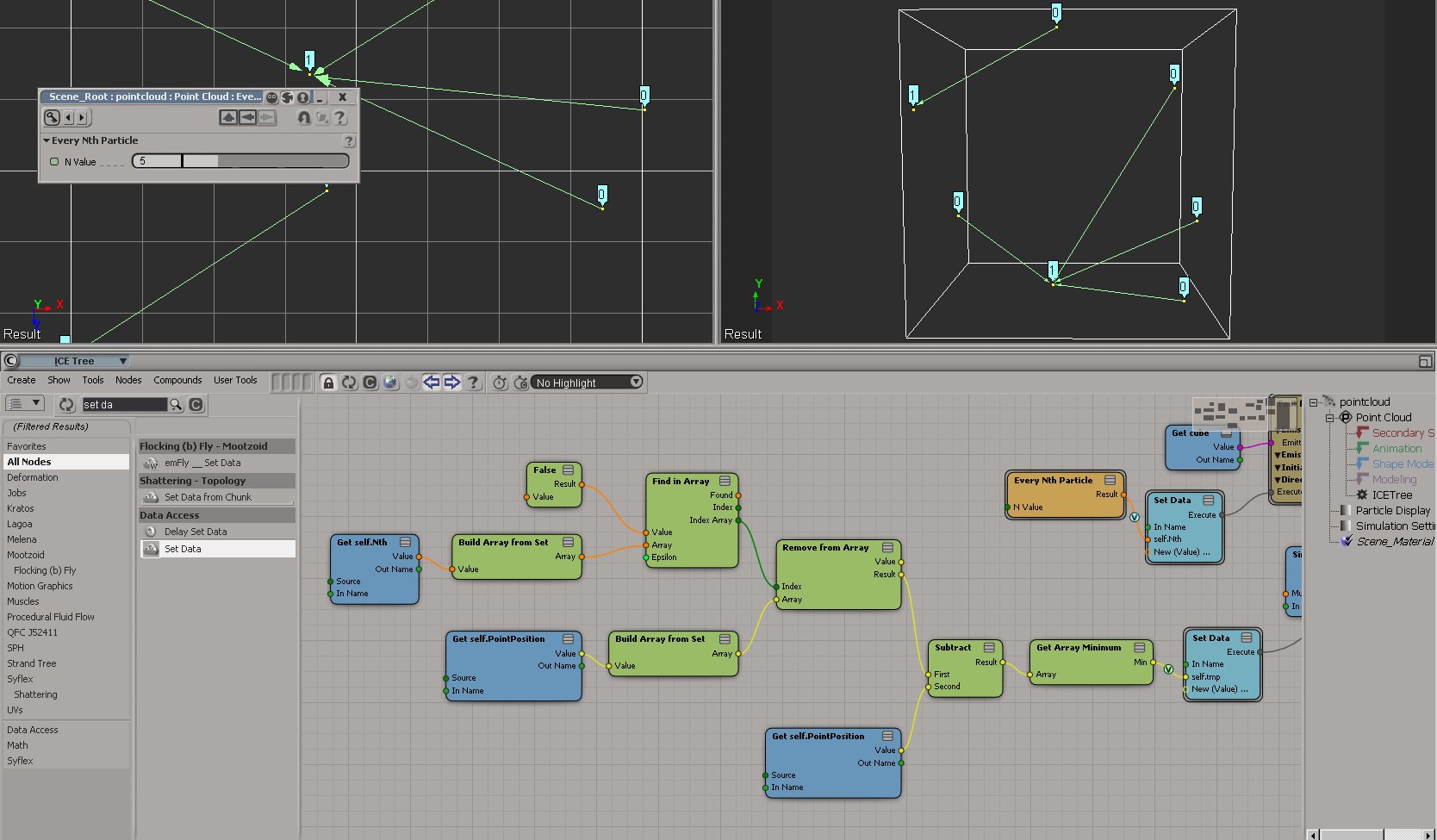
Test distance between every Nth particles (XSI mailing list)

by Chris Marshall
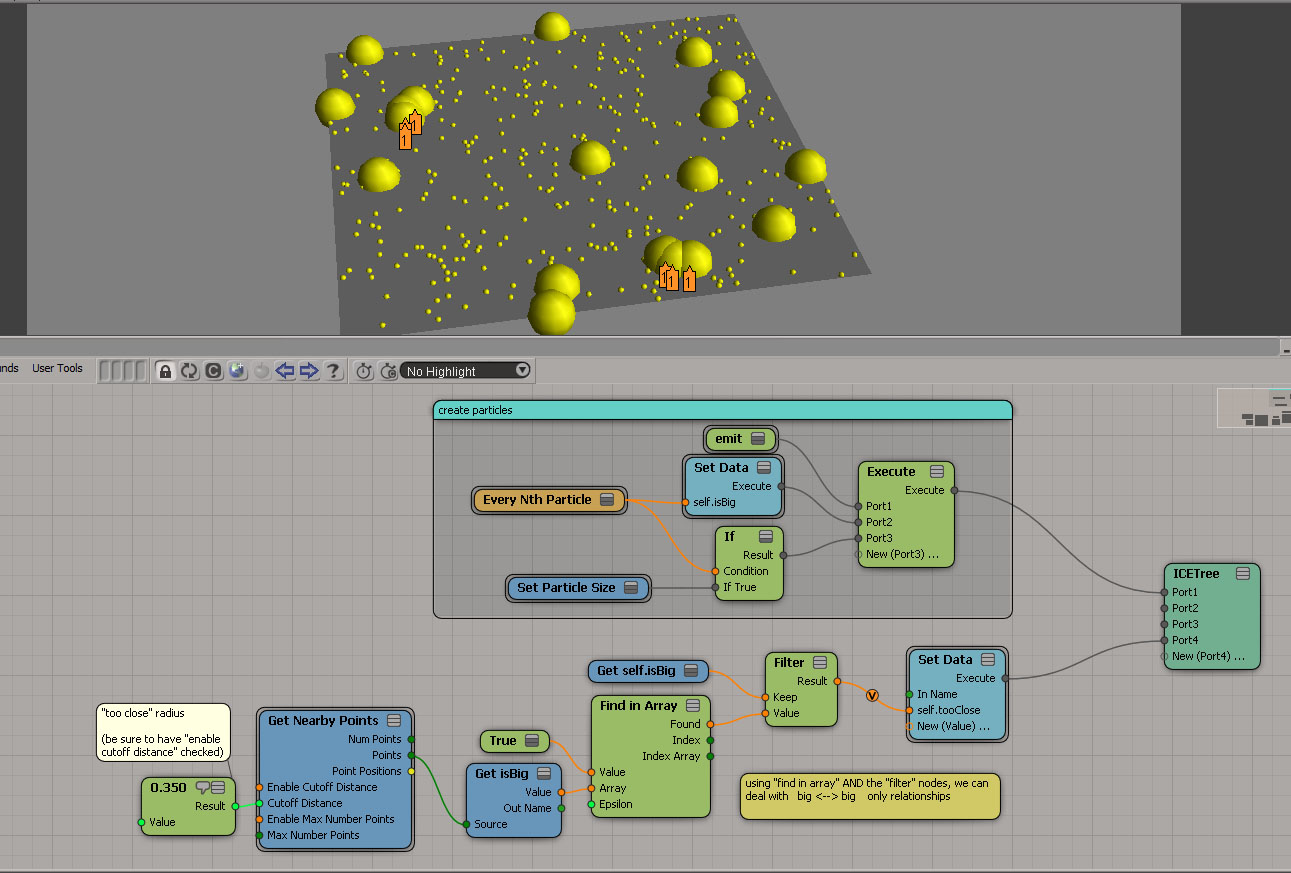
Set the state id’s of the bigger particles to something different than the smaller ones.
Then use the setup in the jpeg, which basically uses the Get Neighbouring Particles by State compound, testing the distance between the big particles using the Cutoff Distance.
by Peter Agg
by Fabricio Chamon
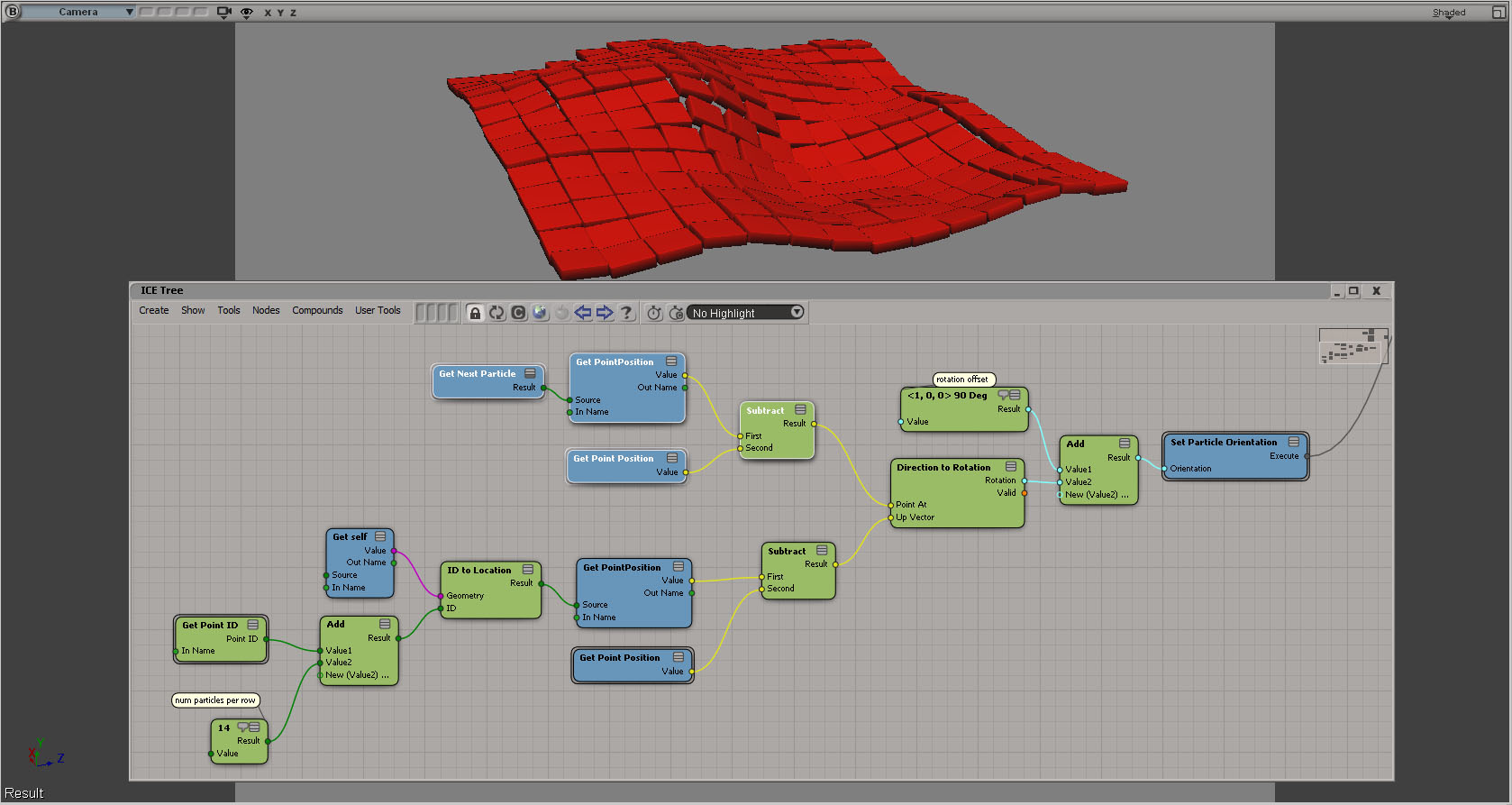
ICE: Rotating particle based on neighbors position?
by Fabricio Chamon
Last but not least

Disabling Customer Error Reporting (CER)


In general, we’d prefer you didn’t disable the CER reports. But if you’re in the middle of debugging a plugin that constantly crashes, for example, you might want to temporarily disable the CERs.

To disable CER reporting, edit the Softimage setenv.bat file and add this:

SI_DISABLE_CER=1

Maya, and presumbably 3ds Max, work the same way.

MAYA_DISABLE_CER=1

What’s new in the 2013 SDK


I see that some of you have found the 2013 docs.
For your convenience, here’s a list of the new commands and Object Model methods, but with actual links 🙂

New Commands

New Methods (Object Model)

  • ICEAttribute.DataArray – Sets a 1D Array object containing the data defined by an attribute.
  • ICEAttribute.DataArray2D – Sets a 2D Array object containing the 2D data defined by an attribute.
  • XSICollection.Filter – Returns a subset of this collection as a new collection of objects matching the filter criteria.
  • Clip.AddProperty2 – Creates and adds a UserDataBlob or CustomProperty to a Clip object. This method is specific to the python language.
  • Geometry.AddICEAttribute – Adds and returns a new attribute data on a geometry.
  • Geometry.RemoveICEAttribute – Removes a non-built-in attribute from a geometry if not required by an ICETree.
  • Layout.CreateViewFromDefinitionFile2 – Creates a new View object given the path to its definition on disk. This method is similar to Layout.CreateViewFromDefinitionFile but specific to the python language.
  • Layout.FindView2 – Finds an existing View object given a name in this layout. This method is similar to Layout.FindView but specific to the python language.
  • Menu.AddItem2 – Adds a menu item at to end of the menu. This method is similar to Menu.AddItem but specific to the python language.
  • Menu.AddCommandItem2 – Adds a menu item at the end of the menu and attaches a command. This method is similar to Menu.AddCommandItem but specific to the python language.
  • Menu.AddCallbackItem2 – Adds a menu item to the end of the menu and attaches a callback function. This method is similar to Menu.AddCallbackItem but specific to the python language.
  • ICENode.GetPortFromName2 – Returns the ICENodePort object that matches a specific port name. This method is similar to ICENode.GetPortFromName but specific to the python language.
  • ICENode.GetPortFromIndex2 – Returns the ICENodePort object specified by a port index, group index and group instance index. This method is similar to ICENode.GetPortFromIndex but specific to the python language.
  • Operator.GetPortAt – Returns the specified Port object. This method is similar to Operator.PortAt but specific to the python language.
  • Operator.GetPort3 – Returns the specified Port object for the operator. This method is similar to Operator.GetPort2 but specific to the python language.
  • Override.AddParameterEntry2 – Adds a new entry to override the input parameter and returns the new overriding parameter. This method is similar to Override.AddParameterEntry but specific to the python language.
  • Primitive.GetGeometry3 – Returns a Geometry object containing the object’s geometry. This method is similar to Primitive.GetGeometry2 but specific to the python language.
  • ProjectItem.AddICEAttribute – Adds and returns a new attribute data on this object.
  • ProjectItem.RemoveICEAttribute – Removes a non-built-in attribute from a geometry if not required by an ICETree.
  • SceneItem.GetPropertyFromName2 – Returns a property, given its scripting name. This method is similar to SceneItem.GetPropertyFromName but specific to the python language.
  • SceneItem.GetLocalPropertyFromName2 – Returns a local property, given its scripting name. This method is similar to SceneItem.GetLocalPropertyFromName but specific to the python language.
  • ShaderArrayParamDef.ItemDef2 – Returns the underlying ShaderParamDef or ShaderStructParamDef object for this array item. This method is similar to ShaderArrayParamDef.ItemDef but specific to the Python language.
  • ShaderArrayParameter.Item2 – Returns the specified ShaderParameter item in this array. This method is similar to ShaderArrayParameter.Item but specific to the Python language.
  • ShaderParamDefContainer.AddParamDef2 – This method is similar to ShaderParamDefContainer.AddParamDef but specific to the Python language.
  • ShaderParamDefContainer.GetParamDefByName2 – Returns the ShaderParamDef that matches the specified name from this container. This method is similar to ShaderParamDefContainer.GetParamDefByName but specific to the Python language.
  • ShaderParameter.Definition2 – Returns the shader parameter definition as a ShaderParamDef object. This method is similar to ShaderParameter.Definition but specific to the Python language.
  • View.FindView2 – Finds an existing View object given a name. This method is similar to View.FindView but specific to the Python language.
  • X3DObject.GetActivePrimitive3 – Returns the 3D object’s active Primitive for a given frame. This method is similar to X3DObject.GetActivePrimitive2 but specific to the Python language.
  • XSIApplication.ActiveProject3 – Returns or sets the active XSIProject object. This method is similar to XSIApplication.ActiveProject2 but specific to the Python language.
  • XSIApplication.GetObjectFromID2 – Returns the object matching the specified ID. This method is similar to XSIApplication.GetObjectFromID but specific to the python language.
  • XSIFactory.CreateObjectFromPreset2 – Creates an object from a preset and optional preset family name. This method is similar to XSIFactory.CreateObjectFromPreset but specific to the Python language.
  • ShaderParamDefOptions.SetReadOnly – Sets the Read Only capability of the Shader parameter.
  • XSIApplication.GetCustomPropertyCount – Returns the Custom Property count for a given type.

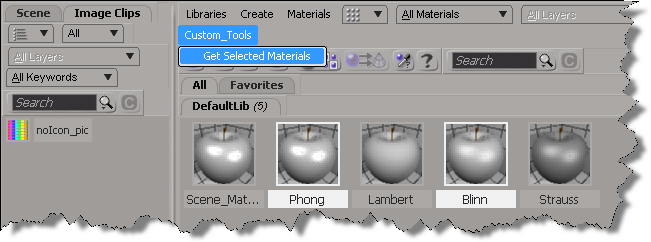
New in Softimage 2013: Getting the selected materials in the Material Manager


In 2013, you can use the selection view attribute to get the materials that are selected in the Material Manager.

Here’s a python custom menu item that shows how to do it. In summary, you do this:

  • Add a custom menu in the Manager Manager
  • Use a callback item, so you can get the view from the context
  • Use selection view attribute to get the names of the selected materials
import win32com.client
from win32com.client import constants

null = None
false = 0
true = 1

def XSILoadPlugin( in_reg ):
	in_reg.Author = "blairs"
	in_reg.Name = "MaterialsManagerPlugin"
	in_reg.Major = 1
	in_reg.Minor = 0

	in_reg.RegisterMenu(constants.siMenuMaterialManagerTopLevelID,"Custom_Tools",false,false)
	#RegistrationInsertionPoint - do not remove this line

	return true

def XSIUnloadPlugin( in_reg ):
	strPluginName = in_reg.Name
	Application.LogMessage(str(strPluginName) + str(" has been unloaded."),constants.siVerbose)
	return true

def Custom_Tools_Init( in_ctxt ):
	oMenu = in_ctxt.Source
	oMenu.AddCallbackItem("Get Selected Materials","OnGetSelected")
	return true

def OnGetSelected( c ):
	view = c.GetAttribute( "Target" )
	Application.LogMessage( view )
	
	Application.LogMessage( view.GetAttributeValue( "selection" ) )
	for mat in view.GetAttributeValue( "selection" ).split(","):
		Application.LogMessage(  mat )

	return true