Here’s a quick way to repeat the scripting commands logged for something you just did in Softimage:
- In the script history log, highlight the lines you want to repeat.
- Right-click and click Repeat.


Here’s a quick way to repeat the scripting commands logged for something you just did in Softimage:
As I posted yesterday, an ICE compound with no category and no task will not show up in the Preset Manager. Here’s a Python script that checks .xsicompound files and reports any that are missing both the category and tasks attributes.
I use ElementTree to parse the .xsicompound XML, and get the category and tasks attributes from the xsi_file element, which looks something like this:
<xsi_file type="CompoundNode" name="abScatter" author="Andreas Bystrom" url="http://www.wurp.net" formatversion="1.4" compoundversion="1.0" constructionmode="Modeling" backgroundcolor="7765887">
Here’s the script.
from siutils import si		# Application
from siutils import sidict	# Dictionary
from siutils import sisel	# Selection
from siutils import siuitk	# XSIUIToolkit
from siutils import siut	# XSIUtils
from siutils import log		# LogMessage
from siutils import disp	# win32com.client.Dispatch
from siutils import C		# win32com.client.constants

from xml.etree import ElementTree as ET
import os, fnmatch


#
# Generator function for finding files
#
def find_files(directory, pattern):
     for root, dirs, files in os.walk(directory):
         for basename in files:
             if fnmatch.fnmatch(basename, pattern):
                 filename = os.path.join(root, basename)
                 yield filename


#
# Check .xsicompound file for category and tasks attributes
#
def check_xsicompound( f ):
	try:
		tree = ET.parse( f )
	except Exception, inst:
		print "Unexpected error opening %s: %s" % (f, inst)

	# Get the xsi_file element
	xsi_file = tree.getroot()

#	name = xsi_file.attrib['name']

	# Check the category and task elements
	cat = False
	tasks = False

	if 'category' in xsi_file.attrib and xsi_file.attrib['category'] != '':
		cat = True

	if 'tasks' in xsi_file.attrib and xsi_file.attrib['tasks'] != '':
		tasks = True

	# return False if both are blank
	return cat or tasks


#
#
#

# list of compounds with no category and no tasks
compounds = []

# check all compounds in all workgroups
for wg in si.Workgroups:
	d = siut.BuildPath( wg, "Data", "Compounds" );

	for filename in find_files(d, '*.xsicompound'):
		b = check_xsicompound( filename )
		if not b:
			compounds.append( filename )

log( "%d compounds found with no category and no tasks:" % (len(compounds)) )
for f in compounds:
	log( f )
Looking back, I find this error popping up in my case notes once or twice every year.
Sometimes we’re able to help fix the problem, sometimes not, because it’s a problem with their system, not with Softimage itself.
Typically, a user will report seeing errors like this at start up:
// ERROR : Automation server can't create object - [line 22 in c:\Program Files\Autodesk\Softimage 2012 SP1\Addons\ICEFlowBuilder\Application\Plugins\ICEFlowCreateParticlesPlugin.js]
// ERROR : Automation server can't create object - [line 70 in c:\Program Files\Autodesk\Softimage 2012 SP1\Addons\sdkui\Application\Plugins\AddonDoc.js]
// ERROR : Automation server can't create object - [line 141 in c:\Program Files\Autodesk\Softimage 2012 SP1\Application\Commands\GlobalVarPlugin.js]
// ERROR : 2006-SetGlobal - Unexpected failure.
// ERROR : Automation server can't create object - [line 141 in c:\Program Files\Autodesk\Softimage 2012 SP1\Application\Commands\GlobalVarPlugin.js]
// ERROR : 2006-GetGlobal - Unexpected failure.
// ERROR : Automation server can't create object - [line 141 in c:\Program Files\Autodesk\Softimage 2012 SP1\Application\Commands\GlobalVarPlugin.js]
// ERROR : 2006-GetGlobal - Unexpected failure.
// ERROR : Automation server can't create object - [line 141 in c:\Program Files\Autodesk\Softimage 2012 SP1\Application\Commands\GlobalVarPlugin.js]
// ERROR : 2006-GetGlobal - Unexpected failure.
Sometimes users miss the startup errors and report seeing the error when they try to do something in Softimage, such as import dotXSI.
// ERROR : ActiveX component can't create object: 'Scripting.FileSystemObject' - [line 352 in c:\Program Files\Autodesk\Softimage 2012 SP1\Application\DSScripts\Model.vbs]
ImportDotXSI(null, null);
Note that the errors all give a line number in a specific file. If you check any of these, you’ll see that all the errors happen when Softimage tries to create an ActiveX object like
Scripting.Dictionary or Scripting.FileSystemObject. These are standard objects in the Microsoft Windows Script runtime, so these errors indicate that something’s wrong with Windows.
If you’re lucky, you can fix this by re-registering C:\windows\system32\scrrun.dll with regsvr32.
If that doesn’t work, then my guess would be that it’s some kind of registry or permissions problem. In the past (on XP systems), I’ve seen cases where it was specific to a user profile, and where it was because the Scripting.FileSystemObject registry key didn’t have an owner assigned.
If you don’t believe it’s a general Windows problem, try this. It should give the same error.
set fso = CreateObject("Scripting.FileSystemObject")
set fout = fso.CreateTextFile("c:\Test.txt", true)
fout.WriteLine Now
fout.Close
WScript.Echo "Testing"
For example, suppose you want to know exactly where a TextureOp is located in the construction history (aka the operator stack).
A TextureOp object is nested under a cluster, not under the primitive, so you can’t use Primitive.ConstructionHistory.
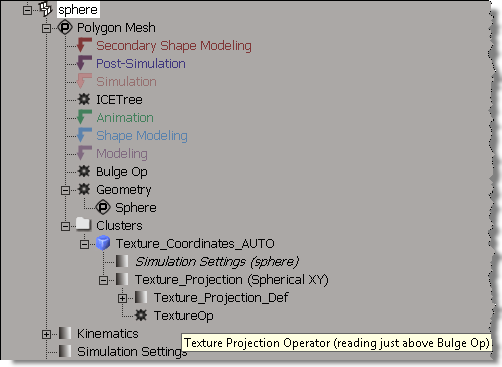
Try it, and you’ll see that the TextureOp does not show up.
from siutils import sisel	# Selection
from siutils import log		# LogMessage

for x in sisel(0).ActivePrimitive.ConstructionHistory:
	if x.BelongsTo( "MarkerOperators" ):
		sMarker = x.type

	log( "%s -> %s" %(sMarker,x.name) )
Instead, you’ll have to use DataRepository.GetConnectionStackInfo, which returns an XML description of the operator stack. The XML looks something like this (note that I had to use <_object> to stop wordpress from removing the <object> tag in my XML):
<?xml version="1.0"?>
<connections>
 	<connection>
 		<datacopy>0x000000001D7B7330</datacopy>
 		<hidden>false</hidden>
 		<_object>sphere.polymsh.modelingmarker</_object>
 		<objectid>533</objectid>
 		<region>2</region>
 		<type>out</type>
 	</connection>
 	<connection>
 		<datacopy>0x000000001F4C9F40</datacopy>
 		<hidden>false</hidden>
 		<_object>sphere.polymsh.cls.sample.clslist.Texture_Coordinates_AUTO.localprops.ClsProp.Texture_Projection.TextureOp</_object>
 		<objectid>571</objectid>
 		<region>2</region>
 		<type>out</type>
 	</connection>
 	<connection>
 		<datacopy>0x000000001C215310</datacopy>
 		<hidden>false</hidden>
 		<_object>sphere.polymsh.bulgeop</_object>
 		<objectid>532</objectid>
 		<region>2</region>
 		<type>in</type>
 	</connection>
</connections>
Here’s a Python snippet that uses ElementTree to parse the connectionstack XML and then log the TextureOp tooltip that says where the op reads from the stack:
from siutils import si		# Application
from siutils import sidict	# Dictionary
from siutils import sisel	# Selection
from siutils import siuitk	# XSIUIToolkit
from siutils import siut	# XSIUtils
from siutils import log		# LogMessage
from siutils import disp	# win32com.client.Dispatch
from siutils import C		# win32com.client.constants

from xml.etree import ElementTree as ET

prim = sisel(0).ActivePrimitive if si.ClassName(sisel(0)) ==  'X3DObject' else sisel(0)


stackInfo = siut.DataRepository.GetConnectionStackInfo( prim )
#log( stackInfo )
connections = ET.XML(stackInfo)
currentMarker =''

#
# Read XML into a list of tuples that looks like this:
# ('sphere.polymsh.secondaryshapemarker', 'sphere.polymsh.secondaryshapemarker')
# ('sphere.polymsh.postsimulationmarker', 'sphere.polymsh.postsimulationmarker')
# ('sphere.polymsh.simulationmarker', 'sphere.polymsh.simulationmarker')
# ('sphere.polymsh.ICETree', 'sphere.polymsh.simulationmarker')
# ('sphere.polymsh.animationmarker', 'sphere.polymsh.animationmarker')
# ('sphere.polymsh.shapemarker', 'sphere.polymsh.shapemarker')
# ('sphere.polymsh.modelingmarker', 'sphere.polymsh.modelingmarker')
# ('sphere.polymsh.cls.sample.clslist.Texture_Coordinates_AUTO.localprops.ClsProp.Texture_Projection.TextureOp', 'sphere.polymsh.modelingmarker')
# ('sphere.polymsh.geom', 'sphere.polymsh.modelingmarker')
#
currentMarker = '%s.%s' %(prim.FullName, 'above-secondaryshapemarker')
ops = []
for connection in connections:
		o = connection.find('object').text
		bHidden = connection.find('hidden').text == 'true'

		if o == currentMarker or bHidden:
			continue

		if o.endswith('marker'):
			currentMarker = o

		ops.append( (o, currentMarker ) )


#
# Go through list of tuples and find
# where TextureOp reads
#
for i in range( len(ops) ):
	oOp = sidict.GetObject( ops[i][0] )
	if oOp.type == 'TextureOp':
		print oOp.Name
		if i == len(ops):
			sRead = "(reading from bottom of primitive stack)"
		else:
			sRead = '(reading just above %s)' %(sidict.GetObject( ops[i+1][0] ).Name)

		print '%s %s' %(oOp.Name,sRead)
		# TextureOp (reading just above Bulge Op)
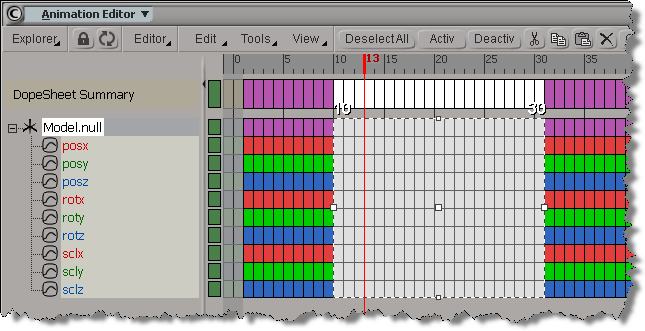 To copy and paste keys in a script, you have to also call SelectKeysInTimespan() to select the keys you want to copy.
If you copy and paste keys in the fcurve editor, SelectKeysInTimespan() is not logged, so it’s easy to get fooled into thinking you don’t need it (SelectKeysInTimespan is logged by the Dopesheet, however). hat tip luceric
SelectKeysInTimespan("null.kine.local.posx", siSetKeySelection, 65, 93, siInputParameters);
CopyKeys("null.kine.local.posx", 65, 93, null, true, siInputParameters);
PasteKeys("null1.kine.local.posx", 55, 83, false, null, siInputParameters, null, null, false, false);
Here’s some OM code that does about the same thing:
var x = Dictionary.GetObject("Model.null.kine.local");
var fcv = x.roty.Source;
LogMessage(ClassName(fcv));

var y = Dictionary.GetObject("null.kine.local");
var fcv1 = y.roty.AddFcurve();
fcv1.Set(fcv);
// Keep keys from 20-50
fcv1.RemoveKeys(1,19);
fcv1.RemoveKeys(51,null);
// Move to 0-30
fcv1.OffsetKeys(fcv1.Keys, -20);
Easy. You do it like this:
# Python
Application.PaintTool()
# JScript
PaintTool();
The real question is “how would you know about this undocumented command?”.
There’s several ways.
In 2012 AP, you can create groups for your ICE compound PPGs:

Editing the .xsicompound XML may still be the fastest way to do the grouping for large number of parameters. Especially if you’re a markup geek.
The SDK includes a new GetICECompoundPortProperties command that I think makes it possible to write a plugin that pops up a “group editor”. I’m thinking a grid control where you can edit the groups for all parameters, and then call EditExposedParamInICECompoundNode to apply the changes.
Before I knew about this new GetICECompoundPortProperties, I had started writing such a plugin only to find myself blocked because I couldn’t get all the port properties. I had managed to get the groups by parsing through the PPGLayout items, but now that will be even easier with GetICECompoundPortProperties.
After seeing Vladimir Jankijevic’s screenshot of an ICE tree with all factory nodes and compounds, I decided to try writing a script that creates all the factory nodes and compounds.
So, it takes forever to create all the ICE nodes, at least 10 to 15 minutes or so. At first I thought my script had crashed Softimage (until I used Process Monitor, which showed me that Softimage was still chugging away loading compounds and presets). Dragging and dropping all the compounds from Windows Explorer wasn’t any faster.
I did learn something about Python from this exercise. To find all the .xsicompound files, I used a Python snippet I found on stackoverflow (lines 10-15 below). See the yield statement on line 15? That makes the function a generator function, which means the function returns one item at a time, so you can process items right away without waiting for the function to build the whole list of all files.
o = Application.GetPrim("PointCloud", "", "", "")
tree = Application.CreateSimulatedICETree(o, "siNode", "")(0)
Application.LogMessage( tree )

import os, fnmatch
from siutils import siut	# XSIUtils
from siutils import si		# Application
from siutils import C		# win32com.client.constants

def find_files(directory, pattern):
     for root, dirs, files in os.walk(directory):
         for basename in files:
             if fnmatch.fnmatch(basename, pattern):
                 filename = os.path.join(root, basename)
                 yield filename


d = siut.BuildPath( si.InstallationPath( C.siFactoryPath ), "Data", "Compounds" );

#
# Compounds
#
for filename in find_files(d, '*.xsicompound'):
	print 'Found .xsicompound:', filename
	Application.AddICECompoundNode(filename, tree)

#
# Private Compounds
#
for filename in find_files(d, '*.xsicompoundp'):
	print 'Found Private .xsicompoundp:', filename
	Application.AddICECompoundNode(filename, tree)

#
# Presets (compiled nodes)
#
d = siut.BuildPath( si.InstallationPath( C.siFactoryPath ), "Data", "DSPresets", "ICENodes" );
for filename in find_files(d, '*.preset'):
	# There's one compound that generates an error
	try:
		Application.AddICENode(filename, tree)
	except:
		si.LogMessage( "AddICENode failed for " + filename )
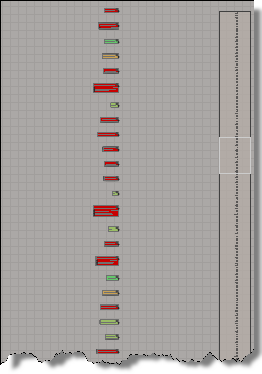 All nodes programatically created |
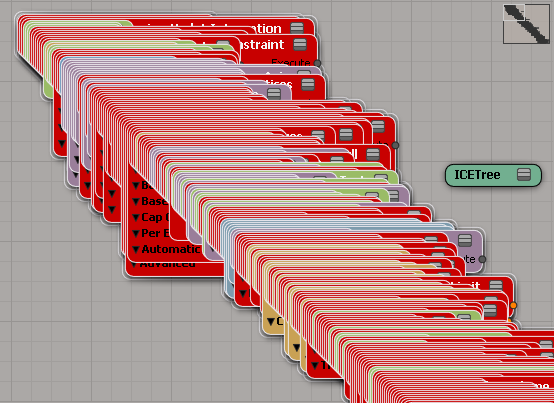 Drag-and-drop all compounds |
New in the 2012 Advantage Pack: PPG logic for ICE compounds.
In the compound properties, there’s a PPG Logic button that opens up a script editor where you can define some PPG callbacks:
from siutils import log		# LogMessage

def OnInit( ):
	log("Modulate_by_Fcurve_OnInit called")
	oPPG = PPG
	oLayout = oPPG.PPGLayout
#
# Clamp exposed port
#
def Clamp_OnChanged():
	log( PPG.Clamp.Value )
#
# Input Range Start exposed port
#
def Input_Range_Start_OnChanged():
	log( "Input Range = ( %.2f, %.2f )" % (PPG.Input_Range_Start.Value, PPG.Input_Range_End.Value ) )

#
# Input Range End exposed port
#
def Input_Range_End_OnChanged():
	log( "Input Range = ( %.2f, %.2f )" % (PPG.Input_Range_Start.Value, PPG.Input_Range_End.Value ) )
The “PPG logic” is saved in the element of the .xiscompound file.
Given this render tree:

here’s a few snippets of JScript that show how to get the image clips for certain ports on the material (in this example, the diffuse and bump ports):
First, get the image clips from the sub-tree that’s plugged into the bump port:
SelectObj("Sources.Materials.DefaultLib.Material1.Lambert", null, null);

var s = Selection(0);
var sp = s.bump;

oEnum = new Enumerator( sp.Sources(0).Parent.ImageClips ) ;
for (;!oEnum.atEnd();oEnum.moveNext() )
{
	var oSelItem = oEnum.item() ;
	LogMessage( classname( oSelItem ) + " " + oSelItem.Name );
}
Second, how to get the image clips when a port uses texture layers:
SelectObj("Sources.Materials.DefaultLib.Material1.Lambert", null, null);

var s = Selection(0);
var sp = s.diffuse;

var tl = s.TextureLayers(0);
var d = tl.TextureLayerPorts("diffuse_port")
if  ( d != null )
{
	LogMessage("diffuse driven by a Texture Layer");
}


oEnum = new Enumerator( tl.Parameters("Color").Source.Parent.ImageClips ) ;
for (;!oEnum.atEnd();oEnum.moveNext() )
{
	var oSelItem = oEnum.item() ;
	LogMessage( classname( oSelItem ) + " " + oSelItem.Name );
}
 eX-SI
eX-SI 