Quick peek under the covers: Send To functionality


Send To isn’t really something you can implement yourself. It’s a combination of application code, plugins, and an inter-application hub.

OneClick plugins take care of the Send To commands. In Softimage, you can use the Plug-in Manager to check out the OneClick plugin (it’s under the Factory location):
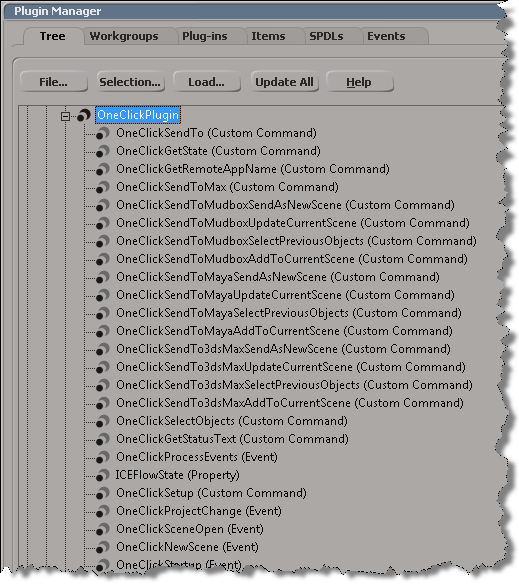
In Maya, there’s also a OneClick plugin. It’s not set to auto-load, so if you have problems connecting to Maya, try going into the Maya Plugin Manager and loading OneClick.mll.

The inter-application hub that handles things like finding running instances of an application, starting applications, and passing messages between applications. The inter-application hub uses a set of XML configuration files to describe the applications available on the local system.

You can find these .syncfg files in %PROGRAMDATA%\Autodesk\Synergy.

For supported inter-application workflows, these .syncfg files determine what Send To menu commands are available. For example, Softimage will check for .syncfg files for Maya, 3ds Max, and Mudbox, and if it finds the right versions, add the Send To commands to the File menu.

The .syncfg files are created and destroyed as you install and remove Autodesk applications.

On older versions of Windows where the location of the .syncfg file contains non-ascii characters, you may need to set the SYNHUB_CONFIG_PATH environment variable to specify the location.

IMO, you shouldn’t be messing about with the .syncfg files themselves, despite what this KB article says. For example, you can’t get Mudbox 2012 to send to Softimage 2011 by hacking the .syncfg files…Softimage 2011 just doesn’t support the Mudbox workflow, that was introduced later.

Getting equidistant points on a curve revisited


I had posted something on this before, but I used a Repeat node because Get Curve Distance from Curve Location doesn’t take an array of Distance Values.

Recently, Gray posted another approach on the XSI mailing list. While using Curve Distance to Curve Location will give you greater accuracy, this approach has the advantage of simplicity and no Repeat node:

The other day it occurred to me that maybe I could get rid of my Repeat node by using a point cloud:

  • Use a per-point attribute to hold the different curve distance values.
  • Then feed that per-point data set into the Distance Value port of the Curve Distance to Curve Location node

Here’s my ICE tree (which is on the point cloud, not the curve):

It looks like it should work, but it doesn’t. Something goes wrong when I do the Set Point Position…all the odd-numbered points end up positioned at the end of the curve.

If I disconnect the Set Point Position node, and debug the tree, it looks like I’m getting all the right locations and points. So, for now, I’m stuck thinking I’m doing something wrong, but I haven’t figured it out yet…

Interpolating between array elements


On the XSI mailing list last week, there was a question about “resizing an array using interpolation”.
The goal was to resize an array by interpolating between the elements of the original array.
For example, given this array:

[0, 5, 10]

how to you get this array ?

[0, 1, 2, 3, 4, 5, 6, 7, 8, 9, 10]

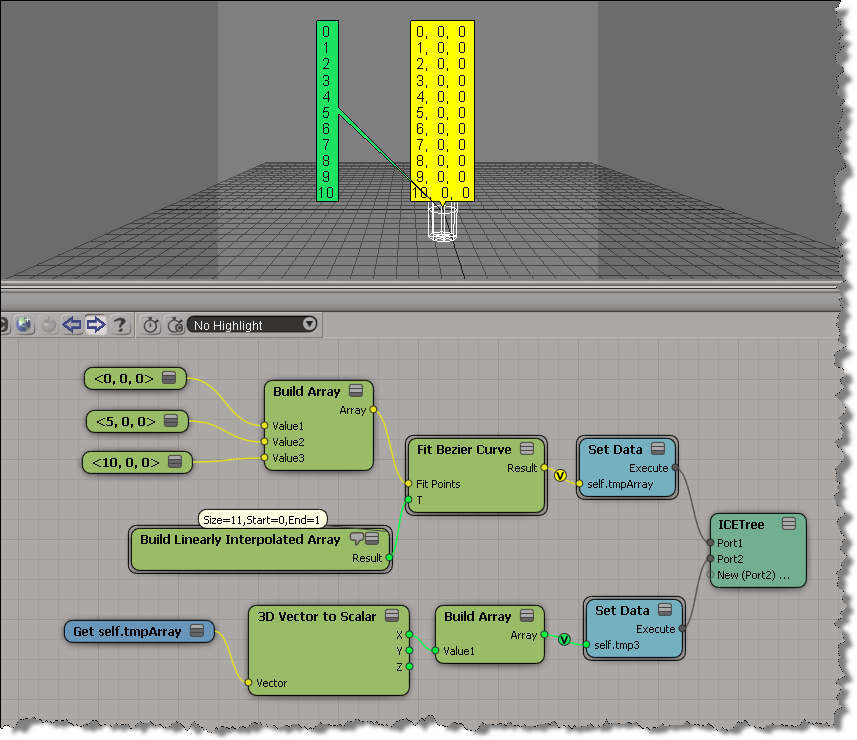
Alan Fregtman suggested bezier interpolation with the Fit Bezier Curve compound. I gave it a try, and here’s a screenshot. I added a branch to go back to a scalar array from the vector array.

Tip: Selecting objects from inside an ICE Tree view


ICE tree views are typically locked, so that they don’t constantly update while you’re working with a scene and selecting different objects. But what do you do if you want to select an object referenced in the ICE tree? Do you have to hunt down the object in the explorer?

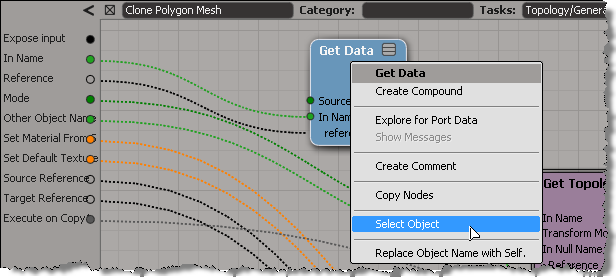
Nope. As of 2011.5, you can right-click a Get Data node to select the referenced object.

This works with the self, this_model and this_parent tokens too.

It also works on an Get Data inside a compound, if the Get Data In Name is connected to a valid reference. So, you don’t need to exit a compound just to select an input object.

hat tip: Guillaume Laforge

Friday Flashback #40


Thanks to Hirazi Blue for suggesting this flashback.

The initial goal of project MoonDust was to develop a new particle simulation system for XSI. The existing particle system, which had been in XSI since v1.0, had reached its limits. It was a monolithic system that wasn’t flexible or customizable enough (eg available events and attributes hard coded into the system).

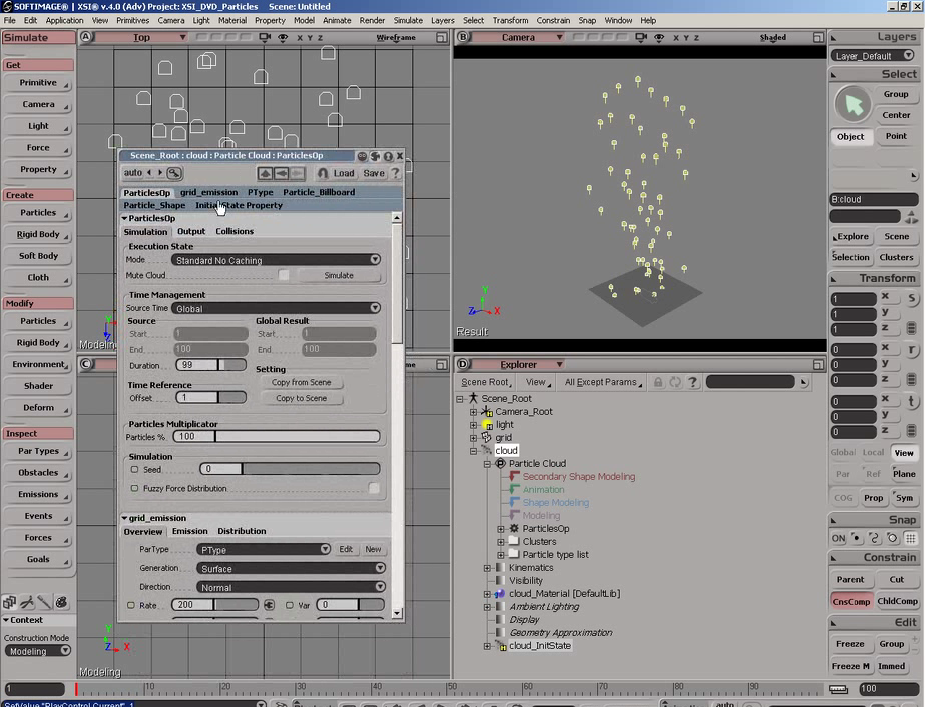
I never had to learn the old particle system. There weren’t that many support cases about it, and MoonDust was always just around the corner. I just remember the old particles as a jumbled forest of PPGs and parameters. See for yourself…here’s some screenshots of the old particle system:

It’s interesting to compare how things worked before:

and after:

However, the scope of the project eventually grew into the development of a procedural graph system.

ActiveX component can’t create object: ‘Scripting.FileSystemObject’


Looking back, I find this error popping up in my case notes once or twice every year.
Sometimes we’re able to help fix the problem, sometimes not, because it’s a problem with their system, not with Softimage itself.

Typically, a user will report seeing errors like this at start up:

// ERROR : Automation server can't create object - [line 22 in c:\Program Files\Autodesk\Softimage 2012 SP1\Addons\ICEFlowBuilder\Application\Plugins\ICEFlowCreateParticlesPlugin.js]
// ERROR : Automation server can't create object - [line 70 in c:\Program Files\Autodesk\Softimage 2012 SP1\Addons\sdkui\Application\Plugins\AddonDoc.js]
// ERROR : Automation server can't create object - [line 141 in c:\Program Files\Autodesk\Softimage 2012 SP1\Application\Commands\GlobalVarPlugin.js]
// ERROR : 2006-SetGlobal - Unexpected failure.
// ERROR : Automation server can't create object - [line 141 in c:\Program Files\Autodesk\Softimage 2012 SP1\Application\Commands\GlobalVarPlugin.js]
// ERROR : 2006-GetGlobal - Unexpected failure.
// ERROR : Automation server can't create object - [line 141 in c:\Program Files\Autodesk\Softimage 2012 SP1\Application\Commands\GlobalVarPlugin.js]
// ERROR : 2006-GetGlobal - Unexpected failure.
// ERROR : Automation server can't create object - [line 141 in c:\Program Files\Autodesk\Softimage 2012 SP1\Application\Commands\GlobalVarPlugin.js]
// ERROR : 2006-GetGlobal - Unexpected failure.

Sometimes users miss the startup errors and report seeing the error when they try to do something in Softimage, such as import dotXSI.

// ERROR : ActiveX component can't create object: 'Scripting.FileSystemObject' - [line 352 in c:\Program Files\Autodesk\Softimage 2012 SP1\Application\DSScripts\Model.vbs]
ImportDotXSI(null, null);

Note that the errors all give a line number in a specific file. If you check any of these, you’ll see that all the errors happen when Softimage tries to create an ActiveX object like
Scripting.Dictionary or Scripting.FileSystemObject. These are standard objects in the Microsoft Windows Script runtime, so these errors indicate that something’s wrong with Windows.

If you’re lucky, you can fix this by re-registering C:\windows\system32\scrrun.dll with regsvr32.

If that doesn’t work, then my guess would be that it’s some kind of registry or permissions problem. In the past (on XP systems), I’ve seen cases where it was specific to a user profile, and where it was because the Scripting.FileSystemObject registry key didn’t have an owner assigned.

If you don’t believe it’s a general Windows problem, try this. It should give the same error.

  • Open a command prompt.
  • Run this command: notepad test.vbs
  • In notepad, paste in this VBScript and save the file:
    set fso = CreateObject("Scripting.FileSystemObject")
    set fout = fso.CreateTextFile("c:\Test.txt", true)
    fout.WriteLine Now
    fout.Close
    WScript.Echo "Testing"
    
  • In the command prompt, run this command: cscript test.vbs

Tip: Using ICE to drive the OpenGL vertex color display


Courtesy of Vladimir Jankijevic, here’s ” a really handy way of showing
arbitrary colors on a polygon mesh in the viewport, without having to create
a vertex property.”

  • Create an ICE tree that sets self.Color in a per-point context.
  • In the Material node property editor, set Vertex Color Display Property
    to Color.

Screenshot by Vladimir Jankijevic:

Another screenshot of the same thing:

Context matters: from PolygonToVertices to VertexToPolygons


This came up last week on the XSI mailing list. The goal, as I understand it, was this: for each polygon, build an array that contains the indices of all polygon neighbors.

So, to start, you can get an array of vertex locations for each polygon:

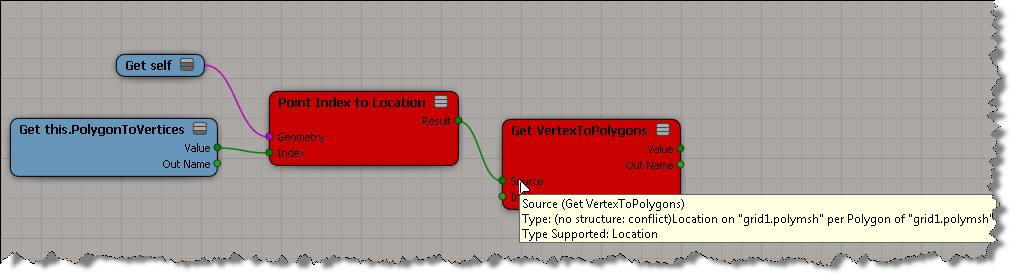
But when try to use those locations to get VertexToPolygons, that’s when you hit a problem:

Usually if it’s a context mismatch, you won’t be able to plug in the connection. In this situation, you can plug the result of Point Index to Location into the Get VertexToPolygons, but as soon as you do, both nodes go red. The tooltip indicates that ICE cannot figure out the structure of the data, that is, is this a single value or an array of values? The error goes back up to the Index port on Point Index to Location (if you right-click Point Index to Location and click Show Messages, you’ll get “ERROR: The type of port ‘Index’ is not defined.”).

If you unplug Get PolygonToVertex, then things are ok:

So, it is possible to use a Repeat node to build the per-polygon array of neighbor polygons.