Satellite rendering licensing


A recent drop of mental ray included a change to satellite licensing scheme.
Satellite licensing will be per machine, not per CPU. You’ll get four machines (instead of the current four CPUs).

Softimage 2011.5 (Subscription Advantage Pack) doesn’t have this particular drop, but you will see this change in subsequent releases.

ERROR : FATAL: DB 1.0 fatal 041500: interrupted by exception code 0xc0000005 (access violation)


‘ ERROR : FATAL: DB 1.0 fatal 041500: interrupted by exception code 0xc0000005 (access violation)

The exception code 0xc0000005 (access violation) indicates this is probably a memory access error. The software is trying to access a region of memory that it shouldn’t be accessing. In general, this could be a problem in the code (for example, a NULL pointer), faulty RAM, or even a bad device driver.

If you get this error with any scene (for example, with one of the sample scenes that ships with Softimage), then that may indicate the problem is specific to your computers. Or if you get the error only with a certain computer, that would indicate a possible problem with that one computer.

If you get this with just some scenes, then that points to a problem in the software (or perhaps the scene). It could be that something about the scene triggers certain conditions in the software, and the software then causes the error. In general, I would try breaking down the scene to try and isolate the root cause. It could be the overall complexity of the scene, or a specific element of the scene.

In one case I had recently, the user got this 0xc0000005 (access violation) error and then an endless series of bad message…0xbad0bad errors. We traced the access violation error back the number of different animated objects that were being instanced through ICE using assemblies.

Assemblies are used when an ICE trees use one of these compounds:

  • Set Instance Geometry
  • Set Particle Instance Animation Time
  • Control Instance Animation
  • Control Displacement Instance Animation

Using assemblies can be memory-intensive, so it appears that when you’ve got a lot of particles and a lot of animated instances of many objects, satellite rendering may fail with a memory access error (actually, the frame was rendered, but XSI was hung up after because of the errors).

Ref: Access Violation? How dare you …

Installing the Autodesk Network License Manager (aka LMTOOLS)


You can use the Softimage Setup program to install the Autodesk Network License Manager (video). Just click Install Tools and Utilities.

Alternatively, if you don’t have the full Softimage Setup on your license server computer, then you can download a standalone installer for ADLM from http://usa.autodesk.com/getdoc/id=TS13737466

Subscription center update


Come Monday morning, you’ll be seeing some changes on the Sub Center when you log a support request.

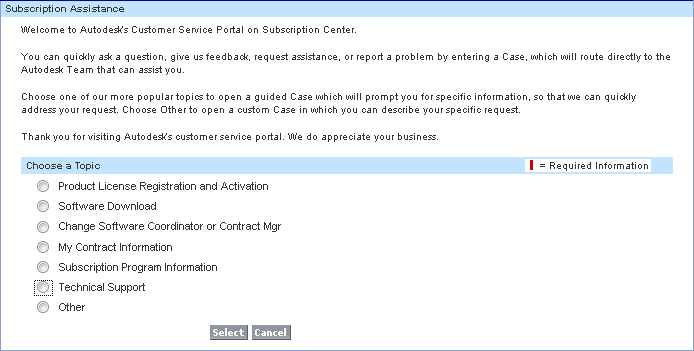
First, when you create a case, you’ll be asked to choose a topic. For example, license registration and activation or software download or technical support.

Your request will be routed the right person

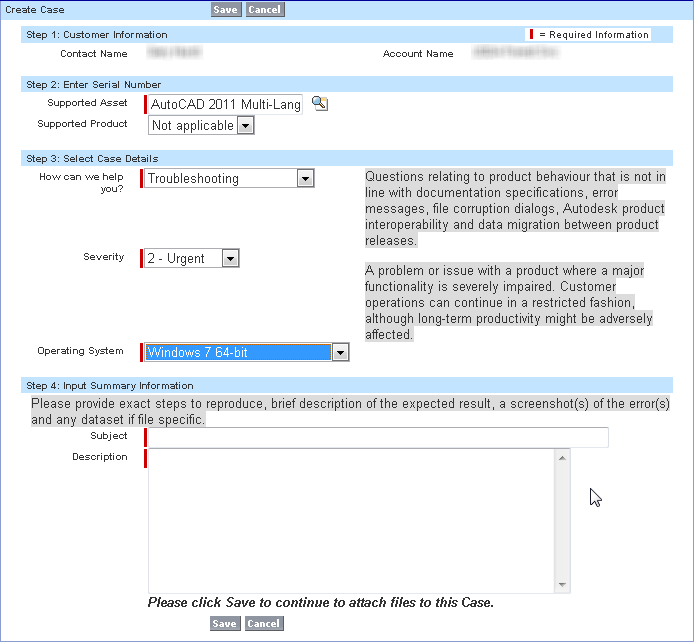
For technical support requests, there’s a simplified form to fill out. Note that there are now three possible Severity values:

  • 1 – Critical (catastrophic defect with no workaround)
  • 2 – Urgent (major functionality impaired)
  • 3 – Standard (limited or minor adverse affect)

The How can we help you? field defines the type of support case:

  • Troubleshooting Questions relating to product behavior that is not in line with documentation specifications, error messages, file corruption dialogs, Autodesk product interoperability, and data migration between product releases.
  • Installation and Licensing Inquiries about product installation process and options, system requirements, peripheral device setup, and FLEXIm installation and network deployment.
  • How To Inquiries about how to use the features and function within an installed Autodesk product where no operational problem or error message exists.
  • Enhancement An idea or suggestions for a new feature or documentation or a request for an enhancement to an existing feature or documentation.
  • Configuration Inquiries about product performance, security and administrative settings, file import and export questions, database connectivity and interoperability with the O/S network and peripherals.

The simplified tech support request form includes on-screen help text

ERROR : MSG 0.n error 011326: bad message received from host 1, 0xbad0bad


In a recent case, a customer getting a endless repetition of this error message when he used satellite rendering:

// ERROR : MSG  0.n  error  011326: bad message received from host 1, 0xbad0bad
...

By itself, this message doesn’t tell us much more than that something bad happened and now the master and the slave aren’t communicating.

  • MSG means this message is from the module that handles low-level message passing and thread management.
  • 0.n identifies the machine where the error occured. Machine 0 is the client machine where the render was started. The dot (.) separates the machine (host) number from the thread number.
  • Thread n is a special network communication thread that keeps contact with the satellilte machines if network parallelism is used.

Typically, the real error message is output just before all these bad message errors start. To catch this first error, we redirected the xsibatch output to a log file:

xsibatch.bat -render \\server\project\Scenes\test.scn" -verbose on > xsibatch.log

The initial error turned out to be a memory access error. More on that later.

Why is my ICE tree all red?


I’ve had a few cases recently where we had to figure out why certain nodes were red in an ICE tree. Usually this was in cases where someone was building something from scratch, or using factory ICE nodes in a slightly non-standard way.

For example, here’s an ICE tree with the Emit Splash from Surface Collision and Move Towards Goal compound.

Red means the evaluation of the compound is returning an error. You can see the first of the errors that are bubbling up if you point to an empty area on a compound. To see all the warnings and errors, right-click the node and click Show Messages.

In this case, the problem is that an attribute is not initialized. Some factory default compounds rely on other compounds (usually the emitters) to initialize certain attributes. When you start building up things from scratch, you’ll have to take care of the initialization.

The case of satellite rendering not working in 2011 SAP on 32-bit Windows XP


In this case, a customer was trying to use 64-bit Windows satellites from a 32-bit Windows XP master computer. The problem: it didn’t work. The mental ray diagnostic messages don’t show any usage of the satellites when he rendered on the master computer.

The customer double-checked that ray3hosts had the right computer names and ports, that the raysat service was running on the master and the satellites, and that telnet could connect to the raysat ports. In addition, the customer tried using the 32-bit XP machine as a satellite, and that did work. So it looked to the customer like maybe 32-bit 2011 SAP couldn’t use 64-bit satellites.

I set up a 32-bit Windows XP master with some 64-bit Windows 7 satellites, and sure enough it didn’t work. In addition to checking the mental ray diagnostics on the master, I also run Process Monitor on the satellites to check for raysat activity, and I wasn’t seeing anything.

After double-checking everything again, I tried using WireShark, a network protocol analyzer, on the master to see if Softimage was even trying to connect to the satellite.

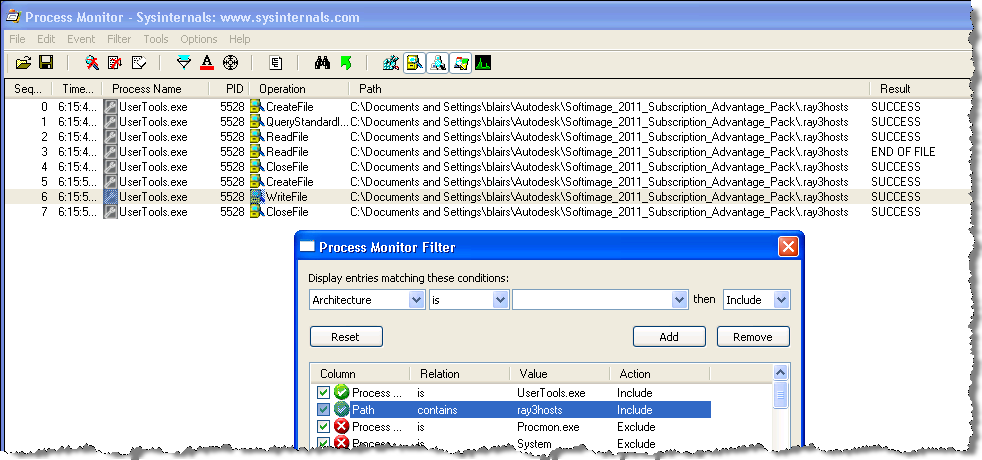
I didn’t see any outgoing TCP traffic to the satellite, so I decided to use Process Monitor on the master to check whether Softimage was loading .ray3hosts. And sure enough, it wasn’t.

So I used Process Monitor to check where UserTools was creating .ray3hosts, and it turned out that on Windows XP, UserTools creates the .ray3hosts file in the “wrong” place:

C:\Documents and Settings\blairs\Autodesk\Softimage_2011_Subscription_Advantage_Pack\.ray3hosts

It’s the wrong place because Softimage looks for .ray3hosts here:

C:\users\blairs\Autodesk\Softimage_2011_Subscription_Advantage_Pack\.ray3hosts

Some workarounds:

  • Manually copy the .ray3hosts file to the right place
  • Edit setenv.bat and set MI_RAY_HOSTSFILE to point to the folder used by UserTools
  • Start UserTools from a Softimage command prompt, so it picks up XSI_USERROOT from the environment set by setenv.bat