ICE kinematics
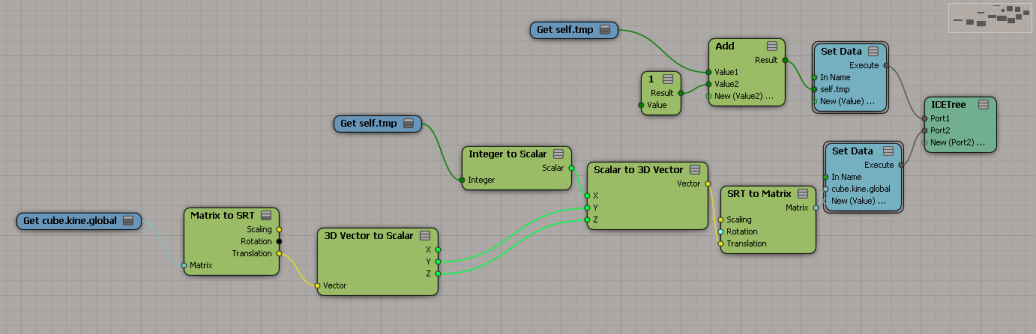
Sticking an ICE tree on a mesh and then getting the kine.global, updating it, and setting the kine.global doesn’t really work. And I’m not sure it should. Between ICE optimizations and the way the XSI evaluation model works, I don’t think you’ll get consistent updates. SCOPs are similar, but they have that Always Evaluate flag to force evaluations.
Second attempt. I also have an ICE Tree in the Modeling region that initializes self.tmp.
Switching material libraries
Here’s how to switch from one material library to another. This script could be useful when you have a corrupted material library (eg missing render tree connections), but you have a backup copy of the material library. For example, you could export a good version of the material library from a backup copy of the scene, and then import the matlib into the current version of the scene.
// Material Library with bad render trees (missing connections)
var oMatLib = Dictionary.GetObject( "Sources.Materials.DefaultLib" );
// Material Library with good render trees
var oMatLib1 = Dictionary.GetObject( "Sources.Materials.DefaultLib1" );
oEnum = new Enumerator( oMatLib.Items ) ;
for (;!oEnum.atEnd();oEnum.moveNext() )
{
var oMat = oEnum.item() ;
if ( oMat.UsedBy.Count > 0 )
{
var oMat1 = oMatLib1.Items(oMat.Name);
if ( oMat1 == null )
{
LogMessage( "Cannot find " + oMat.Name + " in " + oMatLib1.Name );
}
else
{
LogMessage( "Repacing " + oMat.FullName + " with " + oMat1.FullName );
// Groups
var g = oMat.Owners.Filter( "#Group" );
SIAssignMaterial( g.GetAsText(), oMat1 );
// Objects
SIAssignMaterial( oMat.UsedBy.GetAsText(), oMat1 );
}
}
}
Looping through all materials and material libraries
Here’s a snippet that shows how to loop through all material libraries and materials and delete unconnected shaders:
var oMatLibs = ActiveProject.ActiveScene.MaterialLibraries;
oEnum = new Enumerator( oMatLibs ) ;
for (;!oEnum.atEnd();oEnum.moveNext() )
{
var oMatLib = oEnum.item() ;
oEnum1 = new Enumerator( oMatLib.Items ) ;
for (;!oEnum1.atEnd();oEnum1.moveNext() )
{
var oMat = oEnum1.item() ;
DeleteUnusedShaders( oMat );
}
}
The same thing but in Python.
oMatLibs = Application.ActiveProject.ActiveScene.MaterialLibraries for lib in oMatLibs: for mat in lib.Items: Application.DeleteUnusedShaders( mat )
Putting the history log on top of the script editor
Over 10 billion served?
I notice the SR number for my last service request was 1-10019581901.
Has Autodesk really had 10 billion service requests?
I checked out the SRs (service request) for today, I see that the SR numbers aren’t sequential:
1-10003606461
1-10003606471
1-10003606481
1-10003606501
1-10003606521
1-10003606541
1-10003606560
1-10003606566
1-10008631466
1-10010742572
…and so on
So “no”, we haven’t handled over 10 billion service requests.
PPG doesn’t pop up automatically when you create a null
A customer mentioned to me the other day that the PPG didn’t pop up when he created a null.
It turns out we never pop-up the PPG when you create a null. I just never noticed that.
To verify that, I checked the implementation of GetPrim, which is the script GetPrimProc in %XSI_HOME%\Application\DSScripts\primitives.vbs.
In GetPrimProc, you’ll see that we skip nulls when we call AutoInspect:
'-------------------------------------------------------------------- ' Inspect the new object '-------------------------------------------------------------------- if Not TypeName (out_primitive) = "Nothing" then if Not out_primitive.type = "null" then AutoInspect GetPrimProc, ,, "General" end if end if
The customer also had another problem: pressing ENTER didn’t open up the PPG either, or if it did, all he got was a numeric slider for setting the Icon. Restarting Softimage fixed this; my guess is that the cached PPG layout was corrupted somehow (Softimage caches PPG layout definitions–if you’ve spent any time coding custom properties you’ve probably noticed how the PPGs of existing properties don’t change when you change the layout code).
Pinning Softimage to the Windows 7 task bar
Finding all Store in Channel shaders
// Get all shaders
var x = FindObjects(null, "{6495C5C1-FD18-474E-9703-AEA66631F7A7}" );
LogMessage( x.Count );
var oShaderCollection = new ActiveXObject( "XSI.Collection" );
// Build up a collection of all Store in Channel shaders
oEnum = new Enumerator( x ) ;
for (;!oEnum.atEnd();oEnum.moveNext() )
{
var oShader = oEnum.item() ;
try {
//LogMessage( oShader.ProgID );
if ( oShader.ProgID.indexOf( "_storeinchannel" ) > 0 )
{
oShaderCollection.Add( oShader );
}
}
catch(e)
{
LogMessage(e.message);
}
}
LogMessage( oShaderCollection.Count );
Crash when you open the render tree or Material Manager
Some users have reported crashes when they open the render tree or Material Manager. For some users, this happens after a period of extended usage; for others, it appears to be scene- or geometry-specific.
I’ve had users send me scenes with geometry that appeared to crash the render tree and Material Manager, but when I tried on my machine, everything worked fine. So, it’s a bit of a mystery.
There is a workaround however: open the render tree and Material Manager before you load your scene. After that, you can work normally.
You could use an OnStartup event to automatically open those views when Softimage starts. I believe you could just open and close them at startup, and then everything will be ok afterwards.