Looping over an XSICollection


This is a beginner-level walkthrough of a VBScript snippet.

set oColl = CreateObject( "XSI.Collection" )
oColl.Items = "*_face_crv?"

for each oObj in oColl
	LogMessage oObj.fullname 
next

Line 01: We use the VBScript function CreateObject to create an instance of the ActiveX object XSICollection. XSICollection is a part of the XSI SDK, and is available only inside Softimage.

Line 02: Softimage uses string expressions to reference scene elements. For example, the expression “*_face_crv?” expands to “lf_face_crv1,lf_face_crv2,rf_face_crv1,rf_face_crv2” if you have objects with those names in the scene. The [undocumented] XSICollection.Items property takes a string expression and puts the corresponding objects into the XSICollection.

Line 04: We use the VBScript for each nextstatement to loop over the XSICollection.

Line 05: LogMessage is a method of the Application object, which is part the XSI SDK. FullName is a property available on most objects in Softimage.

Here’s the JScript equivalent, with an additional line of code that uses regex to update the object names.

var oColl = new ActiveXObject( "XSI.Collection" );
oColl.Items = "*_face_crv";

oEnum = new Enumerator( oColl ) ;
for (;!oEnum.atEnd();oEnum.moveNext() )
{
	var oSelItem = oEnum.item() ;
	LogMessage( oSelItem.fullname );
	oSelItem.Name = oSelItem.Name.replace( /crv/, "loc" );
	LogMessage( oSelItem.fullname );

}

Further reading:
ADSKFLEX_LICENSE_FILE value in the registry


Softimage saves the location of the license server in the registry. On Vista, the location is saved in the ADSKFLEX_LICENSE_FILE value:

HKEY_CURRENT_USER\Software\FLEXlm License Manager

On my XP system, the value is saved under HKEY_LOCAL_MACHINE.

Over time, you may end up with some obsolete license server locations saved in the registry. For example, if you replace your license server, the location of the old server is still in the registry.

So whenever you cannot get a license, and everything else seems to check out ok, open up regedit and clear the ADSKFLEX_LICENSE_FILE value, to make sure Softimage is connecting to the right license server.

I had a support case the other week where the customer wrote

xsibatch cannot get a license, even though setenv.bat an exact copy of the setenv.bat from a machine where xsibatch can get a license.

It turned out the problem was because of ADSKFLEX_LICENSE_FILE. After he deleted that value, xsibatch connected to the license server specified by setenv.bat and got a license.

Transferring your license to a new license server


You will have to contact the Business Center to transfer your license to the new license server.

A network license is tied to the Ethernet address (aka MAC address or physical address) of a network adapter on the license server computer. So you need a new license if you move your license server to a different computer.

After you set up the new license server, update the setenv.bat files on your workstations to point to the new license server.

Note that on the workstations, the location of the old license server persists in the registry value HKEY_CURRENT_USER\Software\FLEXlm License Manager\ADSKFLEX_LICENSE_FILE. It’s a good idea to clear that value, to make sure XSI.exe and xsibatch.exe don’t try to use the old server.

FLEXnet Licensing error:-125,147: A PACKAGE component must be specified


You can almost always safely ignore this error. In LMTOOLS, Perform Diagnostics reports this error because LMTOOLS does not fully understand the new “package” license file format.

In a license file, a PACKAGE is a container for the actual licenses. LMTOOLS incorrectly treats the PACKAGE as a license, so you get an error (and in the Perform Status Enquiry output, you get what looks like double the actual number of licenses, because the packages are treated like actual licenses).

When I’m helping customers, I rarely use Perform Diagnostics. For general license troubleshooting, I prefer to use Perform Status Enquiry (Server Status tab).

Read on only if you’re interested in the gory details of the .lic file…

For example, in a license file you have this:

PACKAGE 78900SFTIMA_F adskflex 1.000 COMPONENTS="84100SFTIMA_2010_0F \
    78800SFTIMA_7_5F" OPTIONS=SUITE SUPERSEDE ISSUED=12-Aug-2009 \
    SIGN="12B2 E17F D7D2 604D AF1E 76A4 688B 89CB 6DBD 5597 16B6 \
    4116 E855 ABB0 D2F9 01AE EDB9 7B92 9BF8 D829 EF4D E6B7 0EBD \
    F95A 7752 0C2F 95DB F9D9 0B9A 27CE" SIGN2="1276 FD9E A12B 86D7 \
    B9E5 F193 9CB0 8528 21A6 101C 949F 4CAD 4666 0D72 6D9D 022F \
    5EC7 5534 4E20 A90F B6CB D5D4 F4BF 5067 1E6A DCE5 77A2 5EF0 \
    8F36 D066"
  • 78900SFTIMA_F is the package.
  • 84100SFTIMA_2010_0F is the Softimage 2010 license.
  • 78800SFTIMA_7_5F is the Softimage 7.5 license.

In the Perform Diagnostics output, you get an error for the package:

"78900SFTIMA_F" v1.000, vendor: adskflex
  License server: mtl-example
  floating license  starts: 1-jan-1990,   expires: 12-aug-2010
  Requests from the same USER/HOST do not consume a new license

This license cannot be checked out because:
A PACKAGE component must be specified.
Feature:       78900SFTIMA_F
License path:  C:\Program Files\Autodesk Network License Manager\SFTIMA2010.lic;
FLEXnet Licensing error:-125,147

But for the actual licenses (aka features), you get this:

This license can be checked out
-----------------------------------------------------
"84100SFTIMA_2010_0F" v1.000, vendor: adskflex

Rendering Softimage Zpic files


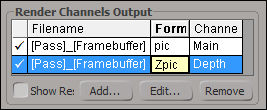
To render out zpic files, first you need a Main channel that outputs pic files, and then you have to add a Depth channel and change its output format from zt to zpic. Here’s a short video that shows how.

Here’s the step-by-step:

  1. In the Render Manager, add a Depth channel (under Render Channels Output, click Add).
  2. In the Create Framebuffer From Render Channel dialog box, click Depth in the Render Channel list, and then click OK.
  3. By default, the output format of the new depth channel is zt.
  4. Select the new depth channel (click that row) and then click Edit.
  5. In the Output Format list, click Softimage Zpic.

See the wiki page Zpics and the FX Tree for more info zpic files.

Softimage and the Autodesk Education Suite for Entertainment Creation


The Autodesk Education Suite for Entertainment Creation includes Softimage, but not the 5 Batch licenses.

The suite license includes an 85519ESEC_2010_0F token that can be used to run Softimage (or Maya or Max or MotionBuilder or SketchBook), but it won’t run xsibatch.

Here’s what you would see in the LMTOOLS log file if you started Softimage on one machine and then tried to run xsibatch on another machine:

15:10:33 (adskflex) OUT: "85520ESEC_F" blairs@machine1
15:10:33 (adskflex) OUT: "85519ESEC_2010_0F" blairs@machine1
15:15:26 (adskflex) DENIED: "85520ESEC_F" blairs@Machine2 (Licensed number of users already reached. (-4,342))
15:15:26 (adskflex) DENIED: "85519ESEC_2010_0F" blairs@Machine2 (Licensed number of users already reached. (-4,342))

On vacation


I’m off to Buenos Aires for two weeks, so there’ll be no blogging until I get back.
See you then!

Steve

PS – The forecast for tomorrow:

Montreal: high -12, low -17 (Celcius).
Buenos Aires: high 29, low 18.

WTFFFFFFFF ?


Just before the Christmas break, I had a case where LMTOOLS reported FFFFFFFF as the Ethernet address, even though ipconfig /all showed a valid Physical address for the network adapater. Because of this, the license server wouldn’t start.

FFFFFFFF (eight F’s) is the broadcast address.

I tried a number of things, like resetting the TCP/IP stack with netsh with no success. I spent quite a bit of time on google, but most of the information was old and no longer applicable.

Eventually I figured out the problem, and was able to reproduce on my machine at home. It was the MAC Bridge Miniport: when I bridged my two network connections, then LMTOOLS thought the MAC address was FFFFFFFF.


To unbridge a network adapter:

  1. From the Control Panel, open Network Connections.
  2. Right-click your local area connection and click Remove from Bridge.
  3. Right-click the Network Bridge and click Disable.