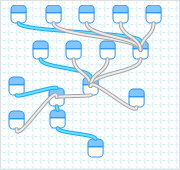
Yahoo pipe for the Softimage dicussion forums on The Area


I find it very hard to keep track of new posts on The Area. The View New Post and View Todays Active Topic pages just don’t do it for me.

So I created a Yahoo pipe to combine the RSS feeds for all the Softimage forums. You can find the pipe here:
http://pipes.yahoo.com/softimage/areaforums

The RSS feed for the pipe here:
http://pipes.yahoo.com/pipes/pipe.run?_id=571b2031be0ff54902079c11db49476c&_render=rss

Note that the forum RSS feeds always show the first post of the discussion, so the RSS feeds tell you only which discussions have been updated recently. You have to click through to see the most recent post.

Visualizing with ICE: drawing vectors and lines


To visualize vectors, I added some points to an empty point cloud, and in Show Values, I set Display As to Vector + Length:

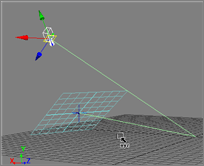
Another way to visualize the vectors you are working with is to use an ICE array with Display As=Line. This ICE tree draws a line from the global origin to the camera interest, from the camera interest to the camera, and finally from the camera back to the global origin.

Possible memory leak with ATI display driver


On the Area forums, a customer reported that Softimage memory usage would keep increasing until the software either froze or crashed. All he had to do was keep moving points. This happened both on Windows 7 and Vista.

Eventually he resolved the problem by rolling back to an older version (June 09) of the display driver for his [uncertified] ATi Radeon HD 4870 card.

Ref: XSI crashing / freezing within Windows 7 x64

Positioning the camera perpendicular to a reference plane


Camera looking at a reference plane

You can use Ref mode to quickly set up the camera so that it is looking straight down at a reference plane.

  1. Set the current reference plane.
  2. Activate the Ref transform mode (in Ref mode, values are relative to the active reference plane).
  3. Select the camera interest, and in the Transform panel enter X=0, Y=0, Z=0.
  4. Select the camera and set X=0 and Z=0. You can also set the Y, or just go to the viewport and use the mouse scroll wheel to pull back from the reference plane.

Here’s a script that does this for you. The script works with a default Softimage camera rig: just select some part of the camera rig and the script will figure out the rest.

var o = ( Selection(0).IsClassOf( siX3DObjectID ) ? Selection(0) : Selection(0).Parent3DObject );

var c = null;
var ci = null;
switch ( o.type ) {
	case "camera" :
		c = o;
		ci = c.Interest; 
		break;
	case "CameraInterest" :
		c = o.Parent3DObject.Camera;
		ci = o;
		break;
	case "CameraRoot" :
		c = o.Camera; 
		ci = c.Interest; 
		break;
	default :
		LogMessage( "Cannot find the camera and camera interest. Please select part of a camera rig." ); 
} 

if ( c != null & ci != null )
{
	// Translate Camera Interest
	Translate(ci, 0, 0, 0, siAbsolute, siObjCtr, siObj, siX, null, null, null, null, null, null, null, null, null, 0, null);
	Translate(ci, 0, 0, 0, siAbsolute, siObjCtr, siObj, siY, null, null, null, null, null, null, null, null, null, 0, null);
	Translate(ci, 0, 0, 0, siAbsolute, siObjCtr, siObj, siZ, null, null, null, null, null, null, null, null, null, 0, null);

	// Translate Camera
	Translate(c, 0, 0, 0, siAbsolute, siObjCtr, siObj, siX, null, null, null, null, null, null, null, null, null, 0, null);
	Translate(c, 0, 20, 0, siAbsolute, siObjCtr, siObj, siY, null, null, null, null, null, null, null, null, null, 0, null);
	Translate(c, 0, 0, 0, siAbsolute, siObjCtr, siObj, siZ, null, null, null, null, null, null, null, null, null, 0, null);
}

.

Versioning for custom properties


Custom properties don’t have built-in support for versioning. After you create an instance of a property, the Define callback is never called again. So if you update your custom property with new parameters, you won’t see those new parameters in existing instances of the property.

If you want to support versioning, you can build it into the OnInit callback.

Add a Version parameter to the custom property. Then in the OnInit, you can compare this Version parameter against the current version of the custom property. If the property was created by an older version of the plugin, then you can update the property by adding parameters or by calling EditParameterDefinition to modify an existing parameter. But you cannot cannot remove parameters (instead, hide them).

If you have custom properties that don’t a Version parameter, then the most you can do is check for the existence of the Version parameter. If it is not there, then you know the property is older and needs to be updated.

Finally, you need to rebuild the PPG layout whenever OnInit is called. The typical way to do this is to get rid of the DefineLayout function and implement your own “RebuildLayout” function.

Here’s an example plugin that shows how to update an existing instance of a property:
Continue reading

Other edit styles for PPG items


A couple of weeks ago, I posted about adding a password field to a PPG with the ES_PASSWORD edit style (from winuser.h).

Here’s a couple of other edit styles you can use; just run this script in the Softimage script editor.

/ Create CustomProperty
var oCustomProperty = XSIFactory.CreateObject( "CustomProperty" );

// Add Parameter(s) to the custom property
oCustomProperty.AddParameter( "password", siString, siClassifUnknown, siSilent, "", "", "", "", 0, 1, 0, 1 );
oCustomProperty.AddParameter( "lowercase", siString, siClassifUnknown, siSilent, "", "", "", "", 0, 1, 0, 1 );
oCustomProperty.AddParameter( "UPPERCASE", siString, siClassifUnknown, siSilent, "", "", "", "", 0, 1, 0, 1 );

// PPG Layout
oLayout = oCustomProperty.PPGLayout;
oLayout.Clear();
var oItem = oLayout.AddItem( "password", "Password", siControlEdit );
oItem.SetAttribute( siUIStyle, 32 ); // ES_PASSWORD

var oItem = oLayout.AddItem( "lowercase", "lowercase", siControlEdit );
oItem.SetAttribute( siUIStyle, 16 ); // ES_LOWERCASE

var oItem = oLayout.AddItem( "UPPERCASE", "UPPERCASE", siControlEdit );
oItem.SetAttribute( siUIStyle, 8 ); // UPPERCASE


InspectObj( oCustomProperty );

Tech notes on standalone licensing


On the train in to work, I spent a little time getting familiar with Standalone licensing. I found a couple of ways to get the there is no interactive license available to run Softimage error:

  • Corrupt or missing ProductInformation.pit
    In %TEMP%\SoftimageLicense.log, you’ll see an entry that mentions the Product Information Table File. For example:

    VendorError=24 [Unable to locate the Product Information Table File]
  • Softimage cannot start the FLEXnet Licensing Service.
    Softimage tries to start this service at startup, and if it cannot start the service (for example, if the service is deactivated), you’ll see this in %TEMP%\SoftimageLicense.log:

    VendorError=101 [The license cannot be accessed/loaded/opened]

    By default, the service is set to start Manual, but you can change that to Automatic and Softimage will still get a license.

Fixing weird problems and odd behavior by resetting your preferences


Whenever you start having strange problems in Softimage, it’s a good idea to try resetting your User preferences. You can do this by renaming the default.xsipref preference file in %XSI_USERHOME%\Data\Preferences (for example, to default.xsipref.backup). The restart Softimage; that will recreate a factory-default default.xsipref file.

Tip If resetting the preferences doesn’t fix the problem, then try renaming your User folder (for example, to C:\users\blairs\Softimage_2010.backup). That will force Softimage to recreate the whole User folder. Sometimes the problem is not the preferences, but some other file or setting in the User folder.

So why does resetting the preferences fix strange problems? Usually we just assume there was a bad preference setting, or a bad combination of settings. But I’m not so sure.

The other day a customer called with a problem: he couldn’t see his blendweight fcurve in the Animation Editor. I Webex’d to his machine to check it out, but I couldn’t get it to work either: right-click the animation icon and click Animation Editor, but there’d be no fcurve. I could repro on my own machine, but my colleague Manny couldn’t repro on his. So I renamed my default.xsipref, restarted Softimage, and then I could see the blendweight fcurve. This worked for the customer too.

Later, I compared the factory-default default.xsipref with my backed-up version, and tried to reproduce the problem by hand-editing my new default.xsipref. But I couldn’t. Eventually I put back my original default.xsipref (the one I had when I could repro the problem), but even then I could not reproduce the problem.

So. Resetting the preferences fixed the odd behavior, but putting back the “corrupted” preferences file didn’t bring the odd behavior back. It seems like it is not the content of xsipref file itself, but the act of forcing Softimage back to the factory-defaults that resolves the problem.

One year ago


One year ago. Years of history being recycled outside the Softimage office on St Laurent. Just before we moved out and down to the Autodesk offices at the Old Port.

The rising sun over the recycling truck is a nice touch.