Shipments should start going out next week, on the 14th.
Email notifications with the product activation information will also be sent out to customers (to the Software Coordinators) on Sept 14th.

Shipments should start going out next week, on the 14th.
Email notifications with the product activation information will also be sent out to customers (to the Software Coordinators) on Sept 14th.
If you don’t see your Softimage 2010 download, or you have other problems with the Subscription Center, log a Business Service Request.
Go to the Support Request page, click Subscription Help, and then click New.
Questions about downloading the product files? See the Product Software Download FAQ
Questions about logging in to subscription center? See the Sign In FAQ
Softimage 2010 includes CER. By default it is disabled, but you can enable CER by setting the SI_CER environment variable.
Here’s a license file parser that gives you a human-readable version of your license file.
Personally I don’t need no stinkin’ license file parser, but then it’s my job to understand the license file in its raw format.
That was the reaction of one beta tester to this.
When you install Softimage 2010, you’ll have to enter a product key and a serial number. Just use the product key 00000 and the serial number 000-00000000. That will install Softimage in Trial mode. And if you need to switch to Network licensing later, all you have to do is change an environment variable.
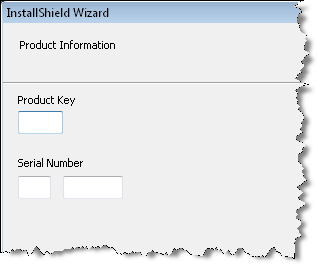
| Product Key | Description |
|---|---|
| 00000 | Trial mode product key. Installs Softimage in Standalone licensing mode. |
| 590B1 | Softimage product key. You can choose between Standalone, Multiseat Standalone, and Network licensing modes. If you choose Network, you’ll be prompted to enter the license server name. If you choose Standalone, or if you choose Network and enter the serial 000-00000000, you’ll get the 30-day trial period. You can switch licensing methods between Standalone and Network. |
| 591B1 | Softimage Advance product key. You’ll be prompted to enter the license server name. If you use the serial number 000-00000000 you can run in Trial mode. You cannot switch back to Standalone mode without reinstalling. |
To get your 2010 license, get your 2010 serial number and then go to http://registeronce.autodesk.com.
SUMATRAPATH is an environment variable that is defined only in Softimage. SUMATRAPATH points to the Application\bin folder in the Softimage folder, and the registry is full of Softimage entries that use SUMATRAPATH to specify the location of DLLs.
In XSI 7.01, you could check whether or not you were in Softimage with this Python code:
import os
app = Application
if os.getenv( ‘SUMATRAPATH’ ) != None :
        app.LogMessage( “you’re in XSI” )
else:
        app.LogMessage( “you’re not in XSI” )
However, in both Softimage 7.5 and 2010, os.getenv(“SUMATRAPATH”) returns None. At least for me it does.
XSIUtils.Environment.Item(“SUMATRAPATH”) does still return the Application\bin path, as does this Jscript:
var oShell = new ActiveXObject ("WScript.Shell");

var oProcessEnv = oShell.Environment("Process");

LogMessage( oProcessEnv( "SUMATRAPATH" ) );
Sumatra was the original code name for the product that eventually became known as Softimage XSI (the Softimage XSI name was unveiled back in March 2000).
 eX-SI
eX-SI 