Introduction to Arnold


I see the October term at fxphd includes ARN101: Introduction to Arnold. The course uses Softimage (yay!) and you get access to Arnold.

I’ve never tried fxphd. It’s not exactly cheap ($359 US for 3 courses, $399 US for 2 courses) so I assume it must be pretty good 😉

ARN101: Introduction to Arnold
Professor: Ulf Lundgren
Software Version:
Original Run Date: October 2012
This course is targeted at anyone who may already be familiar with rendering and lighting but who wants to move over to Arnold; or just wants to know how Arnold can help in production.

Taught by Ulf Lundgren, the goal of the course is to get you up to speed in Arnold and help you understand the differences when using Arnold compared to other Render engines. Prior experiences of rendering and lighting is a plus but not necessary since this course should still help you get on your way to amazing renders.

Workflow, rendering optimization, basic shaders, usefull lighting riggs, sss, volumetrics, linare workflow, Aov and practical work-flow tools might not sound all that sexy but you’ll come to love the results. Furthermore this course is designed to mix more theoretical classes with in-depth case studies of Arnold working on real projects, giving a better understanding of how to use Arnold in production. This course gives you a very good understanding of how to do both full CG projects as well as taking you through all the steps of a production for using Arnold to integrate CG into a live action plate.

Even though the course is using Softimage as it’s main application all the classes are kept generic and should be as relevant for any implementation of Arnold; be it Maya, Softimage or feature implementations in Houdini or Light Wave. No knowledge of Softimage should be needed. Course members will be able to have access to the the Arnold renderer software, thanks to a partnership with Solid Angle.

Ulf Lundgren is a VFX supervisor and director at Lost Liner Productions in Stockholm Sweden. He’s worked on a number of international feature films and well known commercials like Harry Potter 1 and 2, Golden Compass, James Bond Die another day and Xbox Mosquito before starting his own studio and tackling the Swedish movie scene of ghosts and Zombies.

class syllabus

Class 1: A brief history of Arnold and how it integrates into a production workflow and the good vs bad when comparing Arnold with other renderers.
Class 2: How to setup and render with a linear workflow using color managment in Arnold, followed by and an in depth look at all the types of lights Arnold has to offer.
Class 3: An in depth look at shading with Arnold and how to use the different types of shaders in production.
Class 4: An in depth look at render effects and settings and learn how to export ASS files to do batch rendering of sequences using kick.
Class 5: Shading for production, a case study of how to create shaders for all objects in a scene.
Class 6: Working efficiently with Arnold, optimizing renders and setting up a good workflow.
Class 7: Case studies of how to do lighting and shading in a full CG productions.
Class 8: A case study of how to do lighting and shading for live action integration. Part 1. Using lightprobes and other on-set data to better integrate the CG elements into the plate.
Class 9: A case study of how to do lighting and shading for live action integration. Part 2. Rendering with AOV’s and how to best use them in compositing.
Class 10: Wrap up any questions from the forums.

True or false?


For the purposes of ICE, the Boolean value True is always the integer value 1, and False is always 0.

But like most (all?) programming languages, any non-zero value corresponds to True, and only zero is False.

Note that negative values are also True; I could stick a Negate node inbetween Get Point ID and Integer to Boolean and get the same set of booleans.

However, in ICE you cannot plug an integer into an If node, so this point is rather moot. In programming, you can do things like “if ( !n )”, where !n evaluates to true if n=0. Or you can do something like “if ( NbPoints )” instead of “if ( NbPoints > 0 )”.

Saturday snippet: Using the connection stack to find all expressions driven by a given parameter


#
# Softimage 2013 SP1 Python snippet
#
from sipyutils import si			# win32com.client.Dispatch('XSI.Application')
from sipyutils import siut		# win32com.client.Dispatch('XSI.Utils')
from sipyutils import siui		# win32com.client.Dispatch('XSI.UIToolkit')
from sipyutils import simath	# win32com.client.Dispatch('XSI.Math')
from sipyutils import log		# LogMessage
from sipyutils import disp		# win32com.client.Dispatch
from sipyutils import C			# win32com.client.constants

si=si()
siut=siut()
from xml.etree import ElementTree as ET

def getExpressionsDrivenByLocalParameter( obj, param="posx" ):
	stack = siut.DataRepository.GetConnectionStackInfo( obj.Parameters(param) )
#	print stack

	expressions = XSIFactory.CreateObject("XSI.Collection")
	expressions.Unique = True
	xmlRoot = ET.fromstring(stack)
	for xmlCnx in xmlRoot.findall('connection'):
		if xmlCnx.find('type').text == 'out' and xmlCnx.find('localparameter') is not None and xmlCnx.find('localparameter').text == param:
			item = xmlCnx.find('object').text
			if item.endswith('.Expression'):
				expressions.AddItems(item)

	return expressions


# Create an expression where the Scene Material diffuse red drives the diffuse red of a Lambert shader
Application.SetExpr("Sources.Materials.DefaultLib.Lambert.Lambert.diffuse.red", "Sources.Materials.DefaultLib.Scene_Material.Phong.diffuse.red") 

x = getExpressionsDrivenByLocalParameter( si.Dictionary.GetObject("Sources.Materials.DefaultLib.Scene_Material.Phong.diffuse"), param="red" )
log( x )
# INFO : Sources.Materials.DefaultLib.Lambert.Lambert.diffuse.red.Expression

Reference and credits:

Friday Flashback #89


Courtesy of Ed Harriss, here’s some pics of the old SOFTIMAGE Creative Environment boxes. I haven’t seen one of these boxes since we moved out of the Softimage offices on St Laurent; if you went down to the doc team area, you’d see these Creative Environment docs on the bookshelves.


The Softimage product was known as “Creative Environment” until 1995, when it became SOFTIMAGE|3D. Here’s a version history of the SOFTIMAGE Creative Environment (CE) and SOFTIMAGE|3D (SI3D) products.

1988 CE v0.8
1989 CE v1.5
Sep-90 CE v2.1
1991 CE v2.5
CE v2.51
CE v2.52
CE v2.65
CE v2.66
1995 SI3D v3.0 (NT)
1996 SI3D v3.5
SI3D v3.51
1997 SI3D v3.7
SI3D v3.7 SP1
Jul-98 SI3D v3.8
Jan-99 SI3D v3.8 SP1
Aug-99 SI3D v3.8 SP2
Mar-00 SI3D v3.9
May-00 SI3D v3.9.1
Dec-00 SI3D v3.9.2
Mar-01 SI3D v3.9.2.1
May-01 SI3D v3.9.2.2
Feb-02 SI3D v4.0

Finding phantom passes created with Duplicate


As I mentioned last year around this time, it is possible to end up with passes that don’t show up in the explorer. This happens when you Duplicate a pass, and the Hierarchy option “preferences.duplicate.hierarchy” is set to None. So your new pass has no parent, and is disconnected from the rest of the scene (aka floating).

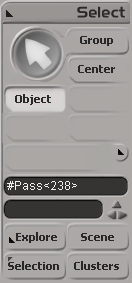
These phantom passes have names like “#Pass”, and you can select them if you know how.

Here’s how, in Python, with the 2013 SP1 Python shortcuts.

from sipyutils import si			# win32com.client.Dispatch('XSI.Application')
from sipyutils import siut		# win32com.client.Dispatch('XSI.Utils')
from sipyutils import siui		# win32com.client.Dispatch('XSI.UIToolkit')
from sipyutils import simath	# win32com.client.Dispatch('XSI.Math')
from sipyutils import log		# LogMessage
from sipyutils import disp		# win32com.client.Dispatch
from sipyutils import C			# win32com.client.constants

si=si()

sClassID = siut().DataRepository.GetIdentifier( si.ActiveProject.ActiveScene.Passes(0), C.siObjectCLSID )
passes = si.FindObjects( None, sClassID ).Filter( "", None, "#Pass*" )
print passes.Count
print passes.GetAsText()

#
# The following don't work! At least not all the time 😦
#
si.DeleteObj( passes )

#si.ParentObj( "FloatingPasses.Passes", "#Pass<61>" )
#si.CopyPaste( passes(0), "", si.Dictionary.GetObject("FloatingPasses.Passes") )

si.SelectObj( passes )

When I was testing this, sometimes I was able to delete those phantom passes, and sometimes I wasn’t.
Sometimes those passes disappeared when I saved the scene, did New Scene, and then reloaded the scene. Sometimes they didn’t (disappear that is).

When DeleteObj didn’t work, I’d use the explorer to view the phantom passes (since I called SelectObj on them, I could just show selected in the explorer).

Rescuing corrupted scenes


Here’s a few things you can try when you need to rescue a scene (or model) that crashes Softimage when you try to load it.

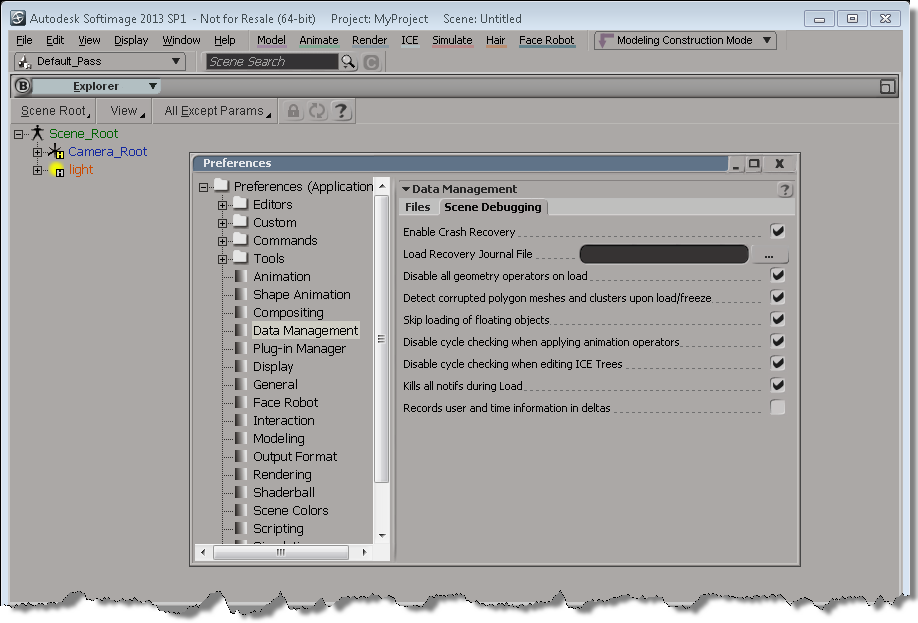
Setting up Softimage before you merge in a corrupted scene:

Context matters: Add Point is always per-object


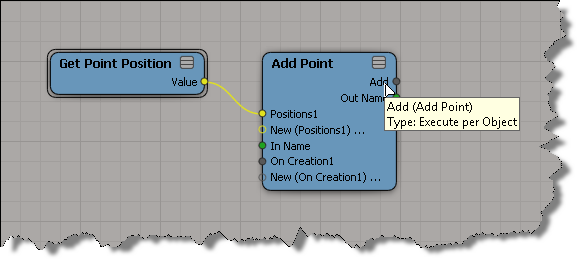
Unlike Clone Point, the output context of Add Point is always per-object, no matter what you plug into its input ports. So, for example, you cannot plug Add Point into an Execute on Emit port (which is a per-point port). Making Add Point per-object makes sense to me, because typically you want to add N points to a point cloud, not add N points for every point that is already in the target point cloud (that already sounds confusing).

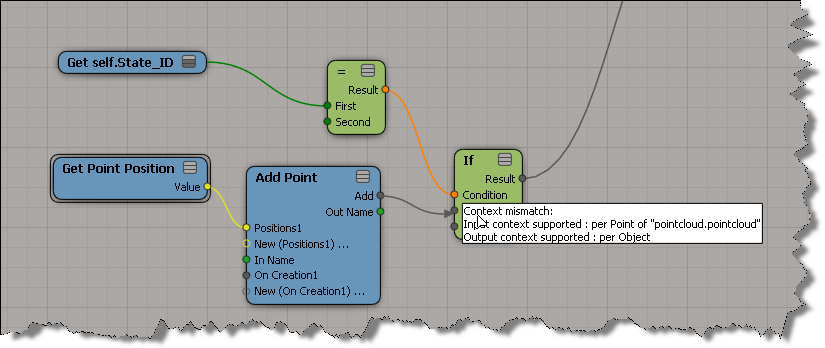
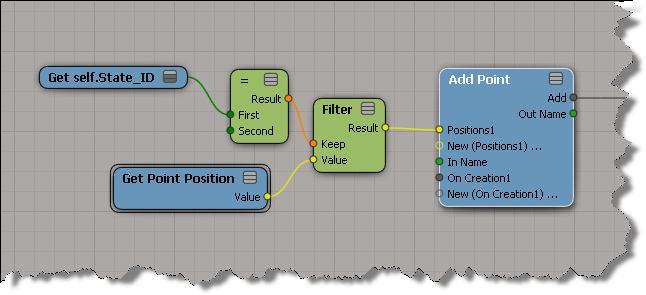
One consequence of Add Point being per object is that you cannot use an If node to copy over some subset of points to the target point cloud. For example, if your If node is already plugged into something that makes it per-point then you’ll get a context error:

If your If node wasn’t plugged in yet, you’d get some red nodes like this:

The solution is to use a Filter on the other side [upstream] of the Add Point:

hat tips to Gray and Julian

The Softimage customer improvement program


Over on the AREA Mr Entertainment blog, the Softimage Program Manager has posted a short video that goes over how the CIP progam helps product planning.

On the Softimage list, someone mentioned that they wouldn’t mind turning on CIP, as long as it doesn’t use too many CPU cycles. Now, I don’t know exactly how CPU-intensive the CIP instrumentation is (I don’t think it is all that intensive), but I do remember reading a few things about CIP:

  • CIP records a transcript of user activities in the software (eg commands used)
  • That transcript is stored in RAM (but there is a limit of something like 2MB)
  • At regular intervals, the transcript will be serialized to disk (not in one big file, but in many files…again, as I remember it, there is a file size limit, and a limit to the number of files)
  • Every day or so, the transcripts are sent to Autodesk. The send happens only if the current CPU/network/system utilization is really very low. That is, it won’t be sent if you’re in the middle of playing back a scene and using the CPU.

Interestingly, while poking around on my own system a few weeks ago, I disabled CIP, either by editing a .MC3 file or changing a registry setting. Now I cannot enable CIP from inside Softimage, and I don’t remember what I changed 🙂