The case of Error 1603 and the corrupt PIT file


In a recent case, a customer reported error 1603” during installation. As I’ve mentioned many times in various places, error 1603 is a generic error code that doesn’t tell us much. So, you can either apply some generic troubleshooting (reboot, check download, disable UAC, reinstall VC++ manually, …) or check the detailed installation logs for more specific information.

The problem is this specific case was that the installer wasn’t able to update ProductInformation.pit. Without looking at the logs, I don’t know whether you would ever figure this out.

http://vimeo.com/33273288

While versus Repeat


Just like in programming, Repeat can be considered a generalization of While (K&R: the for loop is a generalization of the while).

The difference between While with Counter and Repeat with Counter is that when you use While with Counter, the counter doesn’t necessarily control the number of loop iterations. Typically you would use some boolean condition (for example, number of polygons reduced by more than 50%) to control the number of loops, rather than an incremented counter. The counter is a convenience, there for you to use inside the while loop.

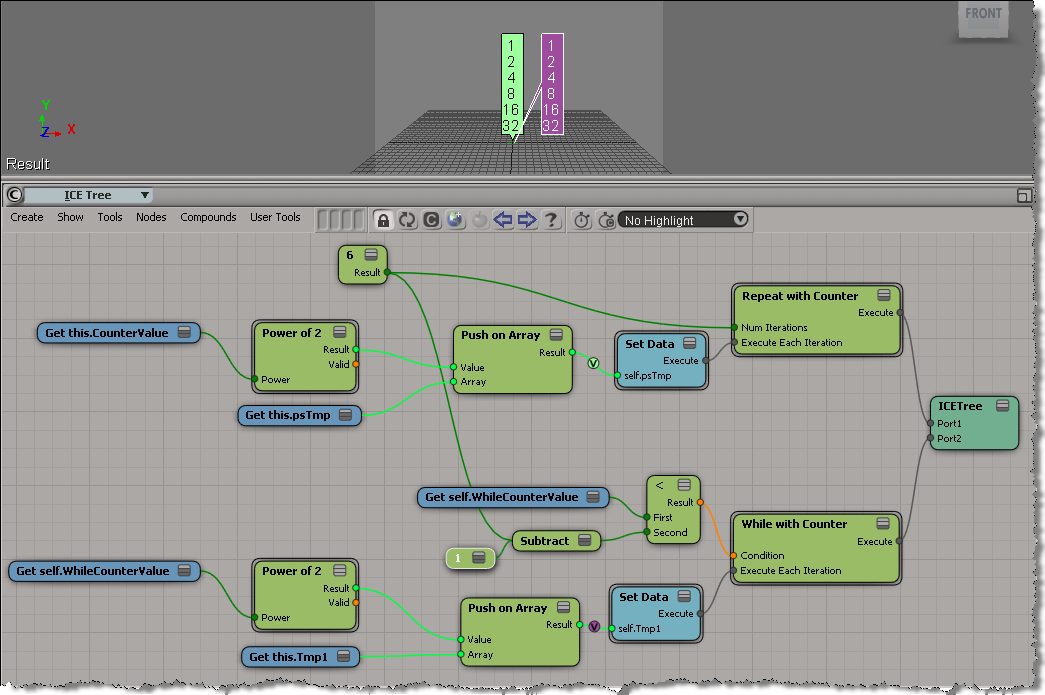
Here’s a rather artificial example of equivalent While and Repeat loops. The While loop uses a counter inside the loop, and also in the condition. Note that I had to subtract one for the While loop, because inside While with Counter, the counter is incremented after the loop is executed.

In this example, it would be simpler to just use the Max Repeats:

Beware of ICE optimizations


It seemed like such a nice, simple way to filter polygons:

  • Use ICE to check the polygon area and then set a boolean attribute.
  • Write a custom subcomponent filter to filter based on that ICE attribute.

With ICE, it’s pretty easy to check if the PolygonArea is within a certain range:

But, beware of ICE optimizations!

Because that ICE attribute isn’t used anywhere else in the scene, ICE doesn’t evaluate that tree, so my boolean attribute is never defined, and my custom filter therefore fails. I have to do something like Show Values to force evaluation:

Note: In Show Values, I used Show Values for Tagged Components Only to cut down the visual clutter.

FWIW, here’s a Python example of a custom subcomponent filter:

# psCustomFilter Plug-in
# Initial code generated by Softimage SDK Wizard
# Executed Wed Nov 23 11:31:56 EST 2011 by blairs
# 
# Tip: To add a command to this plug-in, right-click in the 
# script editor and choose Tools > Add Command.
import win32com.client
from win32com.client import constants

from siutils import si		# Application
from siutils import sidesk	# Desktop
from siutils import sidict	# Dictionary
from siutils import sifact	# XSIFactory
from siutils import simath	# XSIMath
from siutils import siproj	# ActiveProject2
from siutils import sisel	# Selection
from siutils import siuitk	# XSIUIToolkit
from siutils import siut	# XSIUtils
from siutils import log		# LogMessage
from siutils import disp	# win32com.client.Dispatch
from siutils import C		# win32com.client.constants


null = None
false = 0
true = 1

def XSILoadPlugin( in_reg ):
	in_reg.Author = "blairs"
	in_reg.Name = "psCustomFilter Plug-in"
	in_reg.Major = 1
	in_reg.Minor = 0

	in_reg.RegisterFilter("psCustomFilter",constants.siFilterSubComponentPolygon)
	#RegistrationInsertionPoint - do not remove this line

	return true

def XSIUnloadPlugin( in_reg ):
	strPluginName = in_reg.Name
	Application.LogMessage(str(strPluginName) + str(" has been unloaded."),constants.siVerbose)
	return true

# Match callback for the psCustomFilter custom filter.
def psCustomFilter_Match( in_ctxt ):
	Application.LogMessage("psCustomFilter_Match called",constants.siVerbose)

# 	Return value indicates if the input object matches the filter criterias.
	return true

# Subset callback for the psCustomFilter custom filter.
def psCustomFilter_Subset( in_ctxt ):
	log("psCustomFilter_Subset called",constants.siVerbose)

	out_coll = disp( "XSI.Collection" )
	
	in_coll = in_ctxt.GetAttribute( "Input" )
	for item in in_coll:
		log( item )
		polys = []
		for p in item.SubComponent.ComponentCollection:
			log( p.Index )

			attr = p.Parent.ICEAttributes("psCustomPolyFilter")
			if not attr.IsDefined:
				log( "Cannot apply filter. psCustomPolyFilter attribute is not defined" )
			if attr.IsDefined and attr.DataArray[ p.Index ] == -1:
				#log( "%d : %s" % ( p.Index, attr.DataArray[ p.Index ] ) )
				polys.append( p.Index )

		if len(polys) > 0:
			out_coll.Add( item.SubComponent.Parent3DObject.ActivePrimitive.Geometry.CreateSubComponent(C.siPolygonCluster, polys ) )


	in_ctxt.SetAttribute( "Output", out_coll )

# 	Return value indicates if a subset of the input objects matches the filter criterias.
	return true

Troubleshooting 101: runonce.bat


Basic troubleshooting for when you cannot start Softimage, or you get strange errors at startup, or you cannot perform basic tasks such as creating primitives or duplicating objects. Or for fixing Softimage after you run a registry cleaner.

Run runonce.bat to re-register the Softimage DLLs and SPDL files (SPDL files describe the parameters of objects and operators in Softimage).

runonce.bat does a lot of what happens during installation and it is a lot faster than removing and then reinstalling Softimage.

http://vimeo.com/32563418

runonce.bat mentions on xsibase, si-community, the AREA, and the XSI list

The case of the scene that wouldn’t play back


or how I learned to love binary search…


In this case, a customer uploaded a scene that always crashed at a certain point in the playback.

After poking around the scene for awhile, I deleted a model and that fixed the crash. The only problem was that the model contained a thousand (1000) objects, so deleting the model wasn’t really a solution. So my next step was to isolate the problem use a “divide and conquer” approach. Sort of like a binary search:

  • delete half of the objects (eg objects 1 to 500)
  • play back
    • if crash, then the problem is one of the objects in the second half (501 to 1000)
    • else the problem is one of the objects in the first half (1 to 500)
  • Repeat as required… at most 10 times (1000,500,250,125,62,31,16,8,4,2,1)

In the end, I narrowed it down to a single mesh object. We weren’t able to save that mesh (it had to be deleted and then recreated), but we did save the scene.

wikipedia:

A binary search halves the number of items to check with each iteration, so locating an item (or determining its absence) takes logarithmic time. A binary search is a dichotomic divide and conquer search algorithm.

Dividing and conquering the problem space:

Friday Flashback #45


Manta short from back in 2001 and the days of XSI 2.0. The Manta character was used in a variety of different marketing collateral. Looking back over the previous flashbacks, I see that Manta has already appeared twice, in flashbacks #12 and #34.

http://vimeo.com/32636717

From Manta stuff from here and there on the Internet:

Softimage Hints At New Products, Highlights XSI

On April 23, 2001, at NAB, the annual international conference of the National Association of Broadcasters in Las Vegas, Softimage demonstrated version 1.5 of its SOFTIMAGE|XSI software and hinted that a new release would be ready for SIGGRAPH in July. “I can’t say much more,” program manager Michael Smith commented, “but this next release will be big.” Softimage introduced its “INNOVATE::CREATE::COLLABORATE” tagline and displayed the power of XSI with images of Manta, a 3D character created in XSI.

xsibase: What about Manta short

the manta short is already a few years old, and was never released in any form so you can watch it as a video or something. One of the guys who worked on it had some images on his website. There were at the time also some images on the Softimage website for wallpapers and such..

http://www.creativecrash.com/forums/xsi-general/topics/manta-video

Atyss
Jan 13, 2003Post id: 130287 You’re never gonna see Manta, or if you do, it will be unfinished. This is what I was told by Michael Sheasby, the marketing guy at Softimage. Manta was developed to demo (understand sell) XSI 2.0, and they left it unfinished after that.

http://www.xsibase.com/articles.php?detail=5

We had the great privilege of seeing the Manta storyboards. However, even if all of them were on the wall, we couldn’t see the end. Michael started to tell us the story, but when he reached the last boards he nearly threw us out of the office! It’s strange, because he told us that the Manta project will never be finished.

http://www.3dbuzz.com/vbforum/showthread.php?6315-Manta/page2

I went to an Avid confrence last week (london 26 june 2002) and spoke to someone from the softimage dept. and asked them about this. They said that the Manta animation/film was initially being completed by 15 artists, but now just one person is left working on it as the others are completing other projects and it hopefully (probably not was the impression given) will be finished for siggraph 2002.

On the Experience CD (free when registered at the softimage.com site) there are very short snippets of animation during the turials for texturing and the fx tree, and they look quite good. I was told at the Avid confrence that an entire CG film made in soley XSI would be released in a year or so (cant remember what its called though)
I also textured the manta character and gave him some hair last year at the computer arts show in angel islington 2001 as a workshop tutorial using a beta of version 2.

Downloading and using undocumented compounds


A few tips for figuring out how to use a compound you downloaded that has no documentation.
Inspired by this thread on xsibase about scatter compounds.

With experience, you can usually figure out where to create the ICE tree and what to plug into the compound. But if you’re stuck, here’s a few of tips:

  • Check out the error messages. Hover the mouse over the compound (not over a port) to see the first error message. To see all error messages, right-click over the node and choose Show Messages.
  • What attributes are unresolved? For example, if the node is red because of the ID attribute, then you probably need to put the compound on a point cloud, not a geometry.
  • Check out what’s going on inside the compound. If you see Add Point, then the compound needs to be applied to a point cloud.

http://vimeo.com/32540015

Quick tip for using Select SubArray in Array


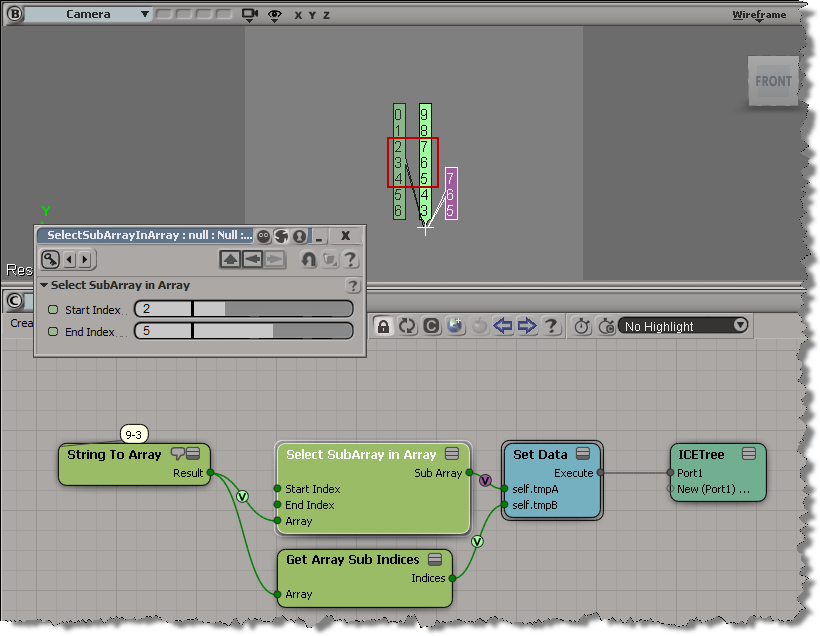
The docs for Select SubArray in Array say that

  • Start Index is The start index of the subarray to return.
  • End Index is The end index of the subarray to return.

But the start index is inclusive, while the end index is not.

In standard range notation: [start, end)

That means if start index = 2 and end index = 5, then Select SubArray in Array selects elements 2, 3, and 4 from the input array.