Centering a button on a PPG


By default, buttons are left-aligned.
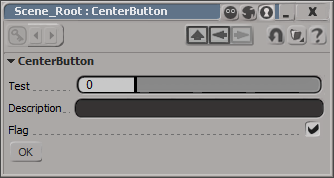
I don’t think there is any way to center a control on a layout. At least not one that I can find. You could set an X position, which will look centered until a user resizes the PPG.

item = oLayout.AddButton( L"MyButton", L"ddd" ) ;
item.PutAttribute( siUICX, <x position in pixels>) 

Or you could use this hack, which uses group width percentages to approximate the centering a button.

var oGroup = oLayout.AddGroup("", false, 40);
oLayout.EndGroup();

// button is left-aligned within its group
// so the centering is not 'true'
var oGroup = oLayout.AddGroup("", false, 20);
var oButton = oLayout.AddButton( "OK" );
oLayout.EndGroup();

var oGroup = oLayout.AddGroup("", false, 30);
oLayout.EndGroup();

oLayout.EndRow();

Softimage timeline akin to the Dark Ages and the destruction of the library in Alexandria ???


In an article on the latest release of CINEMA 4D, the reviewer wrote something I found kinda interesting:

CINEMA 4D … [is] now up to version 11.5, which is just as many versions, if not more, than the older Maya, Max, and Houdini (I’d mention Softimage, but that went through some weird period akin to the Dark Ages after the destruction of the Library in Alexandria, so its timeline isn’t accurate).

via MAXON’s CINEMA 4D | Animation Magazine.

Getting the shader connected to a material


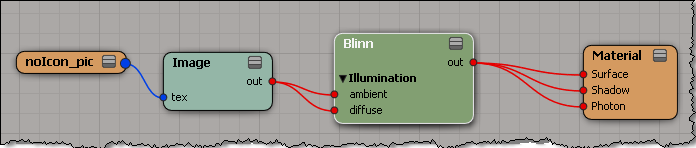
In previous versions of Softimage, you could use Parameter.Source to get the shader/texture connected to a material parameter such as the diffuse port.

As of 2011, Source returns a ShaderParameter. To get the connected shader, use ShaderParameter.Parent (in C++, GetSource().GetParent()).

var m = Dictionary.GetObject( "Sources.Materials.DefaultLib.Material.Blinn" );
var p = m.Parameters("diffuse");
LogMessage( p.Source );
// INFO : Sources.Materials.DefaultLib.Material.Image.out

LogMessage( ClassName( p.Source ) );
// INFO : ShaderParameter

LogMessage( p.Source.Parent );
// INFO : Sources.Materials.DefaultLib.Material.Image

LogMessage( ClassName( p.Source.Parent ) );
// INFO : Texture

Motion blur on non-simulated ICE trees


In a recent case, a customer was using an ICE tree in the Modeling stack to create a fixed number of particles. Then, he used an animated scalar value in the ICE tree to drive changes in the particle positions. Basically, it was a bunch of “spokes” rotating in a circle.

The problem was that there was no motion blur when he rendered with mental ray (but there was motion blur with 3Delight).

To get motion blur in this type of scene, you have to set the PointVelocity attribute to a value that indicates the direction and distance/second of travel.

Unlike 3Delight, mental ray only takes the motion from the velocity attribute. There’s no delta comparison done.

Python: Using Plugin.UserData to pass data to PPG callbacks


UPDATE: Please see the comment from Patrick for a tip. Thanks!

You can use Plugin.UserData to pass data into a plugin.

For example, from outside the plugin, you can store a list in the UserData:

p = Application.Plugins("MyTestPropertyPlugin")
p.UserData = ['a', 'b', 'mpilgrim', 'z', 'example']

In the plugin callbacks, you would access the UserData like this:

def MyTestProperty_Test_OnClicked( ):

    p = Application.Plugins("MyTestPropertyPlugin")

    if p.UserData == None:
        Application.LogMessage( "UserData is empty" )
    else:
        Application.LogMessage( p.UserData )
        Application.LogMessage( p.UserData[2] )

This will work with lists, but not with dictionaries.
Softimage cannot convert Python dictionaries into a COM Variant type. If you try to store a dict in User Data:

x = Application.Plugins("MyTestPropertyPlugin")
x.UserData = {"author":"blairs", "name":"testplugin"}

You’ll get this error:

# TypeError: Objects of type 'dict' can not be converted to a COM VARIANT

I’m afraid there’s no way around that error for Python dictionaries.
This also prevents you from saving dictionaries with SetGlobal or SetGlobalObject.