Autodesk iPad Game Attempts to Make Engineering Fun | PadGadget


via Autodesk iPad Game Attempts to Make Engineering Fun | PadGadget.

Tinkerbox is an entertaining physics app designed to spark the interest of teens and get them curious about mechanical engineering.

Tinkerbox requires players to get creative and think outside the box in order to solve a series of physics puzzles in Puzzle Mode. Players are presented with problems and must then insert parts, assemble systems, test their inventions and finally find out whether or not they were successful.

Think you’re ready to tackle something more advanced? Then get creative in Invent Mode and design your own systems. Creative something original, test your invention and then show it off to your friends.

Composite 2011 SAP: Error while initializing plugin libDLofxUi.dlmodule


A customer reported that Composite crashed while loading libDLofxUi.dlmodule:

Error while initializing plugin: C:/Program Files/Autodesk/Composite 2011 Subscription Advantage Pack/plugins/libDLofxUi.dlmodule :

Before we could do any investigation, he emailed back to say that he found the problem: it was a conflict with Furnace 4.2. When he removed the Furnace ofx plugins from the system, Composite started without error.

I downloaded and installed Furnace 4.2 for Nuke, but I couldn’t repro the problem at first.

By default, Furnace 4.2 for Nuke installs in the folder C:\Program Files\Common Files\OFX\Nuke\Furnace_4.2_Nuke, and that doesn’t cause any problems for Composite.

However, I knew that Composite searches the following folders:

  • C:\Program Files\Common Files\OFX\Toxik
  • C:\Program Files\Common Files\OFX\Plugins
  • C:\Program Files (x86)\Common Files\OFX\Plugins
  • C:\Program Files (x86)\Common Files\OFX\Toxik

so I moved the contents of the Nuke\Furnace_4.2_Nuke folder into C:\Program Files\Common Files\OFX\Plugins, and Composite would not start, and in the logs I found this error:

00:00:48.17 [Fatal Error   ] [Messages       ] Error while initializing plugin: C:/Program Files/Autodesk/Composite 2011 Subscription Advantage Pack/plugins/libDLofxUi.dlmodule : Input srcColourSpace received null policy.

BTW, the Composite logs are in %LOCALAPPDATA%\Temp\toxik\logs.

The discussion in this AREA thread also mentions that OFX plugin conflicts do happen with Toxik/Composite. The error mentioned in the original post is a different libDLofxUi.dlmodule error:

Error while initializing plugin: C:/Program Files/Autodesk/Composite 2011 Subscription Advantage Pack/plugins/libDLofxUi.dlmodule : Assertion ‘_sortedPairs.find( defaultVal ) != _sortedPairs.end()’ failed.. 

PS – The shotgun approach to solving a Composite error like this is to rename the offending plugin file, so that it is no longer loaded.

Command line for installing VCREDIST


If you need to run the Visual C++ Redistributable from the command line and create a log file, use this command line:

cd C:\Autodesk\Softimage_2011_Subscription_Advantage_Pack_English_Japanese_64bit\Support\VCRedist\2005
vcredist_x64.exe /q:a /T:%windir%\temp /c:"VCREDI~2.EXE /q:a
 /c:""msiexec /i vcredist.msi /qn /l*v %temp%\vcredist_x64_2005.log"" "

You can find the command line used by the Softimage Setup in the setup.ini file
(in the C:\Autodesk\Softimage_2011_Subscription_Advantage_Pack_English_Japanese_64bit folder):

[VCREDIST2005X64]
PLATFORM=x64
PRODUCT_NAME=Microsoft Visual C++ 2005 Redistributable (x64)
EXE64_PATH=support\VCRedist\2005\vcredist_x64.exe
EXE_PARAM=/q:a /T:%windir%\temp /c:"VCREDI~2.EXE /q:a /c:""msiexec /i vcredist.msi /qn /l*v %temp%\vcredist_x64_2005.log"" "

Friday Flashback #4


I started at Softimage back in 1995, a few years after Jurassic Park. But everybody in Montreal knew about Softimage and Jurassic Park; I remember my neighbours were sooo impressed when they found out where I worked. It was always nice to be able to say I worked at Softimage (or at Microsoft). People [outside the industry] knew those names. In contrast, few people knew “Avid”, and most people don’t know the name “Autodesk” (I usually have to mention “Autocad”).

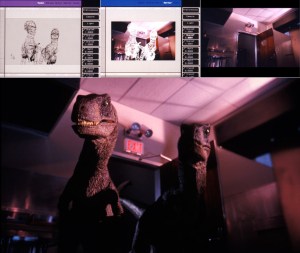
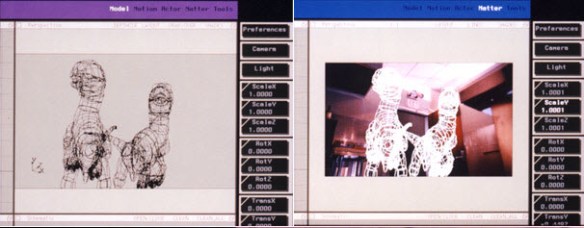
Behind-the-Scenes Photos of ILM’s Greats: Jurassic Park
(Thanks to Alan Fregtman for the link)

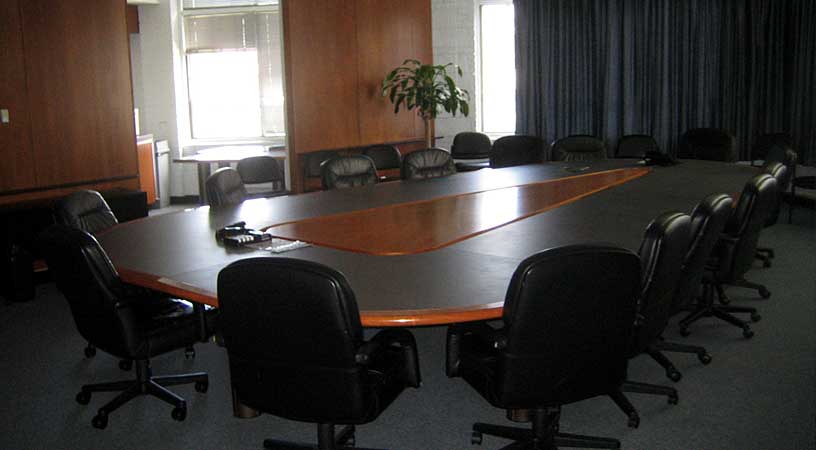
Appropriately enough, given that Jurassic Park gave Softimage’s reputation such a boost, our main meeting room in the 3510 St Laurent Softimage offices was named “Jurassic Park”. (Other meeting rooms were Jumanji, Casper, and Reboot.)
The Jurassic Park meeting room in the Softimage building, circa 2005

Installation aborted, Result=1603


As I’ve mentioned before, Error 1603 during an installation can be almost anything. It’s a generic error and you have to dig into the logs to find out what really happened.

For example, a customer reported getting 1603 during an install. So we looked into the %TEMP%\Autodesk_Softimage_x64_Install.log file, and found this:

2010/12/13:15:46:24	Administrator	DEADBEEF	Install	Microsoft Visual C++ 2005 Redistributable (x86)	Failed	Installation aborted, Result=1603

Now that we knew it was the VCREDIST, we looked into %TEMP%\vcredist_x86_2005.log and found out that problem was that the Softimage install was blocked because installer could not remove an old version of VC++ 2005 Redistributable:

MSI (s) (98:3C) [18:28:15:187]: Product: Microsoft Visual C++ 2005 Redistributable -- Error 1714.The older version of Microsoft Visual C++ 2005 Redistributable cannot be removed.  Contact your technical support group.  System Error 1612.

Error 1714.The older version of Microsoft Visual C++ 2005 Redistributable cannot be removed.  Contact your technical support group.  System Error 1612.

Error 1714 and google led me to the solution: rename the registry key HKEY_LOCAL_MACHINE\SOFTWARE\Microsoft\Windows\CurrentVersion\Installer\UserData\S-1-5-18\Components\F942F94A19C0F79468FD2B85E5E8677B.

After that, we were able to remove Visual C++ 2005 redistributable from the Control Panel, and then Softimage installed ok.

Student Film Crafted with Autodesk Softimage Wins Visual Effects Society Award


“For LOOM, we made heavy use of ICE [the Softimage Interactive Creative Environment] to create spider webs, hair systems and deformers. We’re honored that the VES picked our film,” said co-director Ilija Brunck. “It’s simply awesome,” added co-director Jan Bitzer.

via Student Film Crafted with Autodesk Softimage Wins Visual Effects Society Award | Business Wire.

Python gotcha – Forgetting the parentheses after a method name


Technically, I suppose this is not really a gotcha. But for someone like me who has to switch between scripting languages frequently, it’s a potential “gotcha”.

In Python, functions and methods are legitimate objects. That’s why you can do this:

App = Application
LogMsg = App.LogMessage
ClassName = App.ClassName

but sometimes you might forget the parentheses after a name, and unlike JScript, you won’t get a syntax error (at least not for the missing parentheses). For example, this little snippet will give you a “# AttributeError: ‘NoneType’ object has no attribute ‘AddKey'” error:

param = Application.Dictionary.GetObject( "null.kine.local.rotx" )

if str(param.Source) == 'None':
    param.AddFcurve
    fcurve = param.Source
    fcurve.AddKey( 10, 90 )
    fcurve.AddKey( 20, 45 )

In JScript, you’d get a syntax error for the missing parentheses. I’m not saying that that is better 😉 it’s just a difference you have to be aware of.

param = Dictionary.GetObject( "null.kine.local.rotx" )
param.AddFcurve
// ERROR : Object doesn't support this property or method - [line 3]

Some related links: