By Chris Marshall:
http://vimeo.com/21742004
Building a brick wall with ICE
Reply

By Chris Marshall:
http://vimeo.com/21742004
The installer doesn’t set up the raysat satellite service for you, but it’s easy enough to do manually.
http://vimeo.com/21884667
Some users have noticed that when you open the Animation Editor for the very first time, and click the Edit menu, it takes a little while for the Edit menu to appear.
That’s because the Animation Editor loads plugins when you click the Edit menu (for the very first time).
What happens is that when you open the Edit menu for the very first time, the Animation Editor scans the custom command maps looking for any commands in the siFcurve command category (the AE uses a custom command instead of menu anchor points–see the FCurveEditor object in the SDK docs for more information).
This scan causes the plugins to be reloaded, but this happens only once per Softimage session.
A little over 10 years ago, this review of XSI 2.0 appeared in 3D World, with the tag line “…is this the Softimage we’ve been waiting for?”.
Back then, XSI Essentials cost $8,200 US. Today, a Standalone license of 2012 costs $2995 US.
XSI Advanced costs $12,300. Now, a Network license costs $3745.

Here’s the intro:
Softimage has gone through a turbulent period over the last few years. It’s been tossed between parent companies (Microsoft and Avid) and seen its lead in high-end 3D animation wane, not least thanks to the popularity of Alias|Wavefront’s Maya.
The long-awaited and long-overdue upgrade to Softimage’s 3D animation system, the legendary Softimage|3D, was XSI 1.0, a somewhat lacklustre release in so much as it still relied heavily on Softimage|3D. There was no polygon modelling, import or exporting had to be done via Softimage|3D (and still does actually) and NURBS features were limited. However, it did feature two very important new technologies.
The first was Twister which was the seamless integration of Mental Image’s mental ray rendering system within XSI, complete with visual shading network and finalquality interactive preview rendering. The second was the non-linear animation system, the Mixer, that enabled artists to mix and blend animation clips as if they were mixing tracks of video.
The updated 1.5 version introduced polygon tools and Subdivision Surfaces, which helped workflow considerably. With version 2.0 it seems that Softimage has finally produce the version of XSI that everyone has been waiting for. It’s a beast, and frankly Alias should be worried.
 Page 1 |
 Page 2 |
 Page 3 |
 Page 4 |
In this video, I show how to use vector addition and the vector rescaling to distribute fence panels evenly between two post positions.
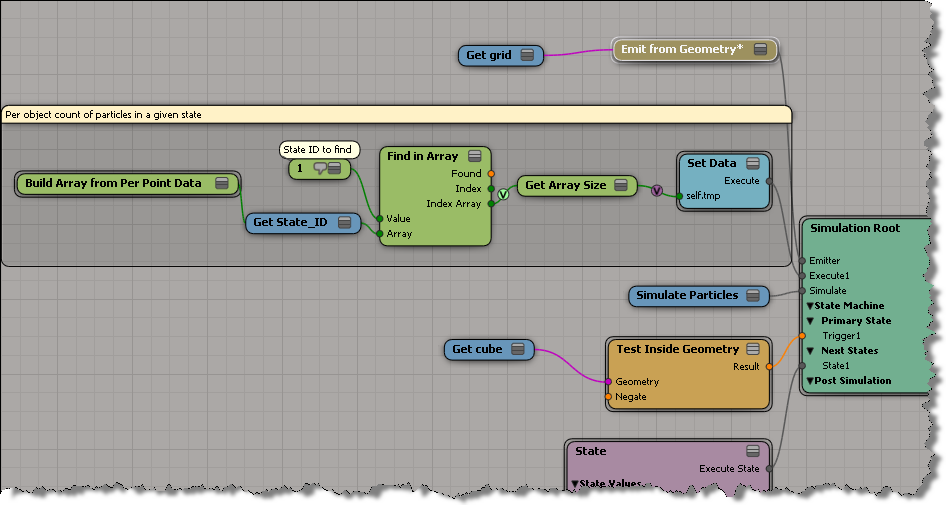
When you’re working with a point cloud, and you want to keep some data on a per-object basis, you need to use one of the Set nodes (like Get Set Or or Get Maximum in Set). Or sometimes you can use arrays, as shown below.
Here we get an array of the points that are in State 1, and then save the size of the array (eg the number of points in State 1) as a per-object value.
The Show Values in the viewport:

This video shows how to use the points on a curve to control the positioning of polygon mesh copies.
Point clouds are a type of X3DObject, so you can use FindChild and FindChildren to find point clouds.
BUT watch out, the SDK docs list the wrong type constant: siCloudPrimType.
That type was for the old, obsolete particle system.
For ICE point clouds, use the constant siPointCloudPrimType (“PointCloud”).
from win32com.client import constants as c

PointClouds = Application.ActiveSceneRoot.FindChildren2("*", c.siPointCloudPrimType )
for pointCloud in PointClouds :
    Application.LogMessage(pointCloud.FullName )
Softimage 2012 will be available on or after 8 April 2011.
So, let’s take a look at installation process:
A quick look at an auto-fence-builder tool that shows how you can do procedural modeling with ICE.
In this example, the end result (a fence) is determined by the points on a curve.

