To put instances of an object on a point cloud primitive, such as a grid, you can use Set Data to set the shape and size of the points. By default, the size is zero, so you have to initialize the size to see the instances.
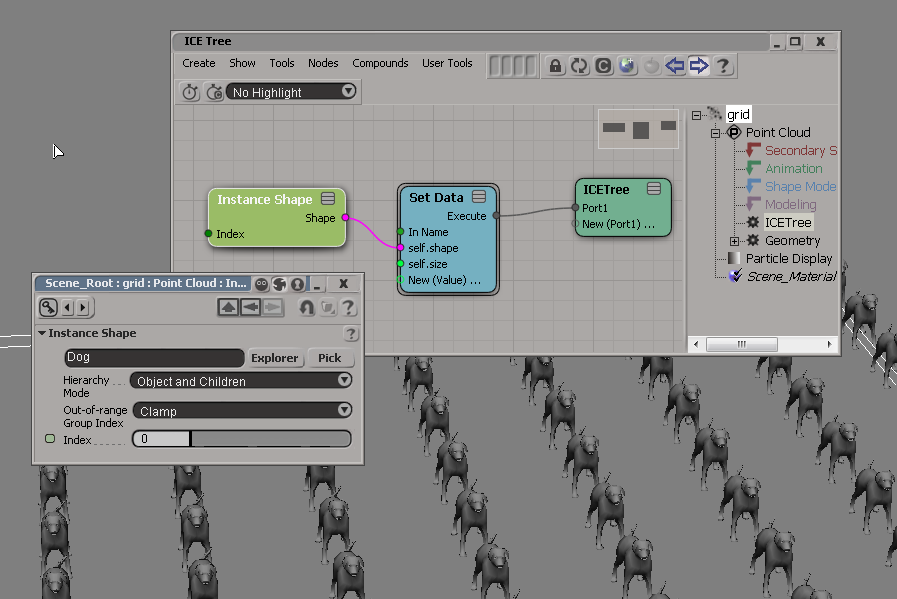

To put instances of an object on a point cloud primitive, such as a grid, you can use Set Data to set the shape and size of the points. By default, the size is zero, so you have to initialize the size to see the instances.

Here’s a quick look at the new installer for Softimage 2011.
I’ve also put a page on the wiki that goes step-by-step through the installation of the Network license version of Softimage 2011.
The number of digits (or bits) of precision also limits the set of rational numbers that can be represented exactly. For example, the number 123456789 clearly cannot be exactly represented if only eight decimal digits of precision are available.
Floating-point arithmetic on digital computers is inherently inexact. The 24 bits (including the hidden bit) of mantissa in a 32-bit floating-point number represent approximately 7 significant decimal digits. Unlike the real number system, which is continuous, a floating-point system has gaps between each number. If a number is not exactly representable, then it must be approximated by one of the nearest representable values.
In Softimage, you can see the inexactness of floating point numbers with a floating point parameter on a PPG, or with the Scalar node in an ICE tree. In either case, try entering the value 123456789: you’ll end up with the value 123456792.
If you run this Python snippet in a script editor, you can try this out:
import win32com.client
from win32com.client import constants

xsi = Application

oCustomProperty = xsi.ActiveSceneRoot.AddProperty( "CustomProperty", False, "Test" )
oCustomProperty.AddParameter2("Int",constants.siInt4,0,None,None,0,None,constants.siClassifUnknown,constants.siPersistable + constants.siKeyable)
oCustomProperty.AddParameter2("Float",constants.siFloat,0,None,None,0,None,constants.siClassifUnknown,constants.siPersistable + constants.siKeyable)
oCustomProperty.AddParameter2("Double",constants.siDouble,0,None,None,0,None,constants.siClassifUnknown,constants.siPersistable + constants.siKeyable)

xsi.InspectObj( oCustomProperty )

xsi.SetValue("Test.Float", 123456789)
x = xsi.GetValue( "Test.Float" )

xsi.LogMessage( x )
# INFO : 123456792.0
Was that there in previous versions? I never noticed it. I was quite happy this morning when I restarted Softimage and it restored my unsaved script 😉
The script editor now has tabs. Just click the plus sign (+) or press CTRL+T to open a new tab.
Some other tab-related features:

To install the network version of Softimage, you have to click the Configure button.
By default, Setup installs the Standalone version Softimage.

Want to use Python to implement an RV_Init callback in an .xsivw file? Here’s how:
<script language="Python"><![CDATA[
def RV_Init( in_rv ):
	Application.LogMessage( "RV_Init" )

	# COM programming ( in_rv is pointer to IUnknown )
	import pythoncom
	oRV = in_rv.QueryInterface( pythoncom.IID_IDispatch )

	import win32com.client.dynamic
	oRV = win32com.client.dynamic.Dispatch( oRV )

	Application.LogMessage( Application.Classname(oRV) )

	for i in range(0,oRV.Views.Count):
		oView = oRV.Views(i)
		Application.LogMessage( oView.Name + " " + oView.type 	)

]]></script>
The XSI and Softimage installers have never allowed you to use folder names that include spaces.
But starting with Softimage 2011, you’ll now be able to install Softimage 2011 in folders like C:\Program Files (which is the default, by the way).
Pretty exciting, eh?
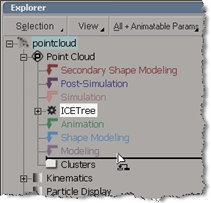 While I was writing the KB article TS14853090, I noticed that if I held down Shift+Alt, I could drag an operator to an empty Modeling stack.
On Windows, Python 2.6.4 is automatically installed with Softimage 2011. You don’t need to install Python or pywin32 yourself, unless you need to use a different version of Python.
If you need to use a different version of Python, then you can turn off the Use Python installed with Softimage preference.


