Beware of ICE optimizations


It seemed like such a nice, simple way to filter polygons:

  • Use ICE to check the polygon area and then set a boolean attribute.
  • Write a custom subcomponent filter to filter based on that ICE attribute.

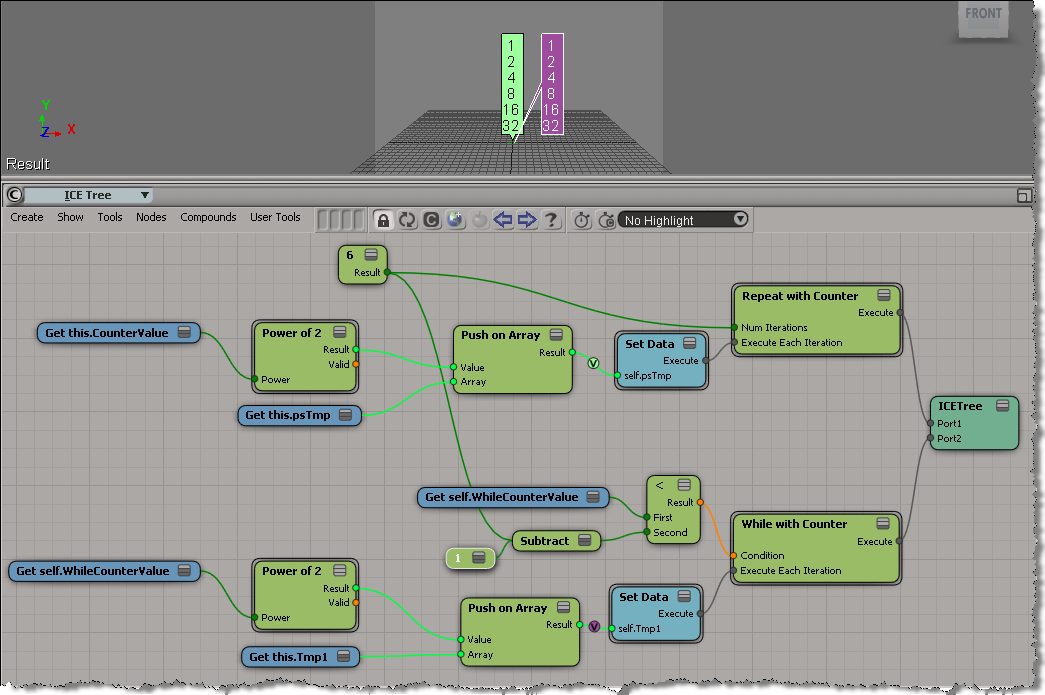
With ICE, it’s pretty easy to check if the PolygonArea is within a certain range:

But, beware of ICE optimizations!

Because that ICE attribute isn’t used anywhere else in the scene, ICE doesn’t evaluate that tree, so my boolean attribute is never defined, and my custom filter therefore fails. I have to do something like Show Values to force evaluation:

Note: In Show Values, I used Show Values for Tagged Components Only to cut down the visual clutter.

FWIW, here’s a Python example of a custom subcomponent filter:

# psCustomFilter Plug-in
# Initial code generated by Softimage SDK Wizard
# Executed Wed Nov 23 11:31:56 EST 2011 by blairs
# 
# Tip: To add a command to this plug-in, right-click in the 
# script editor and choose Tools > Add Command.
import win32com.client
from win32com.client import constants

from siutils import si		# Application
from siutils import sidesk	# Desktop
from siutils import sidict	# Dictionary
from siutils import sifact	# XSIFactory
from siutils import simath	# XSIMath
from siutils import siproj	# ActiveProject2
from siutils import sisel	# Selection
from siutils import siuitk	# XSIUIToolkit
from siutils import siut	# XSIUtils
from siutils import log		# LogMessage
from siutils import disp	# win32com.client.Dispatch
from siutils import C		# win32com.client.constants


null = None
false = 0
true = 1

def XSILoadPlugin( in_reg ):
	in_reg.Author = "blairs"
	in_reg.Name = "psCustomFilter Plug-in"
	in_reg.Major = 1
	in_reg.Minor = 0

	in_reg.RegisterFilter("psCustomFilter",constants.siFilterSubComponentPolygon)
	#RegistrationInsertionPoint - do not remove this line

	return true

def XSIUnloadPlugin( in_reg ):
	strPluginName = in_reg.Name
	Application.LogMessage(str(strPluginName) + str(" has been unloaded."),constants.siVerbose)
	return true

# Match callback for the psCustomFilter custom filter.
def psCustomFilter_Match( in_ctxt ):
	Application.LogMessage("psCustomFilter_Match called",constants.siVerbose)

# 	Return value indicates if the input object matches the filter criterias.
	return true

# Subset callback for the psCustomFilter custom filter.
def psCustomFilter_Subset( in_ctxt ):
	log("psCustomFilter_Subset called",constants.siVerbose)

	out_coll = disp( "XSI.Collection" )
	
	in_coll = in_ctxt.GetAttribute( "Input" )
	for item in in_coll:
		log( item )
		polys = []
		for p in item.SubComponent.ComponentCollection:
			log( p.Index )

			attr = p.Parent.ICEAttributes("psCustomPolyFilter")
			if not attr.IsDefined:
				log( "Cannot apply filter. psCustomPolyFilter attribute is not defined" )
			if attr.IsDefined and attr.DataArray[ p.Index ] == -1:
				#log( "%d : %s" % ( p.Index, attr.DataArray[ p.Index ] ) )
				polys.append( p.Index )

		if len(polys) > 0:
			out_coll.Add( item.SubComponent.Parent3DObject.ActivePrimitive.Geometry.CreateSubComponent(C.siPolygonCluster, polys ) )


	in_ctxt.SetAttribute( "Output", out_coll )

# 	Return value indicates if a subset of the input objects matches the filter criterias.
	return true

Troubleshooting 101: runonce.bat


Basic troubleshooting for when you cannot start Softimage, or you get strange errors at startup, or you cannot perform basic tasks such as creating primitives or duplicating objects. Or for fixing Softimage after you run a registry cleaner.

Run runonce.bat to re-register the Softimage DLLs and SPDL files (SPDL files describe the parameters of objects and operators in Softimage).

runonce.bat does a lot of what happens during installation and it is a lot faster than removing and then reinstalling Softimage.

http://vimeo.com/32563418

runonce.bat mentions on xsibase, si-community, the AREA, and the XSI list

The case of the scene that wouldn’t play back


or how I learned to love binary search…


In this case, a customer uploaded a scene that always crashed at a certain point in the playback.

After poking around the scene for awhile, I deleted a model and that fixed the crash. The only problem was that the model contained a thousand (1000) objects, so deleting the model wasn’t really a solution. So my next step was to isolate the problem use a “divide and conquer” approach. Sort of like a binary search:

  • delete half of the objects (eg objects 1 to 500)
  • play back
    • if crash, then the problem is one of the objects in the second half (501 to 1000)
    • else the problem is one of the objects in the first half (1 to 500)
  • Repeat as required… at most 10 times (1000,500,250,125,62,31,16,8,4,2,1)

In the end, I narrowed it down to a single mesh object. We weren’t able to save that mesh (it had to be deleted and then recreated), but we did save the scene.

wikipedia:

A binary search halves the number of items to check with each iteration, so locating an item (or determining its absence) takes logarithmic time. A binary search is a dichotomic divide and conquer search algorithm.

Dividing and conquering the problem space:

I’m off to Autodesk University this week


This week, I’m off to Autodesk University in Las Vegas. Four days of non-stop lectures, courses, and networking events/lunches/dinners. I’ll study hard, I promise 😉

There’ll be no time for sight-seeing, not like last time, when I took a couple of days to check out the surrounding desert:

I’ve pre-written and scheduled posts, so the blog will keep updating…