Resizing an implicit cube using ICE. Possibly a “stupid ICE trick” 😉
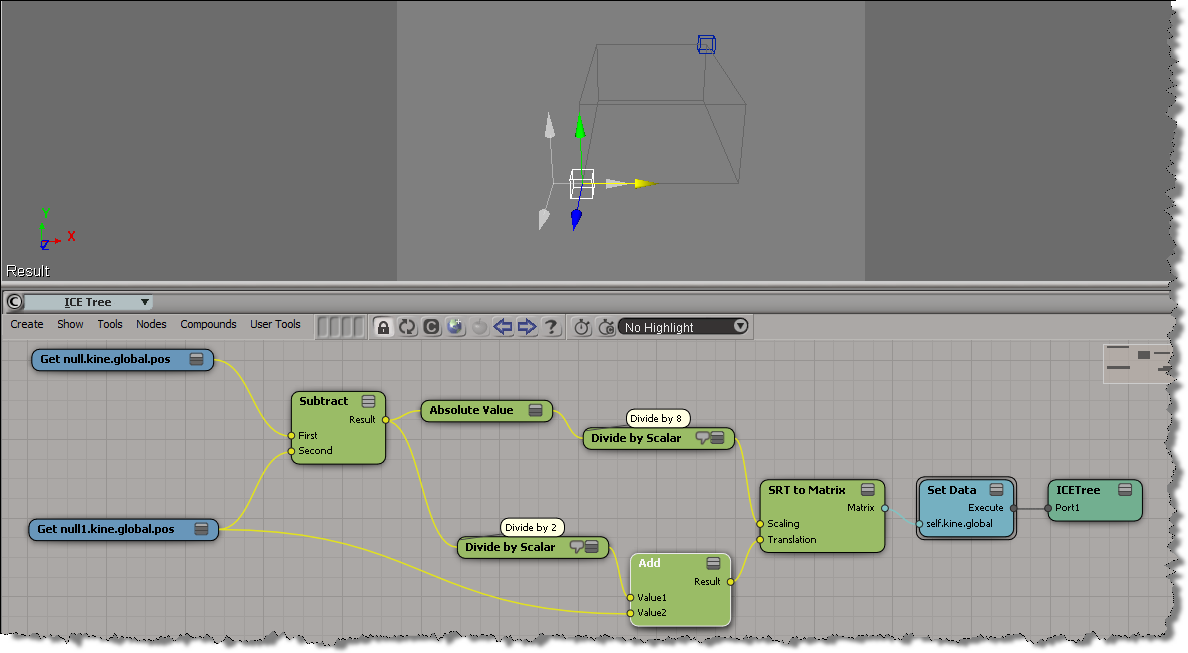
h/t Eric Mootz and his emFlock tutorials (which use expressions to do the same thing).

Resizing an implicit cube using ICE. Possibly a “stupid ICE trick” 😉
h/t Eric Mootz and his emFlock tutorials (which use expressions to do the same thing).
In this video, I take a look at what to look for in a Process Monitor log from a satellite rendering computer. If you don’t see what I’m showing, then the master is not connecting to the satellite.
http://vimeo.com/25201287
To use Process Monitor to confirm whether the master connects to the satellite:
In my first try at this, I used the PointReferenceFrame for the orientation of the copies.
This time, I’m rotating around the global Y axis, so all the copies “point” the same way.

You can put LUT files in a workgroup and share them that way.
In your workgroup, put the LUT files in this folder:
Data/Preferences/ColorManagement
In a workgroup (and in a user folder) you don’t need the “Default” folder that is used in the Factory location of LUT files.
http://vimeo.com/25238551
Softimage|XSI The Bottom Line
There seems to be a bit of UI glitch in the Color Management preferences PPG. If you choose From LUT File in the Source list, you cannot select a LUT file from the Filename list. In fact, the Filename list just lists No LUT.
Here’s a couple of workarounds:
Application.SetValue("preferences.Display.color_management_source", 1, "")
Application.SetValue("preferences.Display.color_management_lut_filename", "sRGB_10bits.lut", "")
BTW, this issue is already logged and fixed internally.
Here’s a simple example that puts a mesh at each point of an arc curve.
The PointReferenceFrame is a 3×3 matrix, so you have to extract the SRT to get the rotation.
I cheated by rotating the original object instead of applying an adjustment in the ICE Tree.

For the Scene Layer Manager, there is a selectedlayer attribute.
For the Schematic view, there are two view attributes: AnchorPointID and Target.
Target is available for the node context menu only.
Here’s some code from the new Schematic example in the XSI SDK workgroup:
def XSILoadPlugin( in_reg ):
	#...
	in_reg.RegisterMenu(C.siMenuSchematicNodeContextID,"LogNodeInfo_Menu",False,False)
	#...

def LogNodeInfo_Menu_Init( in_ctxt ):
	oMenu = in_ctxt.Source
	oMenu.AddCallbackItem("Log Node Info","log_info_cb")
	return True

def log_info_cb( ctxt ):

	Application.LogMessage("log_info_cb called")

	# Returns the view object or a list with the view object and the target node (siMenuSchematicNodeContextID only)
	target = ctxt.GetAttribute('Target')
	anchorPtID = ctxt.GetAttribute('AnchorPointID')
	# ...
Misc notes from frontline support…

API 0.0 error 301098: c:\test.72.mi, line 1484: too many literal bytes for texture (null)
xsibatch didn’t complain, btw.
The only previous reports of that error that I could find were from 10 years ago.
The customer converted the image to another format to get around the error.


Using an undocumented preference value, you can use the undocumented XSIUtils.DisplayHtmlHelp method to open compiled help files. To find the undocumented preference value, I had to go into the Softimage source and find the implementation of DisplayHtmlHelp().
Prior to 2012, DisplayHtmlHelp worked with CHM files, since the Softimage help itself was compiled. But as of 2012, DisplayHtmlHelp now works with HTML files by default.
// Set the helplocationtype to CHM
var tmp = Preferences.GetPreferenceValue( "General.helplocationtype" );
Preferences.SetPreferenceValue( "General.helplocationtype", 3 );

// Open a specific topic in a compiled help file
var s = "C:\\Program Files\\7-Zip\\7-zip.chm::/fm/plugins/7-zip/options.htm";
XSIUtils.DisplayHtmlHelp( s );

// IMPORTANT: Restore pref after
Preferences.SetPreferenceValue( "General.helplocationtype", tmp );

