XSI 1.0 first shipped 10 years ago


As Luc-Eric pointed out on the XSI list today, yesterday was XSI’s 10th anniversary.

Softimage Co. Announces First Customer Shipment of SOFTIMAGE/XSI Version 1.0

MONTREAL–(BUSINESS WIRE)–May 30, 2000

Softimage Co., a subsidiary of Avid Technology, Inc. (NASDAQ: AVID), today announced the first shipment of its groundbreaking 3-D animation SOFTIMAGE(R)|XSI(TM) system. The next-generation of 3-D animation technology, the SOFTIMAGE|XSI system is a significant breakthrough in the international digital media industry because it allows animators in the broadcast, feature films and games industries to take advantage of a first-of-its-kind, truly non-linear animation system. Within the first few weeks of availability, Softimage anticipates delivering the new software to over 17,000 users worldwide.

“SOFTIMAGE|XSI represents a tremendous amount of hard work, talent and energy from Softimage and we are extremely proud of it,” said Marc Petit, vice president of 3-D products for Softimage. “This project has been an amazing challenge from day one. The mandate was simple: completely re-invent a piece of software that had set the standard in the industry and redefine the benchmark.

“The SOFTIMAGE|XSI system is a strong platform on which we’ll be able to quickly build the next generation of tools for media professionals. With SOFTIMAGE|XSI, the .xsi file format and the XSI viewer, Softimage is ideally positioned to extend its leadership into online 3-D interactive content.”

Here’s some vidcaps from the XSI launch tour:

Python – Adding parameter to SCOP


Here’s a Python version of the CustomOperator.AddParameter example in the SDK docs, which shows how to add parameters to a scripted operator (SCOP).

from win32com.client import constants

null1 = Application.GetPrim( "Null" )
f = XSIFactory

s = """def MySOP_Update( ctx, out ):
   xsi = Application
   xsi.logmessage( 'update' )"""

sop = f.CreateScriptedOp( "MySOP", s, "Python" )


sop.AddOutputPort( null1.posx )

param1 = sop.AddParameter( f.CreateParamDef2("text", constants.siString, "hello") )
param2 = sop.AddParameter( f.CreateParamDef2("bool", constants.siBool, True) )
param3 = sop.AddParameter( f.CreateParamDef2("int", constants.siInt4, 10, 0, 100) )
param4 = sop.AddParameter( f.CreateParamDef2("dbl", constants.siDouble, 0.5, 0.0, 1.0) )

sop.Connect()

Application.InspectObj( sop )

Python – Getting rules from a connection mapping template


This snippet shows how to read a connection (or value) mapping template into a Python dictionary.

t = Application.Dictionary.GetObject( "Model1.Mixer.MappingTemplate1" )

n = Application.GetNumMappingRules( t )

d = {}
for i in range(1,n+1):
        r = Application.GetMappingRule( t, i )
        d[r.Value("From")] = r.Value("To")
        
for k, v in d.iteritems():
     Application.LogMessage( k + " > " +  v )

Line 8 GetMappingRule uses output arguments, so we have to take the returned ISIVTCollection and extract the From and To output arguments. We use From as the dictionary key.

PhysX and CUDA-enabled GPU


Softimage 2011 includes PhysX 2.83 and supports CUDA acceleration for PhysX rigid body dynamics (this includes ICE rigid bodies). So what do you need to do to take advantage of CUDA ?

You need an NVidia card that supports CUDA, and you need to enable PhysX hardware acceleration in the NVidia control panel.

If all requirements are met, an INFO message “PhysX Hardware is Enabled” is logged in the script editor the first time you use ICE RBD.

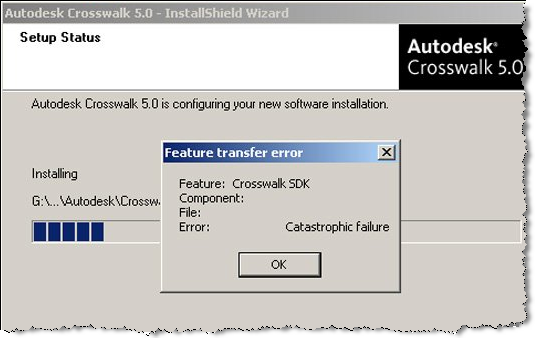
Catastrophic failure


A customer reported this error during the Crosswalk install: “Feature Transfer Error – Catastrophic failure”. Actually, he posted the screenshot on his facebook page, Jennifer Goldfinch saw it, contacted me, and I ended up with the case.

Happily the problem was easily solved. The md5 of his downloaded exe was wrong, so he switched from Google Chrome to Firefox, downloaded again, and Crosswalk installed just fine. Afterwards I downloaded Google Chrome to try it myself, and I didn’t have any problems with the Crosswalk download. Go figure.

I didn’t see the md5 on autodesk.com/softimage-crosswalk, so here it is: 63AF7E5BA1CD27269FE2B1FD135F373C.

T2S_MentalRay addon


The T2S_MentalRay addon includes copies of Softimage DLLs, such as sibase.dll, and that causes problems in Softimage 2011. I’ve had two cases of shader/workgroup problems that were resolved by removing this addon.

Update: As noted in the comments, the problem is older versions of SPDL files that contain GUIDs used by the Softimage factory shaders. Addon shaders are loaded first, so these SPDLs override the factory defaults and cause problems.

Error 0x80040707 DLL function call crashed: gdi32.DescribePixelFormat


A Subscription customer reported getting this error during the Softimage 2010 SP1 install. I also saw this reported on the AREA for ModTool. However, these are the only two reports of this error that I have ever seen.

Error Number: 0x80040707
Description: DLL function call crashed: gdi32.DescribePixelFormat
Setup will now terminate.

The customer worked around the error by installing in Safe mode, but later had problems loading his C# plugins. So we tried a silent install of Softimage 2010 SP1, and that seemed to do the trick.